


FAZ Cookie Manager
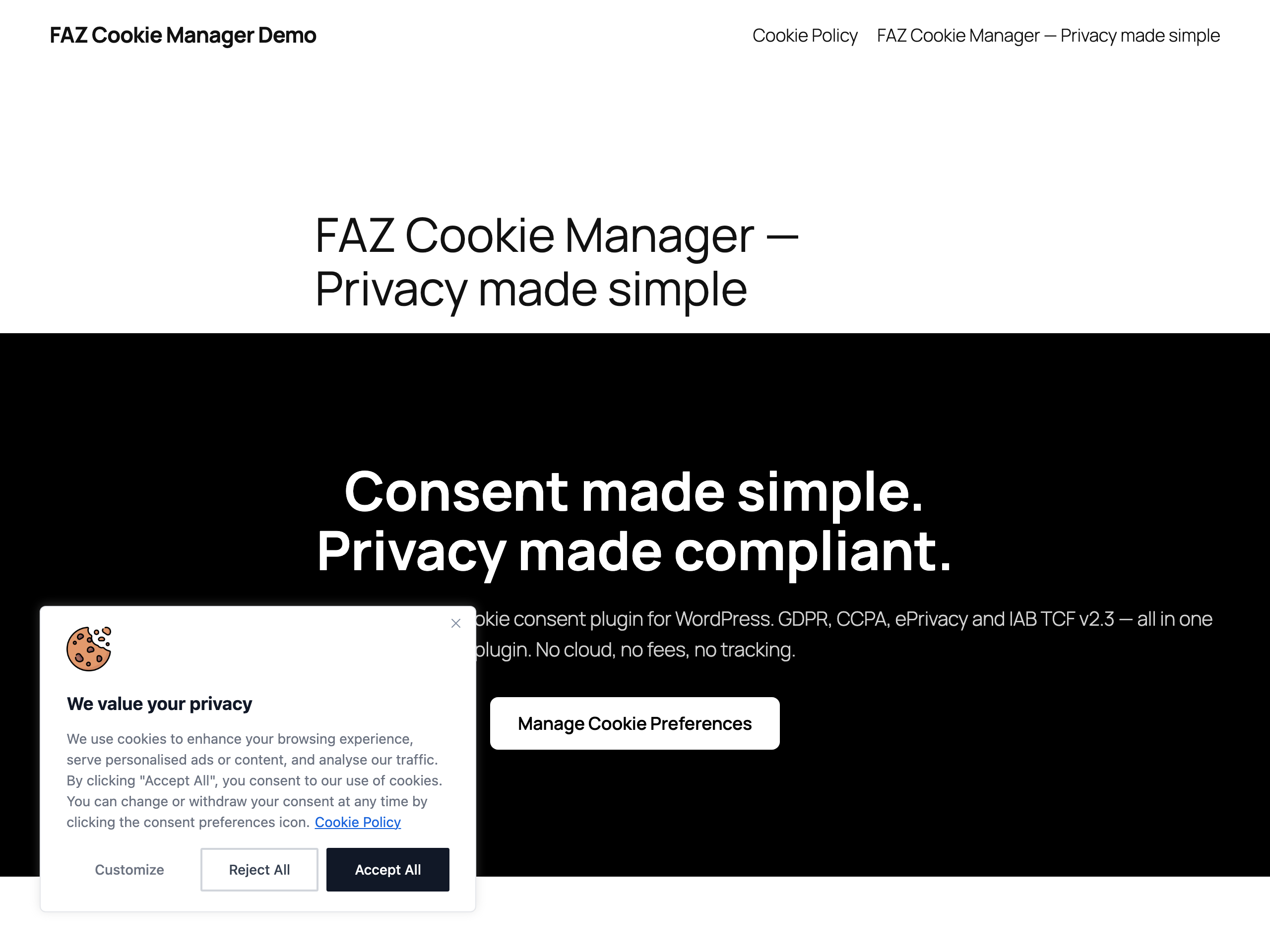
<strong>Cookie consent banner on the frontend</strong> -- GDPR-ready banner in the bottom-left corner with "Customize", "Reject All" and equal-weight "Accept All" buttons. Shown only on the first visit until the visitor makes a choice.
Tired of cookie consent plugins that lock essential features behind paywalls, require cloud accounts, or send your visitors’ data to third-party servers?
FAZ Cookie Manager is a WordPress plugin that helps you implement cookie consent and privacy workflows for international regulations — completely free, with no strings attached.
No account to create. The plugin requires no cloud service connection. Basic features like consent logging and geo-targeting are included — no premium plan needed. Core consent features run on your own server, and you own all your data.
Why FAZ Cookie Manager?
Most cookie consent plugins follow the same pattern: a free version with crippled features, and a paid tier starting at $10-50/month that unlocks what you actually need (cookie scanning, consent logs, Google Consent Mode, IAB TCF). FAZ Cookie Manager breaks that model:
- Cookie scanner — Scans your site directly from your browser. No external service, no API limits, no waiting.
- Cookie Policy generator — Build a jurisdiction-aware Cookie Policy page directly from your admin. Pick GDPR / CCPA / LGPD / POPIA, fill in your company details, and publish via the
[faz_cookie_policy_complete]shortcode. Output ships in en, it, fr, de, es, pt-BR, bg and cs, pulls the live cookie inventory from the scanner, and lets you replace individual sections per jurisdiction and language. Empty editors keep the shipped text as their placeholder; languages without a bundled scaffold, such as Slovak, use the reviewed fallback until you write their text. The standalone[faz_cookie_table]shortcode (and the matching Gutenberg block) still works for embedding just the cookie list. - Consent logging with CSV export — Every consent is recorded locally in your database. Export anytime for audits.
- Google Consent Mode v2 — Sends all 7 consent signals to Google tags. No premium required.
- IAB TCF v2.3 — Full Transparency and Consent Framework API and UI, built in. To operate as a recognised CMP in the IAB framework you must enter your own registered IAB Europe CMP ID; without one the TCF interface stays inactive (no TC string is produced) so invalid signals are never broadcast to vendors.
- Geo-targeting — Show banners only to visitors from regulated regions (EU, California, etc.).
- 180+ languages — Translate every string in the banner, or use one of the built-in translations.
- Script blocking — Tag any script with
data-faz-tagto block it until the right category is accepted. - Guided setup wizard (NEW in 1.25.0) — a first-run wizard detects your environment (multilingual plugin, page cache, WooCommerce, existing consent data) and configures defaults that match your jurisdiction, explaining each choice in plain language. First setup—or switching consent model—applies the expiry and notice controls shown in review; reopening without changing model preserves custom expiry and button visibility. Existing sites are treated as already set up and are never nagged.
- Editable Cookie Policy text (NEW in 1.25.0) — rewrite any section of the generated policy from the admin, per jurisdiction and per language. Placeholders such as {{COMPANY_NAME}} keep working inside your own wording, and an empty box keeps the reviewed text that ships with the plugin. You can also write the policy in a language the plugin ships no template for — pick the language, and your text is stored against it. Each override remembers the section it was written for, so a future update that reorders the templates falls back to the reviewed original instead of putting your wording under the wrong heading.
- A/B test your consent banner (NEW in 1.25.0) — run two or more of your existing banners at once with a persistent random split, then read the accept rate per variant on the Dashboard. Only active, independently compliant banners take part, so improving your wording can never quietly turn into a dark pattern. Off by default.
- Schrems II transfer disclosure (NEW in 1.25.0) — flag, per cookie, that a service sends personal data to a country without an EU adequacy decision, together with the safeguard you rely on. It appears in the preference centre and in the generated Cookie Policy, worded neutrally: it states the fact and your described safeguard, and never claims that safeguard is legally sufficient. Off by default.
- Age-appropriate consent, GDPR Art. 8 (NEW in 1.25.0) — an optional age-confirmation checkbox above the buttons. It gates only Accept, never Reject or withdraw, so the two keep equal weight. This is a self-declared affirmation and is not a substitute for the parental-consent verification Art. 8(2) requires. Off by default.
- Ad-blocker resilience (NEW in 1.25.0) — keeps the legally required notice visible when a cosmetic filter list hides elements whose class contains “cookie” or “consent”. A single deferred re-assert: no loop, no cookie wall. It protects a mandatory notice, it does not circumvent a privacy tool. Off by default.
- Editable “Do Not Sell” opt-out text — customise the title, description and toggle label of the CCPA / US State Laws “Opt-out Preferences” popup, per language, right from the banner editor.
- E-commerce & payment friendly — a per-gateway opt-in (PayPal, Stripe, Square, Braintree, Klarna, Mollie, Amazon Pay) lets your checkout and payment forms load their SDK before consent when you enable that gateway, so pre-consent blocking never breaks a payment button. Off by default; a real WooCommerce checkout/cart is exempt automatically.
- Cache & object-cache compatible — automatically purges and bypasses FlyingPress, LiteSpeed, WP Rocket, W3 Total Cache and more on save; epoch-invalidates on Redis Object Cache / Memcached; and keeps WPML, Polylang, TranslatePress and Weglot banners in the right language even behind a full-page cache. See “Cache Plugin Compatibility” below.
- Microsoft UET/Clarity — Consent integration for Microsoft advertising and analytics tools.
- Revisit consent widget — Floating button lets visitors change their preferences anytime.
- Accessibility-focused — Keyboard navigation (Tab, Enter, Escape), screen-reader support, mobile responsive.
Helps with these frameworks
This plugin assists consent and privacy workflows. It does not itself create, provide, or guarantee legal compliance, and you remain responsible for the final configuration for your site and jurisdiction.
- GDPR (EU General Data Protection Regulation) — Opt-in consent, granular categories, right to withdraw
- CCPA / CPRA (California Consumer Privacy Act) — “Do Not Sell or Share” opt-out link
- ePrivacy Directive (EU Cookie Law) — Consent-based script blocking support
- Italian Garante Privacy — 6-month consent expiry setting and consent logging controls
- EDPB Guidelines — No scroll-as-consent, no pre-checked categories, equal button prominence options
- LGPD (Brazil General Data Protection Law) — Consent-based model
- POPIA (South Africa Protection of Personal Information Act) — Conservative consent-based preset under s.11(1)(a); other s.11(1)(b)-(f) justifications require separate assessment
Try it Live
Try FAZ Cookie Manager in WordPress Playground — no account, no install, runs entirely in your browser.
How it works
- Install and activate — the cookie banner appears immediately with sensible defaults
- Scan your site to detect cookies automatically
- Customize the banner design, text, and colors to match your brand
- Enable Google Consent Mode or IAB TCF if you use advertising tools
- Monitor consent analytics on the dashboard
Core banner functionality runs on your WordPress site. Optional update/download features may contact GitHub, IAB Europe, MaxMind, ip-api.com, ipinfo.io (opt-in VPN detection), or the AMP CDN depending on which features you enable and use.
Cookie Policy generator (1.16.0+)
Need a Cookie Policy page that explains the cookies your site sets, the jurisdiction it operates under, and who the visitor should contact about their data? FAZ Cookie Manager 1.16.0 ships a dedicated Cookie Policy admin tab plus the [faz_cookie_policy_complete] shortcode.
- Jurisdiction-aware — pick GDPR (EU/EEA/UK), CCPA/CPRA (California), LGPD (Brazil), or POPIA (South Africa). Each jurisdiction ships its own template scaffold with the legal references and required sections for that framework.
- Multilingual (8 languages out of the box) — en, it, fr, de, es, pt-BR, bg, cs. Override per render with
[faz_cookie_policy_complete lang="it"]or let the visitor’s browser language pick. The GDPR, CCPA and LGPD sections are exposed throughfaz-cookie-manager.pot(the bundled Czech catalogue includes all 33 of them); the POPIA sections ship as reviewed per-language templates and will join the POT at the next catalogue resync. - Editable section text, per jurisdiction and language — the advanced Policy text card exposes each effective section as an optional textarea. The shipped wording is the placeholder, not the saved value: leave it empty to keep receiving reviewed plugin updates, or write Markdown that still uses placeholders such as
{{COMPANY_NAME}}. The language selector uses the full site-wide catalogue, so an administrator can author Slovak (sk) or another unbundled language against the reviewed jurisdiction fallback. - Auto-populated cookie inventory — the rendered policy pulls live from
wp_faz_cookies, so any cookie discovered by the scanner shows up at the next render with its category, duration and description, in the active language. - Filled with your company data — name, address, DPO email, third-party services, retention period: stored in
faz_cookie_policy_dataoption, edited via the admin form, never seeded fromadmin_emailorblogname(PII protection). - Legal disclaimer — every generated policy shows a localized warning by default that the templates are starting points, not legal advice. Administrators can hide it or replace it with reviewed custom text in the Cookie Policy settings.
- Versioning hash — a
data-faz-policy-versionattribute on the rendered article tracks effective template + gettext override + data drift over time. Display-only fields (the visible “Last updated” date) are excluded so the hash doesn’t change daily. - Filter for site builders —
faz_cookie_policy_datalets you inject custom placeholders before template substitution. - Backwards compatible — the long-standing
[faz_cookie_policy]shortcode (withsite_name/contact/show_tableattributes from 1.7.0) is unchanged. The standalone[faz_cookie_table]shortcode and matchingfaz/cookie-tableGutenberg block still work for embedding just the cookie inventory table.
Multi-banner geo-routing vs multilingual content (1.14.0+)
These are two orthogonal features that combine freely — multi-banner is per country, multilingual content is per language inside each banner.
-
Multi-banner geo-routing picks WHICH banner profile to serve based on the visitor’s country. Typical setup: a strict GDPR banner for EU/EEA/UK and a CCPA opt-out banner for California (or any other per-region compliance profile). Country resolution chain: Cloudflare
CF-IPCountryheader (opt-in via thefaz_trust_cf_ipcountry_headerfilter) MaxMind GeoLite2 ip-api.com fallback. Each banner row carries its owntarget_countrieslist and apriorityinteger for overlap resolution. -
Multilingual content lives INSIDE each banner. A single banner stores translations of its title, description and button labels for as many languages as you enable on the Languages page. The language displayed to the visitor is resolved CLIENT-SIDE from
navigator.languagesso a country-targeted banner can still be served from a full-page cache (LiteSpeed / WP Rocket / Cloudflare APO) and the right language renders on hydration.
Practical example: an install needs only TWO banner rows, not eight. One EU-targeted GDPR banner with English + Italian + German + French + Polish translations inside, and one US-targeted CCPA banner with English + Spanish translations inside. The country selects the banner; the browser selects the translation inside the banner. Visitors hitting the right cache key get the right banner + the right language.
External Services
GitHub / Raw GitHubusercontent (Open Cookie Database)
Used to refresh the built-in cookie definitions snapshot for the optional auto-categorize feature.
Triggered when: you click the definitions update action in the Cookies screen.
Data sent: your server IP address and standard HTTP request headers.
Service URLs:
* https://raw.githubusercontent.com/fabiodalez-dev/Open-Cookie-Database/master/open-cookie-database.json
Terms of Service / Privacy Policy:
* https://docs.github.com/en/site-policy/github-terms/github-terms-of-service
* https://docs.github.com/en/site-policy/privacy-policies/github-privacy-statement
IAB Europe / vendor-list.consensu.org
Used to download the Global Vendor List and purpose translations for the optional IAB TCF feature.
Triggered when: you manually update the vendor list, and weekly while IAB TCF is enabled.
Data sent: your server IP address and standard HTTP request headers.
Service URLs:
* https://vendor-list.consensu.org/v3/vendor-list.json
* https://vendor-list.consensu.org/v3/purposes-en.json
Privacy Policy:
* https://iabeurope.eu/privacy-policy/
MaxMind
Used to download a GeoLite2 database for optional geo-targeting. You choose the edition in Settings GeoIP Database: the smaller Country edition (default, country-level only) or the larger City edition (adds region/subdivision data for sub-national province/state routing such as Quebec Law 25). City is a much larger download; pick it only if you rely on region-level routing.
Triggered when: you enter a MaxMind license key in Settings and start the database download.
Data sent: your server IP address, the license key you provide, and standard HTTP request headers.
Service URL:
* https://download.maxmind.com/app/geoip_download
Terms of Service / Privacy Policy:
* https://www.maxmind.com/en/terms-of-use
* https://www.maxmind.com/en/privacy-policy
ip-api.com
Used as a fallback geolocation lookup for the optional geo-targeting and multi-banner geo-routing features, only when MaxMind is unavailable.
Triggered when: a frontend page renders the banner while geo-targeting / multi-banner geo-routing is enabled AND neither the Cloudflare CF-IPCountry header (opt-in) nor the MaxMind GeoLite2 database produces a result. The visitor’s IP is sent to ip-api.com for country resolution; the resolved country code is cached in a transient (hash-keyed by IP) for one hour to avoid repeating the lookup.
Data sent: the visitor’s IP address and standard HTTP request headers.
Service URL:
* http://ip-api.com/json/{ip}?fields=countryCode
Terms of Service / Privacy Policy:
* https://ip-api.com/docs/legal
ipinfo.io (geo-routing v2 only)
Used for VPN/proxy/Tor detection when the admin opts in to enhanced geo detection via Settings Geo-routing ipinfo settings. The plugin sends the visitor IP to ipinfo.io to determine whether the visitor is masking their location; when VPN is detected, the most-protective rule-set is applied regardless of the visitor’s apparent country.
Triggered when: a frontend page renders the banner AND the admin has configured an ipinfo API key AND has explicitly attested to having a DPF / SCC / DPA agreement with ipinfo.io for cross-border data transfer of EU/UK visitor IPs. Without the admin opt-in, ipinfo is NEVER called.
Data sent: the visitor’s IP address (in cleartext, as required by ipinfo’s lookup contract), the configured API key, and standard HTTP request headers. The plugin caches the VPN classification locally for 24 hours hash-keyed by the IP (with monthly salt rotation) so repeat visitors do not trigger fresh calls.
Service URL:
* https://ipinfo.io/{ip}/privacy
Terms of Service / Privacy Policy:
* https://ipinfo.io/terms-of-service
* https://ipinfo.io/privacy-policy
* DPA (Data Processing Agreement) available on request: https://ipinfo.io/contact
Plugin REST endpoint /faz/v1/banner (public)
Used by the plugin’s own front-end JavaScript (script.js) to fetch the per-language / per-country banner payload after the page has loaded. This is an INTERNAL endpoint hosted by the plugin on the same WordPress install — no third-party network call leaves the visitor’s browser to a remote service. It is documented here only because the response carries bannerSlug and activeLaw, two strings that describe which banner profile and which legal regime (gdpr / ccpa) currently applies to the visitor.
Triggered when: the front-end banner script bootstraps on a page that has multi-banner geo-routing active.
Data sent: only what the visitor’s browser already sends with any page request to the same origin. The plugin does not forward the request to any remote service.
Service URL:
* …