

Fathom Analytics Conversions
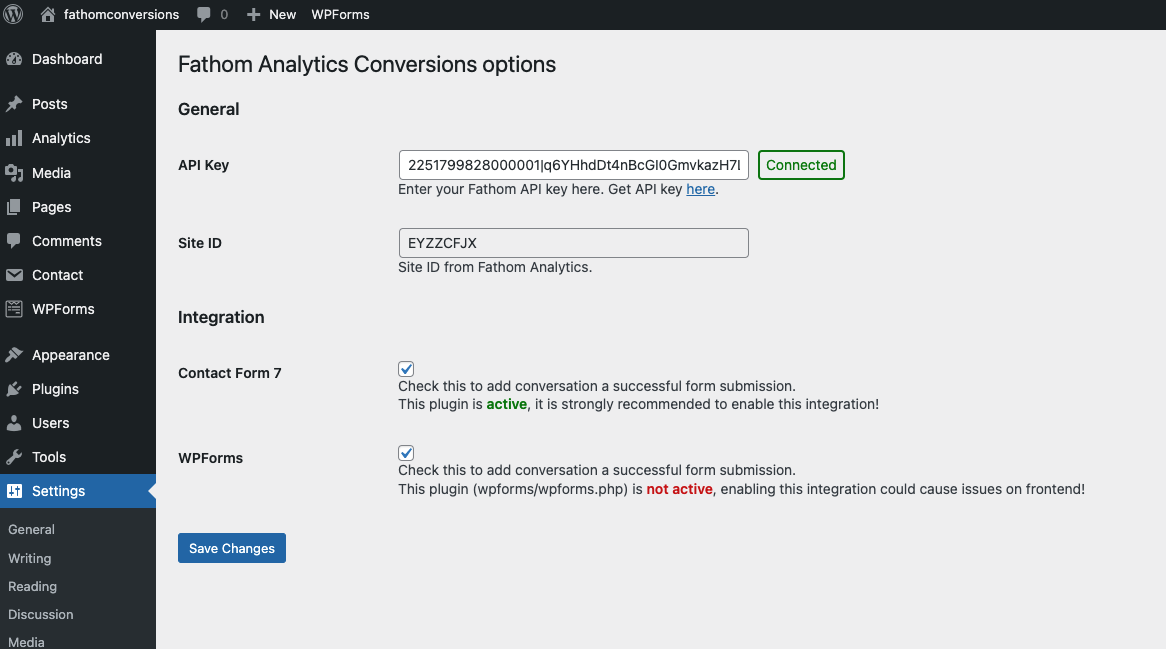
Add your API Key here, and enable / disable integrations via the plugin settings.
This Fathom Analytics partner plugin makes it easy to enable WordPress forms and pages as Fathom Analytics Events with no code.
👉 Go to the official Fathom Analytics plugin
What does this companion plugin do?
Makes it easy to track user actions such as form submissions and landing page visits as events in your Fathom Analytics account.
Best of all no technical knowledge is required to implement events on your site.
Key Features
- No code event tracking for marketers and website owners
- Common form plugins supported
- Make any page or post an Event
- Synchronized event names between website and analytics
Watch the setup walkthrough
This is not an official Fathom plugin
This WordPress plugin “Fathom Conversions” is not part of, or associated with “Fathom Analytics” by Conva Ventures Inc.
⚠️ Warning BETA API in use
This plugin uses the Beta Fathom Analytics API, which is still in early access, and subject to changes in the future, this plugin could stop working without warning if updates occur.
Privacy Notices
This plugin:
- does not track any users
- stores plugin settings and event mappings in the WordPress database
- sends data to the Fathom Analytics servers – more information can be found on Fathom Analytics website
Demo
You can find more information about the plugin, and see a demo and installation instructions on the Fathom Conversions website
Requirements
For this to work you will need a paid Fathom Analytics account (get $10 off your first month with this link)
And a supported WordPress plugin listed below installed and active.
Currently supported plugins
- Contact Form 7
- WPForms & WPForms Pro
- Gravity Forms
- Ninja Forms & Ninja Forms Pro
- Fluent Forms & Fluent Forms Pro
- WooCommmerce
For Developers
Fathom Analytics Conversions provides hooks and helper functions so that plugin and theme developers can fire Fathom conversion events from their own code.
Quick Start
The simplest way to fire a conversion from your plugin:
// Fire a basic conversion event.
add_action( 'wp_footer', function() {
    do_action( 'fac_track_event', 'My Custom Conversion' );
});

// Fire a conversion with a monetary value (in cents, e.g. 1999 = $19.99).
add_action( 'wp_footer', function() {
    do_action( 'fac_track_event', 'Premium Signup', 4999 );
});
The event name you pass here will appear in your Fathom Analytics dashboard. If the event doesn’t exist yet, Fathom will create it automatically on the first fire.
PHP Helper Function
You can also call the helper function directly:
/**
 * fac_track_conversion( string $event_name, int $value = 0 )
 *
 * Outputs a fathom.trackEvent() script tag on the frontend.
 * Must be called during or before wp_footer output.
 *
 * @param string $event_name  Event name (shown in Fathom dashboard).
 * @param int    $value       Optional. Value in cents. Default 0.
 */

add_action( 'wp_footer', function() {
    if ( function_exists( 'fac_track_conversion' ) ) {
        fac_track_conversion( 'Booking Confirmed', 15000 );
    }
});
Both methods automatically check that Fathom Analytics is active and respect excluded user roles — you don’t need to add those checks yourself.
Available Filters
You can customize event names for built-in integrations using these filters:
fac_woocommerce_order_title— Customize the WooCommerce order event name. Default: “WooCommerce Order”.fac_login_event_title— Customize the login event name. Default: “WP Login”.fac_registration_event_title— Customize the registration event name. Default: “WP Registration”.fac_lost_password_event_title— Customize the lost password event name. Default: “WP Lost Password”.
Example:
add_filter( 'fac_woocommerce_order_title', function( $title ) {
    return 'Shop Purchase';
});
Adding a Custom Integration to the Settings Page
Use these filters and actions to add your own integration checkbox to the plugin’s settings page:
// 1. Add a default option.
add_filter( 'fac4wp_global_default_options', function( $defaults ) {
    $defaults['integrate-my-plugin'] = false;
    return $defaults;
});

// 2. Add a checkbox to the Integration section.
add_filter( 'fac4wp_integrate_field_texts', function( $fields ) {
    $fields['integrate-my-plugin'] = [
        'label'           => 'My Plugin',
        'description'     => 'Track conversions from My Plugin.',
        'phase'           => 'fac4wp-phase-stable',
        'plugin_to_check' => 'my-plugin/my-plugin.php',
    ];
    return $fields;
});

// 3. Fire the conversion when your plugin's action completes.
add_action( 'wp_footer', function() {
    $options = get_option( 'fac4wp-options', [] );
    if ( ! empty( $options['integrate-my-plugin'] ) && my_plugin_conversion_happened() ) {
        do_action( 'fac_track_event', 'My Plugin Conversion' );
    }
});
JavaScript API
If you need to fire a Fathom event directly from JavaScript (e.g., after an AJAX action), you can call the Fathom tracking function directly. The Fathom Analytics script exposes a global fathom object:
// Basic event
fathom.trackEvent('My JS Event');

// Event with monetary value (in cents)
fathom.trackEvent('My JS Event', { _value: 1999 });
Note: The fathom object is only available on the frontend when the Fathom Analytics plugin is active and the tracking script has loaded.
Utility Functions
These functions are available for checking the plugin state:
is_fac_fathom_analytic_active()— Returnstrueif Fathom Analytics tracking is active.fac_fathom_is_excluded_from_tracking()— Returnstrueif the current user’s role is excluded.FAC_Options::get( $key )— Retrieve a specific plugin option value.