


FacturAgil
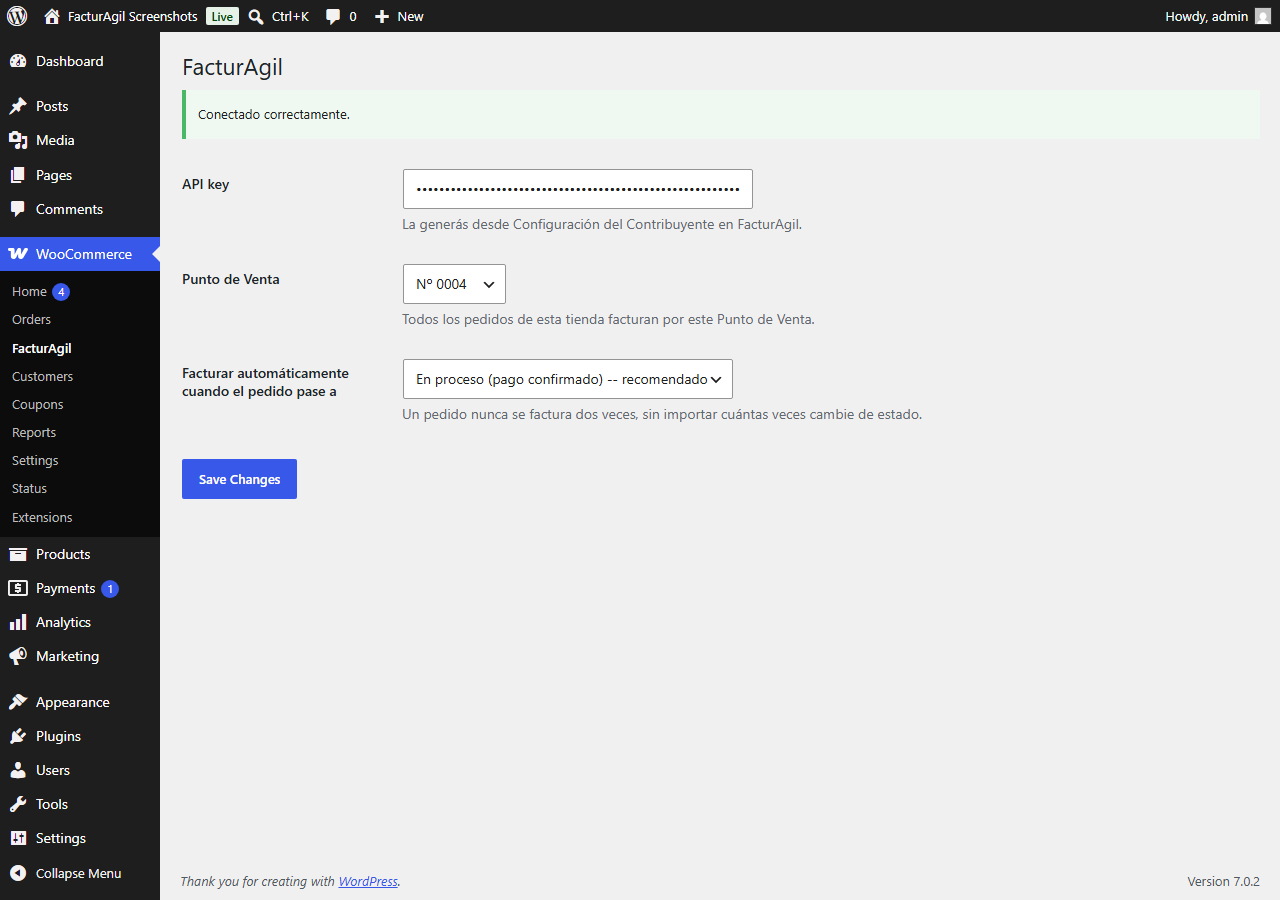
Settings screen (WooCommerce > FacturAgil) -- API key, Point of Sale, and when to trigger invoicing.
Español:
FacturAgil conecta tu tienda WooCommerce con AFIP/ARCA (el organismo fiscal de Argentina). Cuando se paga un pedido, la factura electrónica se emite sola, con un CAE real (código de autorización de AFIP/ARCA), y el comprador la recibe por email y puede descargarla desde “Mi cuenta > Pedidos”.
Qué hace:
- Emite automáticamente Factura A/B/C cuando un pedido pasa a “Procesando” (pago confirmado) o “Completado”, vos elegís cuál.
- Agrega los campos de checkout necesarios para facturar (tipo y número de documento, condición de IVA) — WooCommerce no los trae por defecto. Si tu tienda ya tenía sus propios campos (de otro plugin o de tu tema), FacturAgil puede reusarlos en vez de duplicarlos (ver FAQ).
- Nota de Crédito automática si se reembolsa un pedido ya facturado (total o parcial).
- El comprador descarga el PDF de su factura desde “Mi cuenta > Pedidos”, sin salir de tu tienda.
- Nunca bloquea un pedido si falla la facturación — el error queda registrado como nota del pedido y se puede reintentar con un clic.
Qué necesitás antes de instalarlo:
Una cuenta de FacturAgil (gratis para probar). Si todavía no tenés una, el plugin te guía para crearla en 2 minutos desde la misma pantalla de configuración.
English:
FacturAgil connects your WooCommerce store to AFIP/ARCA (Argentina’s tax authority). When an order is paid, the electronic invoice is issued automatically, with a real CAE (AFIP/ARCA authorization code), and the buyer receives it by email and can download it from “My account > Orders”.
What it does:
- Automatically issues Invoice A/B/C when an order moves to “Processing” (payment confirmed) or “Completed”, your choice.
- Adds the checkout fields required to invoice (document type and number, VAT status) — WooCommerce doesn’t include these by default. If your store already had its own fields (from another plugin or your theme), FacturAgil can reuse them instead of duplicating them (see FAQ).
- Automatic Credit Note if an already-invoiced order is refunded (full or partial).
- The buyer downloads their invoice PDF from “My account > Orders”, without leaving your store.
- Never blocks an order if invoicing fails — the error is logged as an order note and can be retried with one click.
What you need before installing it:
A FacturAgil account (free to try). If you don’t have one yet, the plugin walks you through creating one in 2 minutes from the same settings screen.
External services
Español:
Este plugin se conecta a la API de FacturAgil (facturagil.com.ar) para emitir comprobantes electrónicos de AFIP/ARCA (el organismo fiscal de Argentina) de tus pedidos de WooCommerce. FacturAgil es el servicio para el que está construido este plugin — tu tienda necesita una cuenta de FacturAgil para usarlo (ver Instalación).
Le manda datos a esta API en estas situaciones:
- Al facturar un pedido (automáticamente cuando pasa a “Procesando”/”Completado”, o reintentado a mano desde wp-admin): se envían el tipo y número de documento del comprador, nombre, condición de IVA, email, y los ítems del pedido (descripción, cantidad, precio unitario, alícuota de IVA) para generar el comprobante de AFIP/ARCA.
- Al emitir una Nota de Crédito (por un reembolso de WooCommerce, o manualmente desde wp-admin): se envían los mismos datos de arriba, para los ítems que se acreditan.
- Al descargar una factura o Nota de Crédito en PDF (desde “Mi cuenta > Pedidos”, o desde wp-admin): solo se envía el ID interno del comprobante, para obtener el PDF.
- Al probar la conexión o listar tus Puntos de Venta en la pantalla de configuración (WooCommerce > FacturAgil): solo se envía la API key de tu tienda, para autenticar el pedido.
Cada request de los de arriba se autentica con la API key que generás desde tu propia cuenta de FacturAgil (configuración de WooCommerce > FacturAgil).
Este servicio lo provee PampaLógica. Términos del Servicio: https://facturagil.com.ar/terminos — Política de Privacidad: https://facturagil.com.ar/privacidad
English:
This plugin connects to the FacturAgil API (facturagil.com.ar) to issue AFIP/ARCA (Argentina’s tax authority) electronic invoices for your WooCommerce orders. FacturAgil is the service this plugin is built for — your store needs a FacturAgil account to use it (see Installation).
It sends data to this API in these situations:
- When an order is invoiced (automatically when it moves to “Processing”/”Completed”, or manually retried from wp-admin): the buyer’s document type and number, name, VAT status, email, and the order’s line items (description, quantity, unit price, VAT rate) are sent to generate the AFIP/ARCA invoice.
- When a Credit Note is issued (on a WooCommerce refund, or manually from wp-admin): the same order/item data above is sent for the items being credited.
- When downloading an invoice or Credit Note as a PDF (from “My account > Orders”, or from wp-admin): only the invoice’s internal ID is sent, to retrieve the PDF.
- When testing the connection or listing your Points of Sale on the settings screen (WooCommerce > FacturAgil): only your store’s API key is sent, to authenticate the request.
Every request above is authenticated with the API key you generate from your own FacturAgil account (WooCommerce > FacturAgil settings).
This service is provided by PampaLógica. Terms of Service: https://facturagil.com.ar/terminos — Privacy Policy: https://facturagil.com.ar/privacidad