

Export Plugins and Templates
4.4/5 (12 ratings) 1K+ active installs Updated Aug 9, 2024
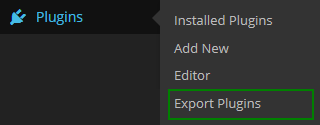
Option of "Export plugins" in the "Plugins" menu.
In this plugin you will be able to export your plugins and templates by easy way so, the file after export it will be zip file you can upload zip file to another sites if you want that’s.
Features
- Export Your Plugins.
- Export Your Templates.
Usage
Export Plugins
- After installing the plugin, you need to go to the “Export Plugins” subsection in the “Plugins” menu.
Just select the plugin you want and then click in the “Export Plugin Now” button. You will get a .zip file to download.
Export Templates
- After installing the plugin, you need to go to the “Export Templates” subsection in the “Appearence” menu.
Just select the template you want and then click in the “Export Template Now” button. You will get a .zip file to download.