

AI Popup Builder & Popup Maker by OptiMonk
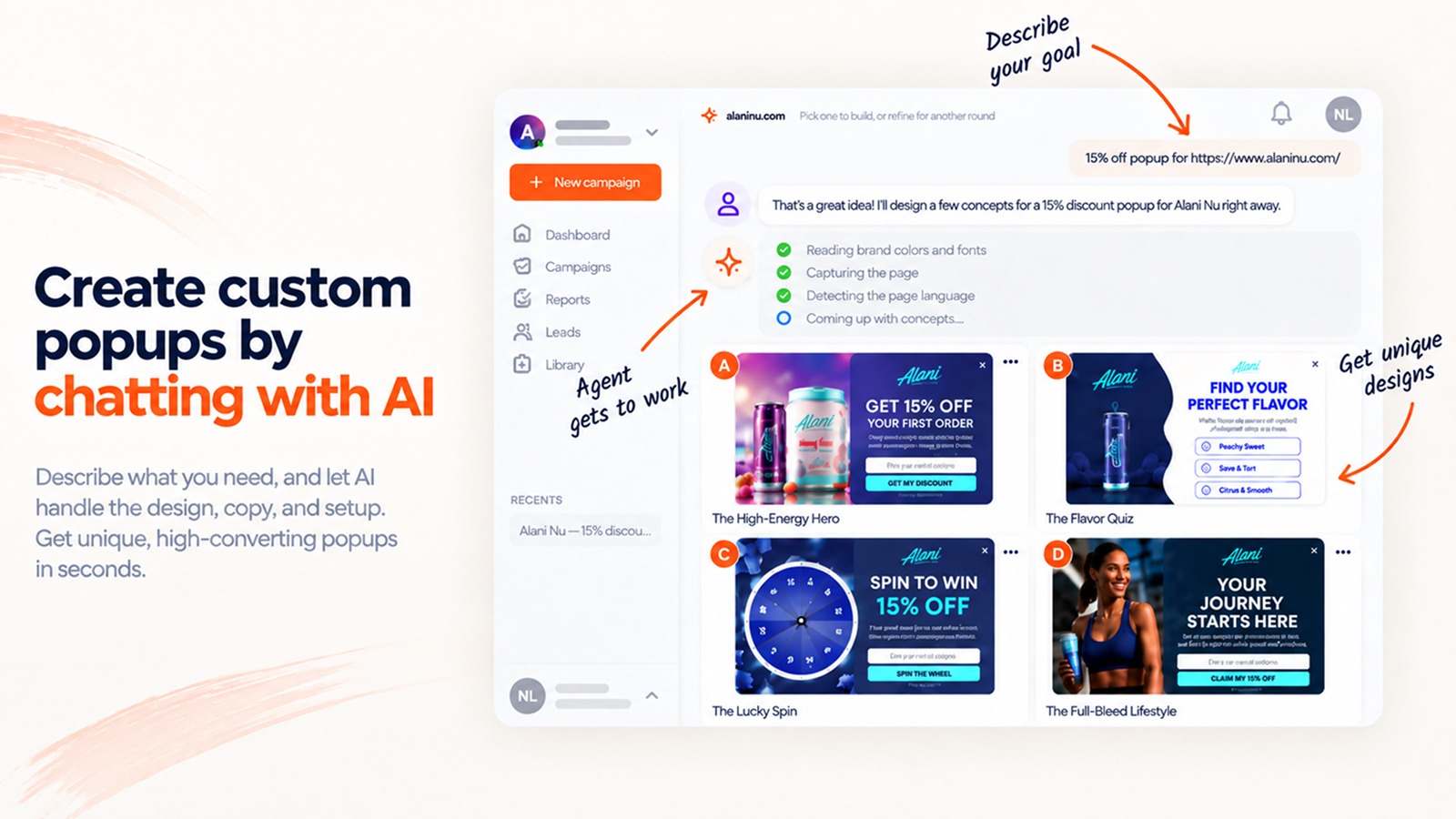
Create custom popups by chatting with AI. The agent handles the design, the copy and the setup.
Chat with an AI agent to build fully custom,
on-brand popups. No templates. No designers.
Start for free | Try the AI agent | Popup library | Connect your AI assistant (MCP) | Support
Most popup tools hand you a template and let you change the colors and the headline. OptiMonk gives you an AI agent instead. Enter your domain, describe the popup you want in plain words, and the agent builds it from scratch, using your brand’s colors, fonts, style and products.
It asks follow-up questions when something is unclear, writes in any language you need, and helps you set who should see the popup and when in a few clicks. After launch, it keeps an eye on your results, suggests A/B tests and new campaigns, and builds them when you say yes.
No templates, no designers, no developers, built on the platform more than 30,000 brands already trust to grow their sales and subscribers.
WHAT YOUR AI POPUP AGENT DOES FOR YOU
- Builds popups via chat: describe your goal, and the AI agent designs, writes and targets the popup for you.
- Adds motion: animated backgrounds that make visitors stop scrolling.
- Works inside Claude and ChatGPT: build and edit popups from your AI assistant through MCP integration.
- Finds your next win: it reads your store data, spots what to improve, and suggests ready-made campaigns.
- Runs A/B tests on request: ask for headline, design or offer variants, and it sets them up.
Start chatting with your popup agent
BUILD, TEST, LEARN, REPEAT: HOW THE AGENT GROWS YOUR SALES
- Build: email and SMS popups, cart abandonment offers, lucky wheels, and scratch cards, each one made for your store in minutes.
- Test: create as many variants as you like. Test headlines, designs and CTAs, or pit whole campaign types against each other, like a lucky wheel against an email signup popup.
- Learn: analytics shows the revenue each campaign brings in, not just clicks and signups, and points out where you are losing sales.
- Repeat: the agent turns what it learns into new campaign ideas, each with a ready-made design. Launch the ones you like in one click.
Start for free, with every feature
The free plan includes 10,000 pageviews per month, all features, and unlimited users.
CONVERSION BOOSTERS YOUR AGENT CAN ADD TO ANY CAMPAIGN
- Animated popups that catch the eye with one click
- Survey popups that collect first-party data
- Lucky wheels and scratch cards that make signing up fun
- Countdown timers that add urgency to limited-time offers
- Multi-step campaigns that guide shoppers from first visit to checkout
CONNECTED TO YOUR MARKETING STACK AND YOUR WOOCOMMERCE STORE
New subscribers flow straight into the tools you already use:
The plugin also shares your WooCommerce data with OptiMonk: cart value and content, products, categories and orders. That lets the agent build campaigns that react to what each shopper does. Just ask for:
- WooCommerce discount popups
- WooCommerce lucky wheel popups
- WooCommerce exit popups
- WooCommerce upsells
- WooCommerce countdown timers
- WooCommerce cart abandonment popups
- WooCommerce product recommendations (Most popular, Recently viewed)
TRUSTED BY MORE THAN 30,000 BRANDS
Ryan Pamplin | CEO, BlendJet | +39.2% extra revenue
“When comparing OptiMonk vs other leading popup solutions, no one else has the valuable integrations we need, robust testing capabilities, and amazing team to support our ever-evolving needs.”
See case studyEric Nguyen | CEO, Indestructible Shoes | +13.2% e-commerce conversion rate
“I had high expectations when I started using OptiMonk, but still I was surprised by the results. In just a short period of time, we could reach higher conversion rates than with any other tools. Highly recommended!”
See case study
BUILD POPUPS BY CHATTING, NOT DRAGGING
You don’t need a designer, a copywriter or a developer. Tell the agent what you want, and it handles the design, the copy and the setup.
From one sentence to a finished popup
Enter your domain and type what you need, for example: “10% discount for email signup, on exit intent”. The agent scans your site in seconds, picks up your colors, fonts, style and products, and builds a popup that looks like it was made by your own team. Classic popups, fullscreens, gamified popups, surveys or multi-step flows: just say which.
Give it a starting point
Have an idea of the look you want? Share one of your earlier popups, an example from the popup library, or any image you upload. The agent turns it into a campaign that fits your site.
Create your first popup for free
Change anything by asking
Want different copy, a new color or a bigger button? Ask in the chat. Need a variant for an A/B test? Ask for that too.
Build from Claude, ChatGPT or any AI assistant
Connect OptiMonk to your AI assistant through MCP, then create campaigns and check your results without opening the OptiMonk dashboard. See how to connect your AI assistant
Details that lift conversions
- Animated popups: subtle background motion, added with one click, draws attention to your message.
- Delay Closing X: show the close button a few seconds later, so visitors read your offer first.
- Countdown timer: use the urgency of limited-time offers.
- Any language: the agent writes your popup in the language your visitors speak.
- Dynamic product recommendations: show each visitor the products they are most likely to buy, such as best sellers or items they viewed recently.
Targeting and triggers in a few clicks
Deciding who sees your popup, when and how often is part of the same simple flow. The agent helps you set it all up at once, so you only need to pick the options you want with a few clicks. Target visitors by pages visited, the current page, time on site, cart content, country, or whether they are already subscribers.
Choosing the right moment is just as quick: show the popup on exit intent, after a set time, on scroll, on click, or after a custom JavaScript event.
Analytics that tell you what to do next
The analytics tracks the revenue each campaign brings in, not only signups and clicks. The agent reads these results, shows you where your store is losing sales, and collects its suggestions under Ideas to try. You’ll find new campaign ideas there, each with a ready-made design. Launch any of them in one click.
Set Conversion Goals that match your business:
- Product sales
- Orders above a set cart value
- Products added to cart
Start creating your free popup now
MORE POPUPS, NEVER TOO MANY: USER EXPERIENCE PROTECTOR
Worried about showing visitors too many popups? User Experience Protector caps how many campaigns a visitor can see within a set timeframe. Further campaigns wait until the timeframe is over, so you get the conversions without annoying anyone.
BUILT FOR MOBILE FROM THE START
The agent doesn’t just shrink your desktop popup. It creates a separate mobile design for every campaign, so your popups look great on any screen without extra work on your side.