


Essentia Image Zoom
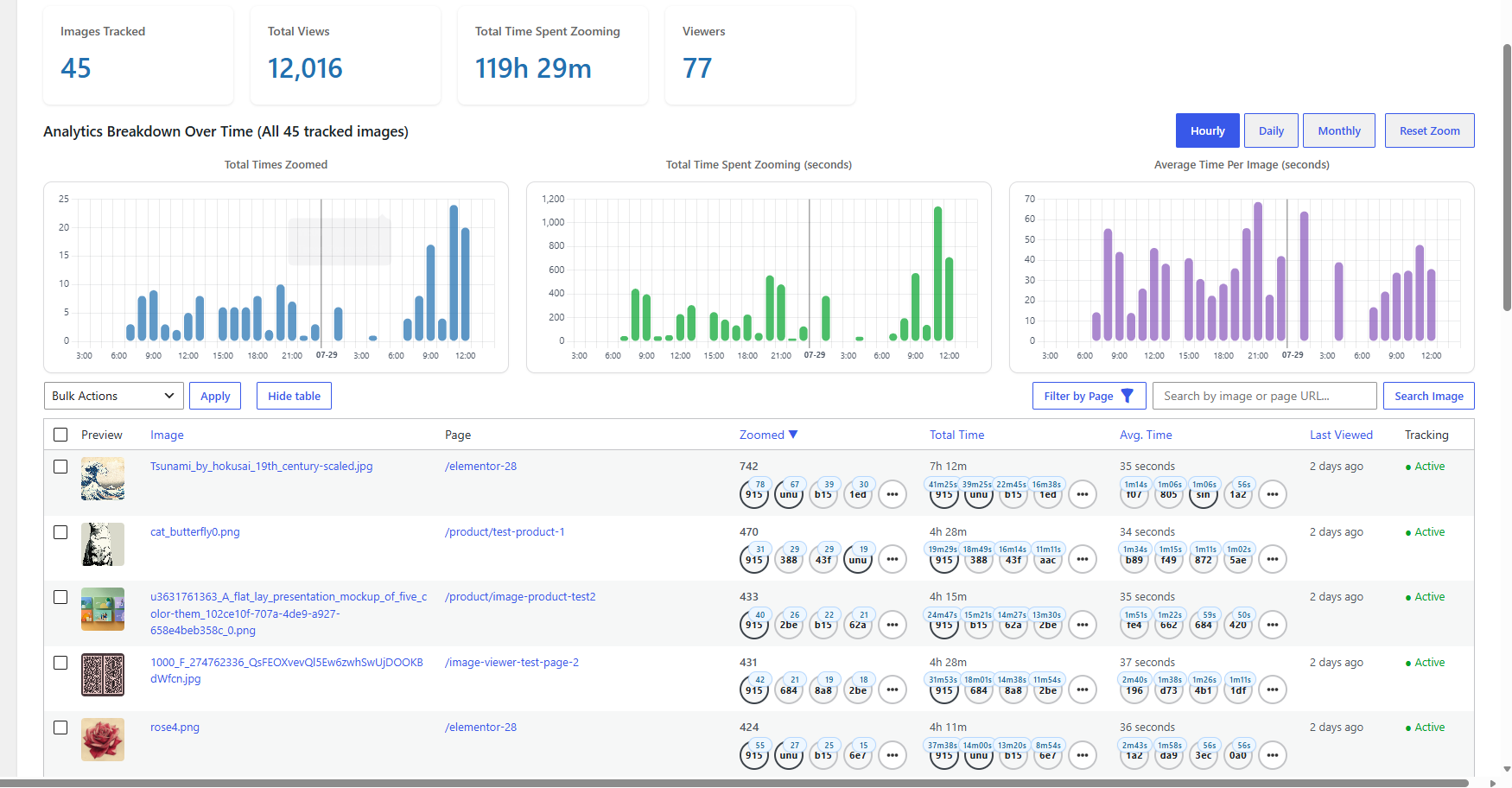
Zoom Analytics page showing summary cards, time-based charts, and the detailed Image-wise Breakdown table.
Essentia Image Zoom helps visitors inspect images in a focused fullscreen viewer.
For stores, portfolios, product pages, and visual landing pages, this gives visitors a clearer way to examine image details.
The Elementor widget gives you a configurable click-to-zoom experience with smooth pan, rotate, flip, minimap, zoom badge, lazy loading, and optional right-click deterrence.
When WooCommerce integration is one-click enabled, the same viewer can auto-replace the product-gallery zoom experience and can also open product-description images.
Zoom Analytics adds image viewing reports so site owners can see how often images are zoomed and how long visitors spend viewing them. For WooCommerce stores, these signals can show which product visuals attract attention and support better merchandising, image selection, and conversion-rate optimization decisions.
Free features
- Image zoom widget for Elementor: Add a click-to-open image, choose its preview size, adjust its size and alignment, and style the image, viewer background, close button, minimap, and zoom percentage.
- WooCommerce product image support: Use the same viewer for product gallery images and images in the product description, including the Description tab. Visitors can move through a gallery with previous and next buttons.
- Three fullscreen viewing modes: Keep the site header visible, hide the site header, or use the browser’s fullscreen mode.
- Simple zoom and movement controls: Visitors can zoom with the mouse wheel or a double-click, move the image by dragging with a mouse or finger, and press Escape to close. Optional keyboard shortcuts rotate and flip the image.
- Minimap and zoom percentage: Show visitors which part of a zoomed image they are viewing and the current zoom level. You can change where these controls appear, when they appear, their size, and their style.
- Faster loading for Elementor images: Optionally show a smaller preview on the page and load the full-resolution image only when the viewer opens.
- Optional right-click blocking: Disable the right-click menu and show a custom message on Elementor or WooCommerce images. For Elementor Media Library images, turning this on also uses temporary image links.
- Consent-based analytics stored on your site: Zoom activity is saved in your WordPress database and is not recorded until the visitor agrees. You can choose whether to include anonymous visitors, set the reporting time zone, and set the minimum and maximum viewing times that should count.
- Easy-to-read totals and charts: See how many images and viewers were tracked, how often images were opened, and how long they were viewed. Charts can group zooms, total viewing time, and average viewing time by hour, day, or month.
- Image-by-image report: Search images, filter them by page type, sort their viewing results, and see which viewers interacted with each image. Select images to update the charts, pause or resume tracking, reset data, or export summary and hourly CSV files.
- Viewer-by-viewer report: Search logged-in users and consented guests, filter registered users by role, sort their viewing results, and see which images each viewer opened.
Pro features:
The separate Professional product adds:
- Marketing tool: Turn consented zoom-interest data into practical on-site recommendation and follow-up workflows.
- Recommendation tool: Show personalized related-page carousels informed by each visitor’s zoom activity and image similarity, with configurable signals, page-type filters, layout controls, previews, and shortcode placement.
- Access to Beta tool: Create reusable email templates and scheduled follow-ups for registered users, with personalized recommendation items based on their recorded image interests and a built-in preview workflow.
Privacy and Data
Zoom Analytics is local to your WordPress site. It does not use Google Analytics or another third-party analytics service.
The plugin includes a built-in analytics consent prompt. When Zoom Analytics is enabled, visitor analytics are not recorded until the visitor grants permission.
Site owners are responsible for configuring analytics, consent text, and privacy-policy wording for their jurisdiction and audience.
External Services
This plugin can interact with the following external services:
Freemius
The bundled Freemius SDK powers optional account, licensing, and upgrade-related screens. Freemius opt-in can be skipped. Skipping opt-in does not disable the free WordPress.org features.
If the site administrator opts in, Freemius may receive site, administrator, plugin, license, and diagnostic information needed to provide its service.
Freemius terms: https://freemius.com/terms/
Freemius privacy policy: https://freemius.com/privacy/
YouTube no-cookie embeds
The How To Use admin tab contains tutorial videos embedded from youtube-nocookie.com. These requests occur when an administrator opens the How To Use tab and the embedded video frames load.
YouTube terms: https://www.youtube.com/t/terms
Google privacy policy: https://policies.google.com/privacy
Bundled chart libraries
The Zoom Analytics admin tab uses bundled local copies of Chart.js, Hammer.js, and chartjs-plugin-zoom to render interactive charts. These libraries are loaded from this plugin’s own files, not from a CDN.
These libraries are MIT licensed and compatible with this plugin’s GPLv2-or-later license. Their license files are included under assets/vendor/.
Chart.js: https://www.chartjs.org/
Hammer.js: http://hammerjs.github.io/
chartjs-plugin-zoom: https://www.chartjs.org/chartjs-plugin-zoom/
WP Essentia links
The plugin includes user-clicked links to WP Essentia product, pricing, support, and related-product pages.
WP Essentia: https://wpessentia.com/