


Error Sniffing Pug – Tells you what broke
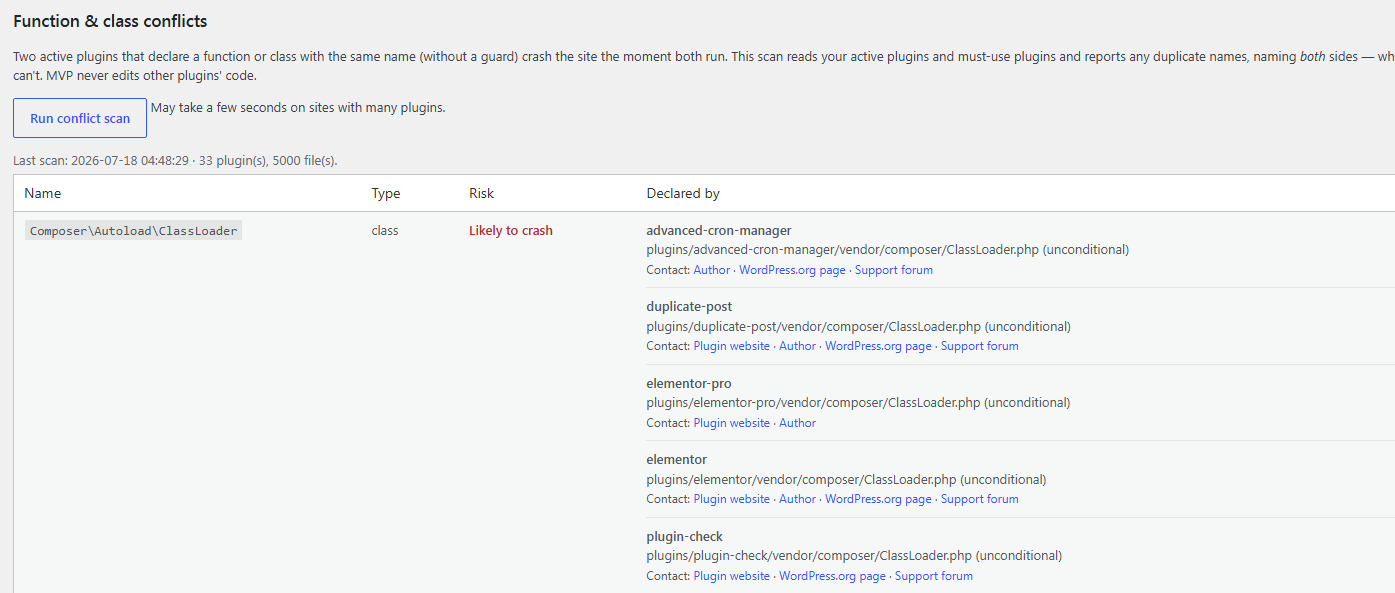
Scan for conflicts before they crash; allows the admin to submit reports to the plugin builder.
When WordPress hits a fatal error, the usual result is a blank “There has been a critical error on this website” page and a cryptic line buried in a log file you have to go find. Pug catches that moment and turns it into something you can act on.
What you get
- **A plain-language diagnosis. **** Pug recognizes common fatal patterns — an undefined function or method, calling a method on null, a class that can’t be found, “cannot redeclare”, out of memory, max execution time, parse errors, a missing file, a type error, and more — and explains in one sentence what actually went wrong. When it doesn’t recognize the pattern, it says so honestly rather than guessing.
- The culprit, named. Pug maps the crash back to the specific plugin, must-use plugin, or theme whose code was running, so you’re not guessing which of thirty plugins to suspect.
- **A crash-notification email. **** Point Pug at an address and it emails you when a new fatal is captured — the plugin involved, the plain-language reason, and where it happened — so you learn about problems without watching a dashboard. Email is sent shortly after the crash from a safe context, never during the crash itself.
- A privacy-safe bug report. For any crash, Pug produces a copy-ready report for the responsible plugin’s support forum, with absolute paths, your home directory, and your site’s address stripped out. Pug never transmits it — you copy and paste it yourself.
- **An after-crash admin notice. **** The next time you open wp-admin after a fatal is captured, Pug shows a dismissible notice linking straight to the report — so you find out even if you aren’t watching a dashboard, and even if email isn’t configured.
- A conflict scanner. On demand, Pug scans your active plugins for functions or classes declared by more than one of them — the “cannot redeclare” landmine — and names both sides before it bites you.
How Pug captures fatals
Pug uses WordPress’ own drop-in mechanism. On activation, it installs wp-content/fatal-error-handler.php, which core loads earlier than any plugin — that is what lets Pug see a fatal that happens before normal plugins have even loaded. It subclasses core’s handler and then hands control straight back to WordPress, so Recovery Mode and the recovery email keep working exactly as they do without Pug. Deactivating the plugin removes the drop-in and stops capture; deleting the plugin removes everything.
What Pug does not do
- It does not send your crash details to us or to any third party. Diagnosis happens on your own server, and the bug report is copy-and-paste, not an automatic upload.
- It does not modify or delete your posts, pages, or any content. It reads nothing from your database except its own settings.
- It does not run its analysis during a crash beyond recording the incident — no network calls, no heavy work on the error path.
External services
This plugin connects to one external service, described below. No crash contents are ever sent anywhere.
WordPress.org plugin API (api.wordpress.org)
When a crash is attributed to a plugin, Pug asks the WordPress.org plugin API whether that plugin is listed there so that it can offer a link to the plugin’s page and support forum. The only data sent is the plugin’s slug (folder name). This happens on demand while you view a crash report, is cached, and never runs during a crash. WordPress.org is operated by the WordPress Foundation; see https://wordpress.org/about/privacy/.