


Click Counter for Woo Products
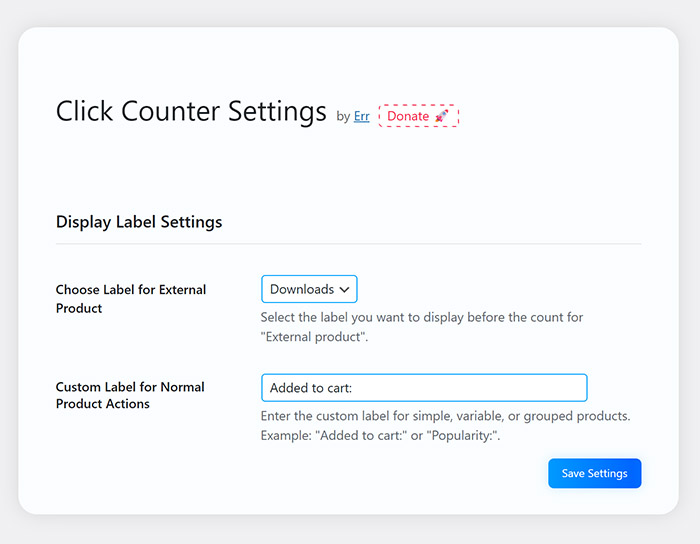
<strong>Plugin settings page:</strong> Shows options to customize labels for external/affiliate and regular products.
“Click Counter for Woo Products” is a powerful and easy-to-use WordPress plugin designed to help you track and display the number of clicks (or downloads for external/affiliate products) on your WooCommerce products.
This plugin provides an intuitive way to assess customer engagement and interest in each product. The click count will be displayed on the product detail page and in the product list in the admin area.
Key Features:
- Click Tracking: Automatically counts every time a customer clicks the “Add to cart” button (for simple, variable, grouped products) or the external/affiliate product button.
- Display on Product Page: Shows the click/download count directly on the product detail page, below the add to cart/product button.
- Admin Column: Adds a “Clicks” column to the WooCommerce product list in the admin dashboard, allowing you to quickly view and sort products by popularity.
- Customizable Labels:
- Choose between “Clicks” or “Downloads” labels for external/affiliate products.
- Customize the label displayed before the count for regular products (simple, variable, grouped), e.g., “Added to cart:”, “Interest:”, etc.
- AJAX Updates: Click counts are updated using AJAX, ensuring a smooth user experience without page reloads.
- AJAX Settings Save: The settings page uses AJAX to save changes, complete with convenient notifications.
- Easy Configuration: A simple settings page located in the WordPress “Settings” menu.
- Clean and Optimized Code: Developed following WordPress best practices.
- Translation Ready: Includes a
.potfile for easy translation into other languages. - Quick Settings Link: Adds a “Settings” link directly to the plugin list for quick access.
This plugin is a useful tool for WooCommerce store owners who want to better understand customer behavior and identify their most popular products.
Support
If you have any questions or issues, please contact the author.
Donate
If you find this plugin useful, please consider donating to support future development. Thank you!