

Easy Table of Contents
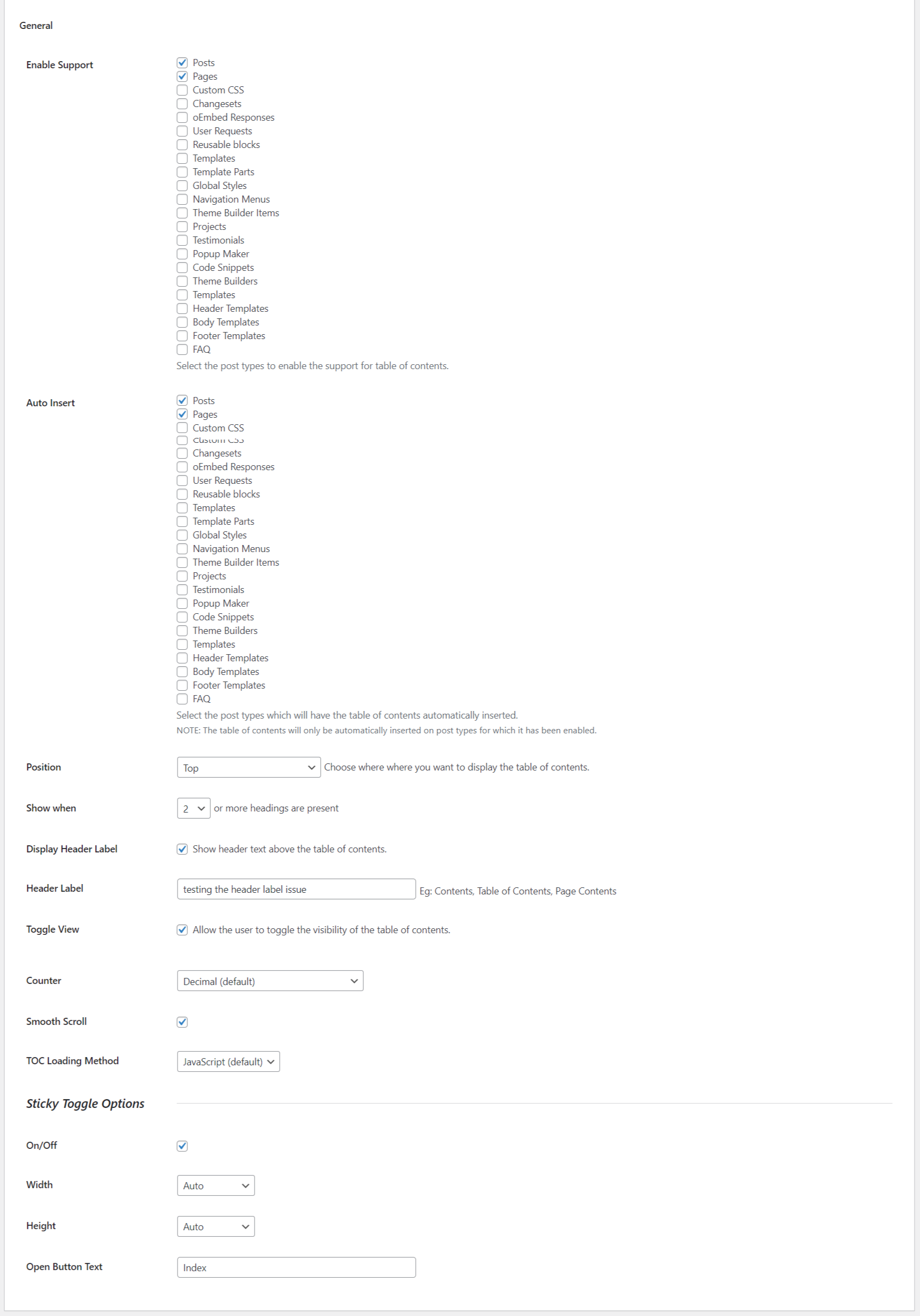
The General section of the settings.
A user friendly, featured focused Easy Table of Contents plugin which allows you to insert a table of contents into your posts, pages and custom post types.
Home | Help & Tech Support | Documentation | Pro version Features
Features
- NEW : Migration Tool to import all the settings from other plugins like Table of Content Plus & more
- Automatically generate a table of contents for your posts, pages and custom post types by parsing its contents for headers.
- Supports the
<!--nextpage-->tag. - Supports the Rank Math plugin.
- Works with the Classic Editor, Gutenberg, Divi, Elementor, WPBakery Page Builder and Visual Composer page editors.
- Optionally enable for pages and/or posts. Custom post types are supported, as long as their content is output with the
the_content()template tag. - Optionally auto insert the table of contents into the page, selectable by enabled post type.
- Provides many easy to understand options to configure when and where to insert the table of contents.
- Many options are available to configure how the inserted table of contents appears which include several builtin themes. If the supplied themes do no meet you needs, you can create your own by choosing you own colors for the border, background and link color.
- Multiple counter bullet formats to choose from; none, decimal, numeric and roman.
- Choose to display the table of contents hierarchical or not. This means headings of lower priority will be nested under headings of higher priority.
- User can optionally hide the table of contents. You full control of this feature. It can be disabled and you can choose to have it hidden by default.
- Supports smooth scrolling.
- Selectively enable or disabled the table of contents on a post by post basis.
- Choose which headings are used to generate the table of contents. This too can be set on a post by post basis.
- Easily exclude headers globally and on a post by post basis.
- If you rather not insert the table of contents in the post content, you can use the supplied widget and place the table of contents in your theme’s sidebar.
- The widgets supports being affixed or stuck on the page so it is always visible as you scroll down the page. NOTE: this is an advanced option since every theme is different, you might need support from your theme developer to learn what the correct item selector to use in the settings to enable this feature.
- The widget auto highlights the sections currently visible on the page. The highlight color is configurable.
- Developer friendly with many action hooks and filters available. More can be added by request on Github. Pull requests are welcomed.
- An option to show toc based on dynamic paragraph count.
- An option which Preserve Line Breaks in TOC.
- An option to use the TOC without anchor links in the URL.
- Support for custom taxonomy description.
- Adds SiteNavigation Schema.
TAKE IT A STEP FURTHER WITH EASY TABLE OF CONTENTS PRO
With EASY TABLE OF CONTENTS PRO You will get access to more professional Settings, options and positions to really push your TOC to the next level.
* New – Gutenberg Block : Easily create TOC in Gutenberg block without the need of any coding or shortcode.
* New – Elementor Widget : Easily create TOC using Elementor Widget without the need of any coding or shortcode.
* New – Fixed/Sticky TOC : Users can find the content that they need, much faster through the option of sticky TOC.
* New – Fixed/Sticky TOC Customization : Customize the appearance of Sticky TOC with Theme Design options.
* New – Full AMP Support : Generates a TOC with your existing setup and make it AMP compatible automatically.
* NEW – ACF Support : Easily create TOC with your custom ACF fields.
* NEW – View More : Show selected number of TOC heading before user clicks to show remaining headings.
* NEW – Read Time : Show time of read for your posts/pages.
* NEW – Collapsable Sub Headings : Show/Hide sub headings of the Table of contents.
* NEW – Highlight Headings : Sticky heading highlight while scrolling through the content.
Shortcode
With Our shortcode feature you are in command of the table of contents with very little effort and even if you have little to no programming skills.
[ez-toc] Would generate the table of contents.
Below are the attibutes we support and could be useful in configuring the table of contents:
[header_label=”Title”] – title for the table of contents
[display_header_label=”no”] – no title for the table of contents
[toggle_view=”no”] – no toggle for the table of contents
[initial_view=”hide”] – initially hide the table of contents
[initial_view=”show”] – initially show the table of contents
[display_counter=”no”] – no counter for the table of contents
[post_types=”post,page”] – post types seperated by ,(comma)
[post_in=”1,2″] – ID’s of the posts|pages seperated by ,(comma)
[post_not_in=”1,2″] – ID’s of the posts|pages seperated by ,(comma)
[device_target=”desktop”] – mobile or desktop device support for the table of contents
[view_more=”5″] – 5, is the number of headings loads on first view, before user interaction (PRO)
[class=”custom_toc”] – add your own class to the TOC
[exclude=”Test”] – exclude heading from TOC which contain text “Test”
[heading_levels=”2,3″] – Show only heading h2 and h3
Support
We try our best to provide support on WordPress.org forums. However, We have a special team support where you can ask us questions and get help. Delivering a good user experience means a lot to us and so we try our best to reply each and every question that gets asked.
Bug Reports
Bug reports for Easy Table of Contents are welcomed on GitHub. Please note GitHub is not a support forum, and issues that aren’t properly qualified as bugs will be closed.
JOIN TELEGRAM GROUP COMMUNITY**: Purpose of this group is to get proper suggestions and feedback from plugin users and the community so that we can make the plugin even better.
Roadmap
- Fragment caching for improved performance.
- Improve accessibility.
- Add Bullet and Arrow options for list counter style.
- View Full Road Map
Credit
Easy Table Contents is a fork of the excellent Table of Contents Plus plugin by Michael Tran.