
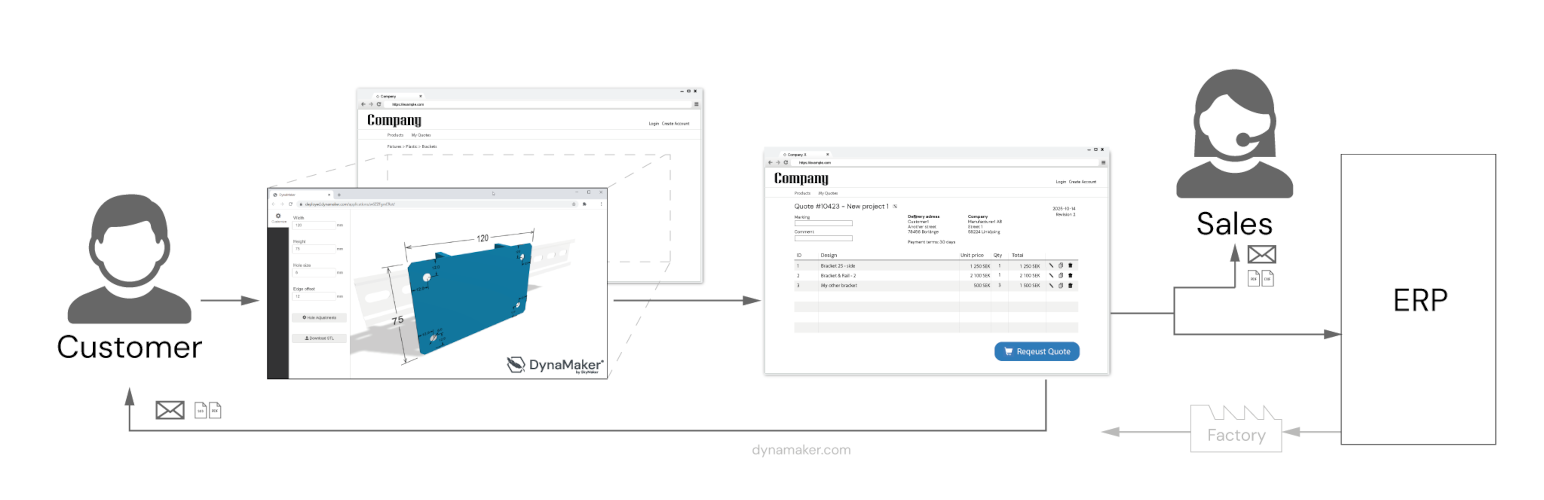

DynaMaker CAD Configurator Integration

Example with hydraulic calculator
With the DynaMaker Plugin for WordPress you can easily display your Online CAD onfigurators in a WordPress page or post, with very few clicks and short setup time.
DynaMaker CAD Configurator features
– Embed your DynaMaker CAD Configurator on your WordPress
– Open your DynaMaker CAD Configurator with a button
– Include page specific meta and preselected choices in url
– Use wordpress login and registration to limit access and enable save / load of configurations in DynaMaker (optional)
– Connect DynaMaker with other services like SendGrid to enable Quotation Requests direct to the sales teams inbox
Request for Quote (RFQ) Portal
– Useful features for logged in WordPress users to submit a quotation request with data from their CAD Configurators
– Checkout of several configurations as individual rows before submit
– Form fields for what information to include with the request (JSONForm)
– History of users requested quotes (optional)
– Send Request trigger endpoint (eg Microsoft Power Automate) to forward request