

DT-PM AI Sale Assistant for WooCommerce
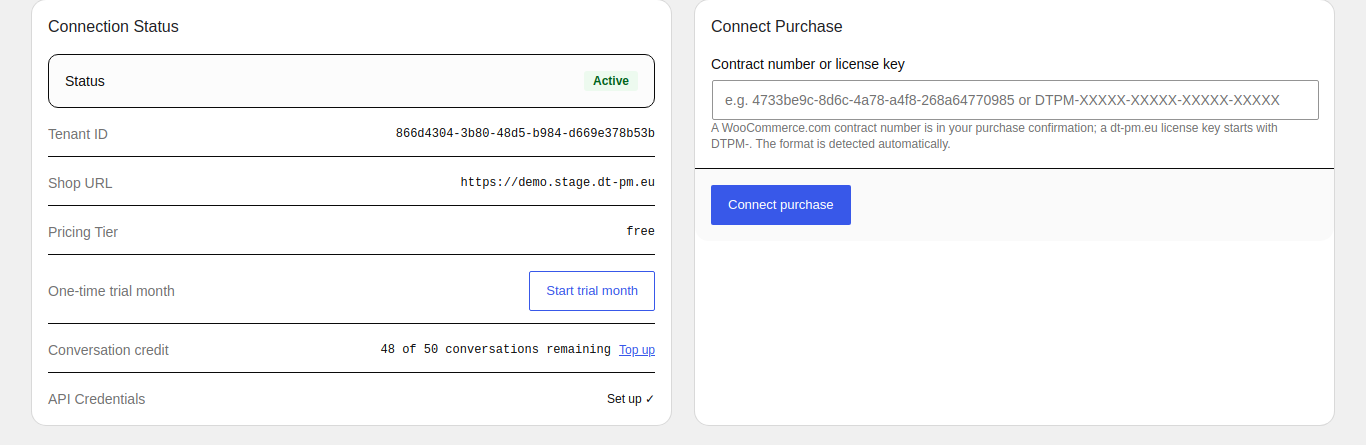
Settings: connection status and connecting a purchase (WooCommerce.com contract number or dt-pm.eu license key).
Turn your WooCommerce shop visitors into buyers with an AI sales assistant that actually understands how your customers make buying decisions—not just keyword matching.
Unlike generic chatbots that guess or quote full product texts, DT-PM AI Sale Assistant uses structured causal decision chains. It asks the right questions (e.g., intended use, must-have features, budget) to guide shoppers directly to the right product—just like an expert salesperson in a physical store.
What you get:
- Smart Sales Advisor (Storefront Widget) – interactive chat widget placed anywhere on your store with personalized recommendations and direct “Add to Cart” buttons.
- Causal Decision Chains – merchant-reviewed decision models per category; you control how the AI recommends products before it ever speaks to a customer.
- Order Tracking & Support Agent – handles order status queries, tracking numbers, shipping info, and FAQs for logged-in customers automatically, reducing repetitive support tickets.
- Bring Your Own Key (BYOK) – use your own Anthropic, Mistral, or OpenAI API keys (and pick your preferred models) on any plan, including the free tier.
- Smart Escalation & Human Handover – smoothly transfers unresolved customer queries via email summary straight to your support team.
- Custom Brand Voice – tailor the assistant’s tone of voice to match your brand style using presets or by analyzing existing shop pages.
- MCP Bridge Included – manage plugin settings remotely using standard Model Context Protocol (MCP) workflows with tools like Claude.
How it works, in 3 simple steps:
- Connect & Analyze – connect your store and let the plugin structure your WooCommerce categories into sensible subcategories.
- Review the model – verify the purchase criteria (causal chain) for each category, ensuring the AI gives accurate recommendations.
- Go live & convert – activate the widget and let your AI sales assistant guide customers and handle support 24/7.
Pricing & getting started:
- Free tier included – includes a free trial month and a one-time conversation allowance, granted once you start processing your catalog.
- Pay as you grow – flexible tiers for larger product catalogs or additional conversation credit; check your status anytime in the plugin dashboard.
External services
This plugin relies on our own hosted backend service (“DT-PM AI Sale Assistant service”, currently reachable at https://api.dt-pm.eu) to do the actual AI work behind the recommendations. Here is exactly what is sent to that service, and when:
-
When you click “Connect this store” (shown on every DT-PM AI Sale Assistant admin page until you do, right after activating the plugin): your store’s web address and store name are sent once, to set up an account for your store on our service so the advice features can work at all. You confirm the current version of our AVV (data processing agreement) as part of this same step, and that version number is sent along with it; the agreement text itself is read from, and the version number checked against, our service beforehand (no store data sent for that check). If you connected before this confirmation step existed, a dashboard banner asks you to confirm the current AVV version afterwards in the same way. Nothing is sent automatically on activation itself – the plugin waits for this explicit action.
-
While the plugin stays active, on an ongoing schedule: the plugin automatically checks in with our service multiple times a day and once a week. These automatic check-ins send only your store’s account identifier – never any product information – and are used to keep your account up to date (for example, tracking your free trial month, keeping previously-submitted product availability current, and, if you’ve connected a dt-pm.eu license key, confirming with our service that it’s still valid). These check-ins only happen once your store is actually connected (see “Installation” below) – none of them run beforehand.
-
Only after you have actively set up the Category Analysis and Causal Chain features yourself: those same daily/weekly check-ins start additionally including real data from your product catalog (product SKUs and category names), so our service can keep its recommendations accurate. No product data is ever sent before you complete that setup step. Alongside your product data, the causal chain logic generated for your categories (the decision questions and criteria the assistant uses to advise shoppers) is also stored on our servers and used to run your chat assistant. On the free tier, an anonymized summary of that structure – just the category type and the list of decision criteria used, never product names, prices, or customer data, and with no way to trace it back to your store – is additionally used to improve causal chain generation for everyone. On paid plans, you can turn this off in the plugin’s settings.
-
Only after you have started processing your product catalog for a subcategory yourself (the Product Coverage step) and that run appears to have stopped partway through: the plugin automatically checks once an hour whether previously started catalog processing is still incomplete and, if so, resumes it by resending the full data (name, attributes, price, date last modified) for the still-missing products only – the same data already sent when you click “Process remaining products” or “Update changed products” yourself. This never starts processing for a subcategory you have not already begun yourself.
-
Every time one of your shoppers uses the chat widget: their typed messages (and, where relevant, the product page they are viewing and your store’s configured language) are sent to our service in order to generate a reply. Our service forwards that message to a third-party AI provider – by default Anthropic (Claude); if your store uses its own AI provider key (BYOK, available on every tier), your configured provider (Anthropic, Mistral AI, or OpenAI) and chosen model are used instead, under your own account with that provider. Separately, finding matching products for that reply uses Mistral AI’s embedding service on our account, regardless of your BYOK setting. This only happens while a shopper is actively using the chat widget on your site – no shopper data is sent at any other time. To identify your store for these requests without exposing a long-lived credential to every visitor’s browser, your WordPress server itself exchanges your store’s permanent credential for a short-lived access token (valid 15 minutes) right before the widget needs one – this is only ever your store’s own already-known account identifier, no new data.
-
When a logged-in customer asks about an order in the chat (their own order history, or one specific order by number): that order’s status, order date, line items, shipping method, and tracking numbers are sent to our service and on to the AI provider in use (see point 5) to generate the reply, the same way a chat message is. This only ever covers orders that already belong to the logged-in customer’s own account – never a guest, and never another customer’s order.
-
Once you assign a page to a slot in the “Service Assistant Policies” section (Shipping, Returns, Withdrawal, Payment, FAQ): that page’s text is sent to our service when you save, and again once a day for as long as the slot stays assigned, so the assistant can answer from your own wording instead of guessing. Unassigning a slot (back to “— Not configured —”) removes its stored text from our service.
-
When a customer agrees to a handover to your support team (“Yes, send”) in the chat: the conversation summary and the customer’s contact details (email, and phone if given) are not sent to our service – your own WordPress installation emails them directly to your configured support contact (via WordPress’s standard mail function), with the customer’s address set as the reply-to, so a reply goes straight back to them. Immediately beforehand, the plugin confirms with our service that a genuine handover was actually offered for that conversation – only your store’s account identifier and an internal conversation reference are sent for that check, never the summary or the customer’s details.
-
If you generate a key in the “MCP Bridge” section of the Service Agent tab: an MCP-capable AI client holding that key (entered there as a Bearer token) can read this store’s current backoffice settings (e.g. AI provider/model choice, escalation target, widget title, knowledge-pool participation) from our service, and change most of them the same way the Settings page itself would – never your AI provider API keys, which stay in the browser-based Settings form only and are not exposed through this bridge. This only works while a key exists; revoking it stops it immediately.
By using this plugin you agree to our Terms of Service.