

Dropshipping XML for WooCommerce
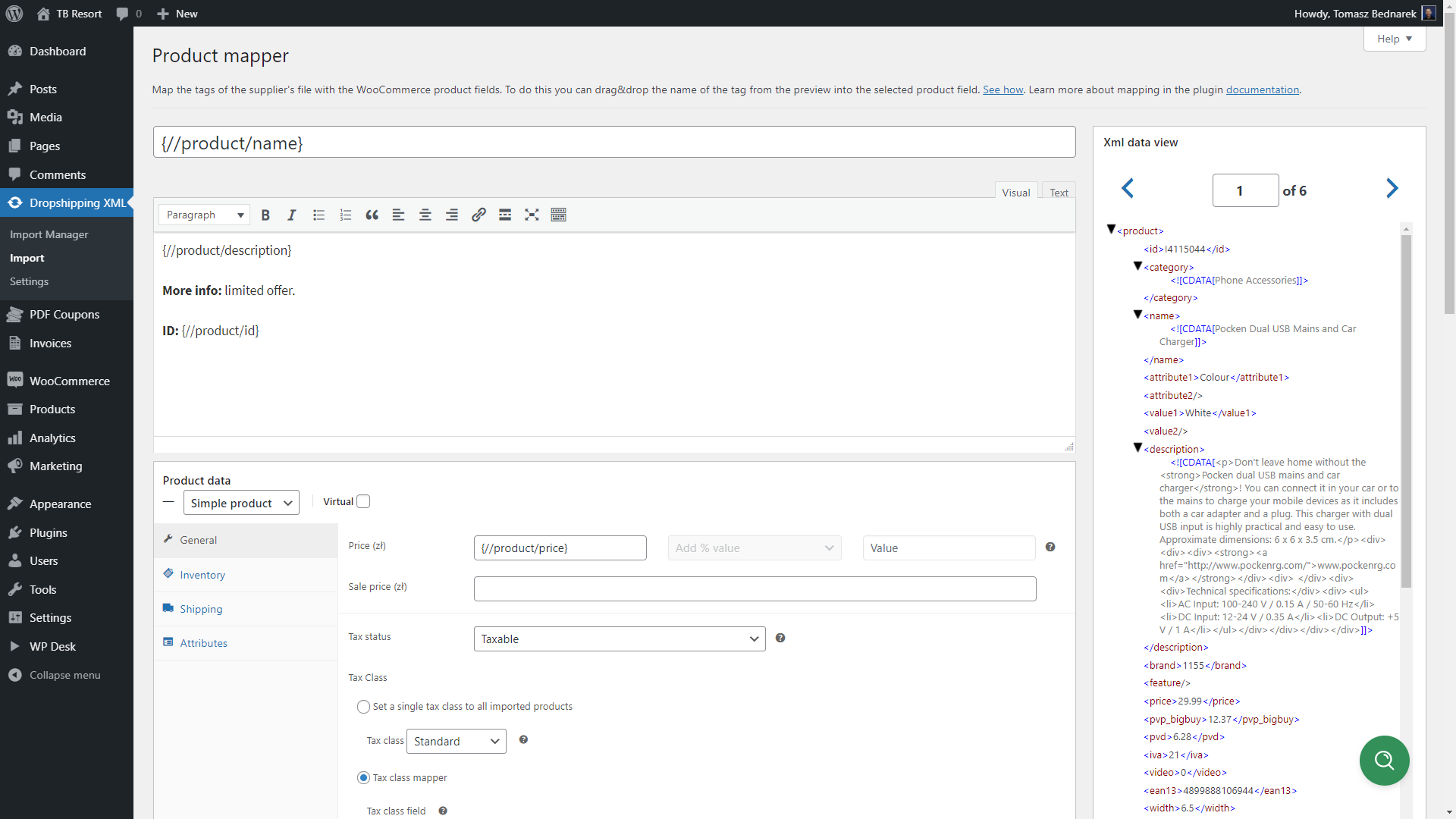
Import WooCommerce products based on product feed fields with Product Mapper
Dropshipping XML for WooCommerce is a plugin that lets you import products to WooCommerce and update them easily. Import products from any XML or CSV to your WooCommerce store. You may also update existing products with many options to speed up the process. Add any number of product feeds to import, for example, from different wholesalers.
The plugin lets you import, then update selected data and product fields. You can import products to WooCommerce with categories, images, descriptions, prices, stock, attributes, and more. You may use WooCommerce and this plugin to import & offer wholesale/ dropshipping products in your store, just in a few moments.
So if you want to import more products from CSV or XML or you’re just starting your WooCommerce dropshipping store, the plugin will be right for you.
See how to import and update WooCommerce products with the plugin 😊!
When you need the plugin – a quick checklist
- I want to import WooCommerce products 🚀
- The plugin should create simple and variable WooCommerce products based on my settings 🌟
- I would like to map product feed data with WooCommerce product fields including the product name, description, price, stock, attribute, category, tax, shipping class, image, and more 🎨
- There are multiple nodes in the XML fields – I would need to choose the right one ✔️
- I would like to import products to WooCommerce from multiple CSV and XML files (with no limits) ♾️
- Products have many categories so I need to create an advanced category tree based on the feed 🌱
- I need to update WooCommerce products but only selected data, for example, prices, stock, or attributes 🔄
- If the products disappear from the product feed in the future I want to automatically set the stock to 0 of the previously created products 0️⃣
- I want to import WooCommerce products and then update them based on the external product feed 🔁
- My warehouse gave me CSV and XML files with product data and I need to import them correctly into WooCommerce 💡
- I wish to start my dropshipping business based on WooCommerce and cyclical product import and fast product update ⏩
- I want to see the progress of the product import and manage imports in one place 😊
- The plugin should have a lot of possible settings and clear documentation 🎚️
- The plugin should recognize the products based on their names or SKU 🔂
- I would like to create new products as drafts before showing them in my WooCommerce store 📝
- There is an option to update existing products without creating new ones 🔃
- The plugin lets me choose the product fields to synchronize ✔️
- I want to see all settings, product mapper, and import options inside WordPress 👁️🗨️
- I need to import products from PrestaShop, Magento, OpenCart, Shopify, Drupal, eBay, or Amazon to WooCommerce 🪙
- It would be nice to use a plugin with a customer-friendly UI and professional support 🥇
Feature list to import and update WooCommerce products
See the main features of the plugin:
- Import products to WooCommerce from any CSV or XML file,
- Use the plugin to start dropshipping with WooCommerce,
- No limit of imported files,
- The File Preview to easily see the structure of the imported file,
- Import Simple and Variable WooCommerce Products,
- Update only previously imported products,
- Match products based on SKU, product name, EAN, or unique product identifier,
- Create new products, also as drafts,
- Start, stop, and pause the import process,
- Map fields from the file to WooCommerce products parameters,
- Import WooCommerce products with names, descriptions, short descriptions,
- Import product attributes from one line,
- Map tags for imported products,
- Select the product fields to import and add your own values,
- Visual and Classic Editor for description and short description,
- Import WooCommerce products with regular prices, sale prices, and tax settings,
- Import WooCommerce products with their images, attributes, stock, SKU, and other product fields,
- Import product EAN and update products based on EAN with Flexible EAN for WooCommerce,
- The plugin can also import GPSR data (manufacturer, importer, other details, and usage instructions) using the GPSR for WooCommerce free plugin,
- Create products in a selected category or map categories,
- Import product categories with a tree structure dynamically,
- Change the stock to 0 if the previously added product will not be available in the import, or leave the stock unchanged,
- Choose which product fields to import/ update and which ones to skip,
- Drag & Drop XML or CSV fields in the Product mapper with ease,
- Use multiple fields, add your custom text as well,
- Log and save import logs,
- Support tab and clear documentation,
- Clear interface,
- Import Log.
Integrations 🚀
- Yoast SEO – Dropshipping XML for WooCommerce automatically detects an active Yoast SEO (both free and PRO) and lets you drag tags from the supplier feed into Yoast meta keys such as the SEO title, meta description, canonical URL, Open Graph, and Twitter Card. The data is saved directly into the product meta so Yoast immediately sees the updated values.
- Advanced Custom Fields (ACF) – when ACF is active, all field groups assigned to products appear in the mapper (including simple field types like
text,textarea,number,select,checkbox,radio,true/false, orwysiwyg). Drag & drop from the feed fills those fields, and the import stores the value both in meta and viaupdate_field(), keeping full compatibility with ACF. - Flexible EAN – update products based on EAN with Flexible EAN for WooCommerce.
Documentation & Support
View Dropshipping XML for WooCommerce Docs.
We provide limited support for the free version in the plugin Support Forum. Please purchase a PRO version to receive priority e-mail support. Upgrade to PRO Now →.
You may help us translate the plugin.
PRO Features
If you need more options to control the import process you may use the PRO version of the plugin. It lets you import more fields, gives you conditional logic to import WooCommerce products based on specific criteria you choose, and more. See all functionalities in the Dropshipping XML for WooCommerce PRO page.
PRO features for advanced WooCommerce product import:
- [PRO] Import WooCommerce products with advanced features and PRO support,
- [PRO] Import (and update) WooCommerce products automatically based on the cron schedule (days and hours),
- [PRO] Conditional Logic options to import products that meet specific rules,
- [PRO] Import External/Affiliate Products,
- [PRO] Import WooCommerce products with categories – create new categories automatically,
- [PRO] Price modifier to change regular prices,
- [PRO] Import and update WooCommerce product prices based on conditional logic,
- [PRO] Adding attributes as taxonomy (globally for all products),
- [PRO] Option to move a product to trash if the import does not find it during the next updates,
- [PRO] No limit for imported images,
- [PRO] Do not replace the existing images. Instead, append new photos to WooCommerce products during product import,
- [PRO] Additional filters to modify the data from the file during the import process.
Visit Dropshipping XML for WooCommerce Docs to see how to use all options and settings of the plugin.
You may test the PRO version in a free demo.
When do I need PRO features?
Check out the quick checklist at the beginning. The PRO contains all those features but you can also:
- Create affiliate/external products 📲
- Import and update WooCommerce products automatically based on schedule 📅
- Create or select product categories automatically based on product feed data with advanced product feed mapping 🗂️
- Use conditional logic to import WooCommerce products based on certain rules and specific conditions 📊
- Import product attributes as taxonomies 🗃️
- Modify prices dynamically based on fixed, percentage, or specific conditions 🧾
- Import product with multiple images ⭐
- Append new photos to the product without overwriting old ones 🛍️
- Delete items (move to trash) if the future import does not have products 🗑️
- Get new updates, features, and PRO support 👑
If you need to export products from WooCommerce use the Dropshipping Export Products for WooCommerce plugin.
How to import and update WooCommerce products with the plugin?
- First, install and activate the plugin.
- Enter the URL of the product feed (in a CSV or XML format). You can get that file from your warehouse, dropshipping service, or export products from different stores.
- Next, choose the appropriate branch with products.
- Then, map the data from the feed with product fields using user-friendly UI (similar to the WooCommerce product editor).
- Also, decide about product import settings, data synchronization, and creating products.
- Finally, run start the import process.
- Of course, you may create multiple product imports with different conditions, settings, and product feeds.
Visit Dropshipping XML for WooCommerce Docs to see how to use all options and settings of the plugin.
Best ideas for using the product import & plugin options
1️⃣ Import simple and variable products into WooCommerce from any CSV or XML file.
2️⃣ Bulk update product prices, stock, description, categories, attributes, and more based on SKU or product names.
3️⃣ Import products as drafts before publishing them in WooCommerce.
4️⃣ Choose product fields to synchronize only selected data and omit the rest.
5️⃣ Create multiple product imports with different settings or more files.
6️⃣ Modify the prices and import products based on advanced conditions (PRO).
7️⃣ Import and update WooCommerce products automatically based on schedule (PRO).
Why choose Dropshipping XML for WooCommerce
The plugin lets you import products to your WooCommerce for free. You may use the plugin to start dropshipping in WooCommerce. Import more products to your WooCommerce store. Use an easy and clear interface, and choose fields to import. Automate the process – the plugin lets you start WooCommerce dropshipping in a few moments!
What’s more, you may update products any time you need with one click. The plugin synchronizes selected fields with your WooCommerce products. Your clients will receive the latest prices, stock, variations, attributes, etc. So, you will be sure that your store’s offer is always up to date. And you can import WooCommerce products from any CSV or XML file.
The PRO version of the plugin has more options if you need more product types, control over created categories, imported attributes, prices, schedule, and conditional logic to import/ skip products based on your criteria.
Data use policy
Learn about Use of Data Policy by WP Desk Plugins