


Dropndot Article Duplicator
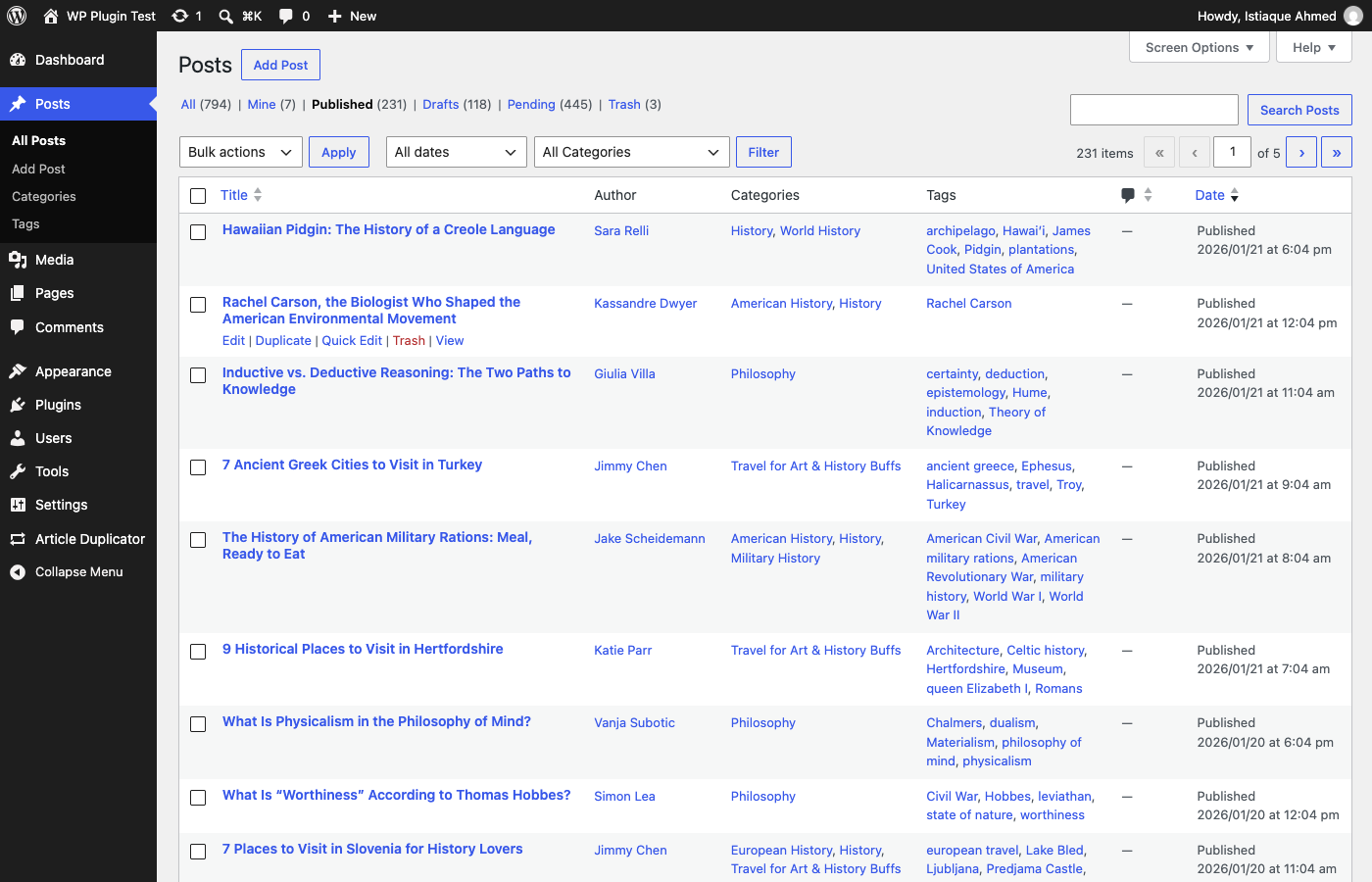
One-click Duplicate action, right after Edit on the Posts list screen.
Dropndot Article Duplicator is a duplication tool for editorial teams that need control and safety, not just a copy button:
- Shape each copy before it exists: set the title, slug, status, author, date, parent, content type, taxonomies, and individual custom fields, or create several copies at once.
- Decide exactly who can duplicate: grant access to individual users on top of their role. A grant never adds capabilities their role doesn’t have.
- Safe by default: content types that a generic copy would break (WooCommerce orders and products, ACF definitions) are blocked. Accidental double clicks and resubmitted forms are caught on the server. A copy is never published or scheduled unless you allow it.
- Know what was copied: a history of who duplicated what and when, storing IDs only, with automatic retention.
- Automate it: a REST endpoint, a WP-CLI command, and a WordPress Abilities API ability (6.9+), all using the same permission checks.
One-click duplication
A Duplicate link is added right after Edit on every supported post type’s list screen, with a matching Duplicate option in Bulk Actions for duplicating several at once (up to 200 per action), and to the admin bar when viewing an article. Clicking it creates a draft copy and takes you straight to the editor. No configuration is required to start using it.
Customize Duplicate
Need more control? The Customize Duplicate screen lets you change the title, slug, status, author, publish date, parent, taxonomies, and metadata before the duplicate is created — and even create several independent copies at once.
Smart, safe by default
- New drafts by default — duplicating a published article never publishes a second copy unless you explicitly allow it.
- A unique slug is generated automatically (
my-articlebecomesmy-article-copy, thenmy-article-copy-2, and so on). - Internal WordPress bookkeeping (edit locks, transients, nonces) is never copied.
- Comments and edit locks are never duplicated.
- Every duplication request is validated against WordPress capabilities, nonces, and post visibility — private and password-protected content stays protected.
- Accidental double clicks and resubmitted forms in the admin do not create extra copies.
- Content types that keep important data outside the post (WooCommerce products, orders, and coupons; ACF field groups and definitions) are blocked, because a generic copy would produce broken records.
Who can duplicate
Administrators can duplicate by default. Other users need two things: an administrator must switch them on under Article Duplicator Settings User Permissions, and their role must already be allowed to create that type of content. A grant never adds capabilities a role does not have. Users who cannot publish get a pending copy instead of a published one.
Built for developers
- Actions and filters for every stage of duplication (
dropndot_article_duplicator_before_duplicate,dropndot_article_duplicator_after_duplicate,dropndot_article_duplicator_excluded_meta_keys,dropndot_article_duplicator_taxonomies,dropndot_article_duplicator_post_data, and more). dropndot_article_duplicator_doing_duplicationreturns true only while the plugin’s ownwp_insert_post()call runs, so “featured image required” style gates can allow the duplicate through and re-check it once the image is copied.dropndot_article_duplicator_insertedfires as soon as the duplicate post exists, before its terms and metadata are copied.dropndot_article_duplicator_unsafe_post_typesfilters the list of blocked content types. Removing a type allows it to be enabled; every capability and permission check still applies, and the plugin cannot copy data that the type stores outside the post, its metadata, and its terms.dropndot_article_duplicator_resubmit_windowsets how many seconds a repeated one-click or bulk duplication counts as accidental (default 5; 0 turns it off).- A REST API endpoint for duplicating a post programmatically.
- A WP-CLI command:
wp dropndot-article-duplicator duplicate <post-id>... - An ability for the WordPress Abilities API (
dropndot-article-duplicator/duplicate-post), registered on WordPress 6.9 and later. It is not exposed through the REST API. - Repeated REST, WP-CLI, and ability calls are never suppressed: each call creates a copy.
- Works with public custom post types and any registered taxonomy — nothing is hard-coded to Posts, Categories, or Tags. Admin-only content types can be enabled in Settings, except blocked ones.
- Compatible with Gutenberg block content, Classic Editor HTML, and custom fields (including ACF-style meta), without corrupting serialized values.
Duplication Profiles
Save reusable duplication presets — for example an “Editorial Draft” profile that keeps the original author and copies everything, or a “Translation Template” that prefixes the title and copies only selected fields — so editors don’t have to reconfigure the same options every time.
On the Customize Duplicate screen, anything the editor sets explicitly wins; options left on “Default” come from the selected profile, and then from the plugin settings. A title prefix or suffix set in a profile replaces the one from the settings. A title typed by the editor is used exactly as entered. Profiles apply to the Customize Duplicate screen only; one-click, bulk, REST, WP-CLI, and ability duplication use the plugin settings.
Duplicate history
A lightweight log (identifiers only, never article content) tracks which articles were duplicated, by whom, and when. The History screen shows activity at a glance (totals for the last 7/30 days), and can be filtered by content type or by how the duplicate was created (one-click, bulk, multi-clone, WP-CLI, REST, or Ability). Administrators can clear it at any time.
A dashboard that’s actually useful
The plugin’s Dashboard summarizes recent duplication activity, surfaces which articles get duplicated most often, and shows your current configuration (default status, author, slug behavior, limits) at a glance.