


DigitalM InsideSEO
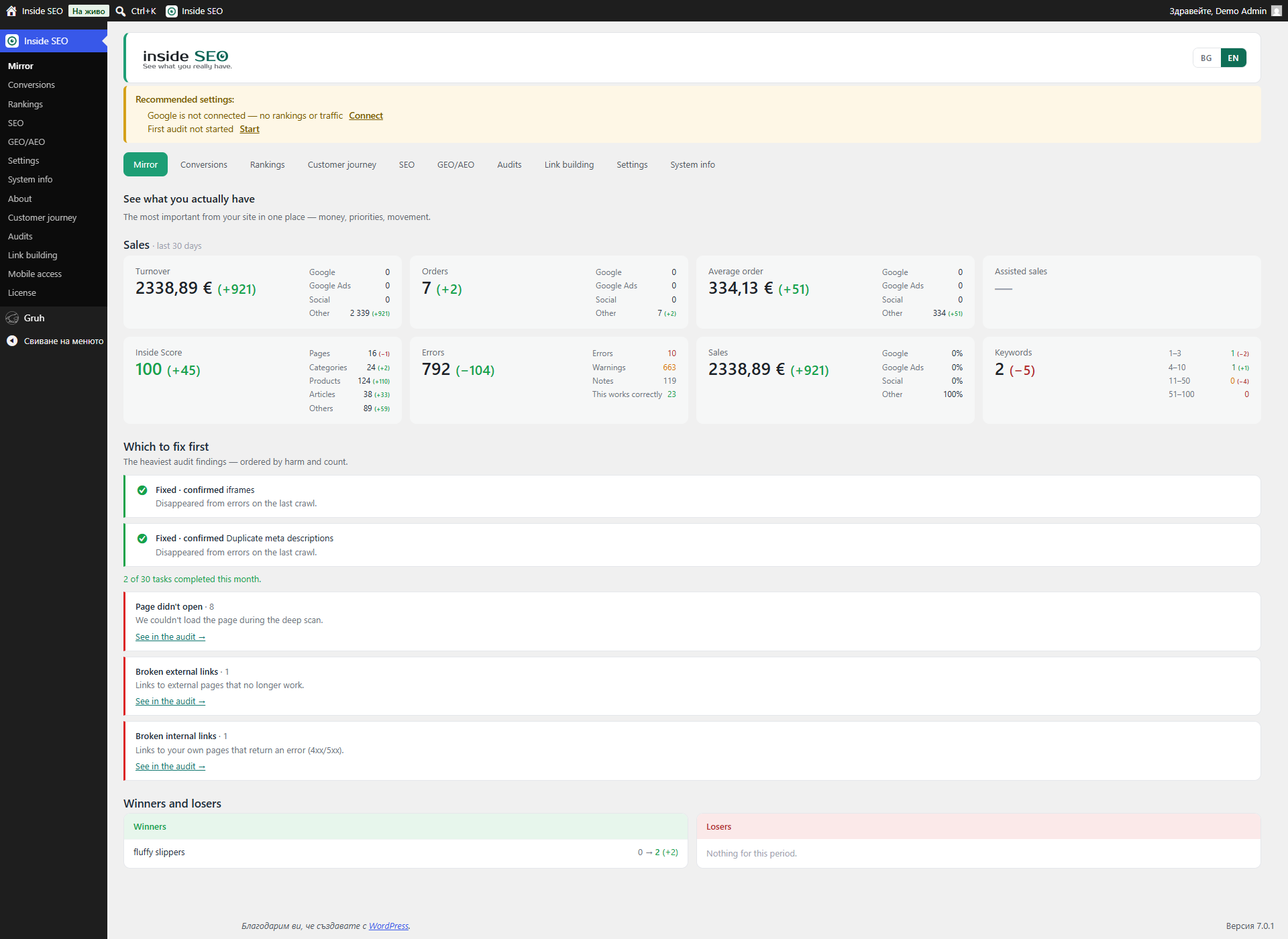
Mirror, what search engines see about your site
DigitalM InsideSEO shows you the truth about your site, not a flattering “SEO score 85/100” but concrete facts and real errors.
Instead of a vanity score, InsideSEO explains problems in plain language: “84 people could not reach checkout, here is why and how to fix it.” Everything runs on your own site, and it reads the fields of your existing SEO plugin instead of replacing it.
Who it is for
- WooCommerce stores that get traffic but not enough sales.
- Service businesses that want to measure calls, emails and form submissions.
- Blogs and content sites that want to know which content brings real results.
The Mirror, what search engines see
The home screen is a single honest snapshot of your site: how many pages are indexable, which structured data types exist and which are missing, whether AI assistants can reach your content, and where titles, descriptions and H1s are missing or problematic. Numbers are measured from your real pages, not estimated.
Error audit, over 110 automated checks
The SEO screen runs more than 110 checks on your pages and groups the findings by priority, hardest first. The checks cover:
- Indexability – site-wide “discourage search engines”, noindex on important pages, canonical missing, duplicated, pointing elsewhere or broken.
- Content – thin content, low text-to-code ratio, images without alt text, generic or uninformative file names, alt text equal to the file name, orphaned images, near-duplicate products, dead products (published but never sold), empty categories, stale year in the title, missing H2, heading order skips.
- Titles and meta – missing, too long or too short titles, duplicated titles, missing, too long, too short or duplicated meta descriptions, missing or multiple H1.
- URL hygiene – overly long URLs, underscores, uppercase, non-descriptive slugs, crawl-eating filter parameters.
- Structure and internal links – broken links, orphaned pages, “traffic without checkout” (content that never links to a product or category).
- Headers and security – missing security headers and related response issues.
- Technical head – problems in the document head that affect crawling.
- Performance – server response time and render weight from your own crawl.
- Schema / AEO – missing or incomplete structured data (JSON-LD) per page.
- Files – sitemap and robots checks.
- Multilingual and validity – hreflang checks on multilingual setups.
- Hidden Cyrillic – invisible characters and mixed Latin/Cyrillic letters in SEO fields that quietly break search.
Each finding explains what it is, why it matters, where it is and how to fix it. You can fix titles and meta descriptions right there in the table, in bulk, and the check re-runs live so a fixed problem disappears on the spot.
Reviewed and accepted issues
Not every finding is a defect. A home page with no breadcrumbs, WordPress’s “Uncategorized”, a decorative image with an empty alt – these are fine as they are, but they used to come back on every crawl and clutter the plan. Now, on the findings that only a human can judge, you can mark one as reviewed with a reason (acceptable, client’s request, by design, not technically possible, postponed until a date, external cause, false alarm) and a short note. Accepted findings drop out of the count, the monthly plan and the site score, but stay in a separate “reviewed and clarified issues” table so nothing is hidden. A postponed one returns on its own after the date, and if the page is edited after you accepted it, the row is flagged for a fresh look.
Speed, from real visitors and your own server
Speed is measured three ways: Google PageSpeed Insights field data from the last 28 days (how your real visitors experience the site), a lab test, and the plugin’s own load test that opens your pages and measures the server, the files, the plugins and the database queries. On top of the Google score it runs 31 of its own checks across server and WordPress, delivery, caching, fonts and plugins.
A standout is “what a plugin costs“: the plugin loads one of your pages with a single plugin’s files disabled, just for that request, and measures the difference – so you can see which plugin is actually slowing you down. You also get a page-weight breakdown by source, the slowest pages, a month-by-month history, a before/after view, and an optional comparison against up to three competitor URLs. All of it is free.
The checks catch the things that hurt real load the most: a lazy-loaded, oversized or old-format main (LCP) image, several oversized images on one page, fonts loaded from a third party, a missing font-display hint, a missing preconnect to an external host, and tracking scripts that fire before the visitor has consented. A dedicated “external calls” measurement shows how long your server spends waiting on third-party sites while it builds the page.
Optimization log
Every time you change a speed or file-loading rule, the plugin records it together with the numbers from just before, and fills in the “after” numbers from the next test – so you can prove a change helped or undo it. You can add a manual note too, such as “switched host” or “changed theme”.
Asset loading, which files load where
A per-page view of which CSS and JavaScript files load on which pages, so you can stop a plugin’s files from loading where that plugin is not used – one button clears all your shop’s files from the pages that have no shop on them. The plugin detects your cache plugin and whether it can defer scripts, gives you a ready exclusions list to copy into it, and warns you when another optimization plugin (Perfmatters, Asset CleanUp and similar) is already doing the same job, so two tools do not fight over it.
Rankings
Connected to Google Search Console, the Rankings screen shows keyword positions and page positions, won and lost positions, and queries close to the top 10 so you can see quick wins. A rank tracker follows specific keywords day by day.
Duplicate content
Finds pages, products, categories and tags with near-identical text – the kind that makes Google unsure which one to rank. Each overlap is graded (over 70% red, 40-69% amber) and shows exactly which other pages it collides with and by how much.
Spelling and proofreading
A real spell checker for your site content, built for Bulgarian and 19 other languages. It combines rule-based checks, a full LibreOffice dictionary (licences included, nothing sent to a third-party server) and grammar rules, and it never blocks a save – it only suggests. You keep a personal “my dictionary” so brand names and terms are never flagged again, and product and category names are skipped automatically.
GEO / AEO, readiness for AI assistants
A dedicated screen checks whether AI assistants (ChatGPT, Claude, Perplexity, Gemini and others) can reach your site, lists every AI bot with its robots.txt access, checks the structured data they understand, and shows the traffic and sales that already come from them. The plugin can also serve an llms.txt map of your key pages and products for AI crawlers, turned on or off from this screen.
Conversions and traffic (every site type)
The Conversions & Traffic screen works for every kind of site, not only stores. WooCommerce stores see orders by channel (Google, Facebook, direct and others), revenue, a net-sales figure (minus VAT, shipping and refunds) and ROAS when you add an ad-spend file. Service sites and blogs see conversions as goals: calls, emails, form submissions, bookings and newsletter sign-ups. A Traffic sub-tab shows visitors, channels, devices, countries, cities and languages from GA4 for any site. Every figure is shown against the previous period of the same length, so you see the trend, not just today’s number.
Content planning
A Content view compares your existing articles against the topics your site should cover: it flags thin, cannibalizing or stale articles, finds topic gaps for new articles, and flags missing categories and tags, all read live from your own data.
Crawl
A full on-demand crawl of your own site detects broken links and orphaned pages, duplicated or broken canonicals and problematic filter URLs, and feeds the audit above – run as often as you like.
Change history
A change history records edits to titles, meta descriptions, alt text and file names, showing who made each change and when, and measures the effect three ways (30 days before vs after, month over month, and year over year) so you can see what actually moved.
Site guide and system information
A built-in Guide maps every feature to the tab it lives in and answers “where do I do X”. A System information screen shows your SEO plugin, cache plugin, site type, sitemap, tags, PHP and WordPress details in one place for quick diagnostics.
Highlights
- A mirror, not a lie – concrete facts, no sugar-coating.
- See why you do not sell – sales by channel plus checkout diagnostics.
- Real speed insight – three data sources and the unique “what a plugin costs” measurement.
- Accept what is fine – mark a finding as reviewed with a reason so it stops cluttering the plan and the score.
- Control which files load – stop a plugin’s CSS and JavaScript from loading on pages that do not use it.
- Spelling built in – a genuine proofreader for 20 languages with your own dictionary.
- AI readiness – checks for ChatGPT, Claude, Perplexity and Gemini visibility, plus an llms.txt map.
- Your data stays on your site – the data is stored on your own WordPress install, not in a foreign cloud.
- Works alongside your SEO plugin – it reads the fields of Yoast, RankMath, SEOPress and All in One SEO instead of replacing them.
Everything above is free and fully functional, with no time limit and no locked features. A separate Pro add-on (offered from our own site, not required) adds AI suggestions and agency tools; this plugin works completely on its own without it.
Requirements
- WordPress 6.2 or newer
- PHP 8.1 or newer
- WooCommerce (optional, for sales data)
- Google Search Console and GA4 accounts for full data
External Services
DigitalM InsideSEO may communicate with the following external services when you use specific features.
seo.digitalmseo.com (our service)
- What: the Google connection uses our service as a connection helper, so you do not have to create your own Google Cloud project.
- When: only when you click “Connect Google account”.
- What is sent: your site URL, plugin version, and a public verification key. Google tokens are stored only on your own site; our service never stores them.
- Privacy Policy: https://seo.digitalmseo.com/en/privacy-policy/
- Terms of Use: https://seo.digitalmseo.com/en/terms/
Google APIs (optional)
- What: Search Console API and GA4 API.
- When: when the user connects their accounts.
- What is sent: OAuth tokens and data requests.
- Policy: https://policies.google.com/privacy
AI provider APIs (optional)
- What: AI suggestions for questions (FAQ) and schema on the GEO/AEO screen.
- When: only when the user explicitly clicks a “Suggest” button, using the AI provider configured in WordPress (WordPress 7.0 Connectors) or the user’s own API key.
- What is sent: page context (title, content excerpt).
- The user pays their AI provider directly; we never see or store the key on our servers.
Credits
Built by Digital M SEO Ltd (digitalmseo.com).