

Diamond Sierra Site Defense
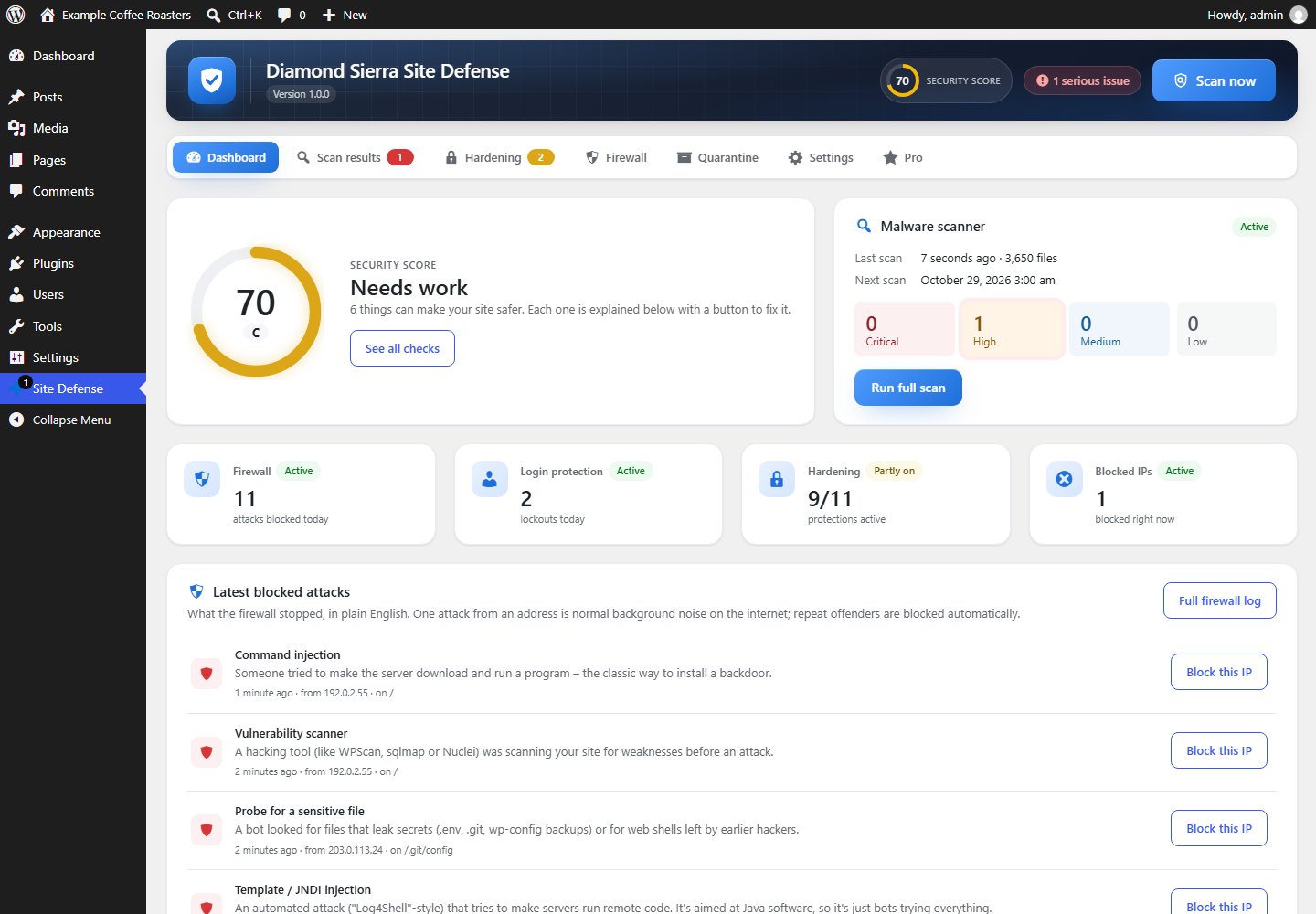
Dashboard: security score, open issues and one-click updates.
Diamond Sierra Site Defense checks your site once a day and tells you – in plain English – what is wrong and how to fix it. Everything below is free, with no account to sign up for, and no firewall rules held back for paying users.
In one plugin: 31 security checks with one-click fixes, 47 malware signatures and 14 firewall rule groups, plus file checks against WordPress.org. A three-step setup wizard switches on the right protection for your site the first time you activate it.
Daily malware scan
- Compares every WordPress core file against the official checksums from WordPress.org.
- Compares plugins and themes from the WordPress.org directory against their official copies, so tampered files (supply-chain attacks) are caught and verified files are skipped.
- Signature scan of themes, plugins, must-use plugins and uploads for web shells, obfuscated eval() backdoors, droppers, hidden-admin code and more.
- Detects ClickFix / fake CAPTCHA pages that trick visitors into running commands on their own computer, clipboard hijacking scripts, and EtherHiding loaders that pull code from BSC/Polygon smart contracts.
- Detects injected remote
import()calls in files and on the live homepage. - Fetches your homepage like a visitor coming from Google, and again as Googlebot, to catch injections and SEO spam that hide from logged-in users.
- Tracks new and changed PHP files between scans, and shows on the dashboard what changed since the previous scan.
- Checks accounts for what they can do, not what their role is called, and lists plugins that aren’t from WordPress.org, flagging the ones that show signs of malware.
- Catches malware that reinstalls itself: watchdog files, the settings and scheduled tasks it keeps in the database, and hostile .htaccess files.
- Reports copies of wp-config.php, database dumps, site backups, error logs, .env and .git left in the website folder, and whether anyone can download them.
- Risky plugin alerts with no setup and no API key: plugins removed from WordPress.org for a security issue, security updates waiting (found in the plugin’s changelog) and plugins abandoned for over two years.
- Optional: checks whether Google Safe Browsing is warning visitors away from the site (off until you turn it on).
- Runs in small steps, so it works on shared hosting without timeouts.
Fixes
- Delete file: removes a file that isn’t part of WordPress, a plugin or a theme, and keeps a copy for 30 days on the Quarantine tab in case something needed it.
- Repair: puts back the verified copy of a changed core, plugin or theme file from WordPress.org. View differences shows what was changed.
- View file shows the code with the matched lines marked, before you decide.
- Remove tasks and Delete settings for self-restoring malware, and Remove admin rights or Delete account for fake administrators.
- A verification scan runs automatically after a fix to confirm the malware is really gone.
Tasks & hidden code
- Every scheduled task WordPress will run, with the plugin or theme behind it. Tasks of known malware families are flagged.
- Every must-use plugin and drop-in, which run on every page without showing on the Plugins screen, with what the scan found in each.
Firewall
- Blocks SQL injection, XSS, path traversal, remote file inclusion, command injection and PHP object injection.
- Blocks executable and disguised PHP uploads and SVGs with embedded scripts.
- Blocks vulnerability scanners and probes for .env, .git, wp-config backups and known shell names.
- Inspects JSON sent to the REST API and cookies, not just forms.
- Repeat offenders are blocked automatically.
- Fake search engines: bots pretending to be Googlebot, Bingbot, Applebot, YandexBot or Baiduspider are checked against the real search engine’s network (the IP lists Google, Bing and Apple publish, then reverse and forward DNS) and blocked. Real crawlers and your SEO are not affected.
- Rate limiting: separate limits a minute for browsers and for bots, either slowing the visitor down (503 with Retry-After) or blocking them. Logged-in users, verified search engines, AJAX and the WooCommerce cart and checkout are never counted.
- Bad bots: site copiers, email harvesters and scraping frameworks, and form posts with no browser headers, are turned away. SEO tool crawlers (Ahrefs, Semrush and others) can be turned away too.
- Your own block list: IP addresses and ranges (IPv4 and IPv6), user agents, referring sites and visitor hostnames. A save can never block the admin making it.
- Comment spam bots are caught with an invisible decoy field and a time stamp, and go to the Spam folder. An IP caught three times in a day is blocked.
- REST API lock (optional): logged-out visitors can only use the routes front-end features need.
- 404 probing: an IP hunting for vulnerable plugins and old backups through dozens of missing pages is blocked. Missing images and styles don’t count, and real search engines are never counted.
- AI training crawlers (optional): GPTBot, ClaudeBot, CCBot, Bytespider and others are told in robots.txt and turned away if they ignore it, while AI assistants fetching a page for a user still get in. The Firewall tab shows which AI bots visit and how often.
- Log-only mode: see what would be blocked before anything is. New installs log for their first week, then start blocking on their own.
- Early firewall (one click): the firewall runs before WordPress and your other plugins load, so an attack on a vulnerable plugin is stopped before its code starts. Site Defense sets it up itself in .user.ini, .htaccess or wp-config.php, and works next to another firewall that already runs this way, such as Wordfence’s.
- A private unblock link for your password manager: if your own address gets blocked, opening it removes the block and trusts that address for an hour.
Login protection
- Passkeys: sign in with a fingerprint, face or device PIN on any current phone, laptop or security key. A passkey only works on your site, so it can’t be phished, and it counts as two-factor login. Each person adds theirs on their profile; passwords keep working.
- Two-factor login with any authenticator app (Google Authenticator, Microsoft Authenticator, 1Password, Authy…) or with codes sent by email, plus one-time backup codes. Email codes are only turned on after a test code has arrived, so a mailbox that never gets the mail can’t lock anyone out.
- CAPTCHA on the login, registration, lost-password and comment forms: a built-in math question (no account needed), Cloudflare Turnstile, Google reCAPTCHA v2 or hCaptcha – with step-by-step instructions for getting the keys. A CAPTCHA outage or a wrong key never locks you out.
- Refuses passwords found in known data breaches (Have I Been Pwned, k-anonymity – the password never leaves your site).
- Custom login URL – move the login page off wp-login.php so bots can’t find it.
- Login form honeypot that blocks automated login bots with nothing for real visitors to solve.
- Limits failed logins per IP and per account, with escalating lockouts. IPs an account has used before are never locked out, so nobody can lock you out of your own site.
- Trap usernames (like “admin”) get bots locked out on the first try, and can’t be registered as new accounts.
- Strong passwords for administrators, editors and shop managers, checked on the server wherever a password is set.
- Login allowlist (optional): powerful accounts can only log in from the IPs you list, while customers log in as before.
- Generic error messages that don’t reveal whether a username exists.
Email alerts
By default you get one security email a week, on Monday morning, and only when something is new. You can switch to a daily email or to emails straight after every scan.
- Scans found something serious (and, if you like, an all-clear when nothing is new).
- An administrator signed in from a new IP (skipped while Wordfence already emails every admin login).
- A new administrator account was created, or someone was promoted to administrator.
- Diamond Sierra Site Defense itself was deactivated – malware often switches security plugins off first.
- Plugin, theme and WordPress updates are waiting (only when a new one appears).
- How many IPs and accounts were locked out after failed logins (optional).
A new administrator and Site Defense being switched off are always emailed straight away.
Hardening
- Disable XML-RPC, the file editor, application passwords and username enumeration. The file editor switch works even when wp-config.php allows the editor, so there is no file to edit.
- Upload guard inside WordPress, on top of the firewall’s upload check: refuses names like photo.php.jpg and images with PHP code anywhere inside. It also covers REST API uploads and files plugins download, and keeps working when another plugin runs the firewall.
- Block PHP execution in uploads, sensitive files and directory listing.
- Security headers and hidden version numbers.
- A security score that explains every check, each with its own Apply button.
Also
- Works alongside Wordfence, All-In-One Security, Solid Security, Sucuri, MalCare, Defender, Shield, Loginizer and others: Site Defense pauses its own firewall and login limits so the same visitor isn’t blocked twice, and keeps scanning.
- Multisite: network-activate it to protect every site. The scanner and settings are for super admins only.
- Results in Tools Site Health, and WP-CLI commands to get back in after a lockout (
wp site-defense unblock,reset-login-url,2fa-reset).
Diamond Sierra Site Defense Pro
An optional add-on for people who clean hacked sites or look after many: bulk actions, one-click database cleanup, “Recover from a hack”, an emergency lockdown, country blocking, live traffic, an AI security advisor, protection against stolen login cookies, supply-chain watches, WooCommerce card-testing and checkout protection, CVE matching, an alert centre with Slack/Discord, an activity log and white-labelling. Everything listed above stays free. Details at diamondsierra.com, and how to use every feature in the documentation.
External services
Diamond Sierra Site Defense connects to these services. Apart from the WordPress.org checks, each one is off until you turn it on.
- WordPress.org (api.wordpress.org, downloads.wordpress.org, core.svn.wordpress.org, plugins.svn.wordpress.org, themes.svn.wordpress.org) – to download official checksums, theme packages and clean copies of files when you restore or repair them, and to read the public directory entry of each installed plugin (whether it was closed, when it was last updated, and the changelog of a waiting update). Only the names and versions of WordPress, your plugins and your themes are sent – the same information WordPress itself sends when it checks for updates. Terms
- Have I Been Pwned – Pwned Passwords (api.pwnedpasswords.com) – only if you turn on “Block breached passwords”. When a password is set, and once a day at login, the first 5 characters of the password’s SHA-1 hash are sent; the password itself and the rest of the hash never leave your site. Terms and privacy
- Cloudflare Turnstile (challenges.cloudflare.com) – only if you choose Turnstile as the CAPTCHA. Its script is loaded on the protected forms, and on submit the visitor’s token and IP address are sent to Cloudflare to check them. Terms · Privacy
- Google reCAPTCHA (www.google.com/recaptcha) – only if you choose reCAPTCHA as the CAPTCHA. Its script is loaded on the protected forms, and on submit the visitor’s token and IP address are sent to Google to check them. Terms · Privacy
- hCaptcha (js.hcaptcha.com, api.hcaptcha.com) – only if you choose hCaptcha as the CAPTCHA. Its script is loaded on the protected forms, and on submit the visitor’s token and IP address are sent to hCaptcha to check them. Terms · Privacy
- Google, Bing and Apple crawler lists (developers.google.com, www.bing.com, search.developer.apple.com) – only while “Block fake search engines” is on (the default). Once a day the plugin downloads the public lists of addresses these search engines crawl from, to tell real crawlers from impostors. Nothing is sent. Google · Microsoft · Apple
- Google Safe Browsing – only if you turn on the blocklist check under Settings Malware scanner. Once per scan, your site’s address is sent to Google to find out whether it is blocklisted. With an API key the request goes to safebrowsing.googleapis.com; without a key, and only if you also tick “Check without a key”, it goes to transparencyreport.google.com. Nothing else is sent. Terms · Privacy
Privacy
- Everything Site Defense records stays in your own database. Nothing is sent to us. The only outside connections are the ones listed under External services.
- The firewall and login logs store the visitor’s IP address, the address they requested and their browser’s user agent, so you can see who was blocked and why. Log lines are deleted after 30 days, and the log never grows past 20,000 lines.
- Blocked IPs are kept until their block ends.
- For each user it keeps the last 10 IP addresses they logged in from (so nobody is locked out of their own account and new-IP alerts work), and, if they turn on two-factor login, the authenticator secret and hashed backup codes.
- The plugin sets no cookies for visitors. While the early firewall is on, logged-in administrators and editors get one signed cookie, so the early firewall can recognise them before WordPress loads. It holds only their user ID, when it expires and a signature, and is removed when they log out.
- Only administrators (super admins on multisite) can see the logs and settings.
- Deleting the plugin removes its tables, settings, user data and quarantined files.