

DevLab Maintenance Mode
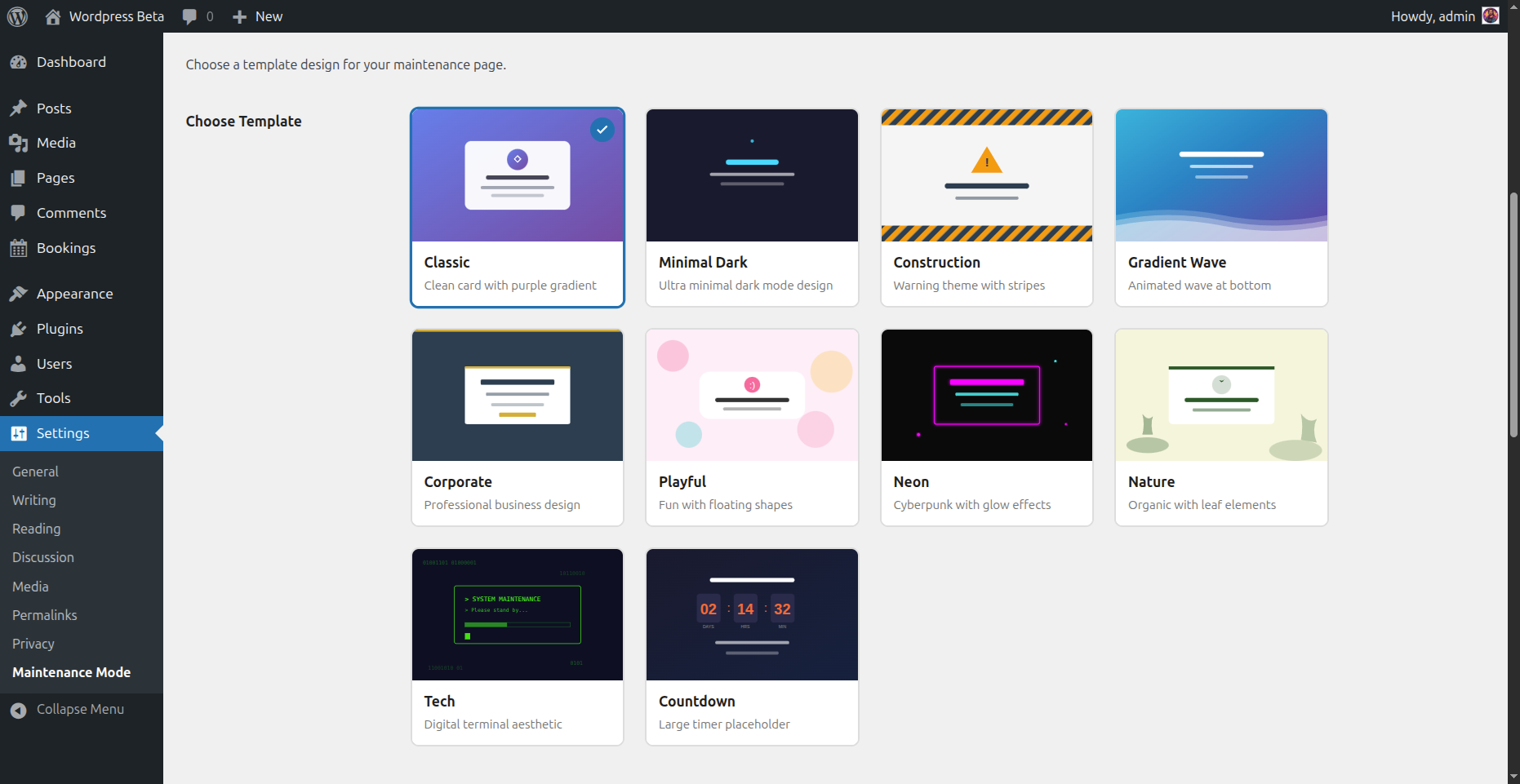
<strong>Template Selector</strong> - Visual grid showing all 10 template previews with thumbnails
DevLab Maintenance Mode lets you display a beautiful “Under Maintenance” or “Coming Soon” page to your visitors while you work on your site behind the scenes. No coding required.
Whether you’re launching a new site, performing updates, or making major changes, this plugin ensures your visitors see a professional holding page instead of broken layouts or error messages.
Why Choose DevLab Maintenance Mode?
Zero Lock-Out Risk – Maintenance mode is OFF by default. You control when it activates. Logged-in administrators always have access.
10 Stunning Templates – Not just one boring page. Choose from 10 professionally designed templates that match any brand or style.
Multiple Bypass Options – Grant access via user roles, IP addresses, or shareable secret links. Perfect for clients, team members, or testers.
SEO Done Right – Returns proper 503 status codes with Retry-After headers. Search engines understand your site is temporarily unavailable, not gone forever.
Features
- One-Click Activation – Enable or disable maintenance mode instantly
- 10 Beautiful Templates – From minimal to animated, corporate to playful
- Live Countdown Timer – Show visitors when you’ll be back (Countdown template)
- Custom Messages – Write your own text with full HTML support
- Role-Based Bypass – Let editors, authors, or any role access the site
- IP Whitelist – Always allow specific IP addresses through
- Secret Access Links – Share
yoursite.com?mmbd_bypass=secretfor temporary access - Cookie-Based Sessions – Bypass visitors stay logged in for your configured duration
- Theme Override Support – Copy templates to your theme for complete customization
- Multisite Ready – Works perfectly on WordPress multisite networks
- Clean Uninstall – Removes all data when deleted, leaves no trace
Template Collection
Your maintenance page should look as good as your site. Choose from:
- Classic – Clean centered card with elegant purple gradient background
- Minimal Dark – Ultra-modern dark theme with subtle cyan accents
- Construction – Bold warning style with animated diagonal stripes
- Gradient Wave – Smooth animated wave effect for a dynamic feel
- Corporate – Professional business design with refined gold accents
- Playful – Fun and friendly with floating colorful shapes
- Neon – Cyberpunk-inspired with vibrant glow effects
- Nature – Calm organic design with gentle leaf elements
- Tech – Matrix-style digital aesthetic for tech brands
- Countdown – Includes live countdown timer to your launch date
Developer Friendly
- Override any template by copying it to
your-theme/devlab-maintenance-mode/ - Minimal footprint – single database query, lightweight hooks
- Clean, documented code following WordPress coding standards
- Filters and actions for extending functionality
Perfect For
- Site launches and “Coming Soon” pages
- Scheduled maintenance windows
- Major redesigns and migrations
- WooCommerce store updates
- Development and staging sites
- Client preview access during development
Privacy
Google Analytics is disabled unless you enter a Measurement ID. When configured, the maintenance page loads JavaScript from Google Tag Manager and sends visitor data to Google Analytics. Enable it only after meeting the consent requirements applicable to your site. Google terms: https://marketingplatform.google.com/about/analytics/terms/us/ and privacy policy: https://policies.google.com/privacy
Bypass links set an HttpOnly access cookie for the configured duration. Changing or clearing the secret phrase revokes existing bypass cookies. IP allowlisting uses the direct server-reported client address; configure trusted proxy IP restoration at the web-server level if necessary.