
Demo Reset – Robust Demo Website Automation
Concept Diagram
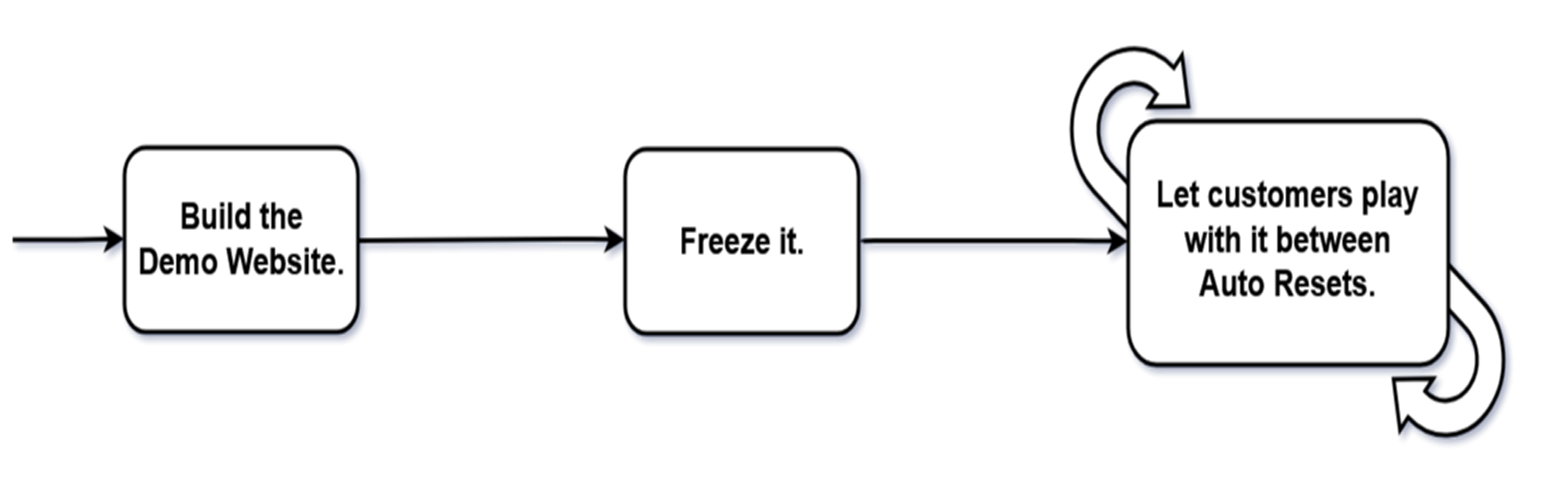
Build it Freeze it Let them play with it Let it to Auto Reset via Server Cron.
A lightweight plugin built to deliver robust, set-and-forget Demo Automation.
Philosophy
Your WordPress product can be a Theme, Plugin, or Specially Developed Website. Why limit your customers to frontend-only demos? With Demo Reset Free plugin, they can experience it as an Editor, Author, Subscriber, or any user—without risking permanent changes or security. This is the ultimate set-and-forget automation solution for Demo Websites.
Stay ahead of your competitors by earning your customers’ trust and confidence with fully accessible Demo Websites on your own servers.
At Ministry of Plugins we believe, it is our duty to develop WordPress technologies to double your sales.
EXPLORE THE LIVE DEMO: Demo Website link…
Concept
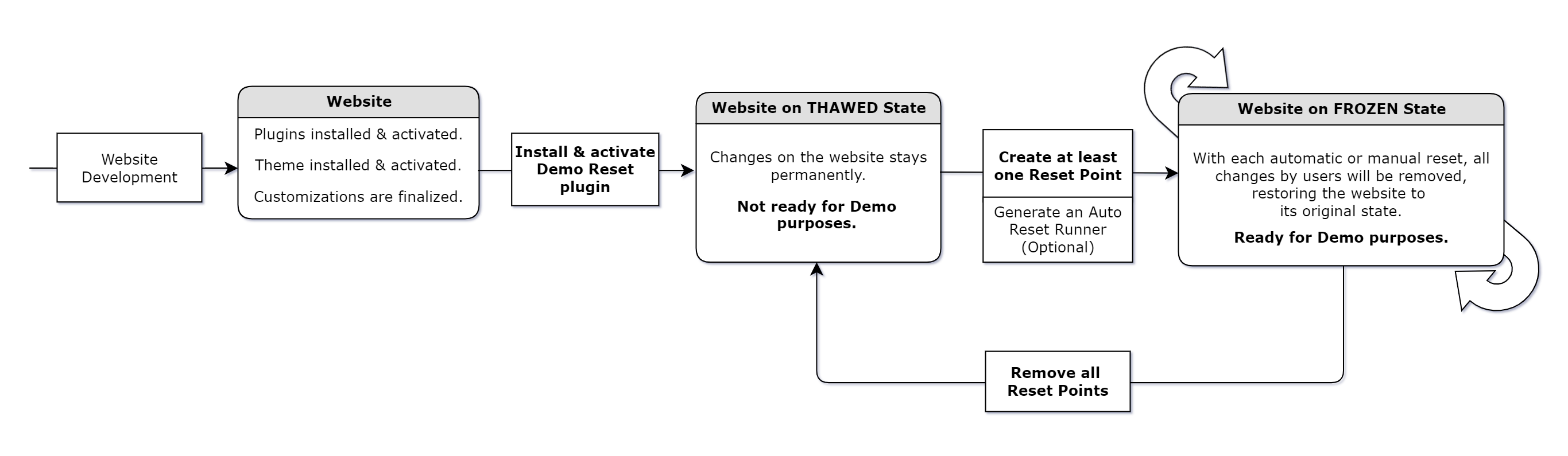
Simply install the Demo Reset free plugin or Demo Reset Pro plugin on your WordPress website and create a Reset Point to put the site in the Frozen State (Demo Mode). This allows you to let your customers to interact with the website without any risk of permanent changes. With each automatic or manual reset, all customer changes will be removed, restoring the website to its original state. In short; Now your website is ready for Demo purposes.
See the Concept Diagram: Image link…

Use Cases of Demo Reset plugin
Demo for sales purposes:
Having a Demo Website as part of your sales funnel can significantly boost customer conversions for website developers, theme developers, and plugin developers. It allows potential customers to experience the product firsthand and increasing their confidence of making a purchase. With each manual or automatic reset cycle, the Demo Reset plugin will keep the WordPress website in its original state by removing all temporary changes made by customers.
Demo for presentation purposes:
For website developers, converting a newly developed WordPress website into a Demo Site is an excellent strategy for presenting its features and functions to stakeholders. After the presentation, the developer can easily reset the website to its original state, erasing any temporary changes. This ensures that the website remains clean and professional. The Demo Reset plugin can be turned off once the presentation is complete.
Demo for training purposes:
Training the staff and stakeholders on a newly developed WordPress website is more effective when using the website in Demo state. This approach allows trainees to interact with the website and explore its features without the risk of making permanent changes. After the training session, the developer can reset the website to its original state, removing any temporary modifications. This method ensures the site remains pristine and always ready for future use. The Demo Reset plugin can be turned off as needed.
See the Use Cases Diagram: Image link…

Demo Reset Free Plugin
Demo Reset Free Plugin – Quick Introduction
Features of Free Plugin:
- Able to create multiple Reset Points.
- Manual Demo Reset execution capability.
- Demo Reset Cycle automation via a regular URL.
- Demo Reset Cycle automation via a RESTful URL.
- The entire Database will reset to the chosen Reset Point.
- All logged-in users will be logged out during the Reset process.
- Displays the Demo Reset Status (THAWED state or FROZEN state) on the WP Admin Bar.
- Media files uploading and deleting is restricted in the FROZEN state. (Images, PDFs etc.)
- Plugins, Themes are WP Core auto updates are restricted, but can update manually in the THAWED state.
- Capable of deploying Demo Websites only for Non-admin users. Because all admins can deactivate the Demo Reset plugin or delete Reset Points.
- Displays the Demo Users’ login details, Live Demo status, and Reset Timer on the Info Bar.
THAWED state of Free Plugin:
- Changes made by admins or other users will remain on the website.
- Permalink Settings page is accessible.
- All the auto-updates are suspended.
- Admins can install WP Core, Plugin & Theme updates.
- Admins can install or delete Plugins & Themes.
- Admins and users can upload new images or files.
- Admins and users can delete/trash existing uploaded images or files.
- Only admins can access the Demo Reset Admin Menu.
- Only admins can change Demo Reset settings.
- Admins must add at least one Reset Point to activate the FROZEN state (Demo Mode).
FROZEN state of Free Plugin:
- Changes made by admins or other users will be reset in every Reset Cycle.
- Permalink Settings page is restricted.
- All the auto-updates are suspended.
- Installation of WP Core, Plugin & Theme updates is suspended.
- Installation, activation, deactivation or deletion of Plugins & Themes are suspended.
- New images or files uploading is suspended.
- Deletion of already existing uploaded images or files is suspended.
- Logged-in users will automatically be logged out during the reset process.
- Only admins can access the Demo Reset Admin Menu.
- Only admins can change Demo Reset settings.
- Admins can add multiple Reset Points.
- Admins should delete all Reset Points to get back to the THAWED state.
Setting a WordPress website to FROZEN state (Valid for Free & Pro)
Setting an Active Reset Point for Auto Reset (Valid for Free & Pro)
Setting Reset Runner URL to run Auto Reset (Valid for Free & Pro)
Setting Reset Runner REST URL to run Auto Reset (Valid for Free & Pro)
Setting a WordPress website back to THAWED state (Valid for Free & Pro)
Demo Reset Documentation: https://ministryofplugins.com/demo-reset-docs
Demo Reset Pro Plugin
Demo Reset Pro – Quick Introduction
Features of Pro Plugin:
- Able to create multiple Reset Points.
- Manual Demo Reset execution capability.
- Demo Reset Cycle automation via a regular URL.
- Demo Reset Cycle automation via a RESTful URL.
- Demo Reset Cycle automation via server Cron Jobs directly.
- The entire Database and Media Library can be reset to the selected Reset Point.
- Offers options to avoid forceful log out on logged-in users during the Reset process.
- Displays the Demo Reset Status (THAWED state or FROZEN state) on the WP Admin Bar.
- THAWED State Website Isolation capability to prevent unnecessary changes to the website.
- Capable of allowing users to upload new media files and trash already uploaded files in the FROZEN state. (Images, PDFs etc.)
- There will be no accumulation of abandoned files in the uploads directory because the Media Library will reset with every reset run.
- Plugins, Themes are WP Core auto updates are restricted, but can update manually in the THAWED state.
- Able to deploy Demo Websites for both Admin and Non-admin users. Only Admin who activate the Demo Reset plugin can access its setup features.
- Displays the Demo Reset Countdown Timer showing the time remaining for the next Reset.
- Shows the customizable Promo Bar at the top of the Demo Website on both admin and public sides.
- Options to display the Promo Bar on the admin side, public side, both, or hide it entirely.
- Features your Logo and Brand Name on the Promo Bar, linking your Business Website to the Demo site.
- Highlights your Special Offers or Promotions on the Promo Bar, linking your Landing Page to the Demo site.
- Capable of providing your Phone Number and Email Address for Demo users as Promo Bar Tools.
- Includes your Help Articles for Demo users as a Promo Bar tool.
- Able to add Extra Links for Demo users as a Promo Bar tool.
- Capable of sending an email notification at the end of each Reset Cycle.
Demo Reset Documentation: https://ministryofplugins.com/demo-reset-docs