


DadsFam SMTP
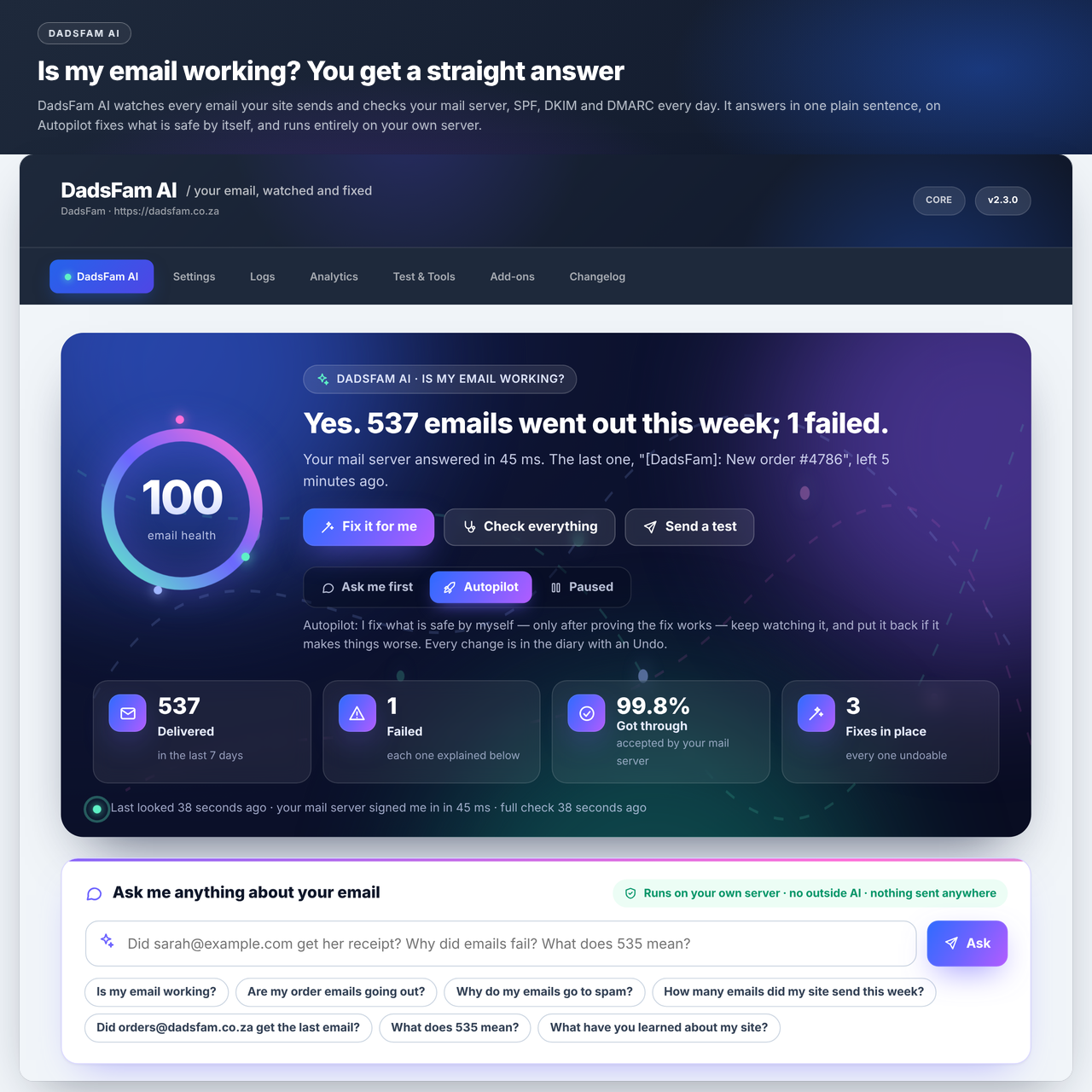
DadsFam AI answers "is my email working?" first, with your email health score, what went out and what failed, and how much it may do by itself.
WordPress sends email with PHP’s mail() function, which most hosts either block or deliver straight to spam. DadsFam SMTP replaces it with a real authenticated SMTP connection, so your password resets, contact forms and WooCommerce order emails actually arrive.
Everything described below works on every site. Nothing is disabled, blurred out, time-limited or reduced.
DadsFam AI: your email, watched and fixed
New in 2.2. Open DadsFam SMTP DadsFam AI and the first thing you see is the answer to the only question that matters: is my email working? If it is not, it says why, in plain words, and what to do about it.
- Every failure explained. It reads what your mail server actually said and tells you what it means: the password was turned down, Gmail wants an app password, Microsoft 365 has SMTP sign-in switched off, the address does not exist, your server’s IP is on a blocklist. With the steps to fix it, and whether sending again can work (later, after a fix, or never).
- It checks everything, every day. A real sign-in to your mail server (nothing is sent), its certificate, whether another plugin has taken over WordPress’s email, whether staging mode was left on, your SPF, DKIM and DMARC records, the log table and the scheduled tasks.
- It learns your site. What your site sends (order receipts, password resets, each contact form), how often and when. It warns you when a kind of email goes quiet for longer than your site’s own rhythm allows, when a form starts sending floods of spam, or when more email fails than is normal for you.
- It fixes what is safe, and proves it first. It only switches to a connection that has just signed in with your own password, uses the DKIM selector your domain really publishes and sends from the address your mail server accepts. In “Ask me first” mode you tap Apply; on Autopilot it does this by itself, keeps watching, and puts a change back if it makes things worse. Every change goes in a diary with an Undo.
- Ask it anything. “Did [email protected] get her receipt?”, “Did order 1234 go out?”, “Why did emails fail this week?”, “What does 535 mean?”, “Stop emailing [email protected]”. Answered from your own email log, with the buttons to act on it. A question never changes anything by itself, and it learns your way of asking from the suggestions you pick.
- It keeps you posted without nagging. A dashboard widget, an optional weekly letter on Monday mornings, and one notice on the Dashboard and Plugins screens only when your email is actually failing.
New in 2.3: it learns, remembers and looks after itself
- A first look the moment you open it. The full check runs straight away, so the health score you see is measured, not assumed.
- It knows what your older emails were. Emails logged before 2.2 did not record who sent them. It works them out from WordPress’s and WooCommerce’s own wording, from the emails your site sends now, and from the words in your installed plugins’ own code, so “Other emails” turns into password resets, order receipts and each plugin by name. Only what it is sure of, and all of it can be undone in one tap.
- It remembers what happened. When email fails, it remembers for how long, what it cost and what made it work again. The next time, it tells you: “this happened on 3 October; changing the password fixed it then”, or “last time it cleared by itself in 40 minutes”.
- The emails that failed can still go out. Once email works again, the ones that failed meanwhile are offered with one tap, once each. On Autopilot it can do this by itself when you switch it on. Never password resets, never to addresses that do not exist, never twice.
- It holds a flood. When one form or plugin suddenly sends far more than your site ever has, it can hold just that kind of email, keep every one in the log, and let everything else through, so your provider does not suspend you. You look, then send them all or delete them. Order emails, password resets and emails with attachments are never held, and it ends by itself once that kind of email is back to its usual pace. Off until you switch it on.
- Bounces after sending. Your mail server accepting an email is not always the end: the other side can send it back later. Switch this on and it reads the bounce messages in your mailbox (read-only), marks those emails Bounced, says why, and offers to stop emailing addresses that do not exist.
- It watches your DNS. When your SPF, DKIM, DMARC or MX records change, the diary says what changed, and a check that starts failing tells you what the record used to be.
- Better advice on DMARC. A policy of p=none only watches; it now says so, with the record to move to once SPF and DKIM both pass.
DadsFam AI runs entirely inside your WordPress, on your own server. It does not use OpenAI, ChatGPT, Claude or any other outside service, there is no API key, and nothing about your email leaves your site. Switch it off completely with define( 'DFSMTP_BRAIN_OFF', true ); in wp-config.php.
Set up in about two minutes
Pick your provider from the list and the host, port and encryption fill themselves in. Enter your username and password, save, then send a test email. The test shows you the full SMTP conversation, so if something is wrong you can see exactly which step failed.
Supported providers
Gmail, Outlook and Office 365, SendGrid, Mailgun, Amazon SES, Brevo, Postmark, SparkPost, SMTP Senpai, Zoho Mail, Yahoo Mail, Hostinger, cPanel, and any custom SMTP server.
Features
- 14 pre-configured providers with automatic host, port and encryption defaults
- Per-provider setup notes built into the interface, including the common gotchas
- AES-256-GCM encrypted credentials — passwords are never stored as plain text
- Full sender control — From Name, From Email, Reply-To and Return-Path
- Unlimited email logging with status, subject, recipient, connection and timestamp
- Retention control — keep logs for as many days as you choose, or forever
- One-click resend of any logged email
- Full email body viewer in a sandboxed preview frame
- CSV export of your entire delivery history
- Send test email with live SMTP diagnostic output
- Connection test that speaks SMTP to your server the way a real send does, checks its certificate, and sends nothing
- Deliverability checker for SPF, DKIM, DMARC and MX records
- Email health score combining DNS authentication, configuration and real send history
- Delivery failure alerts by email
- Blocking mode stops all outgoing mail on staging sites while still logging attempts
- Suppression list for addresses and domains that must never be contacted
- Analytics with a seven-day delivery chart and per-connection success rates
- WooCommerce diagnostics — confirm store emails route correctly and test each type
- DadsFam AI — plain-English failures, daily checks, safe self-fixes with Undo, and answers about your email (see above)
- Flood guard — holds a sudden flood from one form or plugin while everything else keeps going (off until you switch it on)
- Bounce reading — optional, read-only: marks emails the other side sent back, with the reason
- Message-ID recorded for every email sent
- Dashboard widget with the answer to “is my email working?”, the numbers, and a question box
- Backup and migrate your configuration as JSON
- Documented hook API for developers
WooCommerce
DadsFam SMTP hooks in at a late priority, so it wins over WooCommerce’s own From address settings and your store emails always send from the address you configured. The diagnostics screen flags any mismatch between the two and lets you test-send each WooCommerce email type.
Declared compatible with High-Performance Order Storage and Cart & Checkout Blocks.
Extending the plugin
The plugin exposes documented actions and filters — dfsmtp_configure_mailer, dfsmtp_after_configure_mailer, dfsmtp_mail_failed, dfsmtp_mail_logged, dfsmtp_save_settings, dfsmtp_settings_page_end, dfsmtp_nav_pages and others — so you can layer your own behaviour onto the send pipeline. The full list is documented in the header of dadsfam-email-smtp.php.
An optional commercial add-on, DadsFam SMTP PRO, is built on this same hook API for stores and agencies sending at higher volume. It is a separate plugin and is not required — this plugin is complete on its own.
A word about PRO
Right, let me be straight with you, because I hate being sold to as much as you do.
Everything above is free and it stays free. Sending your mail through a proper SMTP server is not a premium feature. Saving your provider details, encrypting your password, logging what went out and resending one that failed are not premium features. Those are things a plugin like this should just do, and if I put them behind a paywall I would be taking the mickey.
There is a PRO add-on. It exists because I am a dad in Cape Town, and this is one of the things that puts food on the table at my house. That is the honest reason. Not “unlock your potential”, not “supercharge your workflow”. Just: if this plugin got your email sending again and you can spare it, PRO helps me keep building.
There is one PRO version and one price: R500 once off, roughly $35, per plugin. It is not a subscription, there is no yearly renewal, and it does not expire. Pay once and it stays yours, updates included. If the free version does everything you need, use that and think nothing of it — it is not crippled to push you across, and it never will be.
What PRO adds is the stuff you only want once you are sending real volume — sending from more than one mailbox and routing each message to the right one, failing over to a backup server when your main one has a bad day, retrying failed sends on their own, open and click tracking, failure alerts into Slack or Discord, and a weekly delivery digest. That is convenience and automation. It is not the plugin working properly, because the plugin already works properly.
So if the free one does everything you need, brilliant. Genuinely. Use it, and I hope it saves you a frustrating afternoon chasing email that will not send. If you get to the point where the automation would save you real time, PRO is at plugins.dadsfam.co.za.
Either way, thanks for using something I built. — Zak, DadsFam
PRO adds:
- Multiple saved SMTP connections
- Smart routing by subject, sender or recipient domain
- Automatic failover to a backup server
- Auto-retry of failed emails
- Open and click tracking
- Slack, Discord and webhook failure alerts
- Weekly delivery digest and hourly send limits
External services
This plugin does not connect to any service of its own. It has no home-phoning, no analytics and no licence checks.
It does, however, exist to hand your website’s email to an SMTP server that you choose and configure. That server is a third party service, and what it receives is entirely determined by your own settings.
What is sent: the emails your WordPress site produces — sender, recipients, subject, message body and any attachments — together with the username and password you entered, so the server will accept them.
When it is sent: only when WordPress sends an email, and only once you have entered SMTP details and saved them. With no details entered, the plugin sends nothing anywhere.
Where it is sent: to the host you type into the settings, and nowhere else.
DadsFam AI (2.2.0) adds no outside service. It checks the mail server you configured by connecting and signing in to it the way your site does, and stops before anything is sent. It reads your domain’s public SPF, DKIM, DMARC and MX records through your server’s own DNS resolver. Nothing about your email, your log or your questions is sent anywhere.
Bounces after sending (2.3.0, off unless you switch it on) connects to the mailbox server you enter, over IMAP, with the username and password you give it, once an hour. It opens the mailbox read-only and downloads only the messages that look like bounce reports, to read them on your server. Nothing is sent to that server except the sign-in and the read-only commands, and nothing else is contacted. That server is the one your email is already hosted on, so its own terms apply.
The plugin includes ready-made host and port presets for a number of well-known providers purely so you do not have to look them up. A preset is only a shortcut for filling in the form; selecting one does not contact anybody, and no provider is contacted unless you have entered credentials for it and WordPress sends an email.
Because you choose the provider, you are agreeing to that provider’s terms. The presets included cover, among others:
- Google Gmail / Workspace — terms, privacy
- Microsoft Outlook / Microsoft 365 — terms, privacy
- Amazon SES — terms, privacy
- SendGrid (Twilio) — terms, privacy
- Mailgun — terms, privacy
- Postmark — terms, privacy
- Brevo — terms, privacy
- SMTP Senpai (MailSenpai) — terms, privacy
- Zoho Mail — terms, privacy
If you use your own mail server, or a provider not listed above, then that server is the only third party involved and its own terms apply.
Support
Email: [email protected]
Website: https://www.dadsfam.co.za