

Custom User Registration Fields for Tutor LMS
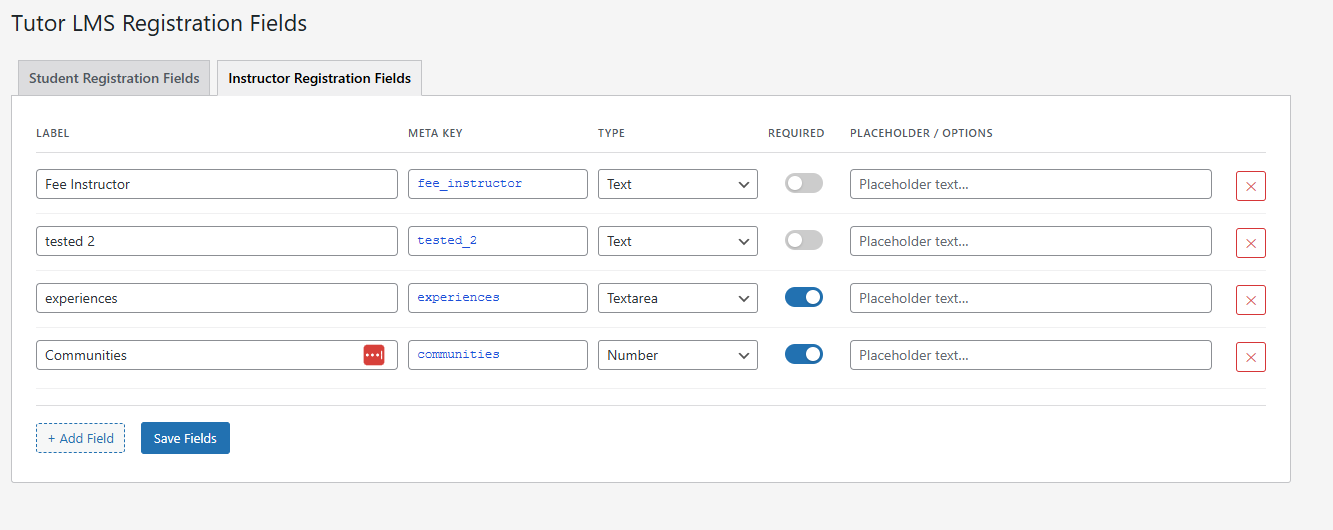
Settings page — Student Registration Fields tab. Add labels, meta keys, field types, required toggle, and placeholders.
Custom User Registration Fields for Tutor LMS lets you add any extra fields to your Tutor LMS student and instructor registration forms — without writing a single line of code.
Need to collect a phone number at registration? A company name, teaching qualification, or country? Configure it in two minutes from the WordPress admin panel and the field appears on your registration form automatically.
Unlike generic custom field plugins, this plugin is built specifically for Tutor LMS. Every field you add is displayed in all the places your team actually works:
- ✅ Student registration form — fields appear automatically.
- ✅ Instructor registration form — separate field sets for instructors.
- ✅ Tutor LMS frontend dashboard — students and instructors can view and update their own data from the Tutor profile settings page.
- ✅ Tutor LMS admin backend — LMS Managers can read and edit all custom field data from Tutor’s built-in user management interface.
- ✅ WordPress admin profile pages — data also visible in the standard WP admin for admins who work there.
Field types supported
- Text
- Phone (tel)
- Number
- URL / Website
- Date
- Textarea (multi-line)
- Select / Dropdown (with your own options)
Key features
No-code field builder — add, edit, and reorder fields from a clean settings page. No PHP, no shortcodes, no template editing required.
Required or optional — toggle each field as required or optional directly in the settings UI. Required fields enforce completion at registration.
Separate student and instructor field sets — configure entirely different fields for the student registration form and the instructor registration form.
Placeholder text — set placeholder text per field to guide users on what to enter.
Dropdown options — for Select fields, define your options list (one per line) directly in the settings panel.
Automatic data display — data saved at registration is immediately visible on the Tutor frontend dashboard profile, the Tutor admin backend, and the WP admin user profile. Updating data from any of these locations works correctly.
v1.x upgrade safe — existing field configurations from plugin version 1.x are automatically migrated to the v2.0 data format on first activation. No data loss.
Who is this plugin for?
- Tutor LMS site owners who need to capture extra information at registration (phone, company, qualifications, country, etc.)
- Online course platforms that need instructor vetting fields (teaching experience, certifications, areas of expertise)
- LMS admins who need to view and manage that data without leaving the Tutor interface
How it works
- Install and activate the plugin (Tutor LMS must also be active).
- Go to Users Tutor LMS Fields in your WordPress admin.
- Add fields under the Student Registration Fields or Instructor Registration Fields tab.
- Give each field a label, a meta key, a type, and optionally a placeholder or select options.
- Save — fields appear on the registration forms immediately.
Developer notes
All field values are stored as standard WordPress user meta, accessible via get_user_meta( $user_id, 'your_meta_key', true ).
The plugin hooks into the correct Tutor LMS action hooks:
tutor_student_reg_form_end— student registration form displaytutor_instructor_reg_form_end— instructor registration form displaytutor_profile_edit_input_after— Tutor frontend dashboard profile edittutor_profile_update_after— Tutor frontend profile save (AJAX)tutor_backend_profile_fields_after— Tutor admin backend metaboxshow_user_profile/edit_user_profile— WP admin profile pagesuser_register— registration savepersonal_options_update/edit_user_profile_update— WP admin profile save