
C
Currently Reading
5/5 (1 ratings) 60 active installs Updated May 14, 2024
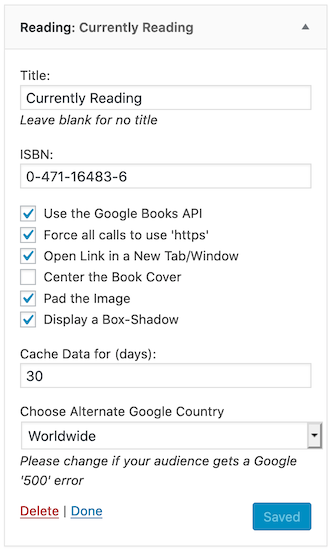
The Configuration of a "Currently Reading" section, with Padding enabled.
Supplying an ISBN (and, optionally, a Title) will display a cover image of the relevant book with a link to that book’s page on Google Books using the Google Books API.
Using the Widget you can choose whether to:
- Force all calls to Google to be HTTPS, instead of the API returned HTTP
- Pad the Image (selected by default, uses internal CSS)
- Display a Box-Shadow (selected by default, uses internal CSS)
- Choose Alternate Google Country (defaults to “Worldwide”)
as well as
- Decide whether you would like to use a Title
- Define the ISBN-10 or ISBN-13 of the book.
Usage
- Activate the Plugin via “Plugins” “Currently Reading” “Activate” (if you hadn’t already done so).
- Go to “Appearance” “Widgets” and drag the “Reading” widget into whichever Sidebar you choose.
- In the “Currently Reading” widget, you can then customise it further.