


CRAI LinkSense – Internal Link Builder
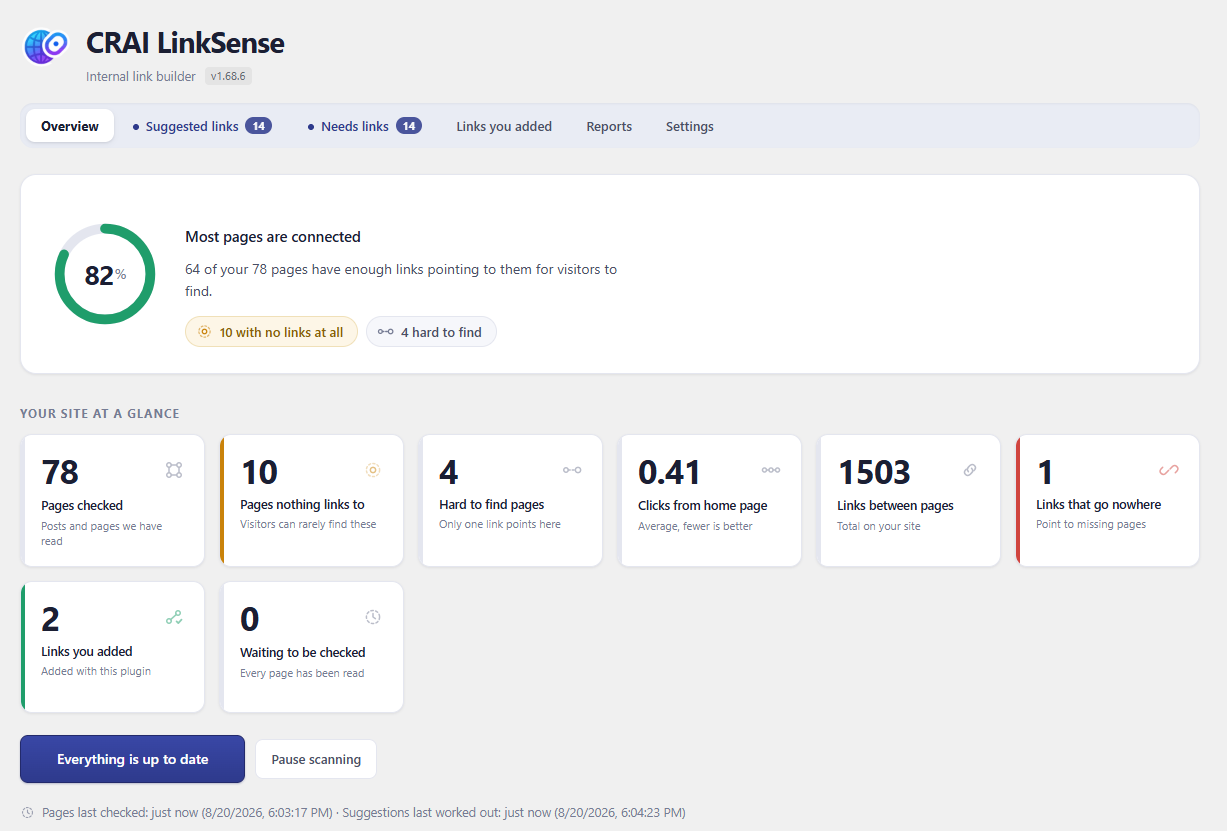
The overview: how well connected your pages are, with the trouble spots one click away.
Your best pages are invisible if nothing links to them. CRAI LinkSense reads your whole site, finds every place one page mentions something another page covers, and turns those mentions into internal links — using wording you already wrote, one approval at a time.
Nothing changes until you press “Add link.” That is the rule the whole plugin is built on. It never edits a post behind your back, never rewrites a sentence, never adds a link you have not seen first. Every suggestion shows you the exact sentence, the exact words that become clickable, and where the link goes — before anything happens.
Your links are yours
On a standard WordPress site, links are written directly into your content. Deactivate this plugin, delete it, switch to something else — every link you approved stays exactly where you put it. They are ordinary links in your own posts, not a rented feature.
On page-builder sites (Elementor, Divi, Bricks, Beaver Builder and friends), writing into the builder’s data risks your layout — so there the plugin adds links safely as each page loads instead, and tells you plainly that it is doing so. The settings screen states which mode your site uses and why. No surprises in either direction.
What it finds
- Places to link — every sentence on your site that names a topic another of your pages covers, scored by how strongly the two pages belong together.
- Orphan pages — pages nothing links to. Visitors and search engines find pages by following links; a page with none is nearly invisible. The “Needs links” tab lists them, and one press hunts for pages that could link to each.
- Broken links — internal and outbound links that no longer resolve, with one-click repair or removal.
- Anchor text patterns — the same clickable words used over and over reads as manipulation to search engines. The link text report shows your distribution.
What it refuses to do
The quality bar is not negotiable. Suggested wording must read as a real phrase — no half-sentences, no “click here”, no wording that describes the wrong page. The plugin rejects its own suggestions rather than show you a bad one, and it tells you the honest reason when a page yields nothing.
Private by design
Your content is analysed on your own server. Nothing is sent to a third party, there is no account to create, no API key to buy, and no page limit. The only outbound requests the free plugin ever makes are the ones you would expect from a link checker: confirming that the links in your own posts still work.
What CRAI LinkSense Pro adds
The free plugin finds links where your existing wording already fits. Pro writes the wording — an AI drafts the sentence or rewrites yours so the right link fits naturally, with every figure and name preserved, checked against the destination page before you ever see it. Pro also maps your site structure into topic groups and suggests the links that bind each group together. The free plugin is complete on its own; Pro is for sites that publish often enough to want the writing done too.
How links are stored
There are two storage modes. The default never touches your content; the other
is opt-in and exists because some site owners want links that survive the
plugin being removed.
Safe mode (the default)
Links are added as the page is rendered, using a WordPress filter. Your posts in
the database are not modified at all. Removing a link, or the whole plugin, puts
everything back exactly as it was, because nothing was ever changed.
Permanent mode (off unless you turn it on)
Links are written into the post content itself, so they remain after the plugin
is deactivated or deleted. This is a real modification of your content, so:
- The original content of every affected post is copied to a backup first, before anything is written.
- “Revert” restores that backup, on one post or across the whole site.
- Only the content column is written, and only for posts with approved links. Nothing else about the post is altered, and no revision is created.
- Page-builder pages always use safe mode, whatever this setting says, because their content is not stored in the post body.
- If you delete the plugin while permanent mode is on, the links stay by design and the backups are kept, so the change is still reversible. Turn the mode off and revert first if you would rather they went.
The setting is in Settings, described there in the same terms, and it defaults to
safe mode on a new install.
External services
This plugin does not use any third party service, API or remote server. Nothing
is sent to the plugin author or to anyone else, no account is required, and no
data about you, your site or your visitors is collected or transmitted.
The plugin does make outbound web requests in one situation, described in full
below so there is no ambiguity.
Checking whether your links still work
To tell you which links on your site are broken, the plugin has to try them. It
requests the web addresses that your own content links to. Where you have linked
to another website, that request goes to that website, exactly as it would if a
visitor clicked the link.
- What is requested: only the web addresses already present in your own posts and pages. The plugin does not choose or add addresses of its own.
- What is sent: a standard web request, identifying itself as “CRAILinkSense” together with your site address, in the same way a search engine crawler or any link checker identifies itself. No personal data, page content, or information about your visitors is included.
- What is kept: only the response status, such as “working” or “not found”, stored in your own database. Nothing is stored anywhere else.
- When: in the background on a schedule, and each link is re-checked at most once every seven days.
- Turning it off: broken link checking runs as part of the background scan, which you can pause at any time from the Overview screen.
Because the addresses requested are the ones you linked to yourself, there is no
single provider to name here, and therefore no terms of use or privacy policy
for this plugin to link to. Any website you link to has its own terms, exactly as
it does for any visitor who follows that link.
All other work, including reading your pages, matching them and suggesting links,
happens entirely on your own server.