


CraftyWebbies Pillar & Cluster Manager
0/5 (0 ratings) — active installs Updated Jul 10, 2026
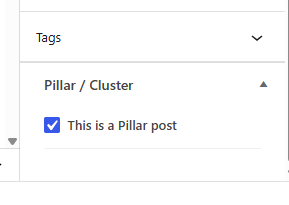
The Pillar / Cluster meta box in the post sidebar.
CraftyWebbies Pillar & Cluster Manager brings a clean, structured way to manage your blog content directly inside the WordPress admin. Instead of a flat list of posts, you can organise every article into a topic hierarchy:
- Pillar post — the comprehensive, authoritative guide on a broad topic.
- Cluster posts — focused articles that go deep on a specific sub-topic and link back to the pillar.
This structure is recommended by SEO experts because it signals topical authority to search engines and creates a better reading experience for your audience.
Features
- Meta box on every post — tick a checkbox to mark a post as a Pillar, or select its parent Pillar from a dropdown to make it a Cluster.
- “Pillar Posts” submenu under Posts — a dedicated view that shows only your pillar content.
- Custom admin column on the Posts list — shows a PILLAR or CLUSTER badge, cluster count with a one-click filter, or the parent pillar name.
- Filter dropdown — quickly filter the Posts list to see all clusters for any pillar.
- REST API support — all meta fields are exposed via the REST API. A virtual
_cwpcm_pillar_urlfield lets you link a cluster by passing the pillar’s URL instead of its ID. - Template helper functions —
cwpcm_get_cluster_posts(),cwpcm_get_pillar_post(),cwpcm_is_pillar(),cwpcm_is_cluster(), andcwpcm_get_all_pillars()for use in your theme templates. - Translation-ready — fully internationalised with a
craftywebbies-pillar-cluster-managertext domain.
Template Helpers
Use these functions in your theme templates:
cwpcm_is_pillar( get_the_ID() ) — returns true if the current post is a Pillar.
cwpcm_is_cluster( get_the_ID() ) — returns true if the current post is a Cluster.
cwpcm_get_pillar_post( get_the_ID() ) — returns the parent WP_Post pillar object for a cluster.
cwpcm_get_cluster_posts( get_the_ID() ) — returns an array of published cluster WP_Post objects for a pillar.
cwpcm_get_all_pillars() — returns all published pillar posts.
Credits
Developed by Kartik Jain.