


Cowboy MCP – Free MCP Server with Undo for Claude & ChatGPT
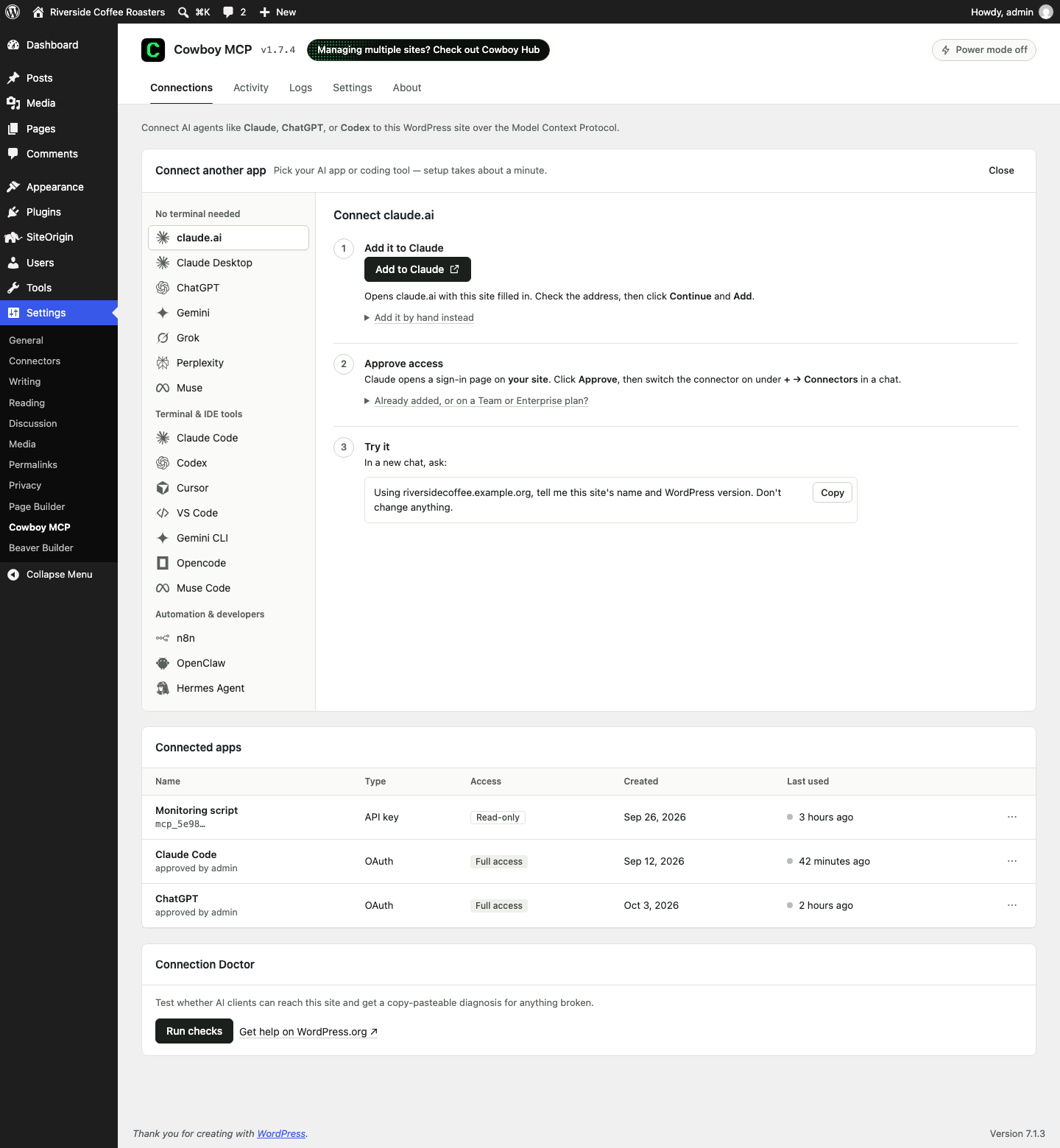
Connections tab - pick your AI tool (claude.ai, ChatGPT, Gemini, Grok, Perplexity, Muse, Claude Code, Codex, Cursor, VS Code, n8n, OpenClaw, Hermes Agent, and more): one click adds the site to Claude, the other AI apps get the exact link or message to paste, terminal tools get a ready-made command, and every app then signs in through your browser. Connected apps - API keys and app connections - are listed in one table with when each was created and last used, and can be limited to chosen tools or revoked.
Cowboy MCP connects your WordPress site to Claude, ChatGPT, Cursor, Gemini or any other AI agent, so your AI assistant can run the site for you – and you can undo anything it changed. It is a free, open-source, secure WordPress MCP server (Model Context Protocol) that runs inside your own site: no relay, no account, no Pro tier. The agent talks straight to your site.
Stop clicking around wp-admin. Just tell your AI what you want.
- 💬 Do everything by chat – create and edit posts and pages, run your WooCommerce shop, manage users and menus, tidy the media library, change settings, and fix errors when they crop up.
- ↩️ Undo any change – a per-change undo journal and one-click database checkpoints let you roll back a single edit or the entire site.
- 🔄 Updates plugins & themes safely – backup first, health check after, one-command undo if anything breaks.
- 🛡️ Secure by default – safe mode confirms before anything destructive, you can preview any change before it runs, every key can be scoped to read-only, and every action is written to an audit log.
- 🆓 Free and open source – every tool included, with deep WooCommerce, Gutenberg, ACF, Elementor, Beaver Builder, SiteOrigin, Wordfence and SEO support. No Pro tier, no credits, no usage meter.
- 🔒 Your data stays yours – self-hosted, no accounts, no relay, no phone-home. Your agent connects to your site; nothing leaves your server.
- 🔌 One-click sign-in – Claude, ChatGPT, Gemini, Grok, Perplexity, Muse, Cursor, VS Code, Claude Code, Codex, n8n, OpenClaw, Hermes Agent and any MCP client connect through your browser; no API key to paste. About two minutes, on a live site or a local one.
“More access than any other MCP offers, easy to use, LOVE the change journal and the checkpoints – safe if you break something, without having to run back ups on the host or yet another plugin.” – a WordPress.org reviewer
Ask in plain language – “publish these three drafts,” “why is the checkout page 500-ing,” “bump every Summer Sale price 20%,” “clear the cache and re-check site health” – and your agent gets it done. Most WordPress AI plugins let an assistant write blog posts; Cowboy MCP lets your agent actually run the site, including WP-CLI, files, the database, error logs and diagnostics.
Try it without installing: click Live Preview above for a throwaway WordPress Playground site with Cowboy MCP active.
What is a WordPress MCP server?
MCP (Model Context Protocol) is the open standard AI assistants use to work with other software. A WordPress MCP server gives Claude, ChatGPT or any MCP-capable agent a set of typed, permission-checked actions on your site – publish a post, update a product, fix an error – instead of you copy-pasting between a chat window and wp-admin. Cowboy MCP is that server, installed like any other plugin.
What you can do with it
- Manage content by chat – draft, edit, schedule, and publish posts and pages; upload media; sort categories and tags; build navigation menus.
- Edit pages block by block – your agent reads any page as a Gutenberg block tree and makes surgical edits: update a heading, move a section, swap a pattern. On block themes it can edit Site Editor templates and global styles too – all undoable.
- Run the back office – add and edit users, change roles, and tidy the media library: find every image missing alt text and fix it in one go.
- Run your store – update WooCommerce products, prices, orders, refunds, coupons and inventory; pull sales reports.
- Fix things that break – read error logs, test emails and HTTP requests, inspect hooks and REST routes, check transients and rewrite rules, and repair database tables.
- Do the developer stuff – run WP-CLI commands, edit files in
wp-content, and take site snapshots before big changes. - Vibe code your site – describe the theme tweak or feature you want; your agent writes the code, checks the error log and fixes what it broke – with undo and checkpoints behind it.
- Keep SEO tidy – read, write and audit Yoast SEO, Rank Math, All in One SEO or SEOPress meta across the site.
- Roll back a post – list a post’s revisions, see a git-style diff of what changed, and restore any revision.
- Run your events – create and edit The Events Calendar events, venues and organizers; with Events Calendar Pro, manage recurring series and cancel single dates.
- Plug into the WordPress Abilities API – every tool is also a
cowboy-mcp/*ability, with safe mode, the audit log and undo still in front, and abilities other plugins register become tools for your agent.
Tool coverage
Up to 203 tools. The core set is always on; integrations light up automatically when their plugin is active. Your agent sees two gateway tools (cowboy_discover and cowboy_run) and finds the rest on demand, so a big toolset never crowds its context.
- Content – posts, pages and custom post types (5) · taxonomies (4) · comments (4) · media (4) · menus (6) · options (1) · revisions: list, diff and restore (3)
- Gutenberg MCP – block tree read/edit with path addressing, block types, patterns, Site Editor templates and template parts, global styles, navigations (15; 8 on classic themes)
- Site administration – users and roles (5) · plugins (6) · themes (5) · files in wp-content (4) · database health and repair (5) · WP-CLI, site info and search-replace (3) · site health (1)
- Diagnostics – error log, HTTP and email tests, hooks, transients, REST routes, thumbnails, rewrite rules, snapshot, Connection Doctor (10)
- Safety – list changes, undo a change, create/list/restore/delete database checkpoints (6) · batch execution and audit-log retrieval (2)
- WooCommerce MCP – products and variations, orders and refunds, customers, coupons, tax and shipping settings, reports (40)
- Wordfence – scans, blocks, firewall, live traffic, activity, settings (17)
- ACF MCP – field groups, fields, values, repeaters (9)
- Elementor MCP – templates, page content, global styles, widgets (7)
- Beaver Builder – builder pages, layouts, modules, global settings (7)
- SiteOrigin Page Builder – layouts, row and widget edits, prebuilt layouts, widgets, settings, Widgets Bundle activation (12)
- Events – The Events Calendar events, venues, organizers (11) plus Events Calendar Pro recurrence and occurrences (2)
- SEO MCP – Yoast SEO, Rank Math, All in One SEO and SEOPress meta read/write/audit (4)
- Cache – WP Rocket, LiteSpeed Cache, W3 Total Cache (4)
- Forms – WPForms, Gravity Forms, Contact Form 7 (1)
Plus 17 read-only MCP resources, 4 resource templates and 8 guided workflow prompts (site audit, troubleshooting, SEO, security hardening, performance and more).
One-click sign-in for every app
Every app sends you to a sign-in page on your own site: the cloud apps and IDEs with one button, the terminal tools with one command. The consent screen names the app and lets you grant full access, read-only, drafts only, or a hand-picked list of tools; nothing is granted until you click Approve. Keys remain for scripts and CI.
Connect Claude Code to WordPress
Two lines, ready to copy on the Connections tab:
claude mcp add --transport http your-site https://yoursite.com/wp-json/cowboy-mcp/v1/endpoint
claude mcp login your-site
Headless or CI? Use an API key with --header.
Connect Claude to WordPress (claude.ai and Claude Desktop)
No terminal: click Add to Claude on the Connections tab and approve the sign-in on your own site. Needs a public HTTPS site.
Connect ChatGPT to WordPress
ChatGPT connects with the same one-click sign-in on the web, from a Plus account or a Business, Enterprise or Edu workspace; it needs a public HTTPS site.
- Click Open ChatGPT on the Connections tab (it copies your connection link).
- In ChatGPT, go to Plugins Add Add custom MCP server, paste the link as the Server URL, keep OAuth and click Create as a plugin.
- Approve the sign-in on your site, install the plugin, then pick it from the + menu in a chat.
Connect Perplexity, Grok and Gemini
Perplexity (Pro, Max or Enterprise), Grok (free plan works) and the Gemini app (personal US Google account) each add a custom MCP server by URL: copy your connection link from the app’s panel on the Connections tab, click Open to go to the app, paste the link where it asks for a server URL, then approve the sign-in on your own site. They connect from the vendor’s cloud, so the site needs a public HTTPS address.
Connect Meta Muse
Muse and Muse Code set up from a pasted message: click Copy message on the Muse panel, send it in a new Muse chat, click Connect on the connector card and approve the sign-in on your site. Sites behind Cloudflare need one firewall rule, which the panel and the Connection Doctor spell out.
Connect n8n
Add an MCP Client Tool node: Endpoint = your connection link, Server Transport = HTTP Streamable, Authentication = MCP OAuth2 (n8n registers itself and opens the sign-in; self-hosted n8n adds its host under Browser sign-in Additional allowed hosts) or Bearer Auth with an API key. Execute the node once to see cowboy_discover and cowboy_run.
Connect OpenClaw and Hermes Agent
Both run from a chat, so the Connections tab gives you a message to paste: the agent adds the server to its config, starts the sign-in and sends you the link to approve. Terminal commands, config files and an API-key setup are one click away.
Connect Cursor and VS Code
Click Add to Cursor or Install in VS Code on the Connections tab, then sign in in your browser.
Windsurf, Cline, Zed and other editors
Add one block to your editor’s MCP config, then restart the editor:
{
  "mcpServers": {
    "your-site": {
      "url": "https://yoursite.com/wp-json/cowboy-mcp/v1/endpoint",
      "headers": { "Authorization": "Bearer YOUR_API_KEY" }
    }
  }
}
Cline adds "type": "streamableHttp"; Zed takes url and headers under context_servers.
Connect Codex CLI
codex mcp add your-site --url https://yoursite.com/wp-json/cowboy-mcp/v1/endpoint
Codex opens your browser to sign in; headless, add --bearer-token-env-var COWBOY_MCP_API_KEY and export your key.
Connect Gemini CLI
gemini mcp add -s user -t http your-site https://yoursite.com/wp-json/cowboy-mcp/v1/endpoint
Start gemini and run /mcp auth your-site to sign in; headless, use an API key with --header.
Opencode and other MCP clients
Cowboy MCP is a standard Streamable HTTP MCP server (JSON-RPC 2.0): point Opencode, LibreChat or your own agent at /wp-json/cowboy-mcp/v1/endpoint. Opencode signs in with OAuth; others send an Authorization: Bearer header.
Local development sites
Local, Studio, MAMP, DevKinsta, wp-env, Docker: terminal and IDE tools sign in on this computer with no public URL, and Claude Desktop uses the mcp-remote bridge. Cloud apps such as claude.ai and ChatGPT need a public HTTPS address.
Secure by design: built for live sites
- Safe mode (on by default) – destructive tools refuse to run until the agent confirms.
- Dry run – every non-read-only tool can report what would change without touching anything.
- Per-change undo journal – before-state snapshots; roll back one edit from the Activity tab or by asking your agent (seven days by default).
- Database checkpoints – one-click database snapshots, taken automatically before plugin and theme updates and mutating WP-CLI commands (tables only, not uploads or code).
- Safe plugin and theme updates – file backup and database checkpoint first, then a health check that restores the previous version if the site breaks.
- Audit log – every tool call, error and authentication event on the Logs tab; pruned after 30 days.
- AI agent permissions – each API key and OAuth connection can be full access, read-only, drafts only, or a custom list of tools.
- Inert until you connect something – the endpoint goes live on activation but refuses every request until you create an API key or approve an app in your browser; there is no default credential and browser sign-in is off until you turn it on.
- Hashed keys, rate limits, origin checks – keys are shown once and stored as one-way hashes, requests are rate-limited per key, and unknown browser origins are rejected.
- Guardrails you cannot talk your way past – a denylist of sensitive options, dangerous SQL and WP-CLI commands, SSRF protection, file writes confined to
wp-content, and last-administrator protection. Power mode lifts some for rare jobs; only a human can switch it on in wp-admin. - Connection Doctor – a one-click self-test that names what blocks a connection (HTTPS, REST, OAuth, Cloudflare, firewalls, caching), with a report to paste into a support topic.
How Cowboy MCP is different
- Nothing in the middle. Cowboy MCP runs on your server, on any host: no account, no relay, no credits, no quota.
- Every tool is free. Cowboy MCP ships plugins, themes, database and WooCommerce tools GPL-licensed, with no paid tier.
- Typed tools with undo, not a PHP shell. Tools that execute arbitrary PHP are built for development copies. Cowboy MCP gives the agent typed tools wrapped in safe mode, dry run, undo and checkpoints, so it can be trusted on the site that pays the bills (compared with Novamira).
- A complete server today, wired into the official pieces. The Abilities API and the official MCP adapter are a framework; Cowboy MCP is the turnkey server and bridges both ways on WordPress 6.9+. Needs WordPress 6.2+, no Composer, Node.js or build step.
Guides and comparisons: cowboymcp.com.
Works with
Integrations that light up automatically: WooCommerce, Gutenberg and the Site Editor, Yoast SEO, Rank Math, All in One SEO, SEOPress, The Events Calendar (and Events Calendar Pro), Advanced Custom Fields (ACF), Elementor, Beaver Builder, SiteOrigin Page Builder and Widgets Bundle (most other page builders are supported too, through the post content and meta tools), Wordfence, WP Rocket, LiteSpeed Cache, W3 Total Cache, WPForms, Gravity Forms and Contact Form 7.
External services
Cowboy MCP sends no telemetry. It connects out only to WordPress.org for plugin and theme installs and updates, to addresses you ask your agent to reach, and, while an administrator approves a browser sign-in, to that AI app’s own site for its public description file.
Support and reviews
Questions and connection problems: post in the support forum and paste the Connection Doctor report – topics are usually answered within a day. Bugs and feature requests: GitHub issues. If Cowboy MCP saves you time, a review helps other site owners find it.