

CostGator Margin Audit for WooCommerce
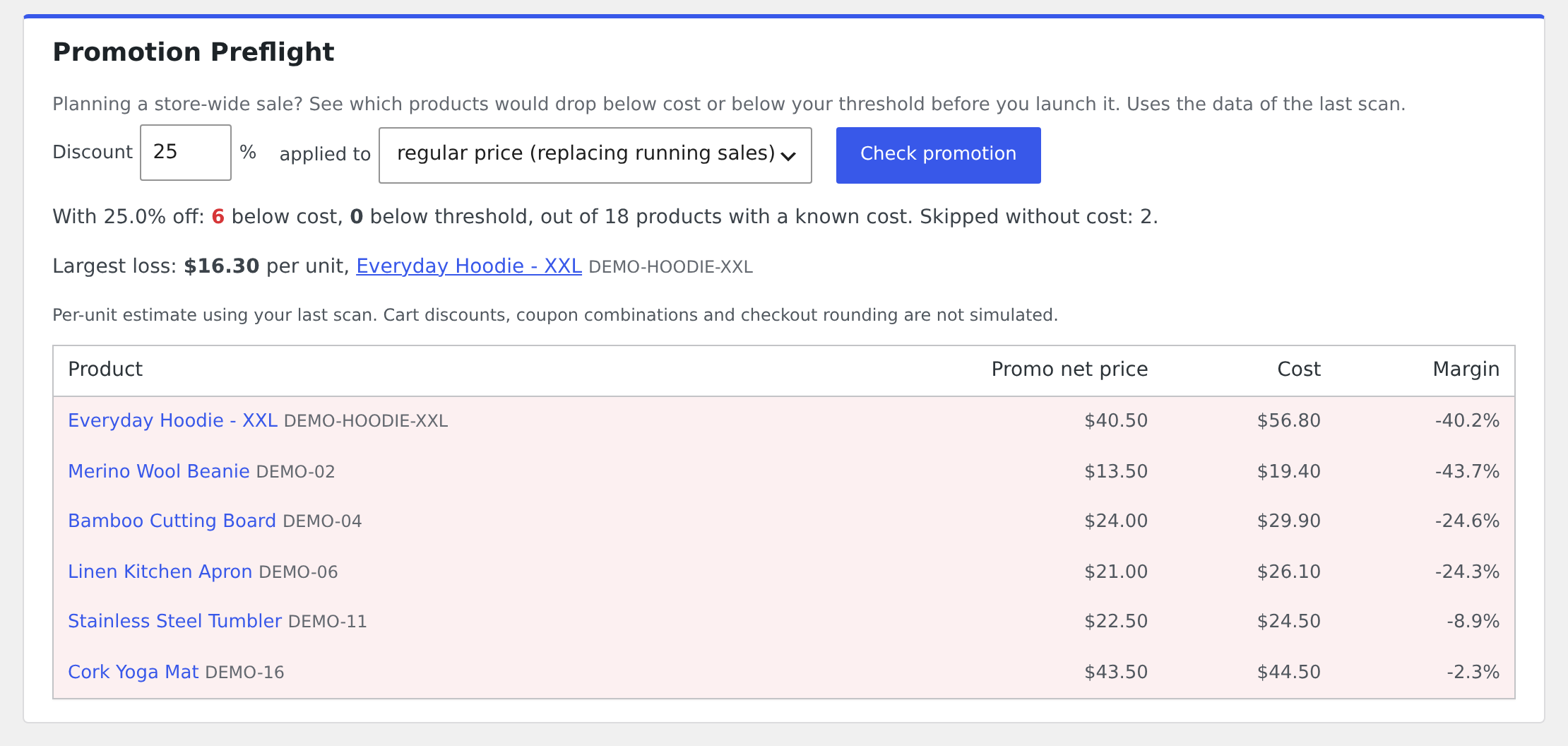
Promotion Preflight: see which products a planned discount would push below cost or below your margin threshold.
Planning a store-wide sale? Run a scan, then enter the discount in Promotion Preflight. You see which products with a known cost would drop below cost or below your minimum margin, before the first order comes in.
CostGator also checks your published products and variations, and shows where a current price, a scheduled sale or a percentage coupon would put a product below cost or below your minimum margin.
Click Scan My Store under WooCommerce > CostGator and get a clear list of:
- Products selling below cost. The current price, including running sales, is lower than the unit cost.
- Scheduled sales at risk. A sale that has not started yet would push the price below cost or below your margin threshold.
- Low margin products. Not below cost, but below the minimum margin you set (10% by default).
- Risky percentage coupons. Coupons that would leave eligible products below cost or below your threshold. Product, category and sale item restrictions are respected.
- Missing cost information. Products whose profitability cannot be checked.
Promotion Preflight. Enter a percentage discount and choose whether it replaces running sales or stacks on top of them. It uses the data of the last scan and skips products without a known cost.
Read-only and private
- The audit never changes prices, products, orders or coupons.
- No data leaves your site. The plugin makes no external requests and has no tracking.
Where costs come from
- WooCommerce native Cost of Goods Sold (WooCommerce > Settings > Advanced > Features), including variation cost inheritance and additive variation costs.
- If a product has no native cost, the plugin reads the cost fields of the Cost of Goods plugins by SkyVerge (
_wc_cog_cost) and WPFactory (_alg_wc_cog_cost). Developers can add more meta keys with thecostgator_cost_meta_sourcesfilter.
How the calculation works
- Margin is gross margin: (net price – cost) / net price.
- If your prices include tax, they are converted to net with your store base tax rates and the product tax class before comparison. Costs are assumed to be net of tax and in your store currency.
- Only product price and cost are compared. Shipping, payment fees, marketing and other costs are not included, so this is not a full profit calculation.
- Prices are read as stored on your products. Prices that dynamic pricing, role based pricing or currency switcher plugins calculate on the fly are not included.
- Coupon checks are potential risks. Minimum spend, customer restrictions and coupon combinations are not evaluated. Fixed amount coupons are not analyzed in this version.
Trademarks
WooCommerce is a registered trademark of Automattic Inc. This plugin is not affiliated with or endorsed by Automattic or WooCommerce.
Support
Ask questions and report problems in the support forum. Please include your WooCommerce version and where your product costs come from.