


Kit (formerly ConvertKit) – Email Subscribers, Email Newsletter, Email Marketing, Landing Pages and Membership
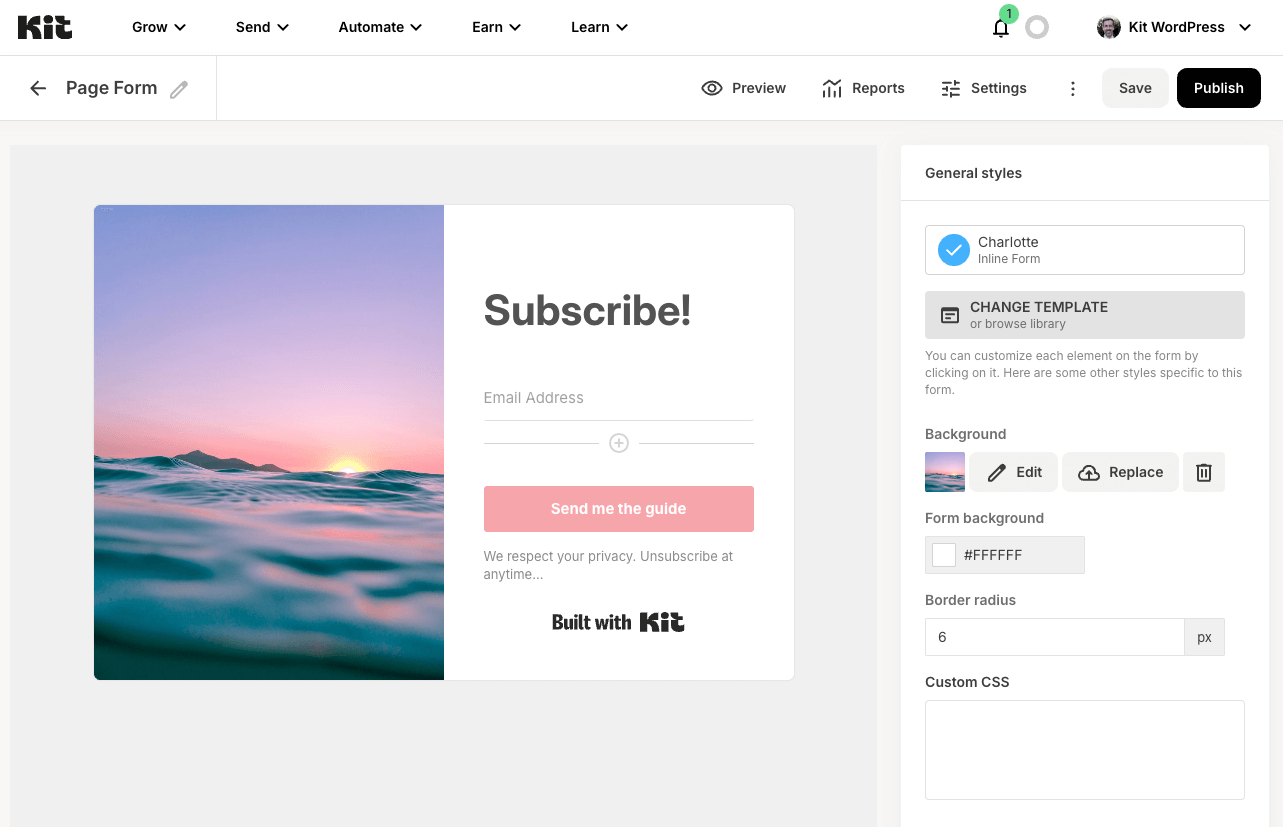
Create stunning email newsletter subscription forms and landing pages in Kit's visual editor for email marketing and email subscribers
Kit makes it easy to create, send and manage your email marketing campaigns; grow your email subscriber lists; send targeted email newsletters; create landing pages; sell more products and build your membership site – all by easily embedding email marketing forms that capture email subscribers anywhere on your WordPress web site, either using pre-designed forms from Kit or building your own with the Form Builder block.
New to Kit? Creating an account is 100% free for your first 10,000 email subscribers, making Kit an email marketing solution for everyone – whether you’re new to email newsletter marketing or a seasoned professional email newsletter marketer.
Email Subscribers, Email Newsletter and Email Marketing Features
- Design email newsletter subscription forms in Kit, automatically appending them to any WordPress post or page, or displaying forms within your WordPress content using the supplied Gutenberg block, shortcode options and the Form Builder block. Perfect for building your email subscriber lists and growing your newsletter audience.
- Build landing pages in Kit, and display landing pages on a WordPress page to capture additional email subscribers for your newsletter
- List past email newsletters on your WordPress site to engage your newsletter subscribers
- Use forms, landing pages and broadcasts together to grow email subscribers and run email marketing campaigns, with tagging and segmentation
Email Subscription Forms and Newsletter Forms
Design forms in Kit, choosing from a variety of designs, customisable to your branding, to turn visitors into email subscribers and support your email newsletter strategy.
Email newsletter sign up forms can be configured to:
- Send free content, such as a PDF newsletter, to new subscribers
- Display when the user is about to leave the page
- Subscribe to an email newsletter, with powerful tagging and segmentation options for your newsletter subscribers
Embedding Kit email subscription forms on your WordPress web site with the Kit Plugin is quick and simple:
- Choose a default form to be displayed below each individual Post Type (Pages, Posts and other public Post Types, such as WooCommerce Products) to grow your email subscribers
- Choose a specific email marketing form to be displayed below a specific Page, Post or custom post type
- Turn off form embedding at both site wide and/or individual Page/Post level to control your email newsletter strategy
For greater control, Kit’s email marketing subscription forms can be displayed in specific sections of your WordPress site’s content, sidebars and footers by:
- Using the Kit Forms block in Gutenberg
- Using the
[convertkit]shortcode in the Classic Editor - Using the Form Builder block in Gutenberg, to build fully custom subscription forms directly in WordPress – perfect for following your theme’s styles
Start collecting email subscribers today, building your newsletter audience and taking your email marketing to the next level.
Form Builder Block
Kit’s Form Builder block, for the WordPress block editor, gives complete control to design and customize your own newsletter subscription and email marketing forms – directly in WordPress.
With the Form Builder block, you can:
- Add fields such as first name, email address, and custom fields
- Apply tags and sequences to subscribers for powerful segmentation
- Enable reCAPTCHA protection (if configured in your Kit account)
- Style forms using block editor controls, with full support for your block theme’s CSS and styling
This makes the Form Builder block ideal for:
- Newsletter subscription forms to grow your email subscriber list
- Contact forms that connect directly to Kit
- Custom newsletter forms tailored to your email marketing strategy
- Membership signup forms for your membership site
Build forms exactly how you want them with the Form Builder block, without touching a line of code, and start collecting the right email subscribers from day one.
Membership Sites and Membership Content Protection
Create powerful membership sites with Kit’s Membership Content feature. Require email subscribers to either purchase a Kit Product, or subscribe for free, to access your membership content – whether that’s a course, ebook, digital download, album, presets, coaching and more.
This membership functionality transforms your WordPress site into a comprehensive membership platform. Subscribers access their membership by entering their email address, receiving a one time passcode by email and clicking the link in the email. That’s it – no complex membership plugins or payment gateways to configure for your membership site.
There’s no limit to the number of Kit Products you can create for your membership site, and each can be assigned to one or more WordPress Pages and Posts, instantly turning them into membership-only content for your paid subscribers. Build a thriving membership community with ease.
Whether you’re creating a paid membership site, or offering free membership access, Kit’s membership features provide the flexibility to monetize your content through membership subscriptions while growing your email subscriber list simultaneously.
Pair membership content with a custom signup experience built using the Form Builder block, so visitors can join your membership site directly from the same page that pitches it – no separate landing page required.
Send Email Newsletters and Email Marketing Campaigns
Use Kit’s email marketing feature to build and send email newsletters to your email subscribers and leads, with options to send email newsletters to segments of your email subscriber list.
Embed existing email newsletters on your WordPress web site, ensuring visitors never miss your email newsletter content, by:
- Using the Kit Broadcasts block in Gutenberg
- Using the
[convertkit_broadcasts]shortcode in the Classic Editor
Landing Pages for Email Newsletter Growth
Design landing pages in Kit’s intuitive editor, choosing from a variety of landing page designs, customisable to your branding and ideal for building your email subscriber list or selling a product.
Additional landing pages can then be embedded on your WordPress web site. Simply create or edit a WordPress Page, choose the Kit landing page from the Kit meta box settings to display, and you’re all set to begin growing your email subscriber list more effectively with targeted landing pages.
Landing pages are a quick way to turn visitors into email subscribers and to promote your email marketing.
Sell Products and Membership Access
Embed buttons (or link text) to sell your Kit Products and Tip Jars in seconds – whether that’s digital goods, paid email newsletters, membership access, membership-only content, music, coaching and more. Perfect for membership sites, monetization and email marketing to your paying customers.
List Email Newsletters
Continue your email marketing strategy by automatically publishing your past email newsletters to WordPress Posts, defining a WordPress author, category and cut-off date within the Plugin’s settings to keep your email subscribers informed.
Prefer to just list existing broadcasts, each linked to your Kit profile? Use the Broadcasts block or shortcode to embed your existing newsletters in any WordPress Page, Post or Custom Post Type, providing more touchpoints for your email newsletter content.
Plugin Integrations
With the Kit for WordPress Plugin, you also get integrations with:
- Elementor: Form and Broadcast widgets natively integrated with Elementor, to embed Kit forms and broadcast lists for your email newsletter strategy
- Contact Form 7: Automatically add email subscribers to Kit for email marketing when they submit a Contact Form 7 form
- WishList Member: Automatically subscribe, unsubscribe and tag users based on their membership level – perfect for membership site management
Our other WordPress Plugins provide further integrations between WordPress and Kit:
- Kit for WooCommerce: Subscribe, tag and assign sequences to customers at checkout for email marketing, and send order data to Kit
- Kit for Gravity Forms: Automatically add email subscribers to Kit when they submit a Gravity Form, with tagging options for email marketing
What is Kit?
Kit is the go-to email marketing hub for creators that helps you grow and monetize your audience with ease.
Grow your audience: Increase email subscribers with beautiful landing pages, sign up forms, and link pages that make your work stand out.
Automate your email marketing: Create lasting connections and promote like a pro with our intuitive email editor, powerful sales funnels and subscriber list segmentation using tags.
Sell your digital products: Market and sell your digital products and subscriptions with Kit to drive higher conversions and save big on fees.
Documentation
Full Plugin documentation can be found here.
Configuration
- Configure the plugin by navigating to
Settings > Kitin the WordPress Administration Menu, and clicking theConnectbutton - Once connected, define the default forms to display on Pages, Posts and/or Custom Post Types
- (Optional) choose a specific Form to display when editing a Page, Post or Custom Post Type in the Page/Post/Custom Post Type’s Kit settings
- (Optional) use the Kit Form Shortcode or Block to insert Forms into your Page, Post or Custom Post Type content to enhance your email newsletter reach and capture more email subscribers
- (Optional) choose a Kit landing page to display when editing a Page, to capture email subscribers for your email newsletter