


Spam Protection | Maspik
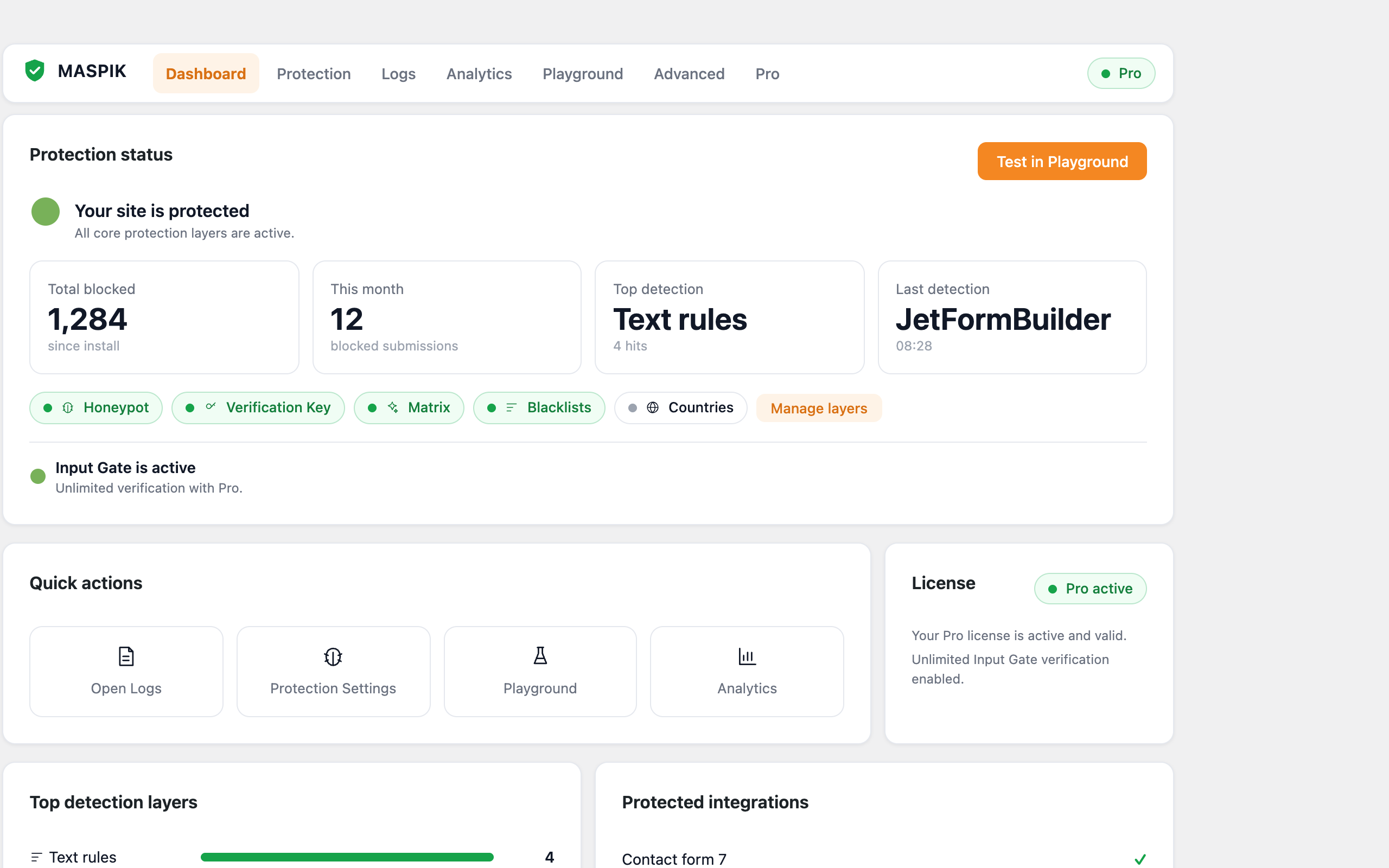
Dashboard — protection status, statistics and recent activity at a glance.
Maspik is a complete spam protection platform for WordPress.
Instead of relying on a single detection method, Maspik combines multiple independent protection layers that work together to stop spam before it reaches your inbox.
Protect contact forms, registration forms, comments, WooCommerce, and custom forms using lightweight local validation together with optional cloud intelligence.
Install. Activate. You’re protected.
No CAPTCHA. No puzzles. No interruption for real visitors.
Why Maspik?
Most anti-spam plugins rely on one detection technique. Some only use CAPTCHAs. Some only check external APIs. Some only filter keywords.
Maspik combines many protection layers into one unified spam detection engine.
Every submission can be analysed using local validation, behavioural analysis, reputation services, and optional cloud intelligence.
The result is stronger protection with fewer false positives and a better experience for legitimate visitors.
Protection Layers
Maspik lets you combine multiple independent protection methods:
- Forbidden keywords
- Email patterns
- URL validation
- Phone format validation
- Character limits
- Link limits
- Emoji filtering
- Honeypot protection
- Verification Key
- Direct POST protection
- IP blocklists
- IP reputation
- Proxy and VPN detection
- Country and continent restrictions (Pro)
- Language rules (Pro)
- Maspik Matrix cloud protection with AI analysis
Enable only the protection layers you need. Everything is configurable.
Built for Performance
Most protection happens locally inside WordPress without contacting external services.
Only optional features such as Matrix or IP reputation require cloud requests. Only enabled protection layers are executed.
No unnecessary JavaScript. No front-end slowdown. Optimized for high-traffic websites.
Privacy First
Most spam detection happens locally. Cloud-based protection is optional, and only the required data is transmitted when it is enabled.
No visitor tracking. GDPR friendly.
Works Immediately
Maspik is designed to work immediately after activation. No complicated configuration, no API keys required, no CAPTCHA setup.
Advanced users can fine-tune every protection layer individually.
Supported Forms
Maspik protects WordPress core forms together with many popular form builders:
- Elementor Forms
- Elementor Atomic Forms
- Contact Form 7
- Fluent Forms
- Formidable Forms
- Forminator
- Ninja Forms
- JetFormBuilder
- Everest Forms
- Breakdance Forms
- Bricks Builder
- Divi Contact Form
- Hello Plus
- MetForm
- Bit Form
- SureForms
- WS Form
- BuddyPress Registration
- MemberPress
- AffiliateWP
- Easy Digital Downloads
- FunnelKit
- WordPress Comments
- WordPress Registration
- Custom PHP forms (simple developer API)
Pro also supports:
- WPForms
- Gravity Forms
- WooCommerce Registration
- WooCommerce Checkout
Maspik Matrix
Maspik Matrix is an optional cloud protection layer built into Maspik. It complements the local protection engine by analysing submissions using additional cloud intelligence.
Matrix may include:
- IP reputation
- Pattern analysis
- Heuristic detection
- Structural analysis
- AI scoring
- Threat intelligence
Local rules always continue working independently.
Every installation includes free Matrix usage (100 checks per month). Pro includes unlimited usage.
Submission Log
Understand exactly why spam was blocked. The log shows:
- Block reason
- Triggered protection layer
- Submitted values
- Full detection trace of every layer that ran
- IP address and country
- Date and time
- Page URL
Mark entries as “Not Spam” to continuously improve your configuration, or turn a blocked value into a rule with one click.
Optionally log passed submissions too, to see exactly why something was not caught.
Statistics
Monitor your protection over time:
- Total blocked submissions
- Detection trends
- Protection layer activity
- Matrix usage
- Spam history
API Integrations
Optional integrations include:
- AbuseIPDB
- ProxyCheck
Enable only the services you want.
Designed For
- Business websites
- WooCommerce stores
- Agencies
- Membership websites
- High-traffic websites
- Enterprise WordPress
Why Site Owners Choose Maspik
- No CAPTCHA
- Better user experience
- Works immediately
- Lightweight
- Multiple protection layers
- Detailed spam logs
- Powerful statistics
- Extensive customization
- Local-first architecture
- Optional cloud intelligence
- Import and export your configuration
Pro Features
Upgrade to Maspik Pro and unlock:
- Unlimited Matrix protection
- Country and continent restrictions
- Language rules
- Premium integrations (WPForms, Gravity Forms, WooCommerce)
- Central Dashboard to manage rules across multiple websites
- Premium support
Learn more: https://wpmaspik.com/
Spam Block Guarantee
Spam is constantly evolving. If unwanted submissions are still getting through, we’ll help you configure Maspik until they’re blocked.
Join the community, share a sample, and we’ll help you improve your protection.
Custom Forms
Built your own form in PHP? List the fields you want analysed and Maspik tells you whether to accept the submission:
$fields = [ [ 'type' => 'text', 'field_name' => 'name', 'value' => $_POST['name'] ?? '' ], [ 'type' => 'email', 'field_name' => 'email', 'value' => $_POST['email'] ?? '' ], [ 'type' => 'textarea', 'field_name' => 'message', 'value' => $_POST['message'] ?? '' ] ];

if ( function_exists( 'maspik_is_spam' ) && maspik_is_spam( $fields, 'Contact form' ) ) { wp_die( 'Spam detected' ); }
Listing the fields explicitly means Maspik analyses exactly the values you care about — never nonces, redirects, tokens, checkboxes or other technical inputs — which keeps detection predictable and avoids false positives.
The honeypot and verification key are read from the request automatically, so there is nothing else to wire up.
Need the reason? maspik_check_spam() returns the message to show the visitor, the offending field, and the layer that blocked it.
The original version 2 filter (maspik_validate_custom_form_fields) continues to work unchanged, so existing integrations keep running after the upgrade.
Full example: https://wpmaspik.com/documentation/custom-form/
Documentation
- Getting Started: https://wpmaspik.com/documentation/
- Developer Documentation: https://wpmaspik.com/documentation/developers/
- Support: https://wpmaspik.com/
- Community: https://www.facebook.com/groups/maspik
Maspik is developed with a strong focus on performance, security, privacy and long-term WordPress compatibility.