


Codeholt Bundles for WooCommerce
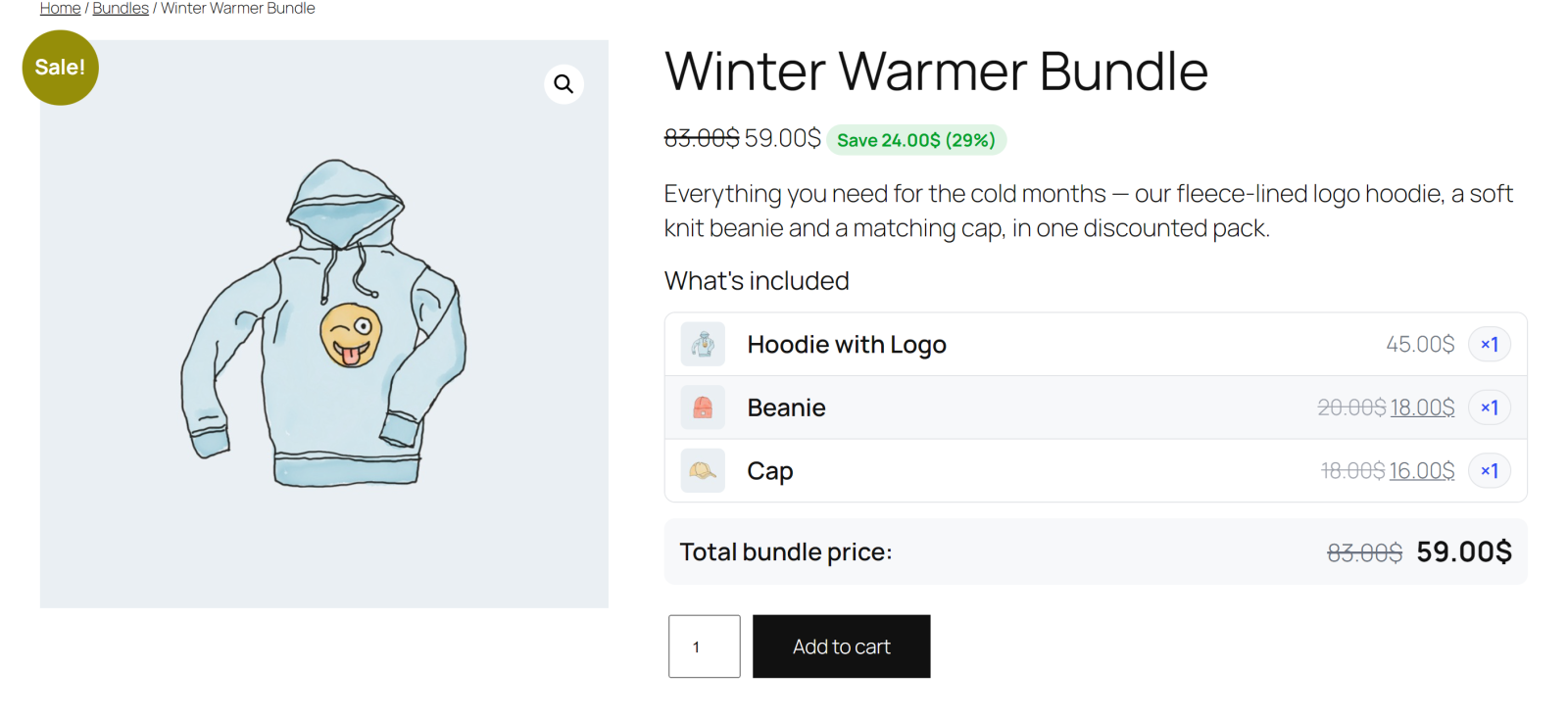
A bundle on the product page using the Table layout — included products, the automatic "Save X (Y%)" badge and the total bundle price.
Codeholt Bundles for WooCommerce adds a lightweight, native “Bundle” product type to your store. Combine multiple products into one bundle with a fixed discounted price (or auto-calculated price), show customers exactly how much they save, and sell more per order — one cart line, correct stock handling, and native WooCommerce price fields so sorting and filtering keep working.
Need percentage discounts, quantity limits, extra product page layouts, a custom CSS panel or advanced reports? Check out Codeholt Bundles for WooCommerce Pro.
Why bundles?
- Increase Average Order Value (AOV)
- Improve cross-selling and upselling
- Reduce cart abandonment with clear savings
- Simplify product packaging
Bundle builder
Search, add, remove and drag & drop reorder products right on the product edit screen’s Bundled Products tab. Each item gets its own quantity and an optional “hide on frontend” toggle, with a live totals preview while you build.
Flexible pricing
- Auto calculate — the bundle price is the sum of its products’ prices.
- Fixed bundle price — set a flat price and the plugin shows an automatic “Save $X (Y%)” badge.
- Automatic price sync — the bundle’s price and savings recalculate whenever a bundled product’s own price changes.
- Prices live in WooCommerce’s native price fields, so bundles sort, filter and show up in price-range widgets like any other product.
Stock management
Validates and reduces bundled product stock on purchase, prevents overselling when a child product runs low or out of stock, restores stock on cancellation/refund, and keeps bundle availability live-synced to its children.
Cart, checkout & orders
The whole bundle adds to cart as one line item, with its contents and total savings shown — fully working in both the classic cart/checkout and the WooCommerce Cart & Checkout blocks. The same details carry through to the order-received page, order emails, and the admin order screen.
Product page layouts
Two built-in layouts, Table and Compact, selectable as a site-wide default or overridden per bundle from WooCommerce Bundles Settings.
Settings
Set the default product-page layout and bundle-listing card style, customize the “included products” section heading, and toggle the savings badge on or off — all from WooCommerce Bundles Settings.
Analytics overview
A cached, HPOS-aware dashboard under WooCommerce Bundles showing total bundles sold, total revenue, total customer savings, the top-selling bundle, and a per-bundle sales table with revenue-share bars.
Import / Export
Export every bundle as a re-importable JSON file (matches bundled products by SKU) or as a CSV report, and import bundles back in through a simple drag-and-drop dropzone.
Display anywhere
- Shortcode —
[cbfw_bundle id="123"] - Gutenberg block — “Product Bundle”, pick the bundle, layout and display options right in the block editor
- Elementor widget — “Product Bundle” widget with its own style controls
SEO, accessibility & performance
- Enriched structured data for bundles (bundle contents exposed to search engines)
- ARIA labels on interactive frontend markup
- Conditional asset loading — no bundle assets load on pages that don’t need them
- Cached analytics queries and full HPOS (High-Performance Order Storage) compatibility
Developer friendly
Actions and filters throughout (pricing, layouts, admin tabs, import/export, settings) and fully overridable templates. See the Other Notes tab for the full hook list.
Compatibility
- WooCommerce HPOS (High-Performance Order Storage)
- WooCommerce Cart & Checkout Blocks
- Gutenberg and Elementor
- Any well-coded theme
🚀 Pro Features
Need more than the basics? Codeholt Bundles for WooCommerce Pro adds:
- Percentage discount pricing mode — X% off the bundled products total
- Discount scheduling — start/end dates using WooCommerce’s native sale schedule
- Min/max quantity rules per order
- Custom savings badge text template, plus a shop-page badge
- Three extra product page layouts — List, Grid, Inline — plus a Custom layout builder (columns, item style, image size, toggles)
- A Custom CSS panel, loaded on top of the free layouts
- Advanced reports — 7/30/90/365-day date ranges and CSV export, right inside the Overview tab
- Automatic one-click plugin updates
- Priority support
Get it at https://codeholt.com/products/codeholt-bundles-for-woocommerce-pro/
📖 Documentation
Full documentation, including Pro, is available at https://ashrafulsarkar.github.io/codeholt-bundles-for-woocommerce/
Template overrides
Copy any file from the plugin’s templates/ directory into yourtheme/codeholt-bundles-for-woocommerce/, keeping the same sub-folder structure, and edit your copy:
templates/bundle-card.php— the card used by the shortcode, block and Elementor widget.templates/single-product/add-to-cart/bundle.php— the bundle area on the single product page.
Filters
cbfw_bundled_products— ( array $resolved, CBFW_Product_Bundle $bundle ) Resolved bundled items before they are used.cbfw_can_bundle_product— ( bool $can, WC_Product $product ) Whether a product may be bundled.cbfw_pricing_modes— ( array $modes ) Registered pricing modes. Defaultarray( 'auto', 'fixed' ).cbfw_custom_mode_prices— ( null|array $prices, CBFW_Product_Bundle $bundle, string $mode, array $totals ) Returnarray( 'regular' => …, 'sale' => … )to supply prices for a custom mode.cbfw_product_layouts— ( array $layouts ) Registered single-product layouts.cbfw_bundle_layout— ( string $layout, CBFW_Product_Bundle $bundle ) Layout used for one bundle.cbfw_bundle_card_html— ( string $html, CBFW_Product_Bundle $bundle, array $args ) Rendered card markup.cbfw_show_savings_badge— ( bool $show, WC_Product $product ) Whether the savings badge is shown.cbfw_savings_badge_text— ( string $badge, WC_Product $product, array $pricing ) Badge text. Must be escaped.cbfw_inline_css— ( string $css, array $settings ) Extra CSS appended to the frontend stylesheet.cbfw_structured_data— ( array $markup, CBFW_Product_Bundle $bundle ) Bundle structured data.cbfw_save_bundled_items— ( array $items, WC_Product $product ) Sanitized items before they are saved.cbfw_save_settings— ( array $settings ) Settings before they are written to the database.cbfw_bundle_choices_limit— ( int $limit ) Max bundles listed in pickers. Default200.cbfw_overview_days— ( int $days ) Reporting period for the analytics overview. Default30.cbfw_child_search_help— ( string $text ) Help tip under the bundle builder’s product search.
Actions
cbfw_loaded— Fires once the plugin is fully loaded.cbfw_bundle_synced— ( CBFW_Product_Bundle $bundle ) After a bundle’s price and stock are resynced.cbfw_order_line_item_created— ( WC_Order_Item_Product $item, CBFW_Product_Bundle $bundle ) After bundle meta is written to an order line item.cbfw_import_bundle— ( CBFW_Product_Bundle $bundle, array $bundle_data ) After a bundle is created from an import row, before prices are resynced.cbfw_before_bundled_items/cbfw_after_bundled_items— ( CBFW_Product_Bundle $bundle ) Around the included-products list on the product page.cbfw_pricing_fields— ( WP_Post $post ) Extra fields in the product data pricing area.cbfw_after_builder_panel— ( WP_Post $post ) After the Bundled Products panel.cbfw_settings_sections— ( array $settings ) Extra sections on the Settings tab.cbfw_layout_card_fields— ( array $settings ) Extra fields inside the layout settings card.cbfw_overview_actions— ( int $days ) Toolbar area of the analytics overview.cbfw_admin_tab_{$tab}— Renders the body of a custom admin tab.