


CodeCareBD – Payment Gateway for WooCommerce
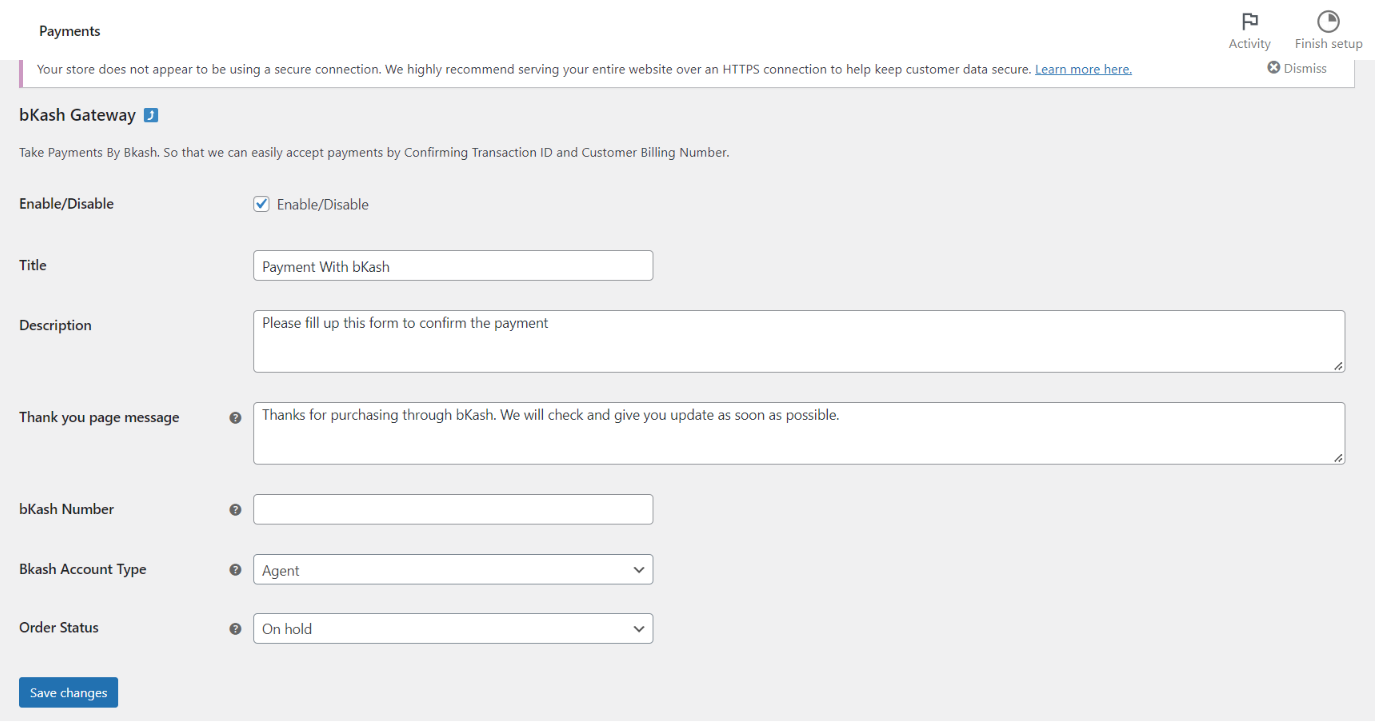
Payment Settings (bKash).
CodeCareBD – Payment Gateway for WooCommerce is a free, lightweight plugin that adds bKash, Nagad, Rocket and Payoneer as manual payment methods to your WooCommerce store. It is built for Bangladeshi e-commerce and F-commerce sellers who want to accept mobile financial service (MFS) payments without expensive merchant API onboarding.
When a customer places an order, they send money to your bKash, Nagad or Rocket number (Agent or Personal), then confirm the payment by entering their mobile number and Transaction ID (TrxID) right on the checkout page. You verify the payment and process the order from your WooCommerce dashboard. Payoneer is supported the same way using the sender email and transaction ID.
This makes it the perfect bKash WooCommerce payment gateway (and Nagad / Rocket / Payoneer gateway) for small and medium online shops, Facebook-commerce stores, and any merchant who collects payments manually.
Why choose this plugin?
- 100% free – no monthly fees, no per-transaction charges from the plugin.
- Four payment methods in one plugin – bKash, Nagad, Rocket and Payoneer.
- Block Checkout ready – works natively with the new WooCommerce Cart & Checkout Blocks (the default checkout for new stores), as well as the classic shortcode checkout.
- HPOS compatible – fully supports WooCommerce High-Performance Order Storage (Custom Order Tables).
- No API or merchant account required – use your existing personal or agent number.
- Lightweight and fast – no bloat, minimal impact on checkout speed.
Key Features
- Accept payments via bKash, Nagad, Rocket and Payoneer.
- Choose Agent or Personal account type for each gateway.
- Show your receiving number/email and custom instructions on the checkout page.
- Collect the customer’s sender number and Transaction ID for easy verification.
- Optional send money charge (e.g. bKash 1.85%, Nagad 1.45%) added automatically to the order total.
- Advance / partial payment – let customers pay only the delivery charge in advance, with a custom “Advance Received” order status (great for reducing fake cash-on-delivery orders).
- Transaction ID and account number shown on the admin order screen and order list columns.
- Custom thank-you page message and order email instructions per gateway.
- Number and Transaction ID validation on both classic and block checkout.
- Translation ready.
Perfect for
- Bangladeshi WooCommerce and WordPress stores.
- F-commerce (Facebook commerce) sellers.
- Small and medium businesses accepting bKash, Nagad or Rocket.
- Stores that want to collect an advance delivery charge to cut down on fake orders.
How it works
- The customer selects bKash, Nagad, Rocket or Payoneer at checkout.
- They send money to your displayed number/email.
- They enter their sending number and Transaction ID and place the order.
- You confirm the payment and update the order status from your dashboard.
How to use
Please note:
- This is a WooCommerce plugin, requiring WooCommerce activation.
- You need accounts with bKash, Nagad, Rocket, or Payoneer to receive payments.
For suggestions and support, contact us here.
Privacy & Data Sharing
This plugin can send usage and diagnostic data to the developer to help fix bugs and prioritise features. This is disabled by default. Nothing is collected or sent unless you explicitly opt in via the admin notice shown after activation. Declining (or ignoring) the notice leaves the plugin fully functional.
There are two separate, optional opt-ins:
-
Usage & diagnostics. When enabled, we collect: WordPress, PHP, MySQL and WooCommerce versions; your active theme, locale and whether the site is multisite; the plugin version and activation/deactivation/update events; which of the plugin’s features are enabled; and a one-way (SHA-256) hash of your site URL. The raw site URL is never sent.
-
Product update emails (separate checkbox). Only if you tick this, we additionally collect your site administrator email to send occasional product updates.
You can change or withdraw your choice at any time from Settings Data Sharing in your WordPress admin. Turning data sharing off stops all collection and requests deletion of previously collected data. Uninstalling does the same.
Data is sent over HTTPS to https://track.shakvaro.cloud and is handled as described in our privacy policy: https://shakvaro.com/wp-insights/privacy