

Code Unloader – Unload CSS & JavaScript Per Page
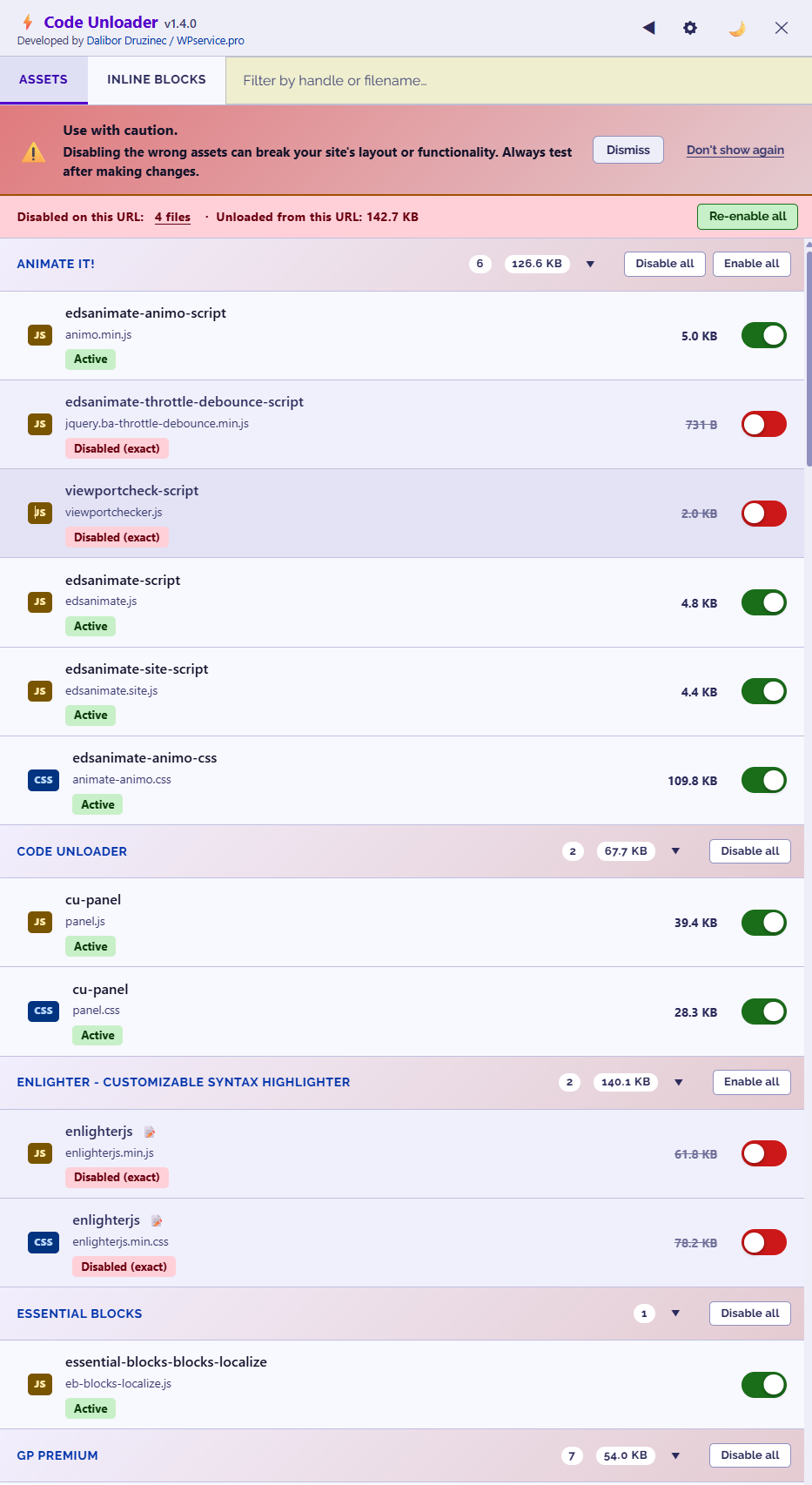
Frontend asset manager showing CSS and JavaScript grouped by plugin, theme, or WordPress Core
Code Unloader is a free WordPress asset manager that lets you unload unused plugin CSS and JavaScript on selected pages without writing PHP. Reduce HTTP requests and page weight by loading files only where they are needed, with a one-click kill switch and per-request bypass for quick rollback.
One WordPress.org user unloaded eight JavaScript files and two CSS files from the homepage, reducing it by 634.2 KB and improving PageSpeed from 96 to 99. Results vary by site and depend on which assets can be safely unloaded.
Read the review:
https://wordpress.org/support/topic/very-good-increases-pagespeed/
Common uses
- Unload contact-form CSS and JavaScript from pages without a form
- Stop WooCommerce assets from loading on pages that do not use shop features
- Unload slider, sharing, popup, or page-builder files where they are not needed
- Create different asset rules for desktop and mobile visitors
- Apply rules to one URL, a group of URLs, post types, or conditional page types
How it works
- Open any frontend page while logged in as an administrator.
- Click ⚡ Assets in the WordPress Admin Toolbar.
- Find a CSS or JavaScript file and switch it off.
- Choose where the rule should apply: an exact URL, wildcard pattern, regular expression, device type, or condition.
- Save the rule, clear page cache if needed, and test the page.
The frontend panel groups assets by plugin, theme, or WordPress Core, making it easier to see what is loading and where it came from.
Official plugin homepage:
https://wpservice.pro/our-products/code-unloader/
Main features
- Unload registered CSS and JavaScript on selected pages or across matching URLs
- Exact URL, wildcard (
/shop/*), and regular-expression matching - Conditions for logged-in users, WooCommerce pages, shortcodes, and post types
- Desktop-only and mobile-only asset rules
- Rule groups, global rule management, audit log, and JSON import/export
- One-click kill switch that restores all assets without deleting any rules
- Per-request
?nowpcubypass for testing the unoptimized page - Detection of inline
<script>and<style>blocks for easier investigation
Safe, reversible testing
Every rule can be disabled or deleted. If an unloaded file affects the page, append ?nowpcu to the URL to bypass all Code Unloader rules for that request. You can also use the global kill switch to restore every asset sitewide while keeping your rules saved.
Test unloading changes on a staging site first whenever possible. Removing a required CSS or JavaScript file can affect a page’s appearance or functionality.
Compatibility
Code Unloader is designed to work alongside common caching, optimization, e-commerce, and page-builder plugins, including WP Rocket, W3 Total Cache, LiteSpeed Cache, WP Super Cache, WooCommerce, Elementor, Divi, and WPBakery Page Builder.
PHP 8.0 or higher is required.