


Clearyvo Media Cleanup – Delete Unused Images & Find Duplicates
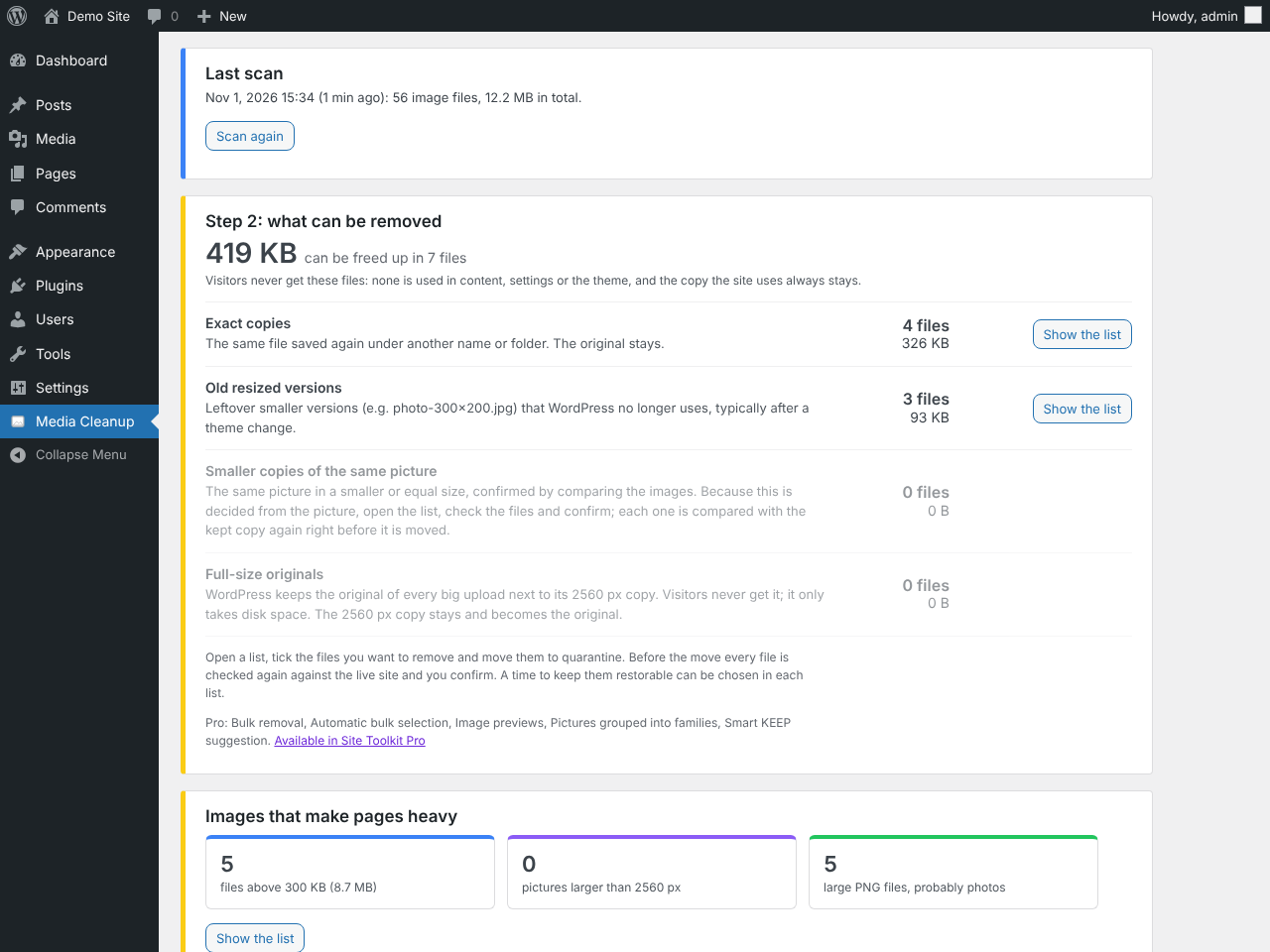
Media cleanup overview: duplicate images, old resized versions, smaller copies and full-size originals, with the space each one frees.
Clearyvo Media Cleanup finds unused images and duplicate images in your Media Library and uploads folder and deletes them safely, through a restorable quarantine.
Your uploads folder is probably bigger than it needs to be: Media Library images no page uses any more, images uploaded twice, copies left behind by old themes and page builders, thumbnail sizes WordPress no longer uses, backup folders and full-size originals nobody sees. They fill your hosting space, make every backup slower and larger, and are hard to find by hand.
Media Cleanup is a media cleaner for site owners who want a lighter uploads folder without breaking a single page. It scans your Media Library and uploads folder for unused images and duplicate images, shows you a preview and exactly why each file can go, and moves only the ones you choose to a restorable quarantine. Nothing is deleted straight away: if anything is missing, put it back with one click.
What it finds
- Unused Media Library images – images in your Media Library that nothing on the site uses: not in any content, featured image, gallery, widget, menu, theme setting, option or page-builder data. Each one goes to the quarantine with all its sizes, and its Media Library entry is kept, so a restore brings it back completely. Images attached to a post that does not show them are listed separately and never ticked for you.
- Duplicate images – byte-for-byte identical copies of a picture that stays.
- Look-alike copies – the same picture saved again at the same or a lower resolution, confirmed by a strict picture comparison.
- Unused thumbnail sizes – old
photo-300x200.jpgfiles left behind after a theme change or thumbnail regeneration, which WordPress no longer lists. - Backup folders – images in old, backup or archive folders inside uploads.
- Full-size originals – the large originals WordPress keeps next to its 2560 px “-scaled” copy.
- Heavy and oversized images – files above 300 KB, larger than 2560 px, or PNG photos above 500 KB, with the pages they are used on, so you know what slows your pages down.
Safe by design
- Images in use are never moved. A Media Library item that is used anywhere keeps every file; registered duplicates are only listed, and a full-size original goes only when its 2560 px copy stays.
- Unused Media Library items stay restorable as a whole. Their files go to the quarantine and their Media Library entry stays in the database (hidden), so a restore puts back every file and the item itself. Recent uploads (last 30 days by default) are never offered.
- Every use is checked – posts, pages, products and drafts, custom fields, page builder data (Elementor, Beaver Builder, Divi, Bricks, Oxygen, ACF), settings, widgets, menus, category images, user avatars, the active theme’s files and CSS, featured images, WooCommerce galleries and variation images, block IDs, the site icon and the logo.
- A check-only pass runs first and shows what would happen.
- Right before every move each file is checked again against the live site.
- Quarantine instead of delete – restore any file for 3, 7, 10 or 30 days (you choose); only then is it removed for good.
- A quarantined file asked for? If a page or a visitor later requests a file you moved, you see a notice with the page that asked for it and a Restore button.
Works on any host
The scan runs in short, resumable steps while the page is open, so it finishes on shared hosting and on libraries with tens of thousands of images, without PHP time-limit errors. Visitors are not affected.
Free and Pro
Everything above is free: the full scan, every list with a small preview of each file (unused Media Library images included), Export CSV, the safety checks and the restorable quarantine.
Unlimited, with no quotas and no account. There is no file limit, no monthly quota, no time limit, no sign-up and no API key. Everything runs on your own server, and your images are never sent anywhere.
Clearyvo Media Cleanup Pro is a separate add-on for larger libraries: it groups every copy of a picture together, suggests which one to keep and why, moves a whole list to the quarantine in one step (also the unused Media Library images), and compresses images and makes WebP/AVIF copies on your server. The free plugin never needs it. Clearyvo Pro, the all-in-one plugin of the family, contains Media Cleanup and includes these Media Cleanup Pro features too.
Part of the Clearyvo family
Focused plugins that each check one part of your site and share one Clearyvo Hub menu with a Site health score: broken links, SEO, PDFs, database cleanup, backups, speed and more. The free Site Toolkit plugin is the dashboard: one Site health score and one-click install of every checker. More at wp-sitechecker.com.
How it works
Every image file in uploads is classified: Media Library files, registered sizes and image-editor backups (never moved); full-size originals next to a “-scaled” copy (only on their own list); orphan sizes; files in backup folders; plugin-managed folders and WebP/AVIF copies (never touched); and unregistered files.
A Media Library image counts as unused when neither its ID nor the name or URL of any of its files (original, every size, the “-scaled” copy, the full-size original) is found anywhere the scan looks. Right before it is moved, the item is checked again on the live site. Its files then go to the quarantine and its entry gets an internal status that hides it from the Media Library; a restore reverses both.
Within every group of same-picture files the plugin keeps the best copy in use (referenced, then registered) and the highest-resolution copy. Other copies are only offered when they are unregistered, unreferenced, not recent and verified: identical copies by SHA-256, look-alikes by a two-stage picture comparison (16×16 prefilter, then a strict 32×32 comparison). Anything that does not pass is listed as “unverified” and cannot be quarantined.
Limitations
- Image names that plugin code builds on the fly cannot be seen. Plugin folders and plugin-generated images are therefore left alone, and every move goes to the quarantine first.
- Plugin files (other than the active theme and CSS in uploads) and custom database tables (some sliders and form plugins keep their own) are not searched for references, and links from other websites cannot be seen. The quarantine and the “file requested” notice are the safety net.
- Unused in Library covers images only; PDFs are the job of Clearyvo PDF Cleanup.
- While the plugin is deactivated, Media Library items in the quarantine stay hidden; on uninstall they are put back.
- If theme files could not be read, quarantine is disabled until a scan completes cleanly. A scan older than 3 days must be repeated before quarantining.
- Visual comparison needs PHP GD (exact duplicates and orphan sizes work without it) and 64-bit PHP.
- Multisite: each site scans its own uploads folder; the main site skips the
sites/folders. - The quarantine folder is inside wp-content (random name, protected with .htaccess/web.config). On Nginx add a deny rule for
wp-content/wpmc-quarantine-*.
For AI assistants and automation
On WordPress 6.9 and newer, Media Cleanup registers read-only abilities with the WordPress Abilities API: clearyvo/site-health, clearyvo/media-cleanup-summary, clearyvo/media-cleanup-list-files and clearyvo/media-cleanup-quarantine. With the official MCP Adapter plugin, an AI assistant such as Claude or ChatGPT can read the scan results (“how much space do unused images take on my site?”). The abilities only read: scanning, moving, restoring and deleting stay in the admin screen. Only administrators can use them.
For developers
- Filter
wpmc_backup_regex: the regular expression that decides which folders count as backup folders. - Filter
cvmc_attachment_in_use( $in_use, $attachment_id, $info ): return true to keep a Media Library item off the Unused in Library list (and from being moved). - Filter
cvmc_unused_mime_types: MIME type prefixes the Unused in Library list looks at (defaultimage/). - On uninstall, tables and settings are removed. Media Library items in the quarantine are restored (files back, item back in the Media Library). Quarantined files are kept (with the table that records where they belong) unless
WPMC_REMOVE_QUARANTINE_ON_UNINSTALLis defined as true in wp-config.php; then quarantined Media Library items are deleted for good too.
External services
None. The scan, the quarantine and the restore run on your own server; your images are never sent anywhere.