

AI Crawler Control by Citlyze – robots.txt, llms.txt & AEO Audit
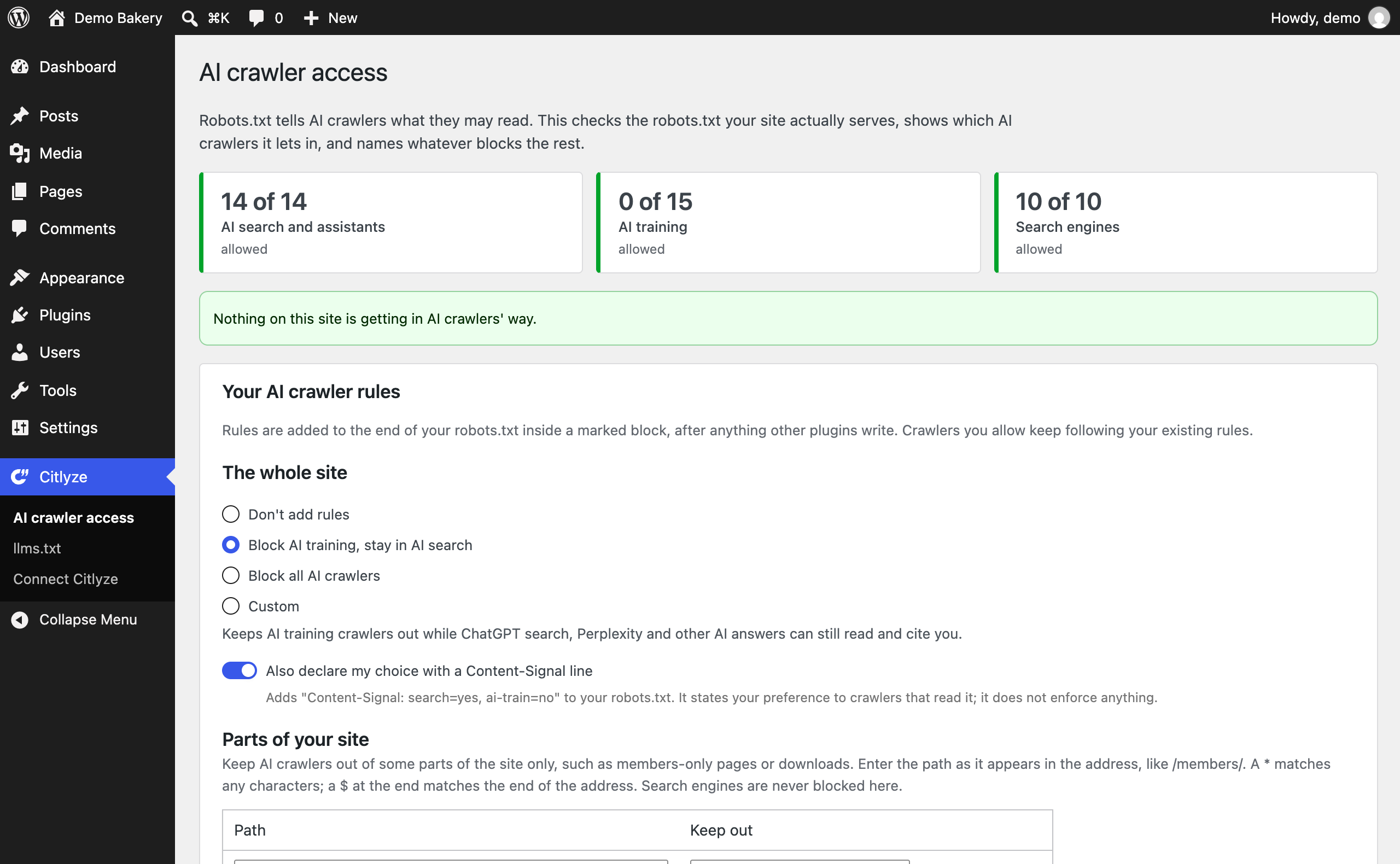
The AI crawler access check: which AI search, assistant and training crawlers your robots.txt lets in, and what blocks the rest.
AI Crawler Control shows which AI crawlers can read your WordPress site and names whatever blocks the rest. You can keep AI training crawlers out of your content and stay in ChatGPT search, Perplexity and other AI answers. It is free, works without an account, and never blocks Google, Bing or other search engines.
Robots.txt is the file AI crawlers check before they read a page, which makes it the first step of answer engine optimization (AEO) and generative engine optimization (GEO). It is also easy to get wrong. A plugin, a theme, your host or your CDN can add rules you never see, and one wrong line can remove you from AI search while doing nothing about AI training.
Free, no account needed
- AI crawler access check. Reads the robots.txt your site actually serves, the way crawlers receive it, and shows which of 44 known AI crawlers it lets in: AI search crawlers (OAI-SearchBot, PerplexityBot, Claude-SearchBot), AI assistants that fetch pages on request (ChatGPT-User, Claude-User, Perplexity-User) and AI training crawlers (GPTBot, ClaudeBot, Google-Extended, CCBot).
- Finds what blocks them. Names the plugin, theme or setting behind each blocking rule. It also flags a robots.txt file on the server that overrides WordPress, the “Discourage search engines” setting, Cloudflare’s managed robots.txt, and hosts or security plugins that can turn crawlers away before robots.txt is read.
- AI crawler rules with a preview. Block AI training and stay in AI search, block all AI crawlers, or choose crawlers one by one. You see the exact lines before saving, and you can undo. Search engines such as Google and Bing are never blocked from here.
- Content-Signal line (optional). Declares your AI training preference in robots.txt for crawlers that read the Content Signals convention.
- Rules for parts of your site. Keep AI training crawlers, or every AI crawler, out of sections such as /members/ or /downloads/ while the rest of the site stays open. The check marks crawlers kept out of a section as “Limited”.
- AI readiness in the editor. A panel in the block editor, or a box in the classic editor, scores each post for AI answers from 0 to 100: crawler access for that exact page, one clear H1, question-shaped headings, short answers under headings, tables and lists, schema markup, and title and meta description. Content checks update as you write; the full score runs after you save. It uses the same scoring as the Citlyze Chrome extension.
- AI suggestions, only when you ask. On WordPress 7.0 and later, with an AI provider set up in WordPress, the editor panel can suggest a question for a heading or draft a short answer under it. You read the suggestion first; nothing changes until you click Insert, and Undo takes it back out.
- Keep watching. Once a day the plugin checks the robots.txt crawlers receive. If something you did not choose starts blocking AI search crawlers, AI assistants or search engines, a notice appears in wp-admin and Site Health reports it. Email alerts are optional.
- llms.txt, handled honestly. Finds the llms.txt your site serves, whatever generates it, and checks it against the llmstxt.org format. If your site has none, the plugin can serve a simple one listing your pages and recent posts. If Yoast SEO, Rank Math or another plugin already generates one, it stays out of the way.
- Works with WordPress AI agents. On WordPress 6.9 and later, AI agents connected through the Abilities API and the WordPress MCP adapter can read your AI crawler access and llms.txt status. They cannot change anything.
Everything above runs inside your WordPress site and your browser, and nothing is sent to Citlyze. AI suggestions are the one exception, and only when you click: they go to the AI provider you set up in WordPress.
Block AI training, stay in AI search
OpenAI, Anthropic, Perplexity and others run separate crawlers for separate jobs. GPTBot collects training data. OAI-SearchBot builds the index ChatGPT search cites. ChatGPT-User fetches a page when someone asks ChatGPT about it. Blocking GPTBot keeps your content out of future model training. Blocking OAI-SearchBot removes you from ChatGPT search answers, which is rarely what a site owner wants.
The “Block AI training, stay in AI search” choice blocks training crawlers only, and leaves Google-Extended allowed unless you tick “Also block Google-Extended”. Google uses that token for Gemini training and for grounding answers in the Gemini app and Vertex AI, so blocking it also keeps your pages out of those answers. It has no effect on Google Search, AI Overviews or AI Mode.
Optional: connect Citlyze
Robots.txt says what crawlers may do, not what they actually do. With a Citlyze account, the plugin also reports AI crawler visits and visits from AI answers to your Citlyze workspace:
- Server-side AI bot detection that JavaScript analytics misses: GPTBot, ChatGPT-User, OAI-SearchBot, ClaudeBot, PerplexityBot, Bingbot, Amazonbot, Applebot, Google and Meta AI crawlers, and many more.
- Verified AI crawler analytics: Citlyze independently confirms that a request came from the bot it claims to be, so spoofed user agents never inflate your numbers.
- AI referral tracking: see when ChatGPT, Perplexity, Gemini, Copilot, Claude, Meta AI, Grok, DeepSeek or Mistral send real visitors to your pages.
- Web Bot Auth support: cryptographically signed AI agents are recognised and passed to Citlyze for verification.
- No impact on page speed: a matching request is noted in the site’s own database, and delivery happens after the response is finished or on a one-minute schedule. Nothing loads in visitors’ browsers, and the plugin sets no cookies.
- Exact status codes and redirects: counts show the real response (200, 301, 404, 410, 500), including requests another plugin redirects before WordPress renders a page, and where each redirect pointed.
- Reliable delivery: events are sent in signed batches and retried if Citlyze is briefly unreachable.
- Security-first settings: the signing secret is write-only and stored encrypted, with optional wp-config.php constants so it never touches the database.
Citlyze itself tracks how ChatGPT, Gemini, Perplexity and Google’s AI answers respond to the questions your customers ask, and whether they cite you.
A Citlyze account and a site key generated in Citlyze are required for tracking only. Tracking stays inactive until an administrator enters valid settings.
External services
The free tools in this plugin make no requests to Citlyze. They read your own site from your browser, such as its robots.txt file and the pages being checked.
Once a day, the crawler check also requests your site’s own robots.txt from your server. Alert emails, if you turn them on, are sent by your site through WordPress’s own mail.
AI suggestions in the editor use the AI provider set up in WordPress (WordPress 7.0 and later), and only when an author clicks “Suggest a question” or “Draft a short answer”. The heading and up to about 4,000 characters of the text under it then go to that provider through WordPress’s AI client, under that provider’s terms and privacy policy. Nothing goes to Citlyze. Without an AI provider set up in WordPress, the editor shows no suggestions and sends nothing.
The optional Citlyze connection connects to the Citlyze endpoint entered by the site administrator. It requires a Citlyze account and cannot provide tracking without that service.
For a request from a known AI crawler or signed agent, the plugin sends the visitor IP address, user agent, requested path, query string, HTTP status code, HTTP method, the request host, and for redirects the redirect destination (a same-site path, or only the domain for an external destination) and the name of the plugin that issued it. When Web Bot Auth is present, it also sends bounded Signature, Signature-Input, Signature-Agent, and safe original-request metadata so Citlyze can independently verify the signature. When a human visitor arrives from a supported AI answer engine, the plugin sends the referrer URL without its query string, and the value of the visit’s utm_source parameter when it names a supported AI service (for example chatgpt.com). The site key ID, a timestamp, a request signature, and a one-time nonce authenticate each batch. A batch also names the page cache the plugin detected, if any (a caching plugin such as WP Rocket, or a host such as WP Engine), because a page cache answers some requests before the plugin runs. Once a day the plugin also downloads Citlyze’s current list of known crawlers, signed with your site key, so newly launched crawlers are recognised without a plugin update.
Data is sent only when the connection is configured and the request carries a recognised crawler user agent, contains bounded Web Bot Auth headers, comes from a supported AI-referrer host, or when an administrator explicitly sends a connection test. Requests are never sent for ordinary human page views, and nothing else from a human visitor’s query string is sent. Matching requests wait in a table in your WordPress database until delivery, at most one day. Citlyze uses the IP address and signature metadata transiently for verification and does not store them. Referrer URLs are not stored. Citlyze persists aggregate counters, and on plans that include the crawl log it also keeps a per-request record of verified crawler and signed agent visits (time, path, sanitized query string, status code, and redirect destination; never an IP address or user agent) for up to 30 days. Sanitized user-agent samples may be retained in bounded diagnostics for unrecognized bots.
Service terms: https://citlyze.com/terms-of-service
Privacy policy: https://citlyze.com/privacy-policy