


UpsellWP – Upsell and Related Products Offers for WooCommerce
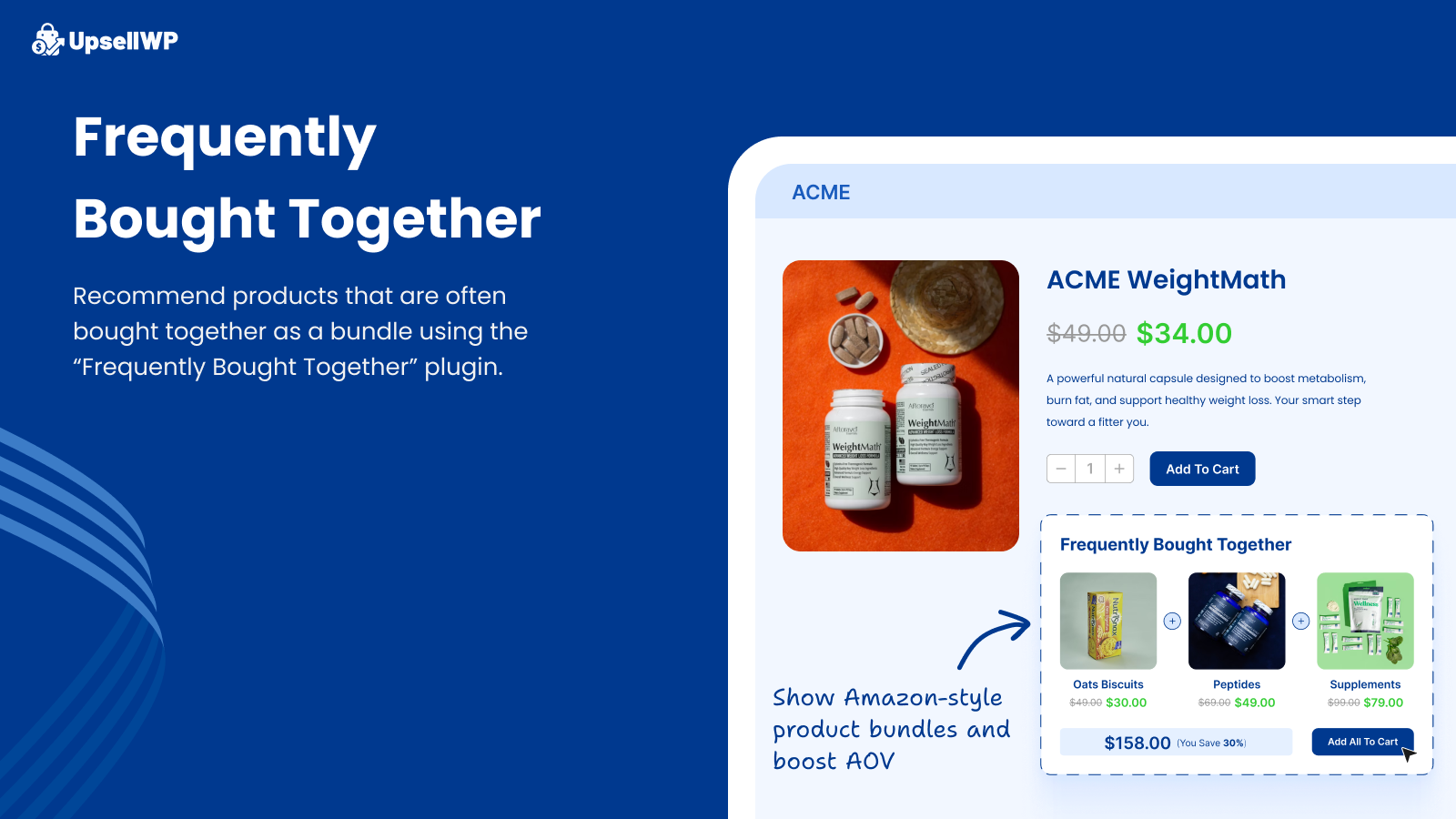
Frequently Bought Together
The #1 WooCommerce upsell plugin trusted by 4,000+ stores to dramatically increase average order value and boost sales effortlessly.
Tired of watching customers leave with just buying one item? UpsellWP solves this by strategically placing irresistible offers throughout your customer’s journey. Suggest relevant products at precisely the right moments – from product pages to checkout completion.
Buy PRO with 15+ ways to upsell | View Demo | Documentation with real examples
Key Benefits of Upsells in WooCommerce:
- Boost sales by up to 2x with strategic upselling
- Display frequently bought together, product bundles and recommendations on product page
- Create one-click checkout upsells, cart upsells, order bumps and more
- Show post-purchase upsell offers to maximize revenue per customer
- Works as a complete AOV booster for your entire store
- Zero coding required – setup takes just minutes
Trusted by thousands of WooCommerce stores worldwide, UpsellWP transforms casual browsers into high-value customers through intelligent product recommendations and seamless purchasing experiences.
Watch a Video on Proven WooCommerce Upselling Strategies
Buy PRO with 15+ ways to upsell | View Demo | Documentation with real examples
Key features of UpsellWP Lite
Join thousands of store owners who’ve increased their revenue by 30-50% using our free WooCommerce upsell plugin. Start with essential features like checkout upsells, cart recommendations, and product bundles—all at no cost.
- Checkout Order Bumps – Display compelling one click upsells directly at checkout & order bumps in WooCommerce to boost last-minute purchases
- Cart Page Cross Sell – Display complementary products while customers review their order
- Frequently Bought Together – Create Amazon-style product bundles on product pages
- **One-Click Upsells ** – Customers can accept offers & add upsells to cart instantly in one-click without page refreshes
- Next Order Coupons – Generate unique discount codes to encourage repeat purchases
- Smart Targeting – Display offers based on cart contents, subtotal, or customer type
- Customizable Templates – Match your brand with fully editable offer designs
- Flexible Placement – Control exactly where offers appear on cart and checkout pages
- WooCommerce Subscriptions Support – Works with simple, variable, and subscription products
- Performance Analytics – Track conversion rates and revenue from each campaign
- Multi-Language Ready – Compatible with WPML and LocoTranslate
- Block Checkout Support – Full compatibility with modern WooCommerce checkout blocks
Advanced WooCommerce Upsell Features: Upgrade to PRO for WooCommerce post purchase upsells, thank you page upsells, upsell popups, double the order, product add-ons, A/B testing, unlimited campaigns, and automated product recommendation algorithms.
Key features of UpsellWP PRO
Transform your WooCommerce store into a revenue powerhouse with UpsellWP PRO. Take your upselling strategy to the next level with advanced features, automation, personalization, and conversion optimization features.
Extended Customer Journey Coverage:
- Post Purchase Upsells – Capture additional sales immediately after order completion with one-click post purchase upsell offers in WooCommerce.
- Added to Cart Upsell Popups – Display targeted upsell product recommendations when customers add items or proceed to checkout
- Thank You Page Offers – Continue selling with personalized suggestions based on completed purchases at the order confirmation page
- Product Add-ons – Show upsell items as add-ons on the product page & sell more.
- Cart Add-ons – Present complementary items like gift wrapping or accessories at key decision points
Revenue Maximization Features:
- Double Order Campaigns – Let customers instantly double their purchase quantity with one click at checkout.
- Enhanced Next Order Coupons – Automatically include personalized discount codes in order confirmation emails
- Advanced Analytics Dashboard – Track detailed performance metrics across all campaigns and customer segments
- Premium Template Library – Access professionally designed offer templates optimized for conversions
Advanced Automation & Intelligence:
- Smart Product Recommendations – Automatically generate relevant upsell and cross-sell suggestions based on customer behavior, purchase history. Use advanced product recommendation engine & algorithms.
- Advanced Targeting Rules – Create hyper-personalized offers using customer segments, purchase history, cart value, product categories and more
- A/B Testing Engine – Optimize your campaigns with split testing to discover your highest-converting offers
- Unlimited Campaign Creation – Build as many targeted campaigns as needed for different customer segments
Why Upgrade to PRO?
While the free version provides essential upselling tools, PRO users typically see 3-5x better results through advanced personalization, automation, and optimization features.
Ready to Scale Your Revenue? Upgrade to UpsellWP PRO and start seeing advanced results within days. Unleash the power of targeted marketing with just one WooCommerce Upsell and Order Bump Plugin. Join thousands of successful stores maximizing their average order value.
Buy PRO with 15+ ways to upsell | View Demo | Documentation with real examples
Maximize Revenue with Strategic Upsells in WooCommerce
Transform every customer interaction into additional sales. Here is a list of proven upselling strategies that leading WooCommerce stores use to boost their average order value by 40-70%.
- Checkout Upsell Order Bumps – displayed at the checkout page
- Post purchase upsell – displayed after placing the order
- Cart Upsell – displayed at the cart page
- Frequently Bought Together offers – displayed at the product page
- Double the order – displayed at the checkout page
- Added to Cart Popup / Upsell Popups – can be triggered when adding an item to cart, clicking the “proceed to checkout button”, placing the order
- Product Add-ons – displayed at the product page, right above the add to cart button
- Cart Add-ons – displayed at the cart page, right next to each cart item (Example: a gift wrapper option)
- Thank you page Upsells – displayed at the thank you page – after a customer placed the order
- Next Order Coupons – displayed at the thank you page and can be included in order confirmation emails.
With our PRO version, you can unleash the power of upselling and cross-selling, all bundled into one versatile plugin! Say goodbye to the hassle of juggling multiple plugins – our comprehensive solution provides you with an all-in-one tool, paving the way for maximum revenue growth with minimal effort.
Best WooCommerce Upsell & Cross Sell strategies
-
Checkout Order Bumps in WooCommerce – Last-Chance Revenue Boost:
Capture impulse purchases at the final moment with irresistible offers displayed during checkout.
- Upsell Strategy: Offer complementary items at 20-30% discount to create urgency.
- Example: iPhone purchase iPhone case at 30% off
- Conversion Impact: Typically increases order value by 15-25%
-
Post-Purchase Upsells in WooCommerce – Strike While Interest is Hot
Present exclusive deals immediately after order completion when buying momentum is highest.
- Upsell Strategy: Offer premium versions or accessories within 60 seconds of purchase.
- Example: Mobile phone purchase Premium charger with $10 discount
- Conversion Impact: 25-40% acceptance rate for relevant offers
-
Frequently Bought Together – Amazon’s Billion-Dollar Strategy
Leverage purchase data to create irresistible product bundles on product pages. These offers work by analyzing past customer purchases and using that data to recommend complementary products.
- Upsell Strategy: Bundle 3-4 related items with small discount for purchasing together.
- Examples: Laptop + case + wireless mouse | Novel + bookmark + book light
- Conversion Impact: Increases average order value by 30-50%
-
Cart Page Cross-Sells – Persuasive offers at cart page
Influence purchasing decisions when customers are reviewing their cart contents.
- Upsell Strategy: Suggest premium alternatives or complementary accessories.
- Example: When customer purchases a T-shirt, recommend matching accessories like jewelry, shoes, or handbag
- Conversion Impact: 20-35% of customers add additional items
-
Double Order Campaigns – Instant Quantity Boost
Encourage customers to double their purchase with one-click convenience. The offer is shown as a banner giving them a chance to double their order with just one click, often with a discount.- Conversion Impact: 15-20% take rate on relevant products
-
Thank You Page Offers – Extend the Shopping Experience
Continue selling when customer satisfaction and trust are at their peak. After a customer makes a purchase, they’re presented with a tailored offer on the Thank You page.
- Upsell Strategy: Present complementary products with exclusive discounts.
- Example: Blender purchase Eco-friendly straws at special price
- Conversion Impact: 10-15% conversion on targeted offers
You can customize the Upsell offer and show relevant products or items from categories based on the items ordered by the customer. You can also offer a percentage or a flat discount on the Upsell products.
-
Next Order Coupons – Build Customer Loyalty
Drive repeat purchases with personalized discount codes delivered via thank you page & email. After a purchase, generate a unique coupon code for the next purchase and display the coupon code in the Thank you page and also include it in the order confirmation email.
- Upsell Strategy: Offer 10-15% discount on next purchase within 30 days.
- Conversion Impact: 25-35% redemption rate increases customer lifetime value
-
Upsell Popups for WooCommerce
Display targeted recommendations when customers add items to cart or proceed to checkout using an Upsell popup in WooCommerce.
- Upsell Strategy: Show 2-3 highly relevant products with clear value proposition.
- Examples: Smartphone Phone cases/protectors | Coffee maker Specialty beans
- Conversion Impact: 12-18% popup conversion rate
-
Added to Cart Popup for WooCommerce – Shows Upsell offers in a popup after customers add items to cart
The Added to Cart Popup for WooCommerce shows a success message in a popup along with upsell product recommendations. Customers can see how many items they have got in the cart and the total so far. Plus, there’s a button to view the cart if they are ready to checkout.
-
Product Add-ons – Enhance the Core Purchase
Offer valuable extra product options in WooCommerce directly on product pages before customers add to cart.
- Upsell Strategy: Present warranty, customization, or premium options.
- Examples: Extended warranties | Gift wrapping | Premium finishes
- Conversion Impact: 20-30% add-on attachment rate
-
Cart Add-ons – Last-Minute Value Additions
As customers view their cart, they are presented with a selection of related products or complementary items, encouraging them to make further purchases. These suggestions can be tailored based on the contents of the customer’s current cart, past purchasing behavior, or popular products in the store.
- Examples: Gift wrapping | Express shipping | Product insurance
- Conversion Impact: 15-25% uptake on value-added services
Buy PRO with 15+ ways to upsell | View Demo | Documentation with real examples
Advanced Revenue Optimization with Smart Product Recommendations Engine
Automate your upselling strategy with smart product recommendations that adapt to customer behavior in real-time.
Key Benefits:
- Personalized Targeting – Recommendations based on browsing history, cart contents, and purchase patterns
- Dynamic Optimization – Algorithm learns from successful conversions to improve product recommendations
- Zero Manual Work – Automatically generates relevant offers without manual product selection
- Privacy-First Approach – All data processing happens on your site, ensuring customer privacy
Recommendation Examples:
- Recently viewed products for returning customers
- Top-selling items in relevant categories
- New arrivals matching customer preferences
- Seasonal or trending products
Create highly targeted, personalized product recommendations for every shopper in your store and skyrocket your sales.
Video Tutorials
Watch our step-by-step video tutorials to learn proven WooCommerce upselling strategies that increase revenue by 30%
Documentation
Learn how to create high-converting upsells and orders bumps in WooCommerce that boost checkout revenue with our complete documentation
Support
Need help maximizing your upsell performance? Our dedicated team provides free setup guidance and optimization tips to ensure you see results fast. Contact our experts now.
External services
This plugin relies on the following external services. For each, we describe what it does, what data is sent and when, and link to the relevant Terms and Privacy Policy.
- Flycart CDN — static.flycart.net Used to fetch static assets (images, icons, and JSON) for the add-ons and recommended plugins lists shown inside the plugin’s admin screens. A request is made to this domain when a merchant opens those screens. No personal or site data is sent. Terms | privacy policy
- Flycart Documentation — docs.upsellwp.com Hosts the plugin’s official documentation. The plugin links to relevant pages from the admin UI to help merchants. No data is sent automatically.Terms | privacy policy