
Checkout Fields for Blocks
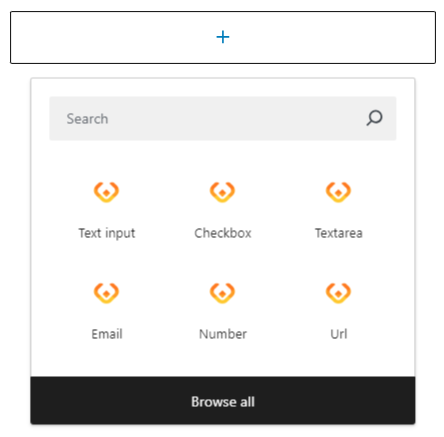
Adding a new field to the WooCommerce checkout form based on blocks.
Checkout Fields for Blocks is a plugin designed to customize the WooCommerce checkout form. The plugin allows adding new fields to the WooCommerce checkout page.

The plugin is a free WooCommerce checkout editor using visual blocks. It requires WooCommerce in version 8.3+ and a theme supporting blocks (block editor).
➡️➡️➡️ Download Checkout Fields for Blocks ⬅️⬅️⬅️
How does the plugin work?
You may customize the WooCommerce new block-based checkout form with new fields.
The plugin allows adding new fields to the WooCommerce checkout form. What’s more, it’s possible to use field general settings, options (for select), validation, display on, and advanced options (text input example).
How to add a new field to the WooCommerce block checkout?
-
Install and activate the plugin. Download Checkout Fields for Blocks
-
Edit the checkout page (more about WooCommerce checkout block).
-
Add a new field or fields to the form (field types below).
-
Use the field settings for checkout customization (options below).
-
Update the page.
Plugin features
✅ Add new checkout fields
You may add a paragraph, image, or separator (the default WooCommerce blocks). However, the plugin extends the number of available options (fields) for the checkout form. Adding a new field is integrated into the block search bar.
The new checkout block fields are also available under the “Checkout Block Fields” category when browsing all blocks.
✅ Field types
It’s possible to choose a new field with the search bar or from the list.
Checkout Fields for Blocks allows the following new fields (field types) for the form.
- Text input
- Number
- Url
- Checkbox
- Select
- Textarea
➡️➡️➡️ Download Checkout Fields for Blocks ⬅️⬅️⬅️
⚙️ Settings for checkout block fields
General settings depend on the field type:
For example, the textarea field comes with:
– Field name
– Meta name
– Label
– Placeholder
– Help text
☑️ Field validation
The plugin allows defining the validation for each field (text input example):
- Required (if the field is mandatory or optional)
- Phone
- URL
- Minimum length
- Maximum length
- Pattern
🎨 Display on settings for checkout block fields
It’s also possible to choose where to show the new checkout fields in WooCommerce.
- Order confirmation
- Admin order
- My Account order
- Order e-mail
➡️➡️➡️ Download Checkout Fields for Blocks ⬅️⬅️⬅️
⚙️ Advanced field settings
Finally, the plugin allows defining the css classes for each field.
🆓 More free plugins
Checkout Fields for Blocks is one of many free plugins from WP Desk. You may find more free plugins for WordPress and WooCommerce by clicking on the link below.
➡️➡️➡️ Free plugins for WordPress and WooCommerce ⬅️⬅️⬅️
Support
We provide limited support for the free version in the plugin Support Forum.
You may help us translate the plugin.
Data use policy
Learn about Use of Data Policy by WP Desk Plugins
⭐PRO Add-ons for Flexible Checkout Fields For Blocks
PRO add-ons extend the functionality of the Flexible Checkout Fields For Blocks plugin for WooCommerce. They allow advanced checkout customization in the block-based checkout, improving usability, flexibility, and order value – without custom development.
Conditional Checkout Fields Add-on
Adds conditional logic to checkout fields in the WooCommerce block-based checkout.
You can show, hide, or set fields as required based on conditions such as cart contents, selected shipping or payment method, user role, order value, other checkout fields, or date.
This helps reduce unnecessary fields, streamline the checkout flow, and improve the customer experience.
Checkout Fields For Blocks – Field Pricing Add-on
Enables price adjustments based on checkout fields in the WooCommerce block-based checkout.
You can apply fixed or percentage-based surcharges and discounts directly from checkout fields, making it easy to offer paid services such as installation, express shipping, or gift wrapping.
The add-on is built specifically for WooCommerce Blocks, ensuring lightweight architecture and predictable behavior.