
WPBot – AI ChatBot for WordPress & Growth Suite: SEO, AI Writer, Email Marketing, Social Media
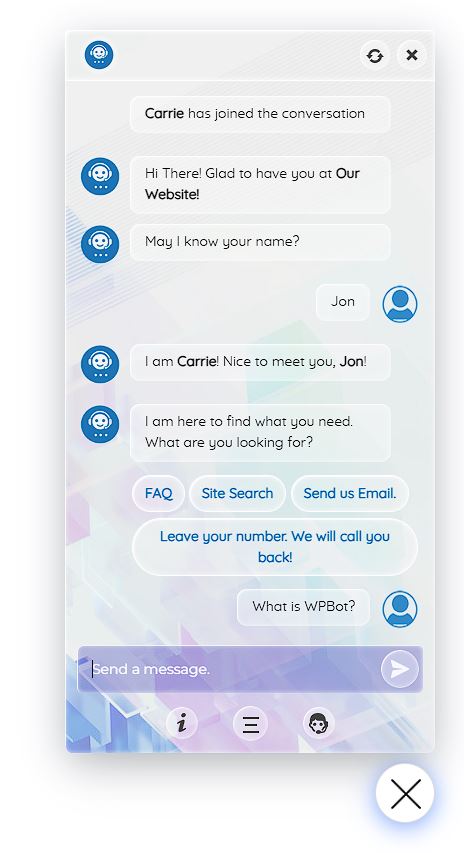
WordPress Chatbot hard at work
WPBot is an AI ChatBot for WordPress. It is also a feature packed AI Growth Suite that completes the full loop of a website’s journey.
Grow your audience with Contents + SEO and AI Search Answer visitors and collect leads with the ChatBot Monitor user journey on website & fix issues with Site Insight Reach your audience with a full email marketing suite.
💡 Each feature and channel shares the data it collects with the others, so your results get more reliable over time. 🚀
Most sites stitch this together from five or six plugins and services that never talk to each other. Your chatbot hears what visitors ask, but your content never answers it. Your forms collect emails, but nobody follows up. Your social posts go out, but you can’t see who came back. WPBot shares and uses the same data from all possible sources & drives your website growth.
AI ChatBot for WordPress, AI Content Writer, SEO & AI Search Optimization, Social Media Outreach, Site Insight, and AI Email Marketing – every feature also works on its own. Start with the one you need today, and add the others when you are ready to grow your website.
🔥 Need more? Upgrade to WPBot Pro for advanced features
💬 Need help? Support, bug reports and feature requests
The WPBot growth loop
- Get found. SEO & AI Search shows what to fix and what to write next, and helps your pages appear in Google and in AI answers from ChatGPT, Gemini and Google AI Overviews. AI Writer writes the articles. WPBot Social schedules and auto posts them to Facebook, Instagram, Threads, Google Business Profile and Telegram.
- Answer and engage. The AI ChatBot answers visitors around the clock from your own content, collects their details with AI Actions, and hands them to you when it isn’t sure.
- Stay in touch. AI Marketing turns visitors into email subscribers, with lists, tags, campaigns and automated sequences. Automator runs the follow-ups for you.
- Reach your goal. Product answers, WooCommerce product copy, review replies, newsletters and timely follow-ups move people toward the action you want: a purchase, a booking, a sign-up or another visit.
- Learn and repeat. Site Insight shows where visitors get stuck. Train turns the questions your chatbot couldn’t answer into new answers or new articles. Those articles bring in new visitors, and the loop starts again.
Data-driven: every feature learns from the others
WPBot acts on data, not guesses. It reads what your visitors ask and do, what search engines and AI assistants see, and what your store sells. Then each feature uses what the others learned, so every decision starts from real numbers.
Data WPBot works from:
- Your own site: chat questions and conversations, site searches, 404 errors, visitor recordings and heatmaps, form entries, email opens and clicks, WooCommerce products and orders.
- Outside sources you connect: Google Search Console, Google Analytics, Google Ads, Google Business Profile, Bing Webmaster Tools, PageSpeed Insights, YouTube, RSS feeds and keyword data providers.
How the features feed each other:
- Questions the chatbot couldn’t answer become new answers or AI Writer articles.
- SEO keywords and ideas open in AI Writer with a ready brief, or go straight to its content calendar.
- AI Writer takes facts from the chatbot’s knowledge base and Business Context, and uses Site Insight and Search Console traffic to warn you when a page starts to decline.
- Finished articles go to WPBot Social, with tracked links so you can see which posts bring visitors back.
- Chatbot and form leads join AI Email Marketing lists, and Automator acts on chatbot, form and store events.
Why WPBot
- No caps on features. No limits on articles, keywords, scans or social accounts. Grow as far as you like without hitting a paywall in the middle of your work.
- Your AI, your key, your price. Works with OpenAI, Anthropic Claude, Google Gemini, xAI Grok, Mistral, DeepSeek and OpenRouter. You pay your AI provider directly at their price, and WPBot shows what each reply and task costs, so there are no surprises.
- Your data stays on your site. Chats, leads, subscribers, recordings and heatmaps are stored in your own WordPress database, not on someone else’s servers.
- Fast pages. WPBot has its own caching and performance options so it does not affect your website speed.
- Works with what you already use. Yoast SEO, Rank Math, All in One SEO, WooCommerce, WPForms, Contact Form 7, Gravity Forms, FluentCRM, popular caching plugins, and any language, including right-to-left.
AI ChatBot for WordPress
The WPBot ChatBot answers visitors’ questions from your own website content, day and night, collects their details and hands them to you when they need a person.
- A knowledge base that keeps itself up to date. Pages, posts, products and custom post types sync when you save them, so the bot never quotes an old price or a closed offer. Add PDF, CSV and XML files, web pages and database tables for everything that isn’t on your site.
- Answers people can trust. Answers can link to the page they came from. Choose what the AI may talk about: only your site’s topics, your topics first, or anything.
- Train. Questions the bot couldn’t answer are grouped and ranked by how often they come up. Add an answer, write an article about it, or ignore it. Every gap you close makes the bot and your site more useful.
- Handoff buttons. When the bot isn’t sure, visitors can leave a message, email you or ask for a call back, so nobody leaves without a way forward.
- Built-in features that need no AI: Simple Text Responses, FAQ, site search, email us, call me back and feedback.
- Costs you can see and control. The cost of every AI reply is shown in AI Settings and Chat Sessions. Set limits and budgets in AI spending and usage control, below.
- Chat Sessions. Every conversation is saved, so you can see what people really ask. Conversations are included in WordPress’s personal data export and erase tools.
- Make it yours. Templates, colours, icons and every message, in any language to match your branding.
Integrations: OpenAI, Anthropic Claude, Google Gemini, xAI Grok, Mistral, DeepSeek and OpenRouter for answers; OpenAI, Gemini, Mistral and Voyage AI for knowledge base search; WooCommerce products; AI Marketing lists; webhooks; Automator; WordPress Abilities and MCP; WordPress privacy tools.
SEO & AI Search
SEO & AI Search tells you exactly what to fix and what to write next to get found on Google and cited in AI answers from ChatGPT, Gemini and Google AI Overviews. Instead of a score and a pile of warnings, you get a clear to-do list, ordered by what will bring the most visitors. It replaces the old SEO Analyzer.
- Opportunities from day one. A page audit, a technical scan and a Topic Map run in the background after you install, with no AI key needed.
- One-click AI fixes. Titles, descriptions, alt text, FAQ and introductions, each reviewed by you before saving and easy to undo.
- Keyword research. An unlimited Keyword Vault, Keyword Map, Topic Map and competitor gaps, with free keyword data from Bing Webmaster Tools.
- AI search readiness and llms.txt. A checklist per page for clear answers, FAQ, schema and entities, the things AI assistants look for when they choose what to quote.
- Get cited by AI. Find the Reddit, Quora, YouTube and forum threads AI assistants learn from, and get a helpful, disclosed draft for each. You post it yourself.
- Technical SEO. Indexing, sitemaps, robots.txt, broken links, canonicals, structured data, a 404 log and redirects.
- Local SEO for sites with a location: LocalBusiness schema, a Google Business Profile health check, AI review replies you approve, a review QR code to print, and a planner for service and area pages.
- Proof it worked. Before-and-after results at 14, 28 and 90 days, and a weekly email summary.
Integrations: Google Search Console, Google Analytics, Google Ads (through a linked Analytics property), Google Business Profile, Google PageSpeed Insights, YouTube Data API, Bing Webmaster Tools, DataForSEO, Keywords Everywhere, Semrush, Yoast SEO, Rank Math, All in One SEO, WooCommerce, and your AI provider.
AI Writer and AI Content Generator
AI Writer writes articles, pages, WooCommerce product descriptions and social posts in your voice, from your real facts. Publishing regularly is how sites grow, and AI Writer turns hours of writing into a review of a draft. It replaces the old AI Content Generator.
- Guided writing. A brief, an outline you approve, then section by section into native blocks, with FAQ and images.
- Ten article formats. Listicle, how-to guide, tutorial, checklist and FAQ, plus original research, statistics roundup, comparison (vs), case study and template or framework in WPBot Pro, each with its own structure and schema.
- Real data. Facts from your pages, products, documents and the chatbot’s knowledge base, each with its source, so your content is accurate and different from everyone else’s.
- Topic Finder and content calendar. Ideas from your site search, Search Console, your store, RSS feeds and seasons, planned on a drag-and-drop calendar, so you never wonder what to publish next.
- Honest persuasion. Choose the reader’s stage and a framework per piece, compare techniques, and get flags for invented proof, fake urgency or prices that don’t match.
- Quick write. 14 templates for emails, ads, product copy, social posts and review replies.
Integrations: OpenAI, Anthropic Claude, Google Gemini, xAI Grok, Mistral, OpenRouter or your own AI server; Pexels, Pixabay, Openverse and Unsplash images; Google Search Console; RSS feeds; WooCommerce; Yoast SEO, Rank Math and All in One SEO; the block editor and the Classic Editor; the chatbot’s knowledge base.
Social Media Marketing: schedule and auto post
WPBot Social plans, writes and auto posts your content to social media from WordPress. Your audience is on social networks; WPBot Social keeps you in front of them without opening five apps every day.
- Write with AI for each network’s rules and length, from a topic or any page.
- Schedule posts, see them on a calendar, and add tracked links to follow in your analytics.
- Share finished articles from AI Writer in a few clicks.
- No account limits in the free version.
Integrations: Facebook Pages, Instagram, Threads, Google Business Profile, Telegram channels, WhatsApp (a ready copy you send yourself), AI Writer, Automator, the Media Library and your AI provider.
Email Marketing and Automation
AI Marketing turns visitors into subscribers and runs your email marketing from WordPress. Email is the one channel you own: no algorithm decides who sees your message.
- Lists and tags for contacts from the chatbot, your forms, your WooCommerce customers and your WordPress users.
- Campaigns and sequences. Personalized campaigns, scheduled sends and automated email sequences that welcome, follow up and remind.
- AI writing help. Email templates, subject lines and preview text, plus a check for spam-trigger words.
- Open and click tracking built in.
Integrations (AI Marketing): WPBot ChatBot leads, WPForms, WooCommerce customers, WordPress users, a sign-up shortcode, CSV import and export, and WordPress email (works with any SMTP plugin).
Integrations (Automator): triggers from WordPress, WooCommerce, Contact Form 7, WPForms, Gravity Forms, Facebook Lead Ads, incoming webhooks and WPBot; actions for email, webhooks and API requests, WordPress, WooCommerce, FluentCRM, Google Sheets, Telegram, Facebook, OpenAI, Claude, Gemini, Grok, Groq, Mistral, OpenRouter and mailboxlayer.
Site Insight: heatmaps and session recordings
Site Insight shows how real visitors use your site, recorded and stored on your own server. Analytics tells you that people left; Site Insight shows you why.
- Session recordings with replay, and click and scroll heatmaps for desktop, tablet and mobile.
- Frustration signals: rage clicks, dead clicks, quick backs and JavaScript errors, marked on the replay so you find problems in minutes.
- AI visit summaries (optional): the visitor’s goal, struggles and outcome in two or three sentences.
- Email reports weekly or monthly, compared with the period before.
- Privacy first. Form inputs are masked in the browser before anything is sent.
Integrations: WP Consent API, Do Not Track and Global Privacy Control; OpenAI, Anthropic Claude, Google Gemini, xAI Grok and OpenRouter for summaries; WordPress email for reports.
AI spending and usage control
You decide how much AI costs, feature by feature, so a busy month never turns into a surprise bill.
- Own key, provider and model per feature. Use a low-cost model for social posts and a stronger one for long articles.
- Monthly budgets in US dollars for AI Writer, SEO & AI Search and WPBot Social. When a budget is used up, only that feature’s AI pauses, with a notice to raise it; everything else keeps working.
- See every cent. The cost of each chatbot reply is shown in AI Settings and Chat Sessions. AI Writer’s Usage screen shows calls, tokens and estimated cost by month, feature and model.
- Limits for visitors. 60 AI answers per guest a day by default, plus rate limits per user role and time frame.
- Ask before spending when AI spending may go over the limit you set
- A backup provider in AI Writer takes over only when the main one fails, so a used-up account doesn’t stop your work.
Who WPBot helps
- Online stores: answer product questions, write product descriptions, win back customers by email.
- Bloggers, creators and publishers: find topics, write articles, share them and grow a subscriber list.
- Nonprofits, schools and communities: answer common questions, take sign-ups and keep members informed.
- Agencies and freelancers: one plugin for chat, SEO, content and email on every client site.
- Local and service businesses: local SEO, Google review replies and enquiries from the chat.
- SaaS and membership sites: qualify sign-ups, book demos and answer support questions.
WPBot Pro
WPBot Pro adds more for growing sites and agencies:
- ChatBot: a WooCommerce and Easy Digital Downloads shopping assistant, live chat, Messenger, Instagram, WhatsApp and Telegram chatbots, a conversational form builder, voice, multi-language, model failover, answer caching, and AI budgets with alerts per bot and user role.
- SEO & AI Search: AI visibility tracking, alerts, bulk tools, competitor keywords, review request emails, multiple locations and white-label reports.
- AI Writer: interview mode, bulk writing, campaigns, research from your own data, several voices and A/B tests.
- Social: LinkedIn, X, Pinterest, TikTok, YouTube Shorts, Bluesky and more, plus trends, a social inbox, analytics and approvals.
- Site Insight: funnels, goals, segments and WooCommerce events.
- Agencies: white label and use on many sites.