


Geo Controller – Geolocation & Geotargeting
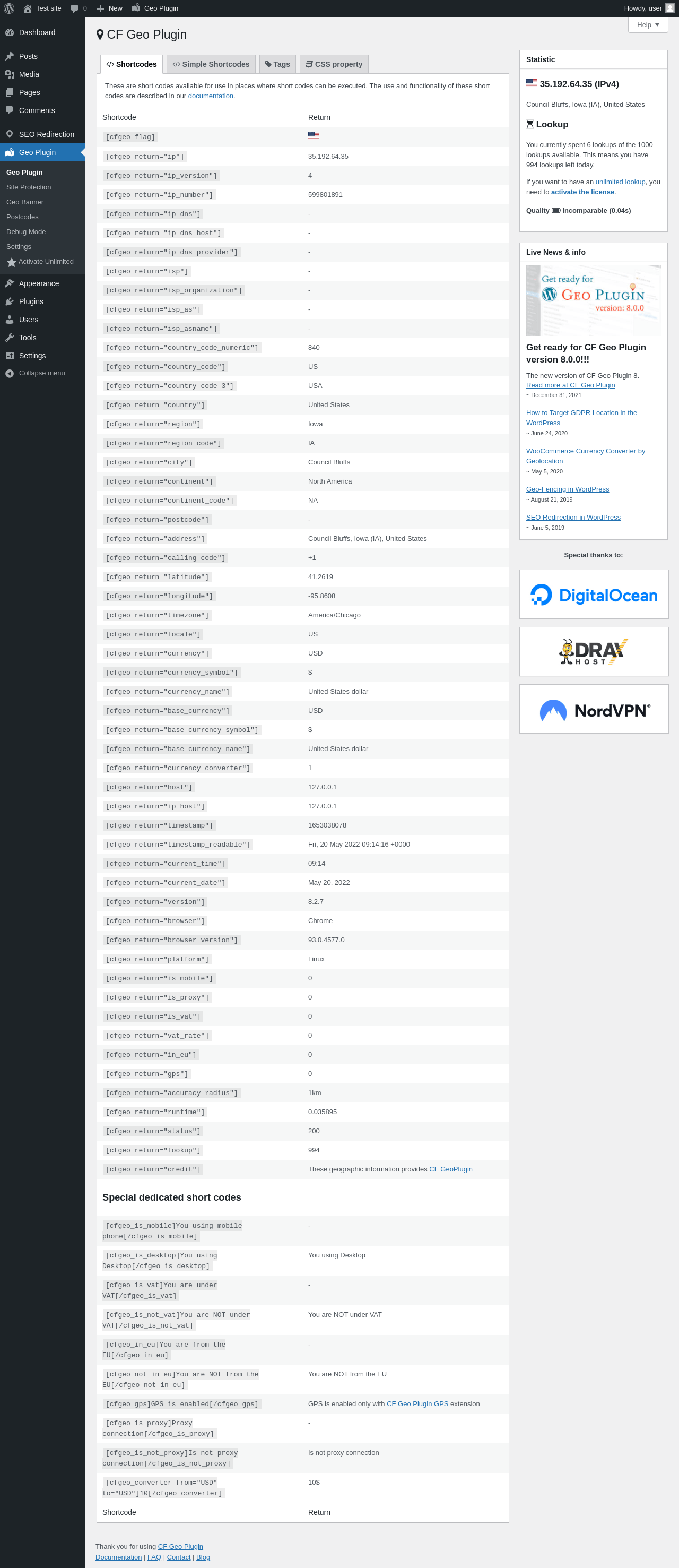
Geo Controller Available shortcodes and values
Geo Controller is a WordPress geolocation and geotargeting plugin that uses IP location data to personalize website content, redirect visitors by country or region, localize WooCommerce, and control geographic access. It combines location-based shortcodes, conditional content, geo redirects, country flags, Google Maps, Geo Defender, and developer APIs in one plugin.
Previously known as CF Geo Plugin, Geo Controller continues the development of the original WordPress geolocation plugin under its new name. Existing users can continue using supported shortcodes, integrations, and location-based functionality without switching to a different plugin.
WordPress IP Geolocation
Geo Controller resolves a visitor’s IP address through the Geo Controller API and makes the available location data accessible in WordPress. Depending on the lookup response and enabled options, this can include country, region, city, postcode, coordinates, timezone, language, currency, ISP, hostname, proxy, TOR, and device information.
- IPv4 and IPv6 lookup support
- Trusted proxy and Cloudflare-aware IP detection
- Configurable SSL, proxy, cache, and API transport settings
- Default values when requested data is unavailable
- Optional DNS, ISP, currency, and device-related data
IP geolocation is approximate. VPNs, proxies, mobile networks, shared connections, CDN configuration, and database accuracy can affect results. Review data sources and accuracy and IP detection guidance before using location data for important decisions.
Geotargeting and Dynamic Content
Use WordPress shortcodes to display visitor data or conditionally show content by country, region, city, continent, postcode, EU status, VAT status, proxy, TOR, or device type. Geo Banner rules provide another way to target text, media, and other WordPress content.
Common examples:
[cfgeo return="country"]
[cfgeo return="city" default="Your Default Text"]
[cfgeo include="US,GB,DE"]Content for selected countries.[/cfgeo]
[in_eu]Content for EU visitors.[/in_eu]
Nested shortcodes remain available in conditional content where the surrounding WordPress content area processes shortcodes. Optional Simple Shortcodes, such as [cfgeo_city], must be enabled in Geo Controller settings. See the shortcode reference for supported attributes and return values.
Location-specific HTML can be affected by full-page caching when one cached response is shared between visitors. Follow the dynamic content and caching guidance and test every rule with a safe fallback.
Common Geolocation Use Cases
Geo Controller can be used to create location-aware WordPress experiences without building a separate geolocation system.
- Display different content, messages, banners, or affiliate links based on visitor location.
- Redirect visitors to country-specific pages, regional websites, or localized content.
- Show local contact information, phone numbers, addresses, and Google Maps.
- Customize WooCommerce payment options and currency information by visitor location.
- Restrict access from selected countries, IP addresses, proxies, or TOR networks.
- Provide location-based information to custom themes, plugins, forms, and integrations.
These features can be combined using shortcodes, conditional content, WordPress integrations, and developer APIs. Availability depends on configuration and, for selected features, the active license.
Geo Redirects and Geographic SEO Redirection
Create ordered geographic rules for pages, posts, custom post types, or site-wide destinations. Rules can evaluate supported country, region, city, and postcode values, with exclusions, bot handling, referrer controls, and CSV import/export tools.
Available response codes are 301, 302, 303, 307, 308, and 404. Choose the response that matches the intended behavior: permanent redirects should not be used while destinations are still being tested, and 404 returns a not-found response rather than redirecting the visitor.
Redirects do not guarantee search-engine results or legal compliance. Avoid redirect loops, keep destinations crawlable where appropriate, and test caching, canonical URLs, language settings, and bot behavior before production use.
WooCommerce Geolocation, Currency and Payments
The included WooCommerce integration can use Geo Controller location data to support:
- Customer geolocation and location data saved with orders
- Country-based payment gateway visibility
- Local currency information and currency conversion
- EU and VAT-aware content
- Classic Checkout, Checkout Blocks, Store API, and HPOS workflows
Some WooCommerce controls and service-backed data require an eligible active license. Availability is shown in the plugin settings. Currency results are informational and may not match the final rate used by a payment provider, bank, tax service, or accounting system.
Geo Defender and Visitor Access Control
Geo Defender can restrict access using configured geographic and IP rules, with support for TOR, proxy, and spam-related signals where available. Administrators can configure a response, allow trusted addresses, receive notifications, and use the existing recovery mechanism if a rule blocks administrative access.
Geolocation and reputation signals can be incomplete or incorrect. Geo Defender is an access-control aid, not a replacement for authentication, a firewall, malware protection, or professional security and compliance review. Test rules carefully before enabling them on a production site.
Google Maps, Country Flags and Geographic Metadata
Enable [cfgeo_map] to display a single-point Google Map for a detected or specified location. A valid Google Maps API key is required.
[cfgeo_map longitude="-74.0059" latitude="40.7128" zoom="15" title="My Company Name"]
    <h3>My Company Name</h3>
    <p>No Name Street 35, New York, USA</p>
    <p>We have what you need</p>
[/cfgeo_map]
Geo tags can add configured geographic metadata to selected public content. Country flags are available through [cfgeo_flag], including custom country, size, class, ID, inline CSS, and include/exclude options.
Examples:
[cfgeo_flag]
[cfgeo_flag country="ca" size="32px"]
Read the Google Maps shortcode documentation before enabling map output. Google Maps is a separate external service with its own account, billing, terms, and privacy behavior.
Integrations and Developer Features
The plugin contains dedicated integration code for WooCommerce, Elementor, Contact Form 7, Gravity Forms, BuddyBoss Platform, WooPlatnica, and Yoast SEO. It also includes Cloudflare-aware IP handling and settings intended for common caching configurations. Compatibility still depends on the active theme, plugin versions, cache/CDN behavior, and site configuration.
Developers can use:
CFGP_U::api()for the current structured geodata arrayCFGP_U::api('country_code')for a single available fieldCFGP_API::lookup()for an explicit advanced lookupwindow.cfgeowhen the plugin’s JavaScript output is enabled- Native WordPress
do_shortcode()in templates that intentionally render shortcode content - The optional public REST lookup feature when the required license level is active
Always validate returned keys and provide fallbacks because not every lookup returns every field.
Free and Licensed Features
The plugin can be installed and used without a paid license. The standard Geo Controller API allowance is up to 500 lookups per day. An active paid license provides unlimited lookups during its license period, and some service-backed features are enabled according to license level.
License-dependent controls can include automatic spam-IP checks, selected WooCommerce payment controls, and the public REST lookup service. The admin interface indicates whether a setting requires a license. Current license plans, available features, and site limits are listed on the pricing page.
Geo Controller depends on an external API service for IP lookup data. Review the Privacy Policy and privacy, consent, and compliance documentation to decide how the service fits your site’s disclosures and legal obligations.
Plugin Links
External Services and Privacy
Geo Controller sends IP lookup requests to the Geo Controller API. Optional Google Maps output uses Google Maps separately when configured. Site owners are responsible for evaluating these services, providing appropriate notices or consent, and meeting applicable legal requirements.
Review the Privacy Policy, Terms and Conditions, and privacy documentation before deployment.