


Category Image Manager by DevDesignDazzle
0/5 (0 ratings) — active installs Updated Apr 10, 2025
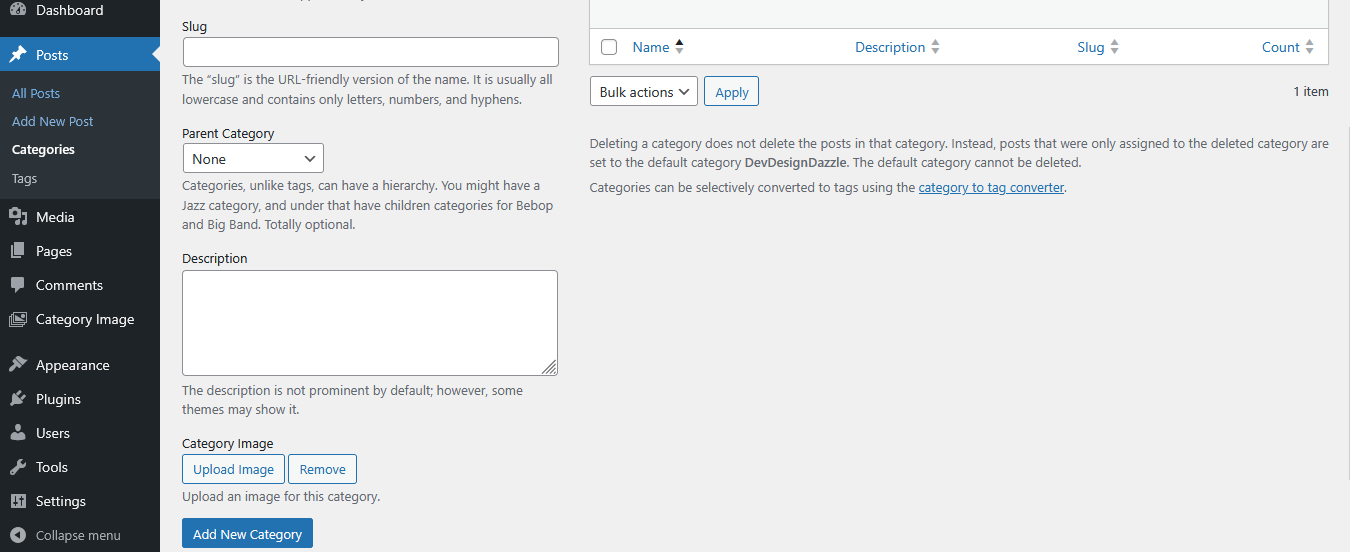
Adding an image in the category creation screen.
Category Image Manager by DevDesignDazzle enhances your WordPress site! Easily add images to categories for stunning pages, archives, and menus. This lightweight plugin lets you upload category images via the admin panel and display them anywhere with a simple function. Perfect for bloggers, e-commerce, and custom themes. Supports multiple image sizes (thumbnail, medium, large, full) and future-ready for premium upgrades. Boost your site’s visuals—install now!
Usage
- Add Images: Navigate to Posts > Categories, edit or create a category, and use the “Category Image” field to upload an image.
- Display Images: Use this function in your theme files:
- Category Archives Example: Add this to
archive.phporcategory.phpafterget_header():
<?php $category_id = get_queried_object_id(); if (is_category() && function_exists('dddCatImageManager_get_category_image')) { $category_image = dddCatImageManager_get_category_image($category_id); if (!empty($category_image)) { echo '’ . $category_image . ”; } } ?> - Image Sizes: Customize with sizes like
'thumbnail','medium','large', or'full':
Support
- Plugin Website: DevDesignDazzle
- Support Forum
Privacy
Category Image Manager by DevDesignDazzle does not collect or store any personal data.