


CatCraft for WooCommerce
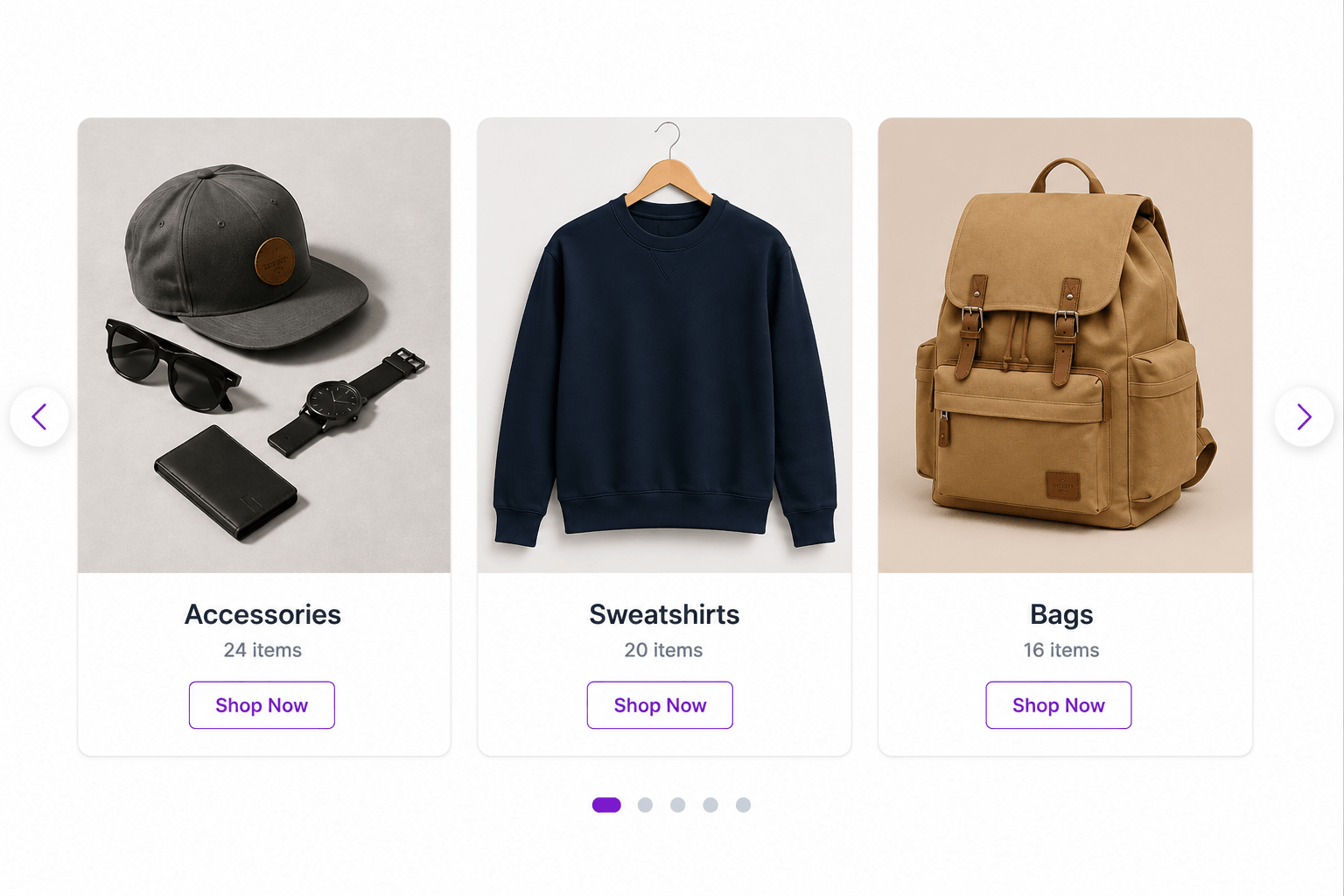
Standard Card grid layout on the frontend
CatCraft for WooCommerce is a Gutenberg block plugin that displays WooCommerce product categories as grids, sliders, banner sections, and hero sliders, without shortcodes, page builders, or extra plugins. Everything is built as a native WordPress block, so you add the block, pick a layout, and it appears on the page exactly as shown in the editor.
The plugin was built for store owners who want a homepage that looks like it was designed by a theme developer, not a default WooCommerce archive page. Every layout is fully responsive, works with your existing theme, and loads no external requests since Swiper (the slider engine) is bundled locally inside the plugin.
What can you build with it?
- A classic category grid on your shop homepage
- An icon-style category menu near your header or footer
- A photo-led overlay card section for editorial-style homepages
- A full-width hero slider for seasonal sales and featured collections
- A split-screen slider pairing a category image with a headline and call-to-action button
- A smooth cards carousel with swipe support and autoplay
Grid Layouts
Standard Card
A clean image-above, text-below card. Shows the category image, title, description, product count, and a “View All” link stacked in order. The default layout for most WooCommerce category grids.
Icon Card
A compact card with a contained, non-cropped image and a label underneath. Suited to logos, icons, or simple product illustrations. Commonly used for category navigation menus, similar to what you see on large grocery or marketplace sites.
Overlay Card
A bold image card with the title and meta text placed directly on top of the photo using a gradient for contrast. Built for editorial-style shop homepages where the visuals carry most of the attention.
Slider Layouts
Cards Carousel
A horizontal, swipeable row of category cards. Shows between 1 and 5 slides at once, with autoplay, pagination dots, and arrow navigation that fades in on hover.
Overlay Banner
A full-width hero slider where each slide is a category image with a gradient overlay, a title, a short description, a product count, and a call-to-action button. The background for each slide can be a category image, a solid color, or a custom CSS gradient.
Split Banner
A full-width, split-screen slider with the category text and call-to-action on one side and the category image on the other. Useful for storytelling-style promotions where you want the copy to have its own space instead of sitting on top of a photo.
Why store owners use CatCraft
- Single native Gutenberg block, no shortcodes and no separate page builder plugin required
- Live preview inside the block editor using your real WooCommerce categories, so what you see while editing is what visitors see
- 6 layout styles across grid and slider modes
- Load More button option reveals additional categories on click without a page reload
- Swiper is bundled locally, so no requests are sent to a third-party CDN
- Works on fashion stores, grocery stores, electronics stores, and marketplaces alike
- Fully translatable and coded to WordPress standards
Customisation
CatCraft outputs clean, predictable CSS classes so you can restyle it from your theme’s stylesheet or the WordPress Additional CSS panel:
.cat-display-block— Main container for the block.cat-display-layout-grid— Applied when a grid layout is active.cat-display-layout-slider— Applied when a slider layout is active.cat-display-item— Individual category card.cat-display-title— Category name.cat-display-count— Product count text.cat-display-desc— Category description text.cat-display-viewall— View All link text.cat-banner-slide— Slider banner slide wrapper.cat-banner-heading— Banner slide title.cat-banner-button— Banner CTA button
Source Code & Build Instructions
The full source code for this plugin is publicly available on GitHub:
https://github.com/jenish-wordpress/catcraft-for-woocommerce
The build/ directory contains the compiled assets. To build from source:
- Clone the repository
- Run
npm install - Run
npm run build
The src/catcraft-for-woocommerce/ directory contains all human-readable source files:
index.js— Block registration entry pointedit.js— Block editor component (JSX)style.scss— Frontend styleseditor.scss— Editor-only stylesblock.json— Block metadata and attribute definitionsrender.php— PHP server-side render callback
Third Party Libraries
Swiper.js — bundled locally inside /assets/
* Purpose: Slider and carousel functionality
* License: MIT
* Homepage: https://swiperjs.com
No data is sent to any external server. Swiper is served from the plugin’s own asset folder.