


ByteCoreStack – Lightsail CDN Cache Manager
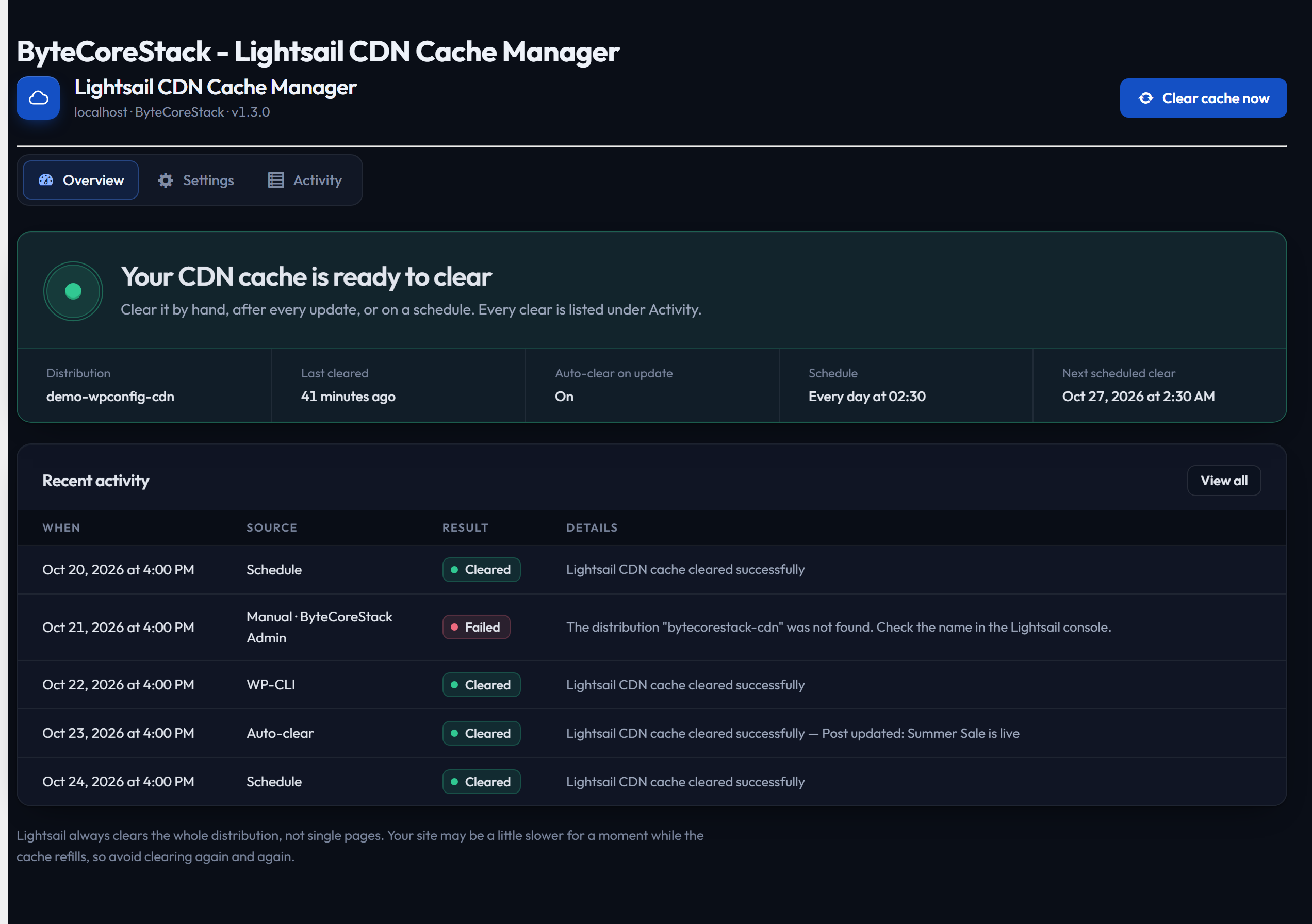
Overview: status, one-click clear and recent activity
ByteCoreStack – Lightsail CDN Cache Manager is the WordPress plugin built around one job — AWS Lightsail cache clear, done right. If your site, blog, or WooCommerce store runs behind an Amazon Lightsail content delivery network (CDN) distribution, this plugin puts you in full control of that cache directly from wp-admin: a one-click manual cache purge, an automatic cache clear the moment you publish or update content, or a scheduled cache invalidation on a recurring timer — all without ever opening the AWS console.
Search terms like “clear Lightsail cache,” “AWS Lightsail CDN plugin,” “Lightsail cache purge WordPress,” and “Amazon Lightsail cache invalidation” all describe exactly what this plugin does. It’s the missing piece between WordPress and the ResetDistributionCache action on your Lightsail distribution — a dedicated cache management plugin for Lightsail, not a generic multi-CDN tool with Lightsail bolted on as an afterthought.
Use it to manually purge your Lightsail CDN cache with one click, fire an automatic cache clear the instant you publish or update content, or set a scheduled cache clear so your cache invalidates itself on its own — hourly, daily, weekly, monthly, or at custom intervals.
Why Use This Plugin?
If you’ve wished WordPress cache management for Lightsail was as simple as clicking a button, this is it:
- Built specifically for Amazon Lightsail — not a generic CDN plugin awkwardly bolted on; it speaks the Lightsail API directly using AWS Signature Version 4.
- No stale content after publishing — auto-clear on publish/update means visitors never see outdated cached pages.
- Set-and-forget scheduling — interval, weekly, or monthly cache clears with a live countdown so you always know when the next clear runs.
- Connect in a minute — paste your access key, secret key and distribution name on the Settings tab, or keep them in wp-config.php if you prefer. Constants in wp-config.php always take priority.
- Your secret key is protected — saved encrypted, never shown again after saving, and never sent back to the browser.
- One-click connection test — verify your AWS Lightsail credentials and distribution name are correct before you ever rely on it.
Key Features
Manual Cache Clearing
* Run a Lightsail cache clear in seconds, right from WordPress admin
* Instant feedback on cache clearing status
* Perfect for when you need immediate control
Automatic Cache Clearing
* Automatically clear CDN cache when content is published, updated, or unpublished
* Also triggers on attachment deletion, taxonomy term edits, nav menu changes, and widget changes
* Select which post types trigger cache clearing, with support for custom post types
* Rapid successive changes are batched into a single deferred clear (fired ~60 seconds later via WP-Cron) instead of one AWS call per save
* Note: Lightsail’s ResetDistributionCache API always resets the entire distribution — there is no per-page/per-path purge
Activity Log
* A local history of every cache clear — manual, automatic, scheduled, and WP-CLI — with timestamp, status, and who/what triggered it
* Stored in your own WordPress database (Lightsail has no live invalidation-history API to pull from, unlike CloudFront)
* Paginated table, kept for 90 days and pruned automatically after that — nothing to manage by hand
WP-CLI Support
* Trigger a cache clear from the command line or a CI/CD deploy pipeline: wp bcs-lsm flush
* Every CLI-triggered clear is recorded in the Activity Log
Scheduled Cache Clearing
* Pick Every hour, Every 6 hours, Every day or Every week
* Choose the time (and weekday) for daily and weekly clears
* Schedules created by earlier versions (5-minute intervals, monthly, several weekdays) keep running and are shown as “Keep: …”
* Shows the next scheduled clear on the Overview
* Uses your WordPress timezone settings
Test Connection
* One-click AWS connection test before you rely on it
* Verifies your access key, secret key, and Lightsail distribution name
* Calls the read-only Lightsail API — never touches your cache
* Clear, specific error messages when something’s misconfigured
Simple Setup
* Three tabs: Overview, Settings and Activity
* Enter your keys on the Settings tab, or use wp-config.php constants (they override the saved values)
* “Save & test connection” confirms everything works before you rely on it
* Secure AWS Signature Version 4 authentication
Monthly Report
* Optional email on the 1st of each month summarising the month before: total clears, successes, failures, and which triggered them
* Send it to several addresses, entered as pills, each checked as you type
* Send last month’s report on demand any time, without waiting for the 1st
Site Health
* Adds a status check to Tools Site Health Status, so a broken connection or a failing clear is visible even to admins who never open the plugin
* Adds a read-only summary to the Info tab for troubleshooting and support
Perfect For
- WordPress sites and blogs hosted behind an Amazon Lightsail CDN distribution
- Agencies and freelancers managing multiple client sites on AWS Lightsail
- Publishers and news sites that need fresh content delivered fast after every update
- Developers who want automated, hands-off Lightsail cache invalidation
- WooCommerce and membership sites with frequently changing content
- Anyone replacing manual AWS console cache purges with a WordPress-native workflow
Requirements
- An AWS account with an active Amazon Lightsail content delivery network (CDN) distribution
- AWS Access Key ID and Secret Access Key with Lightsail permissions
- WordPress 5.3 or higher
- PHP 7.2 or higher
Documentation
Full setup instructions and documentation available at https://bytecorestack.com/plugins/lightsail-manager
External Services
This plugin connects to the AWS Lightsail API to perform CDN cache invalidation operations.
AWS Lightsail API
This plugin sends requests to the AWS Lightsail REST API endpoint:
https://lightsail.{region}.amazonaws.com/
What data is sent:
- Your Lightsail distribution name (stored on your site, in the plugin’s settings or wp-config.php)
- A cache reset request signed with your AWS credentials using AWS Signature Version 4
When data is sent:
- When you manually click “Clear cache now” or “Save & test connection” (the test only reads distribution status)
- When a post/page is published or updated (if Auto-Clear is enabled)
- On a recurring schedule (if a schedule is turned on)
- When you run
wp bcs-lsm flush
No personal data, user data, or site content is transmitted to AWS beyond the distribution name and the cache-clear command.
AWS Terms of Service: https://aws.amazon.com/service-terms/
AWS Privacy Policy: https://aws.amazon.com/privacy/
Support
For support, feature requests, or bug reports, please visit:
* Plugin page: https://bytecorestack.com/plugins/lightsail-manager
* Author website: https://bytecorestack.com/
Privacy Policy
This plugin does not collect, store, or transmit any user data. All AWS credentials are stored locally in your wp-config.php file and are only used to communicate with the AWS Lightsail API for cache management operations. See the External Services section above for full details on what is sent to AWS.
Credits
Developed by ByteCore Stack.
License
This plugin is licensed under the GPLv2 or later.