

Five Star Business Profile and Schema
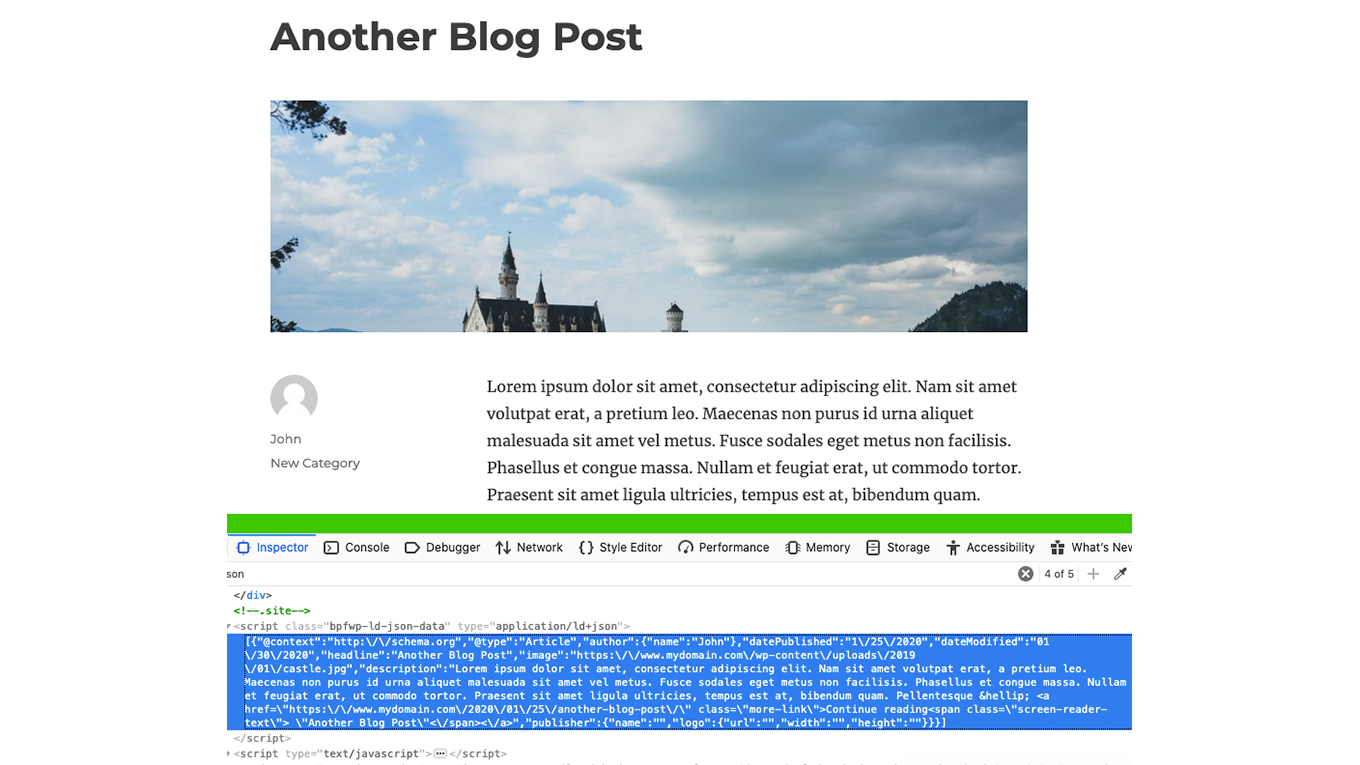
Showing the LD+JSON structured data output on a post page.
Keep your website’s business details, opening hours and location information accurate and easy to find. Five Star Business Profile and Schema lets you create contact cards with addresses, phone numbers, opening hours, holiday exceptions and optional Google Maps, alongside Schema.org structured data that reflects your published business information.
Display your contact card with a Gutenberg block, shortcode or widget. Manage one business or multiple locations, and create additional schema rules for pages, posts and supported post types.
Business Profile manages information published on your WordPress website. It does not update Google Business Profile or other external business listings, and structured data does not guarantee a particular search appearance or ranking.
Key Features
- Display business contact details with a Gutenberg block, shortcode or widget.
- Publish opening hours and exceptions, including overnight hours and holiday closures.
- Manage multiple locations with separate contact details and schedules.
- Choose whether location fields use the main business value, a local value or an intentionally empty value.
- Distinguish public business locations from internal resources.
- Add an optional Google Map and directions link to your contact card.
- Follow a resumable setup process to enter business details and prepare a contact page.
- Add JSON-LD structured data using the included organization and content schema types.
- Customize schema values for individual pages and posts, including nested and repeated fields.
- Open Google’s Rich Results Test to inspect a page’s supported structured data.
Five Star Business Profile and Schema includes a guided setup process for your contact information, opening hours and contact page. You can select an existing page or prepare a new draft, then review the page before publishing.
Add Structured Data to Any Page
The plugin comes with a database of every organization type schema and every rich results type. With this you can easily create a new schema element and assign a specific structured data type to a page, an individual post, an entire post type, or to your site as a whole.
Each schema and rich results type comes with its corresponding properties/fields, as per schema.org. When you add a schema element, you can fill in each of these properties with defaults that you want to apply to all posts/pages that have the schema. You can then customize each property directly on the post edit screen, should you need to make a change for a specific page or post.
Whether you’re running your website for a local business, a corporation, a restaurant, a specific project, a sports team, or any other type of organization, with just a few clicks, you can have the correct schema added to your pages, to help enhance your results in search engines!
Business Profile Contact Card
The Five Star Business Profile and Schema plugin is also perfect for adding your contact details to any page on your site. It comes with a handy form to help you fill in your info, which then gets automatically included on your site both as a contact card and as schema structured data, using the new LD+JSON format.
Your contact card can be quickly added anywhere on your site using a block, shortocde or widget, which will display the following info:
- Business name
- Address
- Phone number with separate click-to-call phone number
- Cell phone number with click-to-call functionality
- Whatsapp number with click-to-call functionality
- Fax number
- Contact page link or email address
- Link to Google Map with directions to your establishment
- Google Map showing your location
- Opening hours
- Exceptions for opening hours, to specify days that are closed or have different hours (e.g. holidays)
For all of this information, the correct schema.org markup is added LD+JSON format. This helps search engines, like Google, discover your address, phone number and opening hours, so they can display them with your listing on Google.
Choose from a wide array of microdata item types for your business schema, including:
- Corporation schema
- Organization schema
- Local Business schema
- Restaurant schema
- Many more!
Google Maps Structured Data
Add an optional Google Map and directions link to your contact card using your own Google Maps API key. Maps load as they approach the visible area of the page. Your textual business details remain available if a map cannot load.
Review the map position and directions before publishing your contact page.
Your business location, including the business address, will be displayed on a map (with the correct map schema), as well as in text with the correct location microdata.
Multiple Locations
Business Profile supports multiple locations. This powerful feature works great for businesses that have several offices, for delivery services, for restaurants with multiple locations, etc. Business location schema is added to each entry and you can showcase your details using the Gutenberg schema block, via the location shortcode or with the included widget.
Using the contact card block, you can display a public location and search for public locations in the block’s location selector.
For help getting started with this, you can visit:
https://doc.fivestarplugins.com/plugins/business-profile/user/multiple-locations
For supported location fields, choose “Use main business value,” “Use this location value” or “Leave intentionally empty.” This lets you share common details without forcing every location to show the same information. Existing locations can retain their existing field behavior until you change it.
Choose a publication purpose before publishing a new location. Public business locations can appear in Business Profile’s public output. Internal resources are excluded from that output.
You can choose separate organization schema, corporation schema or local business schema for each new location you create, so each schema shortcode and each page’s contact info is uniquely optimized with SEO and search results in mind.
Five Star Restaurant Reservations Integration
The multiple location structured data for your business also syncs up with the Five Star Restaurant Reservations to automatically offer a dropdown in your reservation form, so people can pick which location they want to book at.
Public opening hours are separate from reservation availability. If you also use Five Star Restaurant Reservations, manage booking availability in that plugin and verify your connected location workflow before changing location purposes.
WooCommerce Integration (Requires Premium)
The premium version includes new integrations that will help you automatically apply specific structured data to certain areas of your site. For example, the WooCommerce Integration option will automatically add full Product schema to your WooCommerce shop, helping to enhance the search results for your products.
Post/Article Integration (Requires Premium)
There is also a posts integration option, which will automatically add Article rich snippets to the default Posts post type. This way, all your articles and blog posts can have the correct schema, without the need for manually inputting it each time you add a new post.
Yoast SEO and Rank Math Integration (Requires Premium)
Five Star Business Profile and Schema Premium with new features that let you control SEO Ownership, which lets you choose how the business entity’s structured data is published, either directly by the plugin or, instead, by Yoast or Rank Math. This can be used in the following modes:
- Native: Business Profile publishes its own business structured data.
- Integrated: Business Profile supplies its business information to the supported SEO plugin’s schema output and suppresses its separate business entity only when that output is confirmed.
- External: The SEO plugin (Yoast or Rank Math) supplies the business entity. Business Profile suppresses its separate entity only when it confirms a matching business entity in the provider’s output. This mode does not copy Business Profile information into the SEO plugin.
These controls apply to the Business Profile business entity on eligible pages. They do not change SEO titles or meta descriptions, or automatically remove unrelated custom, Article or Product schema.
Five Star Restaurant Manager Mobile App Access (Requires Premium)
The premium version also syncs with our Five Star Restaurant Manager mobile app (available for iOS and Android) and lets you update your business and contact card info on the go, from a phone or tablet, and without having to be logged in to your WordPress site.
Premium Schema Features
The premium version of the Five Star Business Profile and Schema plugin also comes with several extra features that will help you set up and refine your structured data more quickly and more accurately.
These include a default helper functionality for your schema. This option adds a large list of default values to the plugin and allows you to easily populate each schema property with one of these values. No need to be familiar with all the different schema properties and types. Just choose the default you want from the included list and you’re off and running!
Key premium features include:
- Additional contact-card layouts, styling and element-order controls.
- Schema default helpers for supported public data sources.
- Article structured-data automation for supported posts.
- Product structured-data automation for supported WooCommerce products.
- Supported main-business contact updates through the Five Star Restaurant Manager mobile app and Premium Helper.
- Business schema ownership controls for supported Yoast SEO and Rank Math configurations.
This schema structured data and contact card plugin is one part of our suite of plugins designed to give you the best WordPress business and restaurant experience. Our plugins provide an intuitive and easy-to-use interface that make sure you don’t lose out on business to your competitors. For more info:
-
Restaurant Reservations plugin that lets your customers reserve a table directly on your site.
-
Restaurant Menu plugin that lets your customers view your full menu directly on your site.
For help and support, please see:
- Our documentation and user guide, here: https://doc.fivestarplugins.com/plugins/business-profile/user/
- Our FAQ page, here: https://wordpress.org/plugins/business-profile/faq/
- Our installation guide, here: https://wordpress.org/plugins/business-profile/installation/
- Our tutorial videos, here: https://www.youtube.com/playlist?list=PLEndQUuhlvSoOidQF7iRvstiKjOT4tX71
- The Business Profile and Schema support forum, here: https://wordpress.org/support/plugin/business-profile/
- Our Support Center, here: https://www.fivestarplugins.com/support-center/
Developers
This plugin is packed with templates and hooks so you can extend it as needed. Read the developer documentation.