

Multiple File Upload for Contact Form 7
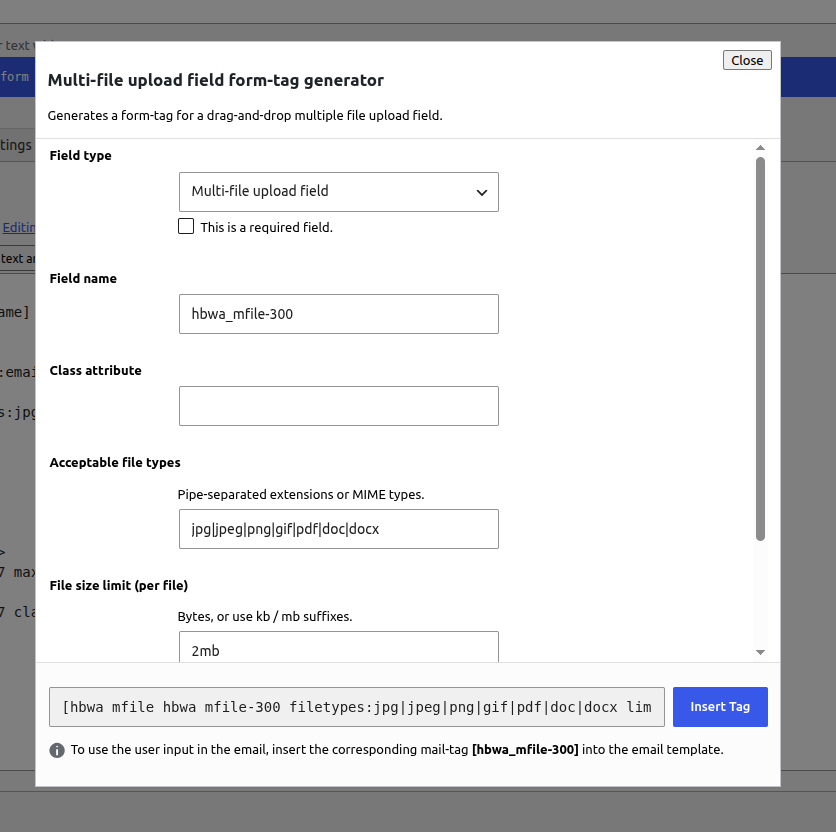
Multi-file form-tag generator in the Contact Form 7 editor
Multiple File Upload for Contact Form 7 adds a new form-tag so visitors can attach several files at once with a drag-and-drop UI. Uploaded files are validated on the server and attached to Contact Form 7 notification emails the same way native CF7 file fields work.
Features
- New Contact Form 7 form-tag:
[hbwa_mfile](optional) and[hbwa_mfile*](required) - Drag and drop or click to browse
- Multiple files in one field
- Per-file size limit with
limit: - Maximum file count with
maxfiles: - Acceptable file types with
filetypes: - Uploaded files are attached to the Contact Form 7 mail (Mail / Mail (2))
- File names can also appear in the message body via the matching mail-tag
- Tag generator button labeled multi-file in the Contact Form 7 form editor
Requirements
- Contact Form 7 must be installed and active
How to use the shortcode
- Edit a Contact Form 7 form.
- Click the multi-file button in the form-tag generator.
- Configure field name, file types, size limit, and max files, then insert the tag into the Form tab.
- Open the Mail tab and add the same field name as a mail-tag in File attachments so files are attached to the email.
- Optionally also put the mail-tag in the message body if you want the file names listed in the email text.
Basic shortcode examples
Optional field:
[hbwa_mfile attachments]
Required field:
[hbwa_mfile* attachments]
With options:
[hbwa_mfile* attachments filetypes:jpg|jpeg|png|pdf|doc|docx limit:2mb maxfiles:5]
Shortcode options
filetypes:— pipe-separated extensions (example:jpg|jpeg|png|pdf)limit:— max size per file (example:2mb,500kb, or bytes)maxfiles:— maximum number of files allowed in one submissionclass:— optional CSS class (supported via the tag generator)
Mail setup (required for email attachments)
If your form-tag field name is attachments, add this in the Mail tab under File attachments:
[attachments]
You can also include [attachments] in the message body to list uploaded file names in the email content.
Uploaded files are sent as real email attachments when Contact Form 7 file uploading is enabled for that mail template. Make sure your hosting PHP upload limits (upload_max_filesize, post_max_size) allow the sizes you configure.
Guidelines
- Always put the matching mail-tag in File attachments if you want files attached to the email.
- Use
[hbwa_mfile*]when at least one file is required. - Keep
maxfiles:andlimit:realistic for your server and mailbox size limits. - Restrict
filetypes:to what you actually need (for example images and PDFs only). - This field does not replace CF7’s native
[file]tag — use[hbwa_mfile]when you need multiple files and drag-and-drop.
Author: hell0bunny