

Broken Link Checker by AIOSEO – Find & Fix Broken Internal, External & Video Links
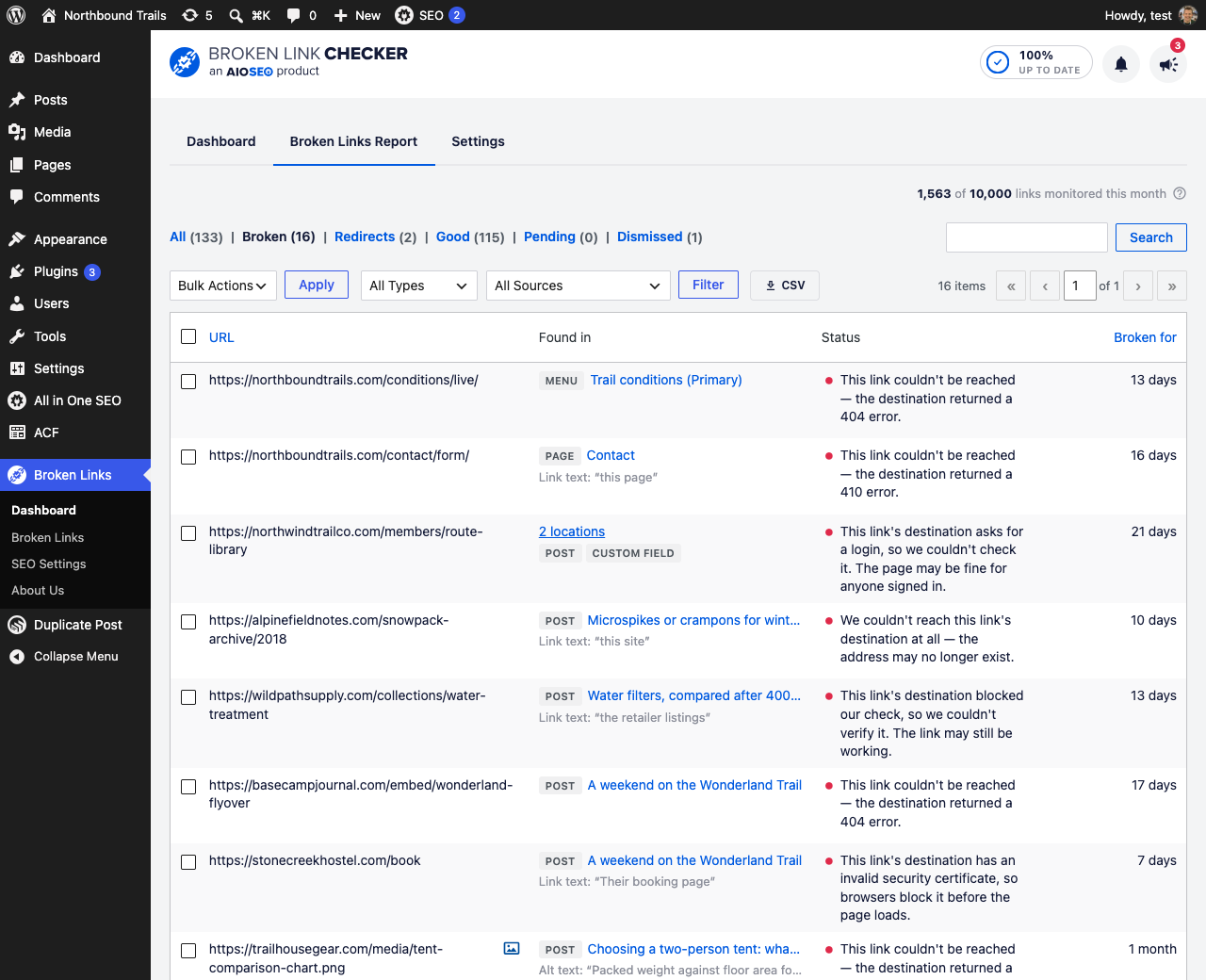
The broken links report: every dead link on your site, why each one failed in plain English, and where it was found.
Broken links hurt your SEO and send visitors to dead 404 pages. Broken Link Checker by AIOSEO scans your whole WordPress site for broken links and shows you exactly which ones to fix. It checks internal links, external links, broken images, and video links, then lets you fix or remove them in a few clicks without editing each post by hand.
This free plugin connects to your AIOSEO account and scans up to 250 internal links every month at no cost, with credits that renew each month. Upgrade to a paid subscription to scan more internal and external links, monitor more frequently, and cover larger sites. See Broken Link Checker pricing and upgrade here.
🔗 Find Broken Internal and External Links
Broken Link Checker monitors every internal link and external link on your WordPress website and reports which links work and which are broken. It crawls your content on a schedule and records the status of each link: a working 200 response, a 301 or 302 redirect, or a broken 404. You get a clear list of broken links to fix, so dead links never sit on your pages unnoticed.
🎥 Check Broken Video Links on YouTube, Vimeo, and More
Video links break in a way that a normal link check misses. A YouTube or Vimeo page can still load and return a working status long after the video was deleted, set to private, or removed by the uploader. Broken Link Checker auto-detects video links and verifies that the video behind each link still exists. It checks the video itself across YouTube, Vimeo, and more than ten other platforms, then flags the ones that are gone so you can swap in a working video. It covers both the videos you link to and the ones you embed, including the players a page builder or a pasted embed code writes as an iframe, so a video that was taken down does not leave a dead player sitting on your page. This keeps tutorials, reviews, and any post built around an embedded or linked video from quietly going stale.
🖼️ Detect Broken Images
Broken Link Checker also finds broken images. If an image file was moved, renamed, or deleted, the plugin reports the broken image URL next to your broken links so you can replace it before visitors land on a missing graphic. It covers the images in your content, the ones a block keeps in its own settings, and the ones a block or a page builder section uses as a background. It also reports audio files that no longer load.
🔒 Catch the Links That Look Fine But Are Not
A link check that only reads the status code misses the links that answer perfectly and still fail your visitors. Broken Link Checker reports a destination whose SSL certificate has expired or does not match the site, because a browser stops your visitor with a full-page warning no matter what the server answered.
It also tells you why every other broken link failed, instead of only that it did: blocked, timed out, unreachable, an address that cannot exist, or a page that is there and asks to be signed in to. That last one matters, because a link behind a login is not broken at all – and a report that calls it broken sends you looking for a fault in an address that is fine. The reason appears in the report, on the frontend highlighter, and in the CSV export.
🧭 Find Links Everywhere, Not Just in Post Content
Plenty of links never appear in the body of a post, and a checker that only reads post content misses every one of them. Broken Link Checker looks in all the other places a link hides on a WordPress site:
- Custom fields – including Advanced Custom Fields (ACF) link, URL, and text fields.
- Navigation menus – custom links in your menus, which often point at pages that were later renamed or deleted.
- Category and tag descriptions – links in your term descriptions.
- Author bios and websites – links on user profiles.
- Post excerpts – links in the excerpt as well as the content.
- Synced patterns, templates, and template parts – block content the editor stores outside your posts, including navigation blocks.
- Embeds – links behind embed blocks that are not videos.
Every broken link is reported with the exact place it was found, so you know whether to open the post editor, the menu editor, or a user profile to fix it. Each source can be switched on or off in the settings.
🧱 Supported Page Builders
If your pages are built with a page builder, your links live in builder data rather than plain post content. Broken Link Checker reads those layouts directly, so a builder page is checked like any other content. The report tells you which link is broken and which page holds it, then sends you to that builder to change it – rewriting a layout in place is the builder’s job, not ours:
- Elementor
- Divi – both Divi 4 and Divi 5 layouts.
- WPBakery Page Builder
- SiteOrigin Page Builder
- Avada Builder (Fusion Builder)
- SeedProd
- The WordPress block editor – including reusable and synced patterns.
☁️ Cloud-Based Scanning That Does Not Slow Down Your Site
Broken Link Checker by AIOSEO runs as a cloud service connected to your AIOSEO account, so the link scanning happens on our servers instead of yours. Other broken link checker plugins crawl from your own server, which can spike resource usage, get your hosting account flagged, or cause your server IP to be blocked. With cloud-based link scanning, your site speed stays the same and your hosting provider has no reason to throttle you, even on large sites with thousands of links.
🎯 Granular Control Over What Gets Scanned
You decide what Broken Link Checker monitors. Choose which post types to scan, such as pages, posts, and custom post types, and which post statuses to include, such as published, draft, or pending review. This keeps the scan focused on the content that matters and your link credits spent where they count.
🚫 Exclude URLs You Do Not Want Checked
Some links should not be checked at all. Affiliate links, tracking redirects, and third-party URLs that block automated requests can show up as false broken links. Broken Link Checker lets you exclude URLs by exact address, by wildcard, by host, or by regular expression – all in a single exclusion list – so your broken link report stays accurate. Remove an exclusion later and the links it was hiding come back.
📊 See What to Fix First
A long list of broken links does not tell you where to start. The dashboard ranks the fixes that clear the most broken links for the least work: one dead address used in dozens of places, a domain that has gone offline, a page carrying several at once. It also shows why your links fail and how long each has been broken, and every figure opens the report already narrowed to it.
🛠️ Fix Broken Links Without Leaving WordPress
Finding broken links is only half the job. Broken Link Checker lets you fix them straight from the dashboard. Edit a link inline to point it at the correct URL, unlink it, or remove it, and the change is written back to your post automatically. You can clear out many broken links in a single sitting instead of opening each post one at a time.
Broken links are also marked in red on the frontend with the Broken Links Highlighter, so they are easy to spot, and the plugin can stop search engines from following broken links while you work through them. If you use the AIOSEO Redirects feature, you can send a broken link straight to a working URL with a redirect. When a link redirects before it breaks, the report offers the end of the redirect chain as the replacement, so you can point the link at where it actually ends up in one click.
📬 Broken Link Reports by Email
You should not have to remember to check a dashboard. Broken Link Checker emails you when something changes:
- A weekly email listing only the links that broke since the last report, so a quiet week means a quiet inbox.
- A monthly scorecard with your totals – links checked, broken, redirecting, and newly broken – plus what broke that month.
Add as many recipients as you like in the settings, and every email has a one-click unsubscribe link.
📤 Export Your Broken Links
Export the report to CSV with one click. The file matches whatever filters and search you have on screen, so you can hand a client a list of exactly the broken external links on their site, or work through a long list in a spreadsheet. Every row carries where the link was found and why the check failed.
🏢 Who Uses Broken Link Checker
Broken Link Checker works for any WordPress site that links out or links internally:
- Bloggers and publishers – keep years of posts free of dead links and broken video embeds.
- eCommerce stores – catch broken product links, broken images, and supplier URLs.
- Affiliate marketers – find broken affiliate links before they cost you commissions.
- Agencies and freelancers – monitor client sites and fix broken links from one place.
- Local businesses – make sure menu, booking, and map links keep working.
🛡️ Built by the Team at AIOSEO
Broken Link Checker is built by AIOSEO, the team behind the All in One SEO plugin used on more than 3 million WordPress websites. The same focus on practical, results-driven SEO goes into keeping your links healthy and your visitors out of 404 pages.
🔎 A Better Way to Check Broken Links Than Ahrefs, Screaming Frog & Other Tools
If you have looked for a way to find broken links, you have probably tried tools like Ahrefs, Screaming Frog, Dr. Link Check, or Dead Link Checker. Those tools can crawl a site, but they run outside WordPress, so you copy URLs back and forth and fix every broken link by hand in the editor. Broken Link Checker by AIOSEO lives inside your WordPress dashboard. It finds broken links, broken images, and dead video links, and it fixes them in place. Because the scanning runs in the cloud, it does this without loading your server the way an on-site crawler plugin does.
Credits
This plugin is created by Benjamin Rojas and Syed Balkhi.
Branding Guideline
AIOSEO® is a registered trademark of Semper Plugins LLC. When writing about the WordPress SEO plugin by AIOSEO, please use the following format.
- AIOSEO (correct)
- All in One SEO (correct)
- AIO SEO (incorrect)
- All in 1 SEO (incorrect)
- AISEO (incorrect)
What’s Next
If you like our Broken Link Checker plugin, then consider checking out our other projects:
- AIOSEO – The Best WordPress SEO plugin & toolkit to improve your SEO rankings in search results.
- OptinMonster – Get more email subscribers with the most popular conversion optimization plugin for WordPress.
- WPForms – #1 drag & drop online form builder for WordPress (trusted by 5 million sites).
- MonsterInsights – See the stats that matter and grow your business with confidence. Best Google Analytics plugin for WordPress.
- SeedProd – Create beautiful landing pages with our powerful drag & drop landing page builder.
- WP Mail SMTP – Improve email deliverability for your contact form with the most popular SMTP plugin for WordPress.
- RafflePress – Best WordPress giveaway and contest plugin to grow traffic and social followers.
- Smash Balloon – #1 social feeds plugin for WordPress – display social media content in WordPress without code.
- WPCode – Must have WordPress code snippet management plugin to help you future-proof website customization (trusted by 1.5 million sites).
- Duplicator – Popular WordPress backup and migration plugin used by over 1 million websites.
- Push Engage – Connect with visitors after they leave your website with the leading web push notification plugin.
- TrustPulse – Add real-time social proof notifications to boost your store conversions by up to 15%.
- SearchWP – The most advanced custom WordPress search plugin to improve WordPress search quality.
- AffiliateWP – #1 affiliate management plugin for WordPress. Add a referral program to your online store.
- WP Simple Pay – #1 Stripe payments plugin for WordPress. Start accepting one-time or recurring payments without a shopping cart.
- Easy Digital Downloads – The best WordPress eCommerce plugin to sell digital products (eBooks, software, music, and more).
- WPCharitable – Top-rated WordPress donation and fundraising plugin for WordPress.
- Sugar Calendar – A simple event calendar plugin for WordPress that’s both easy and powerful.
Visit WPBeginner to learn from our WordPress Tutorials and find out about the best WordPress plugins.