


BPOTech Custom Quicktags Manager
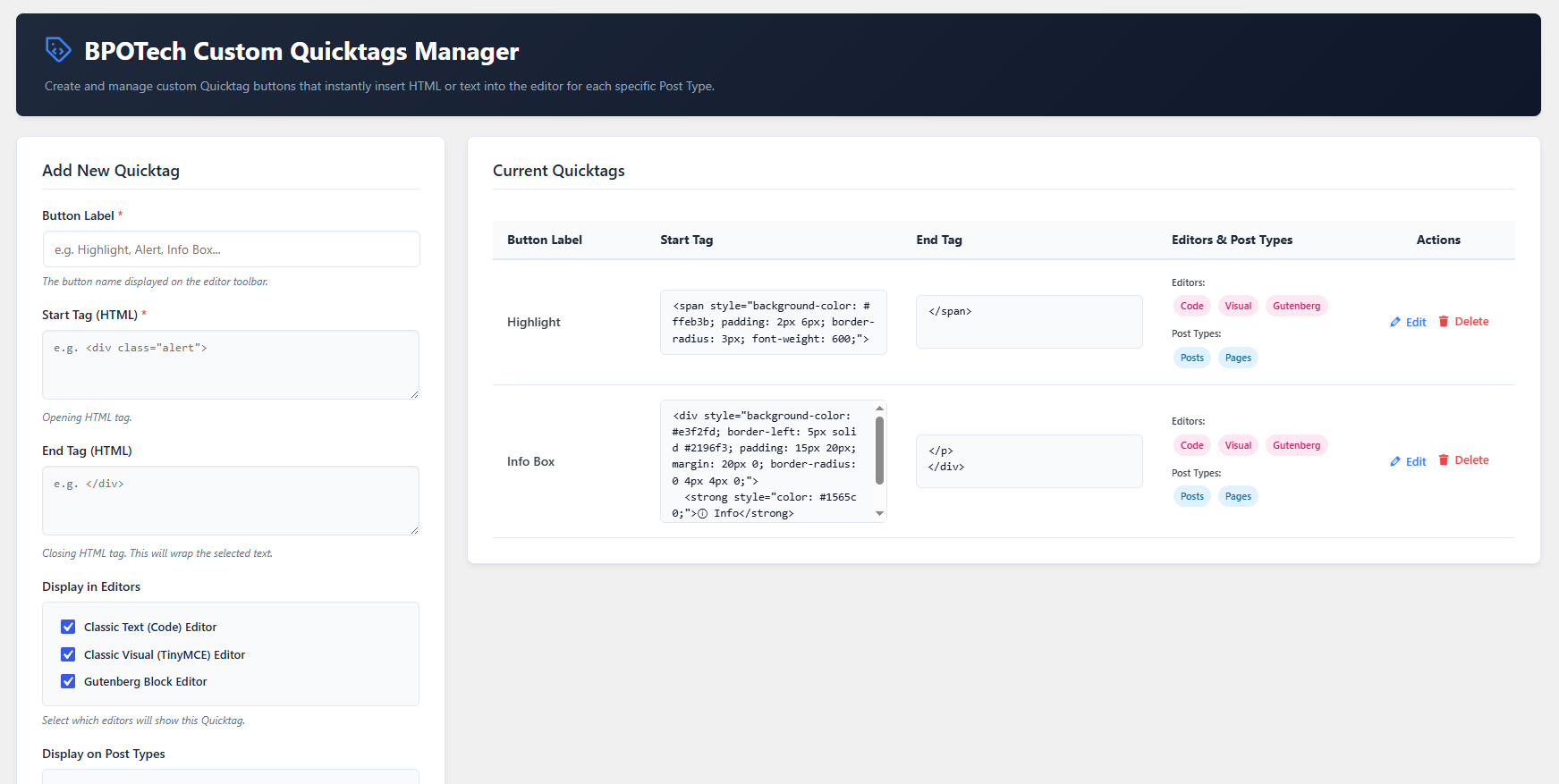
The main administration screen of BPOTech Custom Quicktags Manager. Easily create custom Quicktag buttons by defining start and end HTML tags, choosing supported editors (Code, Visual, Gutenberg), and selecting the post types where each Quicktag will be available. Existing Quicktags can also be edited or removed from the same interface.
BPOTech Custom Quicktags Manager allows WordPress administrators to create and manage custom Quicktags — quick action buttons that insert custom HTML or text into the editor. Each quicktag can be selectively assigned to specific post types so it only appears where needed.
Key Features
- Custom Quicktags Management: Add, edit, and delete quicktags from a clean, modern admin dashboard.
- Per Post-Type Controls: Assign each quicktag to specific post types (posts, pages, or any custom post type).
- Full HTML Content: Define complete HTML content (opening and closing tags) to insert at cursor position in one click.
- Multi-Editor Support: Works with the Classic Editor (Text and Visual tabs) and the Gutenberg Block Editor.
- Select All Toggle: Quickly select or deselect all post types with a single checkbox.
- Default Samples: Ships with sample quicktags (Highlight, Info Box) to get you started immediately.
- Multilingual Ready: Fully translatable with English, Vietnamese, and Japanese translations included.
Developer Hooks
This plugin provides several action and filter hooks to allow third-party developers to extend and customize the Quicktags manager without editing the plugin core files.
Filter Hooks
-
bpotech_custom_quicktags_manager_data(array $quicktags)
Filters the list of quicktags retrieved from the database before rendering them in the editor or admin list. -
bpotech_custom_quicktags_manager_post_types(array $post_types)
Filters the list of public post types displayed on the settings screen. -
bpotech_custom_quicktags_manager_editors(array $editors)
Filters the list of editors displayed in the settings form checkboxes. -
bpotech_custom_quicktags_manager_default_data(array $default_tags)
Filters the initial default quicktags set on plugin activation or reset.
Action Hooks
-
bpotech_custom_quicktags_manager_admin_form_bottom(array|null $edit_tag)
Fires at the bottom of the quicktag creation/edit form. Useful for adding custom input fields. -
bpotech_custom_quicktags_manager_after_save_tag(array $new_tag, array $all_tags, bool $is_new)
Fires after a quicktag is saved or updated. You can use this to save custom form inputs. -
bpotech_custom_quicktags_manager_after_delete_tag(string $tag_id, array $updated_tags)
Fires after a quicktag is deleted. Useful for clearing out custom metadata linked to the deleted tag ID.
Other available actions:
* bpotech_custom_quicktags_manager_before_save_tag (array $new_tag, bool $is_new)
* bpotech_custom_quicktags_manager_before_delete_tag (string $tag_id)
* bpotech_custom_quicktags_manager_reset_defaults (array $default_tags)