

Blog Filter – Post Grid Filter by Category or Tag
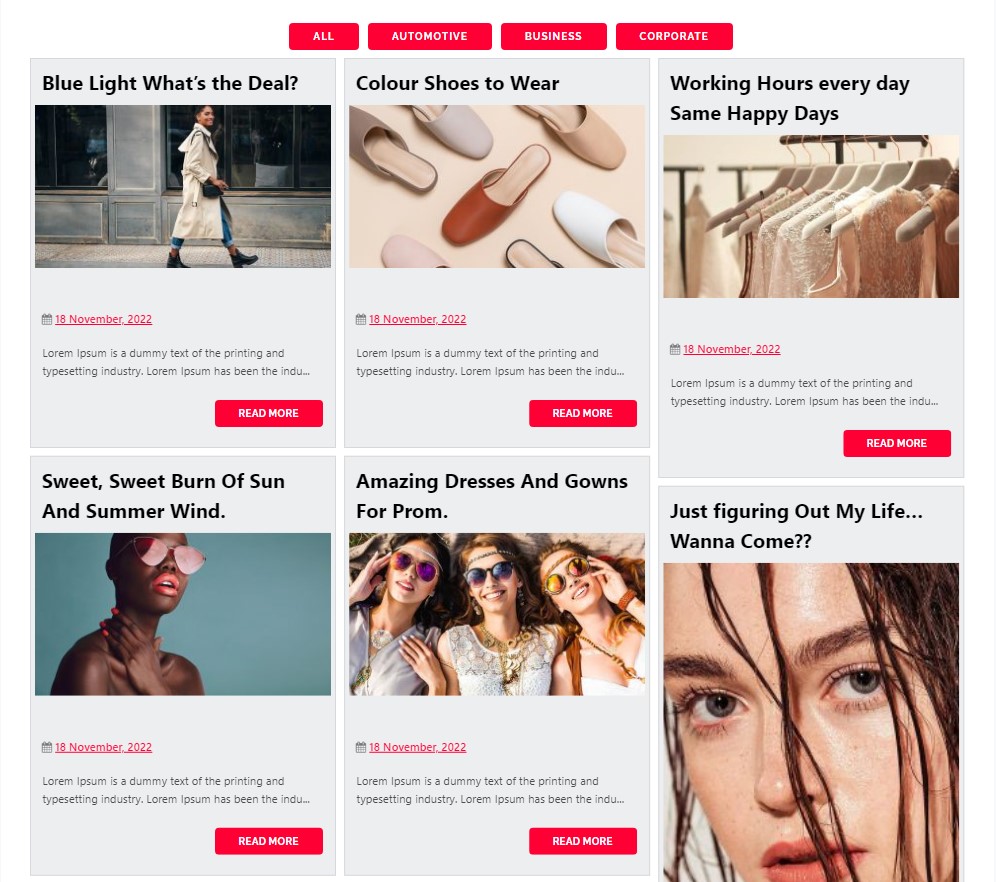
Blog with Category Filters
Need a beautiful blog post grid for your site? This plugin is built for you. It helps you show your posts in clean grids or masonry layouts.
Visitors can instantly filter posts by Category or Tag without loading new pages. This makes your site faster and much easier to explore.
Upgrade To Premium – Blog Filter Plugin
Premium Blog Filter Plugin Demo
Simple and Powerful
Our Blog Filter fetches your content automatically. You can choose two main styles for your Post Grid:
* Grid Layout: Shows your posts in even rows and neat columns.
* Masonry Layout: Fits posts tightly together like Pinterest, saving empty space.
Who Needs a Filterable Post Grid?
- Bloggers: Let readers sort through articles by Category or Tag.
- News Sites: Arrange top news into easy sections that users can toggle.
- Portfolio Sites: Showcase your work dynamically in a clean visual grid.
- Writers: Help users find specific topics using simple button clicks.
Blog Filter Post Grid Key Features
Instant Category or Tag Filters
Users click filter buttons above your grid. Posts will instantly sort by their Category or Tag.
Responsive Layouts
Your Post Grid looks great on phones, tablets, and desktops. The design adapts to every screen size.
Grid and Masonry Styles
Switch between standard grids or masonry layouts with one click. Masonry works best for images of different heights.
Fast Load More Button
Instead of slow page numbers, use our AJAX Load More button. It loads new posts fast without refreshing.
Page Builder Ready
Works with classic editors and modern page builders. Fully compatible with Elementor, Beaver Builder, and Divi.
Quick Setup Guide
- Install and activate the plugin through your WordPress dashboard
- Navigate to “Plugins Menu > Blog Filter Settings”
- Configure the appearance and filtering options
- Copy the generated shortcode
- Paste the shortcode into any page, post, or widget area
That’s it. The plugin handles the rest automatically.
Available Languages
Blog Filter supports multiple languages out of the box:
- Arabic (ar)
- Chinese (zh_CN)
- Dutch (nl_NL)
- Finnish (fi_FI)
- French (fr_FR)
- German (de_DE)
- Hebrew (he_IL)
- Hindi (hi_IN)
- Hungarian (hu_HU)
- Indonesian (id_ID)
- Italian (it_IT)
- Japanese (ja_JP)
- Polish (pl_PL)
- Portuguese (pt_PT)
- Russian (ru_RU)
- Spanish (es_ES)
You can also translate the plugin into your native language using standard WordPress translation methods.
Blog Filter Features
Automatic Post Detection
The plugin automatically pulls in your existing WordPress posts. There’s no manual entry required – just install, configure your display preferences, and your posts appear in the filtered layout.
Category and Tag Filtering
Choose whether to filter posts by categories, tags, or both. Filter buttons appear above your post grid, allowing visitors to narrow down content with a single click.
Responsive Grid Layout
Posts display in a grid format that adapts to screen sizes. Whether someone visits on a desktop monitor, tablet, or smartphone, the layout adjusts accordingly.
Masonry Arrangement
Enable masonry layout to create that Pinterest-style look where posts of varying heights fit together without awkward gaps. This works particularly well when your posts have featured images of different dimensions.
Image Quality Control
Select the image resolution for displayed thumbnails. You can opt for high-resolution images on design-focused sites, or choose smaller sizes for faster page loads.
Multi-Color Filter Buttons
Apply different colors to your filter buttons to match your site’s design or to help visitors visually distinguish between categories.
Post Titles and Details
Show or hide post titles, dates, authors, and other metadata. Control what information appears beneath each post thumbnail.
Automatic Post Links
Each post in the grid links directly to its full single post page. No additional configuration needed.
Shortcode-Based Placement
Use the generated shortcode to place your filtered post grid anywhere on your site – pages, posts, sidebar widgets, or page builder sections.
Load More Functionality
Instead of pagination, you can enable a “Load More” button that fetches additional posts without page reloads.
Custom Post Type Support
Display posts from custom post types, not just standard WordPress posts.
Premium Version Features
The premium version of Blog Filter includes additional capabilities:
BLOG FILTER PREMIUM FEATURES WITH DEMO
- Blog Filter Premium Layout 1
- Blog Filter Premium Layout 2
- Blog Filter Premium Layout 3
- Blog Filter Premium Multiple Column Layout
- Blog Filter Premium Without Image
- Blog Filter Premium Without Filters
- Blog Filter Premium With Hover Effects
- Blog Filter Premium With Lightbox
- Blog Filter Premium With Single Post Link On Image
- Blog Filter Premium With Second Variation for Title, Date & Author
Premium Features Include
- Multiple pre-designed templates
- Up to 4-column layouts
- Five hover effects for post thumbnails
- Lightbox popup for featured images
- Unlimited filter colors
- Custom CSS option for advanced styling
- Widget support for sidebar placement
- Additional post metadata display options
- Bootstrap-based framework
- Priority support
Understanding Masonry Layouts
Masonry layout arranges elements in a grid where items are positioned to fill vertical space efficiently. Unlike traditional grids where each row has the same height, masonry allows items of different sizes to stack closely together.
This layout style became popular through sites like Pinterest and works well for:
- Posts with varied featured image dimensions
- Content archives with mixed media types
- Visual portfolios and galleries
- Magazine-style homepage designs
Blog Filter handles masonry calculations automatically. You enable the option, and the plugin takes care of positioning each post to minimize empty space.
Lightbox Functionality
The premium version includes Swipebox lightbox integration, which displays featured images in an overlay popup. Key lightbox features:
- Swipe gestures for mobile navigation
- Keyboard navigation on desktop
- CSS transitions with jQuery fallback
- Retina-ready UI icons
- Browser compatibility: Chrome, Safari, Firefox, Opera, IE9+, iOS 4+, Android, Windows Phone
Recommended Plugins
Other plugins from the same development team:
-
Portfolio Filter Gallery – Create filterable image galleries for portfolios, photography, and artwork.
-
Instagram Type Gallery – Display images in Instagram-inspired grid layouts.
-
Grid Gallery – Simple grid layout for image galleries in posts, pages, and widgets.
-
Image Gallery – Lightbox-enabled gallery for displaying images.
-
Photo Gallery – Versatile gallery supporting photos, videos, links, and maps.
-
Responsive Slider Gallery – Create responsive image sliders with shortcode placement.
-
Video Gallery – Display video content in organized gallery layouts.
-
Contact Form Widget – Add contact forms via shortcodes and widgets.
-
Social Media Widget – Display social media profile links in your sidebar.
-
Slider Responsive Slideshow – Lightweight responsive slider for WordPress.
-
Facebook Like Box – Embed Facebook page like boxes on your site.