


Block for Mailchimp – grow your email list with signup forms
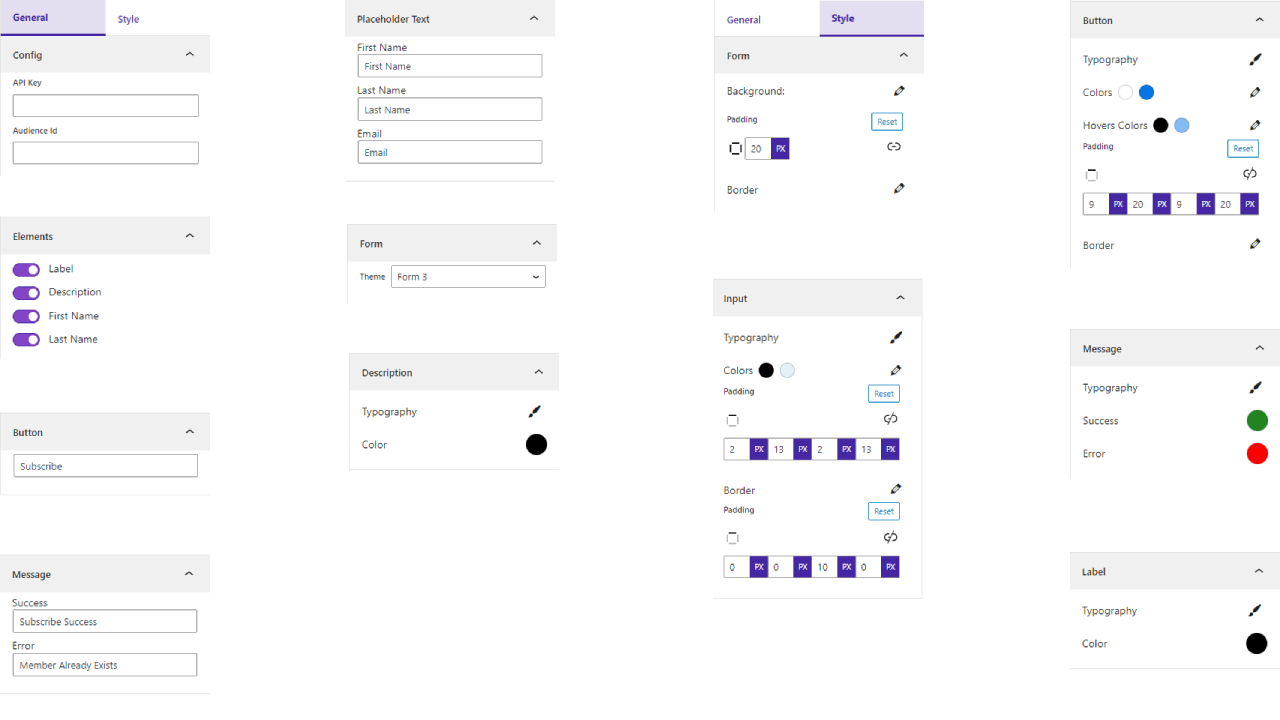
Settings
Turn visitors into subscribers with beautiful Mailchimp signup forms you can build and style right inside the Gutenberg editor – no code required.
Mailchimp Block | Documentation | Pricing | Support | Demo
Why Block for Mailchimp?
Growing an email list shouldn’t require a developer. Block for Mailchimp connects your Mailchimp account to WordPress and gives you a dedicated Gutenberg block to visually build subscription forms that fit your website’s design. Display a form inline on a page, open it in a popup, or keep it floating at the top or bottom of the screen.
All collected emails are safely stored in your Mailchimp audience, so you can use Mailchimp’s automation to send newsletters, product updates, or event invitations. Every form is fully responsive and adjusts automatically to mobile, tablet, and desktop screens.
Whether you run a business, publish a blog, or manage a community, this plugin helps you collect leads effortlessly and stay connected with your audience.
Free Features
- Easy Integration: Connect your Mailchimp account and select your audience list directly from the WordPress dashboard.
- Dedicated Gutenberg Block: Add the “Mailchimp Subscribe Form” block anywhere without using shortcodes.
- Multiple Layouts: Choose from four layout styles – inline, modal popup, floating top bar, and floating bottom bar – to match your page design.
- Fully Responsive: Every form looks great on desktop, tablet, and mobile devices.
- Customizable Fields: Show or hide fields such as first name, last name, and email. Adjust labels and placeholder text easily.
- Button Styling: Change button text, color, padding, and border radius to match your website’s color palette.
- Typography Control: Adjust fonts and text sizes for form labels, inputs, and messages.
- Success & Error Messages: Create custom success and error messages with separate color and font options.
- Unlimited Forms: Use the block multiple times across posts, pages, or templates.
- Theme Compatibility: Works smoothly with all well-coded WordPress themes.
Pro Version
Upgrade to Mailchimp Block Pro for advanced design options and extra control over your form’s layout and behavior:
- Five Layout Options: All free layouts plus an auto-popup form that appears after a set delay.
- Ten Ready-Made Themes: Apply a pre-built theme or customize one to fit your site’s style.
- Advanced Design Controls: Adjust margins, padding, borders, and spacing for a tailored look.
- Shortcode Support: Embed your Mailchimp form anywhere – in widgets, templates, or non-block areas.
- Pattern Library: Import and edit form patterns with one click.
- Logo Upload: Add your brand logo to the form for a consistent visual identity.
- Popup Timing Settings: Define when and how your popup form appears to visitors.
- Regular Updates & Priority Support: Ongoing improvements and fast customer support.
How to Use – Quick Start
- Install and activate the plugin.
- Open the page or post where you want to display your Mailchimp form.
- Click the + icon in the Gutenberg editor and search for Mailchimp.
- Add the Mailchimp Subscribe Form block.
- Connect your Mailchimp account and select your audience list.
- Choose a layout (inline, popup, floating, etc.) and customize the design.
- Publish your page and start collecting subscribers.
Live Demo | Get Mailchimp Block PRO
Use Cases
- Marketers and Influencers running newsletters and campaigns.
- Online Course Creators staying in touch with students.
- Non-profits and Community Groups gathering email lists for updates or donations.
- Event Planners and Promoters managing registrations and attendees.
- E-commerce Stores and Subscription Services collecting customer leads.
- Real Estate Agents, Travel Agencies, Restaurants, and Local Businesses promoting listings, trips, menus, and offers.
- Artists, Photographers, and Creators sharing portfolio updates and content.
Like the plugin? Missing a feature? Send us your feedback.
Check Out the Parent Plugin
🔥 b Blocks – Best gutenberg blocks collections for WordPress.
Check Out Our Other WordPress Plugins
🔥 Html5 Audio Player – Best audio player plugin for WordPress.
🔥 Html5 Video Player – Best video player plugin for WordPress.
🔥 PDF Poster – A fully-featured PDF Viewer Plugin for WordPress.
🔥 StreamCast – A fully-featured Radio Player Plugin for WordPress.
🔥 3D Viewer – Display interactive 3D models on the webs.
Source Code
You can find the source code, report bugs, and contribute to the development of this plugin on our GitHub repository:
Block for Mailchimp on GitHub
Third-Party Libraries
Font Awesome
- Source: https://fontawesome.com/
- GitHub: https://github.com/FortAwesome/Font-Awesome
- License: SIL OFL 1.1 (Fonts), MIT (CSS) – https://fontawesome.com/license/free
- Purpose: Provides scalable vector icons used for slider navigation arrows and UI elements.
bpl-tools
- Source / GitHub: https://github.com/bPlugins/bpl-tools
- License: GPL-2.0-or-later – https://www.gnu.org/licenses/gpl-2.0.html
- Purpose: Shared utility library providing admin dashboard components and common Gutenberg editor controls.
- External Services: The library may connect to bPlugins, WordPress.org, and Freemius services for product data and checkout functionality. See full details: https://github.com/bPlugins/bpl-tools#external-requests–why-they-are-made
Freemius Lite SDK
- Source: https://bplugins.com/
- GitHub: https://github.com/bPlugins/freemius-lite-sdk
- License: GPL-2.0-or-later – https://www.gnu.org/licenses/gpl-2.0.html
- Purpose: Provides an opt-in consent form for usage tracking and analytics to help improve the plugin. No data is sent before explicit user consent.
- External Services: Communicates with
api.bplugins.com(activation events) andwp.freemius.com(opt-in processing) only after user opt-in. See bPlugins Privacy Policy and Freemius Privacy Policy.