

Bit SMTP – Easy SMTP Solution with Email Logs
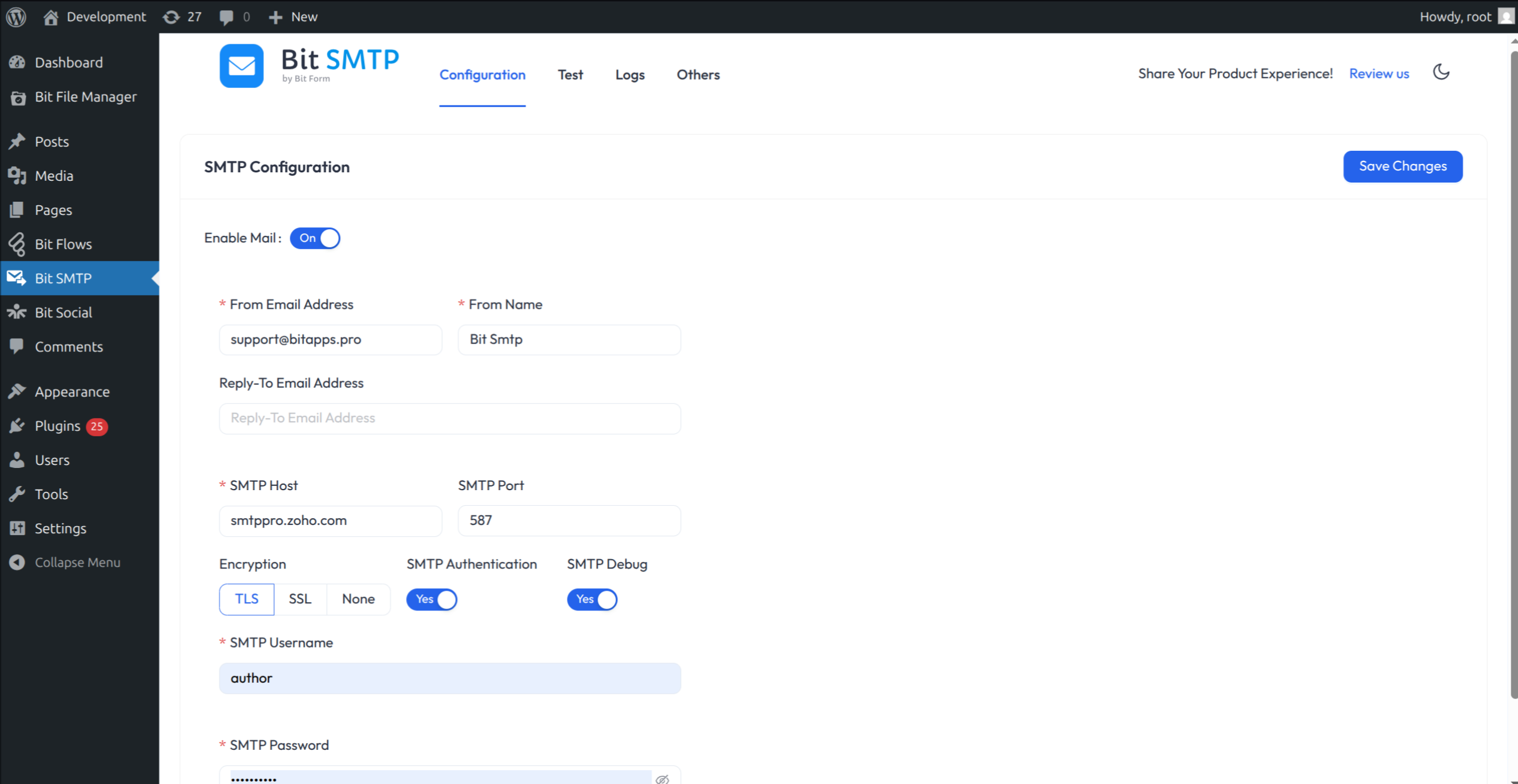
SMTP Configuration
Easily fix WordPress email delivery. Connect Gmail, Outlook/Microsoft 365, SendGrid, Amazon SES, Mailgun, Postmark, Brevo, Cloudflare Email Sending, and more — over their fast API, secure OAuth, or classic SMTP.
Add several sending connections, set a priority order so delivery automatically falls back to the next provider if one fails, see the real delivery status (delivered / bounced) of each email, and get alerts when sending fails — all free.
Is your WordPress not sending emails, or are they going to spam?
The default PHP mail() function is often blocked by hosts or filtered as spam. Bit SMTP sends your WordPress email through an authenticated provider instead, so receiving mail servers can trust that it really comes from you.
Key features
- Dedicated provider integrations: SendGrid, Amazon SES, Mailgun, Postmark, Brevo, Resend, Mailjet, Zoho CPaaS (ZeptoMail), SparkPost, and Cloudflare Email Sending over their own APIs — plus Gmail and Microsoft 365, any SMTP server, and PHP mail().
- Secure OAuth for Gmail & Microsoft 365: authorize with one click; Bit SMTP stores tokens, never your account password.
- Multiple connections with automatic fallback: if the top connection fails, the next one sends the email.
- Automatic retries: temporary failures (timeouts, rate limits) are queued and retried with backoff.
- Smart routing: send matching mail through a chosen connection by recipient, from address, subject, or the plugin that sent it.
- Real delivery tracking: provider webhooks record each email’s outcome — Delivered, Bounced, Blocked, Deferred — separately from “accepted by the provider”. Webhooks are set up for you when you save a supported connection.
- Connection health checks and alerts: get told by email, webhook, Slack, Discord, or Telegram when sending starts failing or a connection becomes unhealthy.
- Detailed email logs: every email with its send result, delivery status, and recipients (To/Cc/Bcc). Search, filter, preview, resend, delete, or export to CSV, with automatic clean-up after the retention period you choose.
- Analytics dashboard: volume, delivery outcomes, and sending trends by plugin and connection. Optional open and click tracking, off by default.
- Encrypted credentials: API keys and secrets are stored with AES-256-GCM, or kept out of the database entirely as
wp-config.phpconstants. - WP-CLI: send test emails, read and export logs, manage the retry queue, run health checks, and import from other SMTP plugins.
- Easy switching: import connections from WP Mail SMTP or Easy WP SMTP with WP-CLI.
- Multisite ready, with a dark mode and an accessible, plain-language interface.
- Free and fully functional: no premium plan required.
Set up in minutes
- Sign up with an email provider: Gmail, Microsoft 365, SendGrid, Amazon SES, Mailgun, Postmark, Brevo, Cloudflare Email Sending, or any SMTP server.
- Add a connection: go to Bit SMTP ▸ Connections, click Add connection, and pick your provider.
- Enter your credentials: paste the provider’s API key (or SMTP host, port, username, and password). For Gmail and Microsoft 365, click Connect to authorize over OAuth.
- Set the sender: the From email (an address verified with the provider), the From name, and an optional Reply-To.
- Send a test: click Test to confirm delivery. Add more connections and drag them into a priority order for fallback.
Every field has help text that explains what it is and where to find it in your provider’s dashboard.
Supported email services
API integrations (paste an API key):
- SendGrid — great deliverability; free tier available.
- Amazon SES — best for large volumes; enter Access Key, Secret, and region.
- Mailgun — sending API key, domain, and region (US/EU).
- Postmark — fast transactional delivery (Server API Token).
- Brevo (Sendinblue) — generous free daily tier.
- Resend — modern developer email API.
- Mailjet — API Key + Secret Key.
- Zoho CPaaS (ZeptoMail) — transactional mail with a Send Mail Token and data center.
- SparkPost — Transmissions API (US/EU).
- Cloudflare Email Sending (Beta) — configure the sender address and domain in Cloudflare first; sending to general recipients requires a Workers Paid plan.
OAuth integrations (one-click Connect, no password stored): Gmail / Google Workspace and Microsoft 365 / Outlook.
Any SMTP server — use Other SMTP for your host, Yahoo, Zoho Mail, or any mailbox. Common settings:
- Gmail SMTP: smtp.gmail.com · TLS · 587
- Outlook SMTP: smtp-mail.outlook.com · TLS · 587
- Yahoo SMTP: smtp.mail.yahoo.com · SSL · 465
- Zoho Mail SMTP: smtp.zoho.com · TLS · 587
You can also use PHP mail() (the server’s own mailer) when no external provider is configured.
Failure alerts: email, webhook, Slack, Discord, and Telegram
Open Bit SMTP ▸ Settings to add alert channels. Bit SMTP sends one alert when a failure streak starts and one when it recovers, so an outage does not flood your inbox or channel.
- Slack: create an app with Incoming Webhooks and paste its
https://hooks.slack.com/services/...URL. - Discord: create a channel webhook and paste its URL.
- Telegram: create a bot with @BotFather, message it from the destination chat, then enter the bot token and that chat’s numeric ID.
- Webhook: any HTTPS URL; requests are signed so you can verify they came from your site.
Use Test notification to check a saved channel. Webhook URLs and bot tokens are encrypted and shown masked. Alerts are best effort: each request has a five-second limit and can never change the outcome of the email that triggered it.
Works with every plugin that sends email
Bit SMTP handles any email sent through WordPress’s wp_mail() — WooCommerce, core notifications, and form plugins such as Bit Form, Contact Form 7, Gravity Forms, WPForms, Ninja Forms, Forminator, Fluent Forms, Formidable Forms, Everest Forms, Elementor Forms, and more.
Explore our other products
- Bit Form: multi-step and conversational form builder with 50+ built-in integrations.
- Bit Integrations: no-code automation connecting 300+ apps and services.
- Bit Assist: one button for all your support channels — chat, WhatsApp, email, SMS, Telegram, Messenger, and more.
- Bit Social: auto-post and schedule to 12+ social platforms.
- Bit Flows: multi-step automation with routers, iterators, and built-in AI integrations.
- Bit File Manager: manage files from your WordPress dashboard.
Join our Bit Apps Community for updates. The full source code is on GitHub; contributions are welcome.
External services
Bit SMTP delivers your site’s email through the provider you choose, so it connects to third-party services. Except for the optional deactivation feedback described below, nothing is contacted until you set up the matching feature. Your email content only ever goes to the email provider you configured.
Email providers
When you add a connection, every email sent through it — including test emails, resends, and retries — is sent to that provider. Each request contains the full message (sender, To/Cc/Bcc recipients, Reply-To, subject, body, attachments, and headers) and is authenticated with the API key, SMTP login, or OAuth token you entered.
For providers that support it, saving a connection with Track delivery status turned on (the default) also registers your site’s webhook address (https://your-site/bit-smtp/...) with the provider through its API, so it can report delivery events back to your site. Deleting the connection removes that webhook. Turn Track delivery status off to skip this.
- SendGrid (Twilio) —
api.sendgrid.com. Terms, Privacy. - Amazon SES (Amazon Web Services) —
email.<region>.amazonaws.com. If you subscribe your webhook address to Amazon SNS for delivery events, Bit SMTP also confirms that subscription and downloads the SNS signing certificate fromsns.<region>.amazonaws.com. Customer Agreement, Service Terms, Privacy. - Mailgun (Sinch) —
api.mailgun.netorapi.eu.mailgun.net. Terms, Privacy. - Postmark (ActiveCampaign) —
api.postmarkapp.com. Terms, Privacy. - Brevo —
api.brevo.com. After a successful connection test, Bit SMTP also reads that test email’s delivery events from Brevo’s statistics API. Terms, Privacy. - Resend —
api.resend.com. Terms, Privacy. - Mailjet (Sinch) —
api.mailjet.com. Terms, Privacy. - Zoho CPaaS (ZeptoMail) —
api.zeptomail.com,api.zeptomail.eu, orapi.zeptomail.in, depending on the data center you pick. Terms, Privacy. - SparkPost (Bird) —
api.sparkpost.comorapi.eu.sparkpost.com. Terms, Privacy. - Cloudflare Email Sending —
api.cloudflare.com. Terms, Privacy. - Gmail / Google Workspace (Google) — when you click Connect, your browser opens Google’s sign-in page (
accounts.google.com) with your Client ID and From address; Bit SMTP then exchanges the authorization code, and later refreshes the access token, withoauth2.googleapis.comusing your Client ID and Secret. Email is sent through the Gmail API (gmail.googleapis.com). Terms, Privacy, API Services User Data Policy. - Microsoft 365 / Outlook (Microsoft) — the same OAuth flow with
login.microsoftonline.com; email is sent through Microsoft Graph (graph.microsoft.com). Services Agreement, Privacy. - Other SMTP — the SMTP server you enter, under that host’s own terms.
Failure and health alerts
Only used when you add an alert channel in Settings. Alerts and test notifications include your site name and address, the connection’s name and provider, the error, and the failed email’s subject and up to 10 recipient addresses — never the email body. Health alerts include the connection’s status and last error.
- Slack —
hooks.slack.com. Terms, Privacy. - Discord —
discord.com. Terms, Privacy. - Telegram —
api.telegram.org. Terms, Privacy. - Webhook — the URL you enter receives the same details as signed JSON.
Usage data sharing (opt-in)
Only if you choose to share usage data in the welcome prompt or in Settings; you can stop at any time. The report goes to Bit Apps (wp-api.bitapps.pro) once when you agree and then about once a week. It contains your site name and address, the site admin email and the first administrator’s name, your server’s public IP address, WordPress, PHP, and MySQL versions, your theme and language, a few server settings, user counts by role, the names and versions of your active plugins, the number of inactive plugins, and how many test emails you sent. It never contains email content, recipients, logs, passwords, or API keys. Bit Apps Terms, Bit Apps Privacy.
To find the server’s public IP address, the report asks icanhazip.com, which is operated by Cloudflare. That request sends nothing except the request itself. Cloudflare Privacy.
Deactivation feedback (optional)
When you deactivate Bit SMTP, an optional feedback form appears. Only if you choose a reason and submit it, Bit SMTP sends that reason and any text you typed, plus your site address, site language, and plugin version, to Bit Apps (wp-api.bitapps.pro). Choosing Skip sends nothing. Bit Apps Terms, Bit Apps Privacy.
Open and click tracking (off by default)
Not an external service: when you turn it on, the tracking image and rewritten links point to your own site (https://your-site/bit-smtp/track/...), and the results are stored in your own database.