

BetterShield – Security Audit, Hardening, 2FA, Passkeys, Login Protection & Activity Log
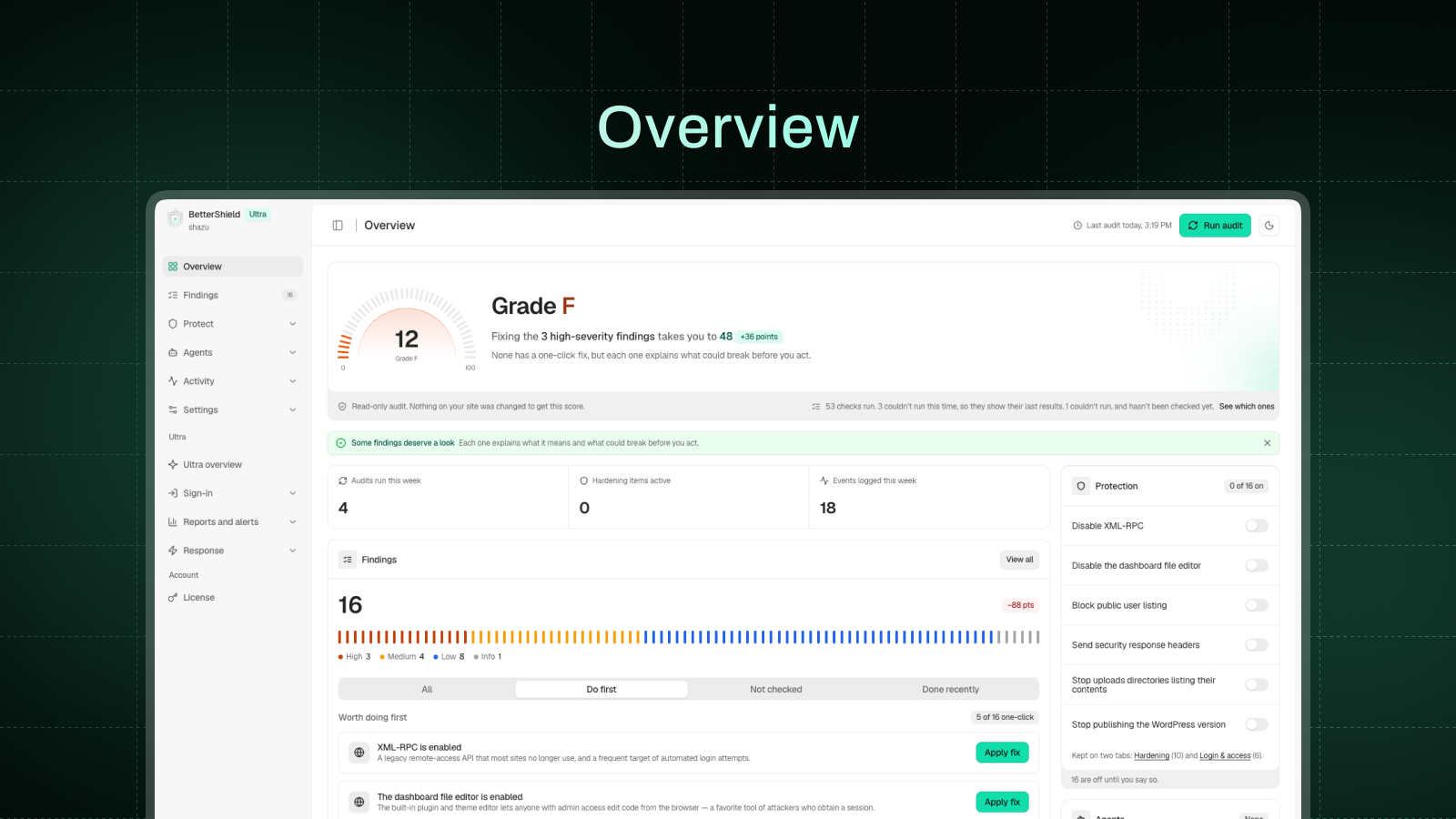
The Overview after the first audit: your score, the three fixes worth doing first, and what changed since your last visit.
BetterShield is a WordPress security plugin that checks your site, explains what it found in plain language, and fixes what it can in one click once you say yes. Change your mind months later and you can still undo it.
It is made by WPDeveloper, whose WordPress products are used on more than 6 million sites. BetterShield has no firewall and no malware scanner, and it works alongside a plugin that does.
What you get
- A security audit and fixes you can undo. A 72-check audit scores your site, and thirty one-click fixes close the gaps. All but one wait for your go-ahead.
- Two-factor authentication and passkeys. Any authenticator app plus ten backup codes, or a passkey unlocked with a fingerprint, face or device PIN. Require either by role.
- Login protection. Limit login attempts, a hidden bot check on the sign-in, registration and comment forms, and an allowlist that is never locked out.
- An activity log and a file check. Who did what and when, with a CSV export, and core and plugin files compared with WordPress.org’s copies.
- Ask your AI assistant what needs fixing. Claude, ChatGPT, Cursor and others can read your site’s security through the built-in MCP server, once you switch it on.
- Outside connections. Out of the box, the only outside services contacted are WordPress.org’s own and, when checking our Pro plugins or Ultra, WPDeveloper’s checksum servers (checksums.wpdeveloper.com and bettershield.ai). Usage sharing, vulnerability checks, the leaked-password check, your AI provider and BetterShield Hub stay off until you turn them on.
- Skipped checks. A file it never compared, or a check that couldn’t run, is never reported as clean.
- Performance. The Overview shows the queries and milliseconds BetterShield added to real page views.
- What’s free. The full audit, all 30 fixes with undo, 2FA, passkeys, the activity log, the file integrity check and alerts.
Quick Setup
A short Quick Setup Wizard opens once after activation. It offers 5 hardening fixes that cannot lock anyone out, gives you a way back in (an emailed single-use recovery link plus printable recovery codes), and lets you choose which plugin handles which job if you run another security plugin. Every step can be skipped, and run again from Settings > General.
WordPress Security Audit: 72 checks, explained in plain language
Seventy-two read-only checks cover access, exposure, updates, extensions, server settings and configuration, including:
- Idle “Admin” accounts nobody has used in over six months
- User enumeration, XML-RPC, the file editor and the WordPress version on every page
- Missing security headers, an outdated PHP version and weak security keys
- Plugins closed on WordPress.org, or with no update for years
- Installer or database tools left in the web root after a migration
- A domain without SPF, DMARC or CAA records
- Core and plugin files that no longer match the official copies
- Plugins, themes and core with published vulnerabilities, once you turn on vulnerability checks
Each finding explains what it is, why it matters and what acting on it could break. You can snooze a finding for 7 or 30 days.
One-click hardening: 30 fixes, each with a permanent undo
Each fix shows what it will change and stays off until you apply it, except the cloud-metadata block. A fix that cannot work on your site, such as .htaccess rules off Apache or HSTS without HTTPS, stays off and says why.
The thirty one-click fixes:
- Sign-in: custom sign-in address, app password block, leaked password check, short reset links and email change confirmation for admins and editors, sign-in page cache protection, sign everyone out on demand.
- What your site reveals: usernames, the WordPress version, error messages, folder listings, the dashboard.
- Files and uploads: file editor lock, uploads code block, private file protection, admin-only script, file, SVG and code uploads, and admin-only plugin actions.
- Roles and settings: dashboard lock for customers and subscribers, subscriber role for new sign-ups, admin-only key settings.
- HTTPS and headers: HTTPS site address with a 5-minute way back, HTTPS redirect, strict HTTPS (HSTS), content security policy in test mode, cross-site data protection, browser security headers.
- Requests and updates: XML-RPC off or just pingbacks, refusing requests to cloud-metadata addresses, BetterShield’s own auto-updates.
Two-factor authentication (2FA) and passkeys
For yourself, the roles you choose or your WooCommerce customers:
- Two-factor with any authenticator app and ten single-use backup codes, never enforced until the app is proven to work.
- Require two-factor by role, with a 14-day grace period by default.
- Passkeys: sign in with a fingerprint, face or device PIN. A passkey is a WebAuthn credential, and only the public half of the key is stored on your site.
- Passkey-only, passwordless sign-in by role, once a working recovery option is in place.
Login protection and brute force defense
- Limit login attempts: by default, 5 failed sign-ins in 15 minutes lock that connection out for 15 minutes, doubling with each repeat within a day.
- A hidden bot check on the login, registration, WooCommerce account and comment forms.
- Limits on public forms: comment bursts wait in moderation, and repeated password resets or sign-ups are paused.
- Strong password rules, an optional leaked-password check, an IP and username blocklist, and an allowlist that is never locked out.
Lockout recovery
If you get locked out, you can get back in without FTP or a call to your host. A single-use recovery link, emailed when you activate BetterShield, pauses its sign-in protections for one hour. Printed recovery codes are a second way in.
Security activity log
Sign-ins, account and role changes, password resets, and plugin, theme and core changes, with who and when. Filter, search and export to CSV, with 30 days of history. Each finished day is sealed, so an edit or deletion opens a high-severity finding.
Incident response
Related access and file changes are joined into one incident, flagging signs of account takeover. You review the response plan before anything changes, and BetterShield checks again afterward.
Security alerts
Get a weekly summary, even on quiet weeks, a security report on demand, and an email when something high or critical happens. Off until you turn them on, in Quick Setup or Settings. Alerts never carry an upgrade prompt.
File integrity check against WordPress.org
WordPress core and directory plugins are compared with WordPress.org’s official copies, showing exactly which lines changed. One click puts the official file back; the replaced file is kept, never deleted. Your theme, drop-ins, wp-config.php, .htaccess and other unpublished code are watched for changes.
AI explanations and AI assistants (MCP)
- With an AI provider connected under Settings > Connectors (WordPress 7.0 or newer), get any finding explained in plain language, up to 20 an hour for each account, or ask Explain My Audit for a summary.
- The MCP server lets assistants read your site’s security through twenty-eight bounded, read-only abilities. It is off until you turn it on under Agents > Connect.
- A second switch, off by default, lets an assistant apply and undo fixes and put a changed file back. Undoing, restoring and anything with no undo, such as ending sessions, wait for your approval, and every change is logged.
- Never possible through a connection: creating accounts or credentials, changing recovery, two-factor or alert settings, lifting lockouts, or deleting log rows.
Switching from another security plugin
BetterShield can bring over your old plugin’s settings, with a preview first and an undo.
For agencies: BetterShield Hub, WP-CLI and multisite
An optional dashboard for people who look after more than one site. Connect sites from BetterShield Hub to see every score and finding, apply or undo fixes across sites, with sign-in changes and undos waiting for your agreement, get downtime and grade-drop alerts, and invite your team.
- WP-CLI commands for audits, findings, hardening, activity, recovery, file checks, settings, alerts, lockouts, blocklist and reports
- Settings export and import, with a preview and an undo
- Multisite: every site’s score in one table, and two-factor and passkey rules set once for the network
BetterShield Ultra
BetterShield Ultra is for people who look after sites for others. It needs this plugin active and adds:
- Two-factor setup at sign-in for the roles you choose, plus trusted devices
- Passkey reminders by role and a date for passkey-only sign-in
- A sign-in report by role, and your branding on the two-factor screens
- Alerts in Slack, Microsoft Teams, Google Chat, Discord, a JSON webhook or syslog; on WordPress 7.0 or newer, incidents in PagerDuty or Opsgenie and events in Splunk, Datadog or Elastic
- Scheduled client reports
- Temporary access that ends on its own
- Hourly check of key site files
- Cloudflare controls (WordPress 7.0 or newer, with a Cloudflare token)
- No hourly limit on explanations
- 90 days of activity history, up from 30
Plans and prices: https://bettershield.ai/ultra/
Who makes BetterShield
BetterShield is made by WPDeveloper. For help, use the support forum here on WordPress.org or https://bettershield.ai/support/. If it has been useful, a review here helps other site owners find it. Translations are welcome at https://translate.wordpress.org/projects/wp-plugins/bettershield/.
External services
BetterShield contacts nine outside addresses. It contacts four addresses operated by WordPress.org to verify and restore official files. It contacts your own AI provider only if you have connected one; Pwned Passwords and usage reporting each require opt-in.
api.wordpress.org: the published checksums for your WordPress version, when the file check runs on its schedule or when you start one; the request carries your WordPress version and language. Once a day it also asks whether the directory still lists a few of the plugins you installed from it; that request carries the plugin’s slug only. Installs and updates started from BetterShield go through WordPress’s installer, from here and downloads.wordpress.org.
downloads.wordpress.org: checksums for a directory plugin at your exact version, during the same check and whenever a plugin is installed or updated, including automatic updates. For WPDeveloper’s Pro plugins and Ultra, the same question then goes to checksums.wpdeveloper.com, and for Ultra to bettershield.ai if that has no record. Each carries the plugin’s slug and version.
core.svn.wordpress.org and plugins.svn.wordpress.org: the official copy of one file, fetched when you press Restore on a changed file or open its difference. The request carries the version and the file’s path, and the copy is checked against the published checksum before anything is written.
api.pwnedpasswords.com: the Pwned Passwords service by Have I Been Pwned, only if you switch on “Leaked password check”, and only when someone signed in to your site sets or changes a password. The password is hashed on your server and only the first five characters of the hash are sent; the comparison happens on your server. No password, account name, email, site address or identifier is sent. Documentation: https://haveibeenpwned.com/API/v3#PwnedPasswords, terms of use: https://haveibeenpwned.com/TermsOfUse, privacy policy: https://haveibeenpwned.com/Privacy
send.wpinsight.com: WPDeveloper’s usage service, only if you choose to share usage data (Allow & Continue on the first Quick Setup step; Skip sends nothing). At most once a day, and once when you deactivate BetterShield, it sends your site address and title, administrator email, WordPress, PHP and web server versions, language settings, whether the site is multisite, the installed and active plugins, your theme and its version, BetterShield’s version and folder name, and the report reference. If you choose to answer the question its Deactivate link asks, the report sent on deactivation also carries your reason and the few words you typed. It sends nothing else about your visitors, users, sign-ins or findings. Turn it off under Settings > General. Terms and conditions: https://wpdeveloper.com/terms-and-conditions, privacy policy: https://wpdeveloper.com/privacy-policy
BetterShield Hub (hub.bettershield.ai, or the address a developer sets in wp-config.php), only if you connect the site and approve it on this site’s own consent page. Pressing Connect sends your browser to the hub with this site’s address, a return address, the access you chose and a single-use ticket. Once connected, it reads the score, findings, tools and the activity log, which names the account behind each change and its truncated networks, and checks the front page every few minutes. With the Hub link on, this site sends it security events every five minutes, accounts as digests and networks truncated, and a heartbeat of versions, digests and, when it changes, the list of installed plugins and themes, signed with a key kept here. Turning the link off stops it; Disconnect ends both. Terms of service: https://bettershield.ai/terms, privacy policy: https://bettershield.ai/privacy
Your own AI provider, only if you have connected one to WordPress and only when you ask for an explanation: of one finding, of your open findings with Explain My Audit, or of an incident. WordPress sends the request through your connector under Settings > Connectors; BetterShield never asks for, stores or sends the key, though Agents > Agent surface shows administrators its last four characters. For one finding it sends that finding’s title, severity, description and recorded evidence. Explain my audit sends the titles, severities and recorded evidence of up to twelve open findings in one request. An incident’s explanation sends what was recorded about it, with accounts and files named only as placeholders such as “account-1”. Web and email addresses are stripped, and file contents, usernames, keys and your site’s address are never sent.
None of the WordPress.org requests carries anything about your site: no site address, email, username, keys, file contents or identifier. The exception is WordPress’s own installer, which names your site address in its user agent, as every WordPress update does. They happen on a schedule, when you press a button, or when a plugin is installed or updated, never while a visitor loads a page. If a service cannot be reached, the check says it could not run rather than reporting a file as unchanged.
The four WordPress.org addresses are provided by the WordPress Foundation. Privacy policy: https://wordpress.org/about/privacy/, cookie policy: https://wordpress.org/about/privacy/cookies/
Published vulnerability advisories (hub.bettershield.ai), only with vulnerability checks on under Settings: the slugs and versions of WordPress, plugins (must-use ones included) and themes, when enabled, daily, on request and after updates or removals. Nothing else; the server sees the connection’s IP address. Terms · Privacy.
What it keeps about people
Everything BetterShield keeps about a person is stored on your own server, with IP addresses truncated to a network first. If you connect BetterShield Hub, some of it leaves as described above. The FAQ describes each record, and Tools > Site Health > Info lists every record, why it is kept and for how long.
Source code
Everything that runs is readable in the plugin folder. The PHP in src/ is not generated, compiled or minified. The admin interface is compiled into assets/build/ from the sources in assets/js/ and assets/css/, which ship next to it. To rebuild, run npm install and then npm run build, which uses @wordpress/scripts from the included package.json.