


Bandwidth Saver: Image CDN
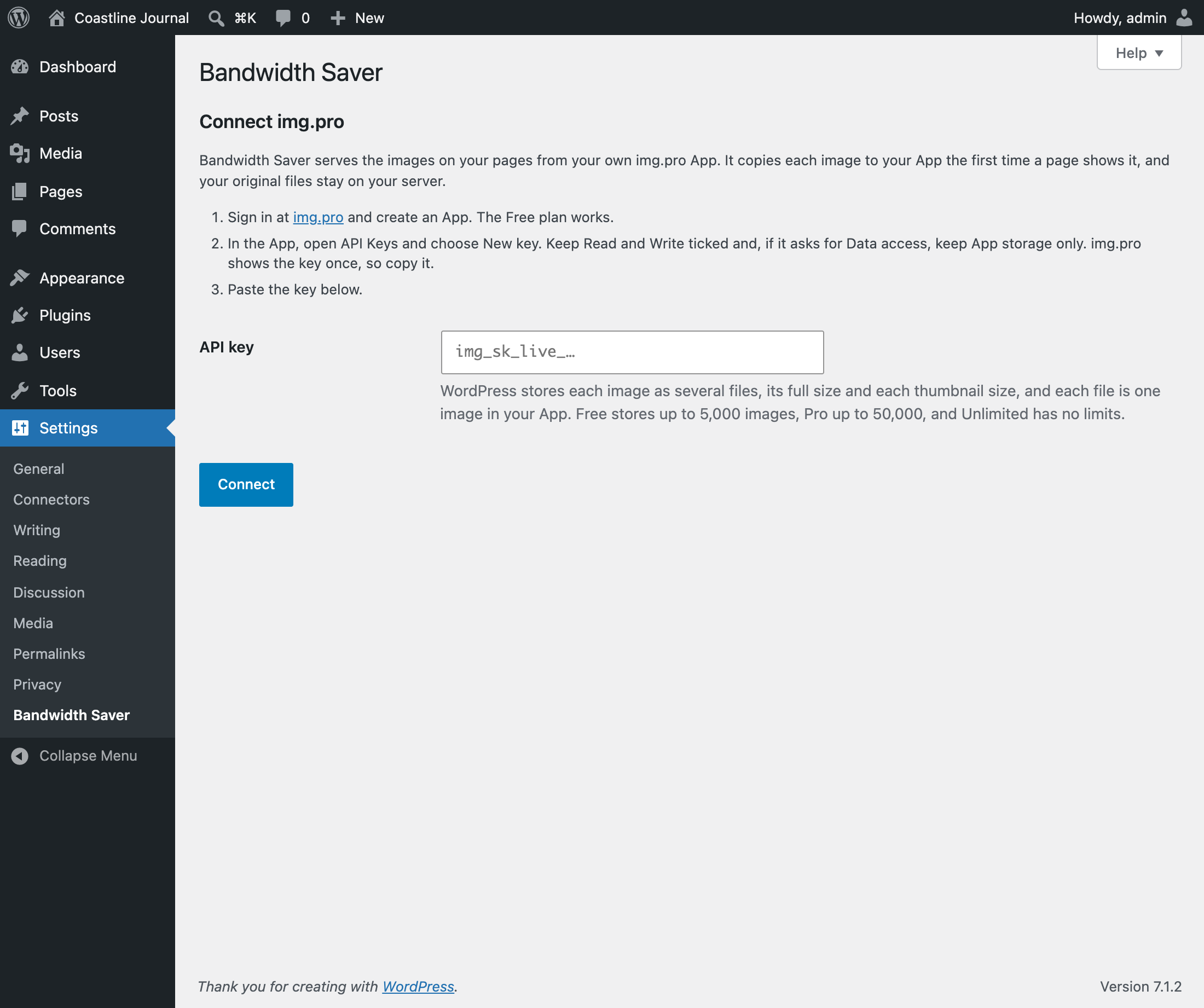
Connect your img.pro App with an API key
Image CDN for WordPress, powered by img.pro.
Heavy images slow down your site. When images lag, visitors leave, Core Web Vitals suffer, and search rankings drop.
Bandwidth Saver serves the images on your pages from your own img.pro App, through img.pro’s image CDN. Each image is copied the first time a page shows it, so your App holds the images visitors actually see and nothing else. Your server stops sending image bytes to every visitor, and pages load faster.
Your files, your account. Images are uploaded straight from your server’s disk, so it works on staging sites, password-protected sites and sites that are not public yet. Everything lives in an img.pro App you own, and you can delete it from the plugin at any time. Copies on img.pro can be loaded by anyone who has their address.
How It Works
- Create an App on img.pro (the Free plan works) and copy an API key with Read and Write permission.
- Paste the key in Settings > Bandwidth Saver.
- The first time a page shows an image, the plugin copies it to your App in the background. Until the copy is ready, the image loads from your server.
- From then on, pages load the image from img.pro. Images no page shows are not copied unless you copy them from the Media Library, so until then they use none of your App’s images.
WordPress stays in charge of your images. Each size WordPress creates (the full image and each thumbnail size) is copied unchanged, when a page first uses it or when you copy the image, and served at the same dimensions, so your theme, srcset and image editor keep working exactly as before.
Why Use an Image CDN?
- Faster page loads. Images come from img.pro’s global network instead of your web host.
- Better Core Web Vitals. Faster image delivery helps LCP (Largest Contentful Paint).
- Less load on your server. Your host no longer serves image traffic for copied images.
- Safe by design. If img.pro cannot deliver an image, the browser loads it from your server instead.
Supported Image Formats
JPG, PNG, GIF, WebP, AVIF and HEIC, up to 20 MB per file.
SVG, BMP, ICO, TIFF, animated PNGs and files over 20 MB stay on your server and keep working as normal.
Pricing
The plugin is free. Storage and delivery are provided by your img.pro App, and img.pro plans count stored images, not bandwidth:
- Free: up to 5,000 images per App, at no cost.
- Pro: up to 50,000 images per App, for $20 a month.
- Unlimited: no limit, for $100 a month.
See img.pro pricing for the current plans.
Each copied file counts as one image. WordPress saves every photo in several sizes, often 4 to 8. When a page shows a photo, every size its srcset offers the browser is copied, so a photo usually uses 4 to 6 images, and a small one fewer. Images no page shows use none.
The Media Library
- An img.pro column in list view, and an img.pro line in each image’s details, show whether an image is copied, queued, not copied yet, or stays on your server, and why a copy failed.
- Copy to img.pro copies an image ahead of time, from its row, its details or its edit screen. To copy several, select them in list view and choose Copy to img.pro from Bulk actions.
- Copy img.pro URL copies the address of an image’s img.pro copy, for images used where Bandwidth Saver does not change URLs, such as theme CSS.
What Gets Served From img.pro
- Images from your media library that your pages show, in every size they use
- Images inserted in posts, pages and widgets
- Featured images and images your theme or plugins output with
wp_get_attachment_image(), such as WooCommerce product images, including srcset - Images your posts load from other websites, such as an earlier domain of your site or an image inserted from a URL. img.pro copies each one from its address the first time a page shows it. You can turn this off in Settings > Bandwidth Saver.
Theme files and other files on your own server that are not in the media library are left alone.
Works With Your Theme and Plugins
- Block editor and classic editor
- WooCommerce product images and gallery thumbnails
- Page builders that output standard media library image URLs
- Lazy loading, native and plugin-based
- Responsive images with full srcset support
- Caching plugins such as WP Rocket, LiteSpeed Cache, W3 Total Cache and WP Super Cache
Need Video or Audio?
This plugin is for images only. Video, audio and other files keep loading from your server.
Privacy
The plugin does not add cookies, tracking scripts or analytics to your site.
When you connect an img.pro API key, the plugin uploads the image files your pages show, and those you copy from the Media Library, to your img.pro App. Images your pages load from other websites are copied by img.pro from their address, so those websites receive a request from img.pro. Each upload includes your site’s address, the attachment ID, the image size name, its path in the uploads folder, its file size and a fingerprint of its contents (an MD5 hash), so the plugin can find and manage its images later. Your API key is stored encrypted in your WordPress database.
Images on img.pro are public: anyone who has an image’s img.pro address can load it, without a key. Copying from a private, password-protected or staging site makes those images reachable at their img.pro address.
Visitors’ browsers load copied images from img.pro, so img.pro receives the usual request data a browser sends to any website, such as IP address and user agent.
External Services
This plugin connects to img.pro, an image hosting and CDN service, to store your images and deliver them to visitors. Nothing is sent until you paste an img.pro API key on the settings page.
- img.pro API (
api.img.pro): used to check your API key and plan, upload images, list the images this site uploaded and delete them. Data sent: your API key, image files from your media library, and the site address, attachment ID, size name, file path, file size and MD5 hash of each image, plus the address of each image from another website that a page shows (img.pro then fetches it from that address). Requests are made when you connect, when a page shows an image that is not copied yet (it is uploaded in the background), when you copy images from the Media Library, when images are deleted or replaced, during the background sync, and when you view the settings page or, while copying is paused, the Media Library. - img.pro CDN (
src.img.pro): visitors’ browsers load copied images from this domain.
Service provider: img.pro. Terms of Service, Privacy Policy.