

AYBABTU Inventory Sync for WooCommerce
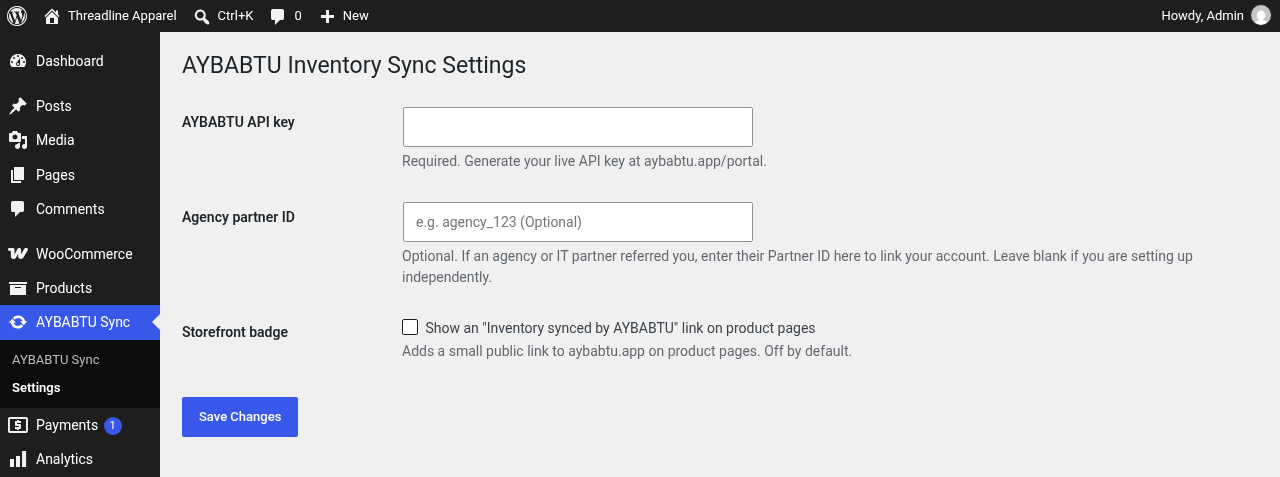
AYBABTU Sync settings for the API key, connection status, agency partner ID, and optional storefront link.
Connect WooCommerce to AYBABTU to configure supplier feeds and synchronize selected product and variation inventory. The plugin provides in-admin Sandbox signup with email verification, manual API key entry, and a link to the separate AYBABTU dashboard. Signup begins only after an administrator clicks Start Sandbox.
An AYBABTU account and API key are required. AYBABTU’s Sandbox plan includes 1,000 requests per month and automatic inventory syncs every 15 minutes. Scheduled syncs are not counted against the monthly request allowance.
AYBABTU is not affiliated with or endorsed by SanMar Corporation. SanMar is a trademark of its owner.
External services
This plugin connects to AYBABTU, operated by Epic Force LLC. Its API origin defaults to https://aybabtu.app. An administrator can set AYBABTU_SYNC_API_BASE in wp-config.php to a validated HTTPS origin for staging. AYBABTU_SYNC_APP_URL continues to control dashboard and documentation links.
When an administrator with the manage_options capability views the AYBABTU Sync settings page and an API key is saved, WordPress makes a server-side GET request to https://aybabtu.app/api/dashboard/jobs/active, or to the same path at the configured service origin. This read-only route uses the same API-key authentication as the dashboard and works before a WooCommerce connection is configured. The saved key is sent only in the Authorization: Bearer header. The URL does not include the key, WordPress site URL, or other site settings. The plugin uses the HTTP status to display connection status and does not display the response body. Results are cached per site and key for about 10 minutes. Clicking Check connection clears the cache and redirects to the settings page, where the check runs again. This authenticated read request can count toward the AYBABTU API request allowance. WordPress sends ordinary network information such as the server IP address and HTTP headers with this request.
The optional agency partner ID is saved in WordPress settings and is not included in the connection check.
No request is made to aybabtu.app when the plugin is activated or when the Get your key page is viewed before consent. The plugin may queue setup events locally until consent is given. When an administrator clicks Start Sandbox, the plugin saves aybabtu_sync_telemetry_optin=1 and sends the entered email address, a site hash, and plugin version from the WordPress server to the AYBABTU signup endpoint. The site hash is SHA-256 of the WordPress home URL and the WordPress auth salt. AYBABTU creates or looks up the account on the Sandbox plan as applicable, generates a short-lived email code, and sends that code to the submitted address. The signup endpoint records the request IP with the code for abuse prevention.
When the administrator submits the email code, WordPress sends the email, code, and site hash server-to-server. AYBABTU returns an API key in the response, and WordPress saves it in the same option used by manual key entry. The API key is not put in a browser URL.
After opt-in, the plugin sends setup events to aybabtu.app: plugin activation, key-screen views, code sent, key saved, first successful stock sync, and deactivation. Event requests contain only the site hash, plugin version, event names, client timestamps, and (for deactivation) the selected reason and optional text. They do not contain an email or WordPress site URL. The deactivation prompt is shown only after opt-in; selecting a reason sends the event before deactivation, while Skip & deactivate sends no reason event. Setup events are sent from the WordPress server. If consent has not been given, queued events remain local and are not transmitted.
When an administrator connects a WooCommerce store in the AYBABTU portal, the store URL and WooCommerce REST API consumer key and secret are sent to AYBABTU. The AYBABTU service uses those credentials to read and update product and variation SKUs, stock quantities, backorder settings, optional prices, and the _aybabtu_supplier product-selection field during configuration and inventory synchronization. The plugin exposes _aybabtu_supplier as WooCommerce REST product metadata for that selection flow.
The plugin also registers the WooCommerce REST route /wp-json/wc-aybabtu/v1/stock/increment. AYBABTU can send a receipt ID and product or variation stock adjustments to this route after a receipt is marked received. The route requires a timestamped HMAC proof associated with a WooCommerce read/write API key and applies each receipt adjustment once.
The optional storefront link to https://aybabtu.app is disabled by default. If enabled, it adds a link to product pages; a visitor’s browser contacts AYBABTU only if the visitor follows that link.
The plugin does not load third-party scripts, styles, fonts, or analytics, and it does not contact supplier services directly. If an administrator configures a supplier such as SanMar, AYBABTU’s service may contact that supplier using the feed credentials and product information provided to AYBABTU.
Terms of Service: https://aybabtu.app/terms
Privacy Policy: https://aybabtu.app/privacy