


Authority Mailer SMTP – WordPress SMTP Plugin with Email Logs
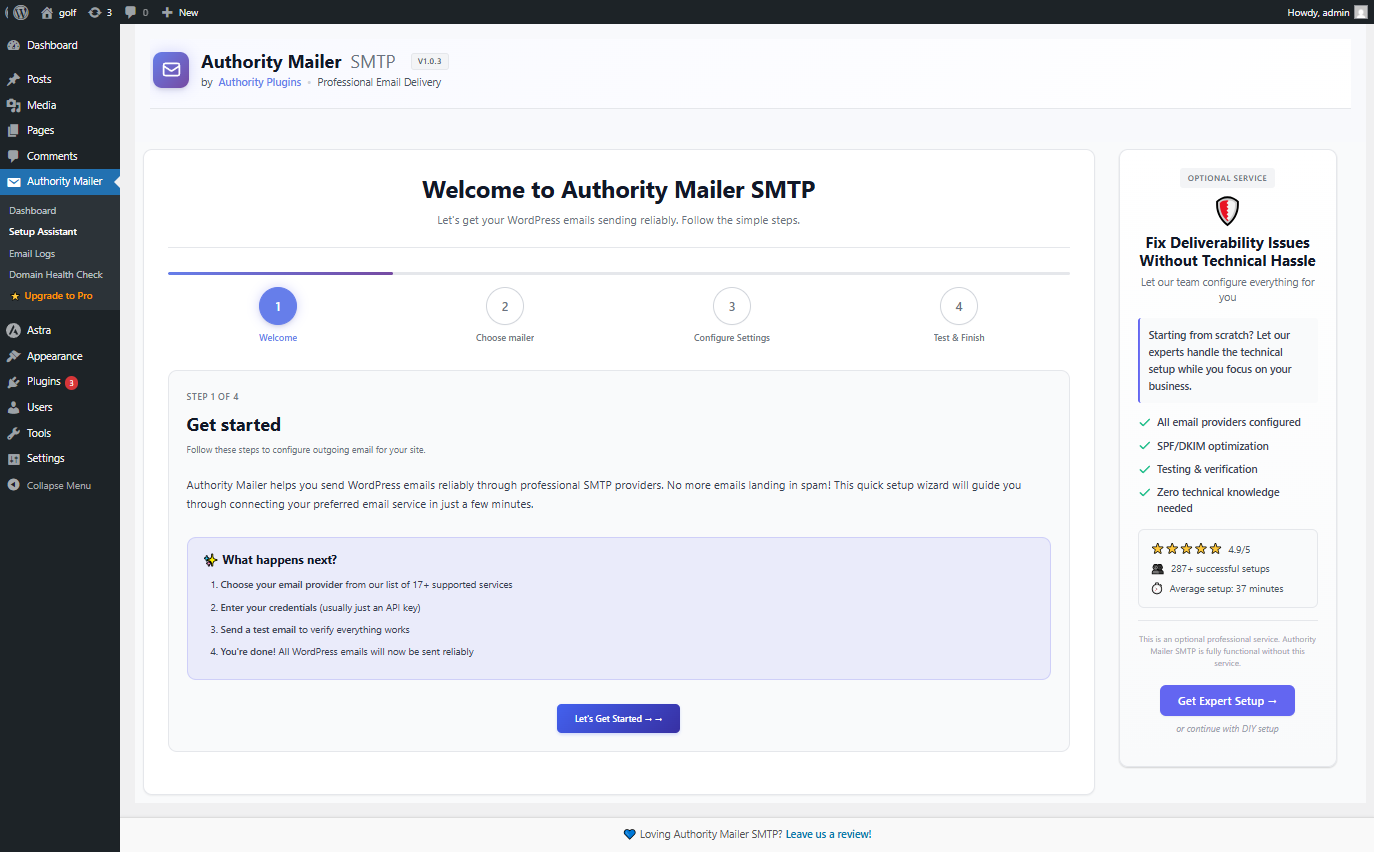
Quick setup wizard to fix WordPress emails not sending in minutes
Lightweight SMTP Plugin for WordPress with Email Logs
Authority Mailer SMTP is a WordPress SMTP plugin designed to fix WordPress emails not sending, improve email deliverability and spam issues.
By default, WordPress sends emails using PHP mail, which often fails or sends emails to spam.
Authority Mailer SMTP replaces PHP mail with secure SMTP or API-based delivery, ensuring emails from WordPress, WooCommerce, contact forms, and membership plugins reach inboxes reliably by hooking into wp_mail().
❌ Missing WooCommerce orders?
❌ Contact form emails not reaching your inbox?
❌ Password reset emails not arriving?
❌ Clients saying “we never got the email”?
Authority Mailer SMTP fixes WordPress email delivery by replacing unreliable PHP mail with secure SMTP or API-based sending.
It works instantly with Gmail, Outlook, SendGrid, Mailgun, and other trusted email providers.
Includes email logs so you can see exactly which emails were sent, failed, or blocked.
WordPress SMTP Plugin to Fix Emails Not Sending
– Hosting servers blocking PHP mail
– Shared IP addresses being blacklisted
– Missing SPF, DKIM, or DMARC authentication
– No visibility into failed email delivery
✔ Improve Email Deliverability & Avoid Spam
Authority Mailer SMTP improves inbox placement by:
– Sending emails via authenticated SMTP or APIs
– Supporting DKIM, SPF, and DMARC alignment
– Using trusted email infrastructure instead of shared hosting IPs
– Providing clear delivery status through email logs
✔ Email Logging & Monitoring
Know exactly what happens to every email sent from your site:
– View sent and failed emails
– Inspect error messages for debugging
– Search and filter email history
– Export logs for audits or compliance
🚀 Supported SMTP & Email Providers
This WordPress SMTP plugin supports Gmail SMTP, Outlook SMTP, SendGrid SMTP, Mailgun SMTP, and custom SMTP servers.
– Gmail & Google Workspace (OAuth2) – Use your Gmail account with OAuth2
– Outlook / Microsoft 365 – Enterprise-grade email
– SendGrid – High-volume transactional email provider
– Mailgun – Powerful API with excellent documentation
– Postmark – Transactional email specialists
– MailerSend – European GDPR-compliant option
– Elastic Email – High-volume, low-cost solution
– Mailjet – Proven reliability and compliance
– Mandrill – Mailchimp’s transactional service
– Zoho Mail – Integrated with Zoho Suite
– SMTP2GO – Simple, reliable relay service
– SparkPost – Industry standard with analytics
– Custom SMTP Servers – Use your own mail server
Choose the provider that fits your volume, budget, and reliability needs.
1 WP Mail SMTP Alternative
Authority Mailer SMTP works as a lightweight WP Mail SMTP alternative with built-in email logs and modern provider support.
Free vs Pro Version
Authority Mailer SMTP is fully functional in the free version and is suitable for most WordPress sites.
For advanced use cases, the Pro version adds additional features designed for businesses, agencies, and high-volume websites.
Free Version Includes:
– Secure SMTP and API-based email delivery
– Support for major email providers
– Easy setup wizard
– Test email functionality
– Basic email logging
Authority Mailer SMTP Pro Adds:
– Extended email logs and advanced diagnostics
– Email resend and retry functionality
– Multi-provider failover support
– Enhanced reporting and delivery insights
– Advanced configuration options for power users
– Webhook support for supported API providers
– Customization options for WordPress email templates
– Priority support
You can learn more about the Pro version here:
Key Features
⚙️ Easy Setup Wizard
– Step-by-step configuration with visual guidance
– No technical knowledge required
– Provider-specific authentication helpers
– Automatic credential validation
📊 Email Logging & Monitoring
– Track every email sent from your WordPress site
– Monitor delivery status in real-time
– Search and filter email history
– Debug failed deliveries with error logs
– Export email logs for compliance and auditing
✉️ Test Email Functionality
– Send test emails before going live
– Verify provider configuration instantly
– Test with different email templates
– Confirm OAuth2 connections are working
🔒 Enterprise Security
– OAuth2 support for Gmail and Microsoft 365
– Secure credential storage in WordPress database
– API keys never exposed in logs or error messages
– HTTPS/TLS encryption for all connections
– No data sent to third-party servers except your chosen provider
– Designed to work with GDPR-compliant email providers
🎯 Advanced Configuration
– Custom SMTP server support
– Multiple provider configuration
– Sender name and email customization
– From address aliasing
– Header manipulation support
How Authority Mailer SMTP Works
- Install & Activate – Upload the plugin and activate it
- Choose Your Provider – Select from 17+ email services or use custom SMTP
- Configure Credentials – Enter API keys or authentication details
- Send Test Email – Verify your setup before production
- Emails Route Automatically – All WordPress emails now send via your provider
Email Delivery Problems It Solves
Problem: Lost Emails
– WordPress emails disappear without notification
– *Solution: * Professional SMTP ensures delivery confirmation and tracking
Problem: Spam Folder Delivery
– Your legitimate emails get marked as spam
– Solution: Professional providers have established sender reputations and DKIM/SPF/DMARC authentication
Problem: No Delivery Insight
– You don’t know if emails actually sent
– Solution: Email logging shows exact delivery status
Problem: High Bounce Rates
– Invalid email formats cause bounces
– Solution: Professional providers validate and handle invalid addresses
Problem: Server Blacklisting
– Your shared server gets blacklisted for spam
– Solution: Use enterprise infrastructure not shared with spammers
Our SMTP Plugin is Perfect For
✅ E-commerce Sites – Order confirmations, shipping notifications, refund alerts
✅ Membership Platforms – Welcome emails, password resets, membership notifications
✅ WordPress Communities – User registration, comment notifications, admin alerts
✅ Agency Websites – Client notifications, project updates, delivery reports
✅ Online Courses – Lesson notifications, enrollment confirmations, certificate delivery
✅ SaaS Platforms – User onboarding, subscription alerts, usage reports
✅ Real Estate Sites – Property inquiries, showings alerts, offer notifications
✅ Healthcare Portals – Patient notifications (HIPAA compliant with SMTP)
✅ Nonprofit Organizations – Donation receipts, campaign updates, volunteer communications
✅ WooCommerce Stores – Product alerts, customer service messages, review requests
Security & Privacy
Authority Mailer SMTP is designed with privacy and security in mind:
🔐 Credential Protection
– API keys and passwords stored encrypted in WordPress database
– Credentials never transmitted to external servers
– Secure credential hashing with WordPress functions
🌐 Data Transmission
– All connections use HTTPS/TLS encryption
– Email content only sent to your chosen provider
– No data logging on Authority Mailer servers
– Direct provider communication without intermediaries
✅ Compliance
– Designed to work with GDPR- and SOC 2–compliant email providers.
📋 Permission Model
– Explicit OAuth2 authorization for Gmail/Office 365
– Never stores passwords for sensitive accounts
– Transparent permission requesting
– Easy revocation through provider settings
SMTP Configuration Guide
SMTP (Simple Mail Transfer Protocol) is the standard for sending emails. Here’s what you need to know:
SMTP vs API Methods:
– SMTP: Traditional protocol, works everywhere, slightly slower
– API: Faster, more reliable, provider-specific
– Most providers support both; Authority Mailer uses the faster API when available
Essential SMTP Settings:
– Host: Server address (e.g., smtp.sendgrid.net)
– Port: Usually 587 (TLS) or 465 (SSL)
– Username: Usually email or account ID
– Password: API key or account password
– Encryption: TLS (port 587) preferred over SSL
Troubleshooting Connection Issues:
1. Verify credentials are correct
2. Check firewall allows outbound SMTP traffic
3. Ensure port 587 or 465 is not blocked
4. Test with Authority Mailer’s test email feature
5. Check email logs for specific error messages
Email Delivery Best Practices
Sender Reputation
– Send only to opted-in recipients
– Honor unsubscribe requests promptly
– Monitor bounce and complaint rates
– Use consistent “From” address
Authentication Protocols
– Enable DKIM signing (provider-managed)
– Configure SPF records in DNS
– Implement DMARC policy
– Use domain alignment for authentication
Email Content
– Avoid spam trigger words
– Balance text and images
– Include physical address (CAN-SPAM compliance)
– Provide clear unsubscribe link
List Management
– Remove hard bounces immediately
– Suppress repeat complainers
– Segment by engagement level
– Clean lists before migrations
External Services
Authority Mailer SMTP connects to external email services to deliver emails from your WordPress site. We respect your privacy and are transparent about data usage.
Important: Data is ONLY sent to the provider you explicitly choose during setup. Other providers receive no data.
SendLayer
– Purpose: Email delivery via SendLayer SMTP service
– Data: Email content, headers, recipient addresses, sender info, API key
– When: Only when sending AND SendLayer is configured
– Provider: SendLayer
– Privacy: https://sendlayer.com/privacy-policy
– Terms: https://sendlayer.com/terms-of-service
Elastic Email
– Purpose: Transactional email delivery
– Data: Email content, headers, recipient addresses, sender info, API key
– When: Only when sending AND Elastic Email is configured
– Provider: Elastic Email Inc.
– Privacy: https://elasticemail.com/resources/usage-policies/privacy-policy
– Terms: https://elasticemail.com/resources/usage-policies/terms-of-use
Google Gmail API
– Purpose: Send emails through Gmail account
– Data: Email content, headers, recipients, OAuth2 tokens
– When: Only when sending AND Gmail is configured
– Provider: Google LLC
– Privacy: https://policies.google.com/privacy
– Terms: https://policies.google.com/terms
– Authentication: Secure OAuth2 (passwords never stored)
– Scopes: gmail.send, userinfo.email
MailerSend
– Purpose: Transactional email delivery
– Data: Email content, headers, recipient addresses, sender info, API token
– When: Only when sending AND MailerSend is configured
– Provider: MailerSend (UAB “Mailerlite”)
– Privacy: https://www.mailersend.com/legal/privacy-policy
– Terms: https://www.mailersend.com/legal/terms-of-service
Mailgun
– Purpose: Email delivery and email validation
– Data: Email content, headers, recipient addresses, sender info, API key
– When: Only when sending AND Mailgun is configured
– Provider: Mailgun Technologies, Inc. (Sinch)
– Privacy: https://www.mailgun.com/legal/privacy-policy/
– Terms: https://www.mailgun.com/legal/terms/
– API: REST API with webhook support for bounces/complaints
Mailjet
– Purpose: Email delivery platform
– Data: Email content, headers, recipient addresses, sender info, API key
– When: Only when sending AND Mailjet is configured
– Provider: Mailjet SAS (Sinch)
– Privacy: https://www.mailjet.com/legal/privacy-policy/
– Terms: https://www.mailjet.com/legal/terms-and-conditions/
Mandrill (Mailchimp Transactional)
– Purpose: Mailchimp’s transactional email service
– Data: Email content, headers, recipient addresses, sender info, API key
– When: Only when sending AND Mandrill is configured
– Provider: The Rocket Science Group LLC Intuit Mailchimp
– Privacy: https://www.intuit.com/privacy/statement/
– Terms: https://mailchimp.com/legal/terms/
Microsoft 365 / Outlook
– Purpose: Send emails via Office 365 account
– Data: Email content, headers, recipients, SMTP credentials
– When: Only when sending AND Office 365 is configured
– Provider: Microsoft Corporation
– Privacy: https://privacy.microsoft.com/en-us/privacystatement
– Terms: https://www.microsoft.com/en-us/servicesagreement
Postmark
– Purpose: Transactional email specialist service
– Data: Email content, headers, recipient addresses, sender info, API token
– When: Only when sending AND Postmark is configured
– Provider: Wildbit LLC (ActiveCampaign)
– Privacy: https://postmarkapp.com/privacy-policy
– Terms: https://postmarkapp.com/terms-of-service
SendGrid
– Purpose: Global leader in email delivery
– Data: Email content, headers, recipient addresses, sender info, API key
– When: Only when sending AND SendGrid is configured
– Provider: Twilio SendGrid
– Privacy: https://www.twilio.com/legal/privacy
– Terms: https://www.twilio.com/legal/privacy
SMTP2GO
– Purpose: Reliable email delivery service
– Data: Email content, headers, recipient addresses, sender info, API key
– When: Only when sending AND SMTP2GO is configured
– Provider: SMTP2GO
– Privacy: https://www.smtp2go.com/privacy/
– Terms: https://www.smtp2go.com/terms/
SparkPost
– Purpose: Email delivery platform with analytics
– Data: Email content, headers, recipient addresses, sender info, API key
– When: Only when sending AND SparkPost is configured
– Provider: SparkPost (Message Systems)
– Privacy: [https://www.sparkpost.com/policies/privacy/]](https://www.sparkpost.com/policies/privacy/)
– Terms: https://www.sparkpost.com/policies/tou/
Zoho Mail
– Purpose: Zoho’s email service
– Data: Email content, headers, recipient addresses, sender info, SMTP credentials
– When: Only when sending AND Zoho Mail is configured
– Provider: Zoho Corporation
– Privacy: https://www.zoho.com/privacy.html
– Terms: https://www.zoho.com/terms.html
Custom SMTP Server
– Purpose: Use your own SMTP server
– Data: Email content, headers, recipient addresses, sender info, SMTP credentials
– When: Only when sending AND custom SMTP is configured
– Provider: Your configured server
– Security: Ensure your SMTP server uses TLS encryption
Resources & Support
Getting Started:
– Visit the Setup Wizard after activation
– Choose your email provider
– Follow provider-specific configuration steps
– Send test email to verify setup
Common Configurations:
– SendGrid https://sendgrid.com/docs/ui/account-settings/api-keys/
– Mailgun https://documentation.mailgun.com/
– Gmail https://developers.google.com/gmail/imap
– Office 365 https://support.microsoft.com/en-us/office
Additional Help:
– Check email logs for error details
– Review provider-specific documentation
– Verify DKIM/SPF records in DNS
– Contact hosting provider for port/firewall issues