
ART4ART Thumbnail Doctor
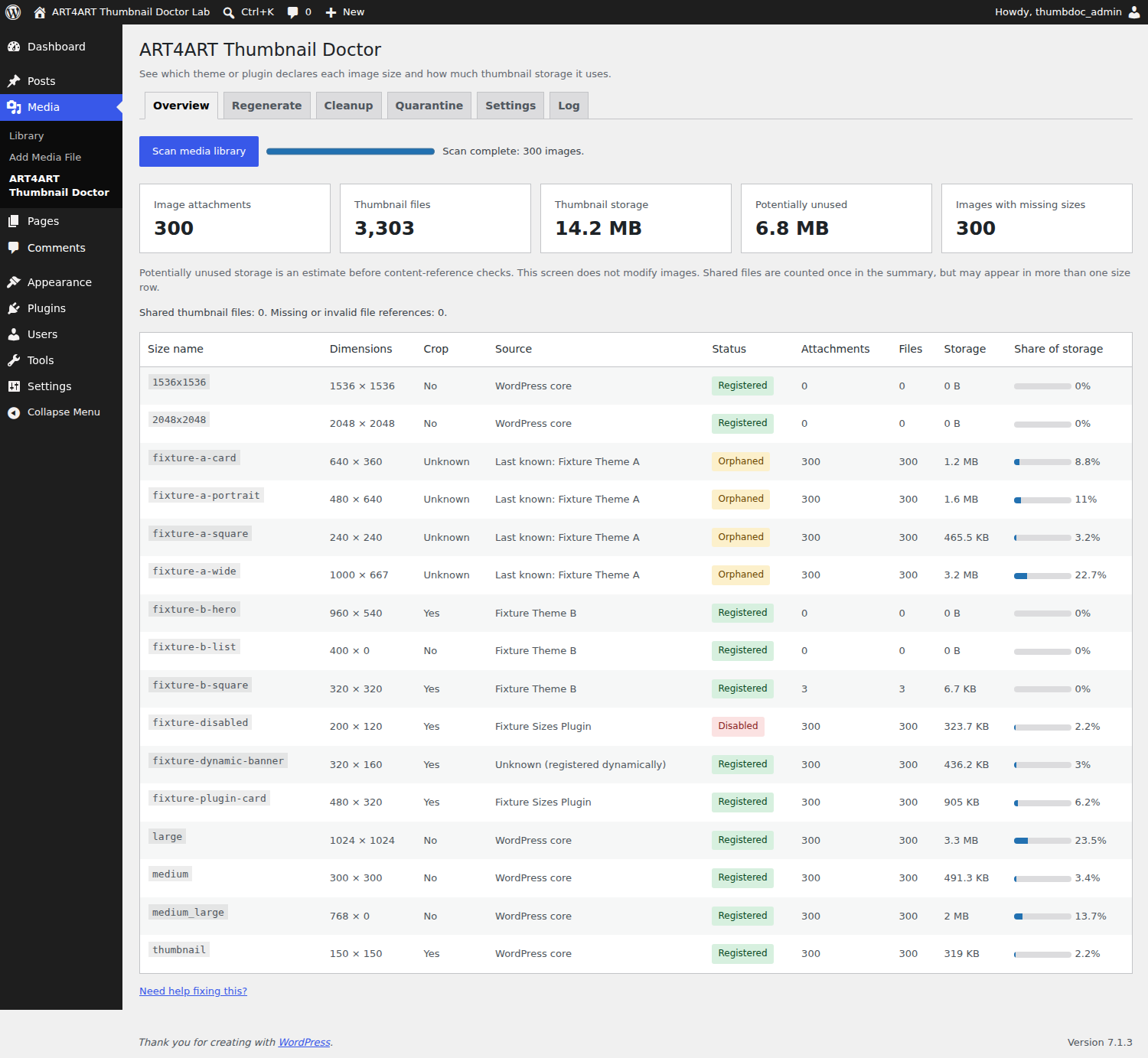
Overview with source attribution, registered/orphaned/disabled statuses and storage totals.
ART4ART Thumbnail Doctor shows your registered, orphaned and disabled image sizes under Media > ART4ART Thumbnail Doctor.
Inspect thumbnail storage after a theme change or migration, rebuild missing sizes, and review old derivatives before moving them to quarantine. All features are free, with no account, telemetry or external service.
- See literal image-size declarations in your active theme and plugins.
- Identify historical sizes from an earlier theme.
- Scan existing image files in resumable batches; pause, resume or cancel.
- Detect missing physical thumbnails even when their metadata still exists.
- Count a shared thumbnail once in overall storage totals.
- Regenerate missing sizes, all enabled sizes, or selected sizes.
- Limit regeneration by upload dates, attachment IDs or Media Library selections.
- Pause, continue or cancel durable tasks; no WP-Cron is required.
- Exclude sizes from future server and WordPress 7.1 client-side generation.
- Review unused sizes with mandatory dry-run, content-reference protection and quarantine.
- Restore exact metadata, or explicitly empty quarantine or permanently delete files.
- Optionally discover dimension-suffixed disk files absent from metadata.
- Use WP-CLI:
wp art4art-thumbnail-doctor sizes,scan,regenerate,cleanupandquarantine.
Scanning is read-only. Regeneration creates new uniquely named files and updates selected size entries in attachment metadata; existing files remain on disk. Potentially unused storage in Overview is provisional; Cleanup builds its own current content-reference index. Unknown, dynamic and incomplete source attribution is labeled explicitly. A source declaration does not prove that its conditional code ran.
Tested on WordPress 6.6.1 and 7.1.3, PHP 7.4, 8.3 and 8.5, and MySQL 8.0. Take a backup before regeneration or cleanup.
Why use this instead of a basic thumbnail regenerator?
ART4ART Thumbnail Doctor combines source attribution, storage counts per size, missing-file detection, selective regeneration and reversible cleanup. A registered size is not necessarily used, and an unregistered size is not necessarily safe to delete. Review the dry-run and its protection reasons before making changes.
More free tools by Eugene Do: https://art4art.site
Development: the JavaScript sources, package manifest and lockfile are included. To rebuild, run npm ci followed by npm run build in the plugin directory. Runtime assets use WordPress libraries; no development dependencies are loaded by the plugin.
External services
None. The plugin sends no telemetry and makes no external requests. Documentation, donation and help links open only when clicked.